기본형
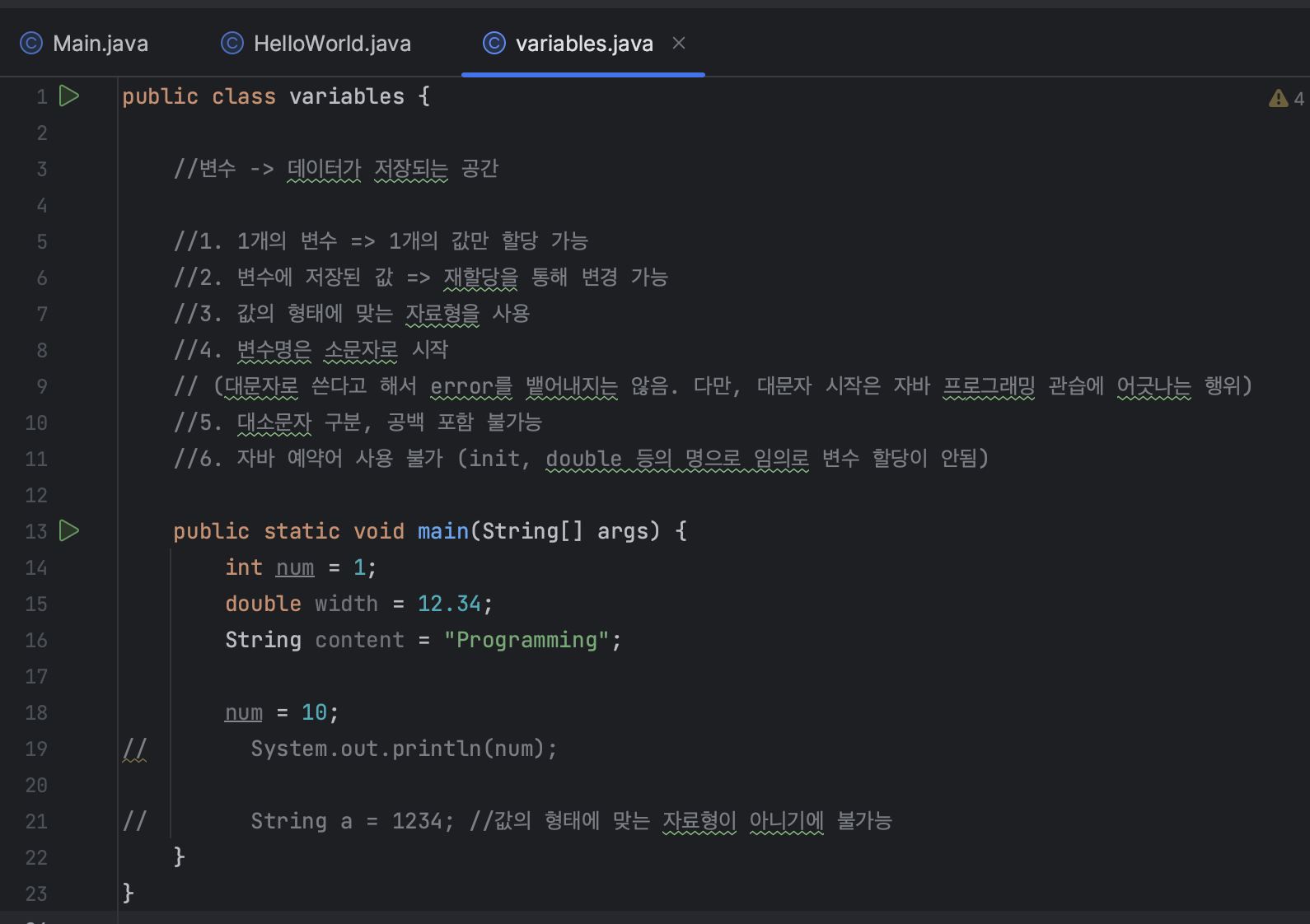
변수: 데이터가 저장되는 공간
- 1개의 변수에 1개의 값만 할당 가능
- 변수에 저장된 값 -> 재할당을 통해 변경 가능
- 값의 형태에 맞는 자료형을 사용
- 변수명은 소문자로 시작
(대문자로 시작한다고 해서 error가 뜨지는 않지만, 관습에 어긋나는 행위) - 대소문자 구분 필요, 공백 포함 불가능
- 자바 예약어를 변수로 사용 불가능
정수형
1. byte(1byte = 8 bits): -2^7~2^7-1 (-128~127)
2. short(2 bytes): -2^15 ~ 2^15-1 (-32,768~32,767)
3. int(4 bytes): -2^31~2^31-1
4. long(8 bytes): -2^63 ~ 2^63-1
실수형
1. double(8 bytes) - 소수점 15자리
double a = 1.23;- float (4 bytes) - 소수점 7자리
float b = 9.45f;💡 float은 이렇게 f를 붙여줘야지 float으로 인식함!
문자형 (문자열과 다름, 문자 하나만 다룰 수 있는 데이터)
1. char(2 bytes)
char char_1 = 'a';💡 문자열과 다르게 큰따옴표로 하면 에러남!
논리형
1. boolean(1 byte)
참조형 (ReferenceType)
string a = new String(original: "Hello!");
Syste m.out.println(a)
참조형 데이터의 값 -> 힙 메모리 영역
변수에 대입되는 값 -> 힙 메모리 영역의 주소값
상수 (constants, final variables)
- 한 번 값이 할당 -> 재할당이 불가능
- 전체를 대문자, 단어 간 구분은 _
final double PI = 3.14;
System.out.println(PI);

PI = 3.141592;
(이건 에러뜸! 재할당이 불가능하기에)
형변환 (TypeCasting)
- byte < short < int < long <<< float < double
int a = 128;
short b = a; (에러)

// 강제 형변환
short b = (short)a;
System.out.println(a);
System.out.println(b);

//자동 형변환
short x = 10;
int y - x; (에러 안남)
System.out.println(x);
System.out.println(y);
System.out.println(x);
String (문자열 객체)
- 객체: 힙 메모리 영역
- 변수: 힙 메모리 영역의 주소
String str = "안녕하세요!";
//문자열 리터럴
//"안녕하세요"는 힙 메모리 영역으로 저장
//str은 힙 메모리 영역의 주소로 저장

String str_2 = new String(original:"안녕하세요");
//생성자
//정식적으로는 이렇게 new 연산자로 만들어서 할당해야함
문자열 병합
- "+" 연산자
String str_1 = "Hello,";
String str_2 = "World!";

System.out.println(str_1 +" "+ str_2);
하나하나를 합칠 때마다 임시로 stirng 객체를 만들어서 붙인 후 반환하는 형태로 사용
-> 임시로 객체를 만들어서 사용한다는 것은 결국 힙메모리 사용을 의미함 (단순한 코드는 ㄱㅊ지만 작업량이 많아지면 메모리에 영향을 줌!)
- StringBuilder
: 메모리를 바꾸지 않고, 임시객체를 생성하지 않고 붙여나갈 수 있는 방법
StringBuilder strBdr_1 = new StringBuilder("Hello,");

strBdr_1.append("");
strBdr_1.append("World");

String str_new = strBdr_1.toString();

System.out.println(str_new);
문자열 슬라이스
String str_1 = "이름: 김자바";
System.out.println(str_1.indexOf("이"));
//"이"가 가지는 인덱스 값 확인하기 위함

String str_name = str_1.subString(4, 7);
//인덱스 4부터 7 미만까지 데이터 취함
System.out.println(str_name);
//"김자바" 출력됨
string은 하나하나에 인덱스를 붙여서 관리하고 있음
문자열 대소문자 변환
💡 toUpperCase, toLowerCase
String str_1 = "abc";
String str_2 = "ABC";

str_1 = str_1.toUpperCase();
str_2 = str_2.toLowerCase();

System.out.println(str_1);
System.out.println(str_2);
대소문자를 섞어서 입력했을 때 각각 동일한 데이터로 인식하기 위해서는?
💡 .equals()
💡 .equalsIgnoreCase() : 대소문자를 무시하고 비교!
String str_1 = "abc";
String str_2 = "ABC";

if (str_1.equals(str_2)){
	System.out.println("str_1.equals(str_2)");
    //아무것도 출력되지 않음. 즉, 값이 다른 것임
}

if (str_1.equalsIgnoreCase(str_2)){
	System.out.println("str_1.equals(str_2)");
    //출력됨. 즉, 값이 같다는 것

}
공백 제거
- 양쪽 끝 공백이 있는 경우
💡 .trim()
💡 replace(target: , replacement: );
String str_1="       Hello      ";
str_1 = str_1.trim();

System.out.println(str_1);- 문자열 중간에 공백이 있는 경우
String str_2=" Hel.   lo   "
str_2 = str2.trim();
//trim을 사용해도 문자열 양끝의 공백만 제거됨
str_2 = str_2.replace(target: " ", replacement:"");
System.out.println(str_2);
콘솔 입출력
public class ConsoleIO {

	public static void main(String[] args) {
    	Scanner sc = new Scanner(System.in);
        //사용자 디바이스의 입력장치를 연결
		System.out.println("아이디를 입력해주세요: );
        String username = sc.nextLine();
        //사용자로부터 입력값을 받아 그것을 string형태로 다룰 수 있게 됨

        System.out.println("생년월일을 입력해주세요: );
        int birthDate = sc.nextInt();

        System.out.printf("%s %d, username, birthDate");
        // printf로 format을 지정
        // string을 의미하는 %s, int로 받은건 %d
        //%s에는 username이, %d에는 birthDate가 들어가서 한 칸 띄어진 상태로 출력됨

        System.out.printf("%s\n%d", username, birthDate);
        //줄바꿈해서 username과 birthDate가 나옴

	}
}
printf() - 지시자
%b: boolean 형식으로 출력
%d: 10진수(decimal)
%o: 8진수(0ctal)
%x, %X: 16진수(hexa-decimal) (x는 소문자로, X는 대문자로)
%f: 부동 소수점(floating point)
%e, %E: 지수 형식(exponent)
%c: 문자(character) 형식
%s: 문자열(string) 형식
printf() - 플래그
-: 왼쪽으로 정렬
+: 부호 출력
0: 남는 자리를 0으로 채움
,: 일정 자리수마다 구분 문자 표시
#: 8진수, 16진수 표시시 접두사 포함 등 출력 형태 보완
public class Main{
	public static void main(String[]
 args){

 		int number = 10;
        double score = 12.31;
        String text = Integer.toBinaryString(number);

        System.out.println(:%+d %n", 10);
        // 10진수 (부호 표시)