제어문
조건문
프로그램 수행 흐름을 바꾸는 역할을 하는 제어문 중 하나로 조건에 따라 다른 문장이 수행되도록 함
- 조건문의 종류
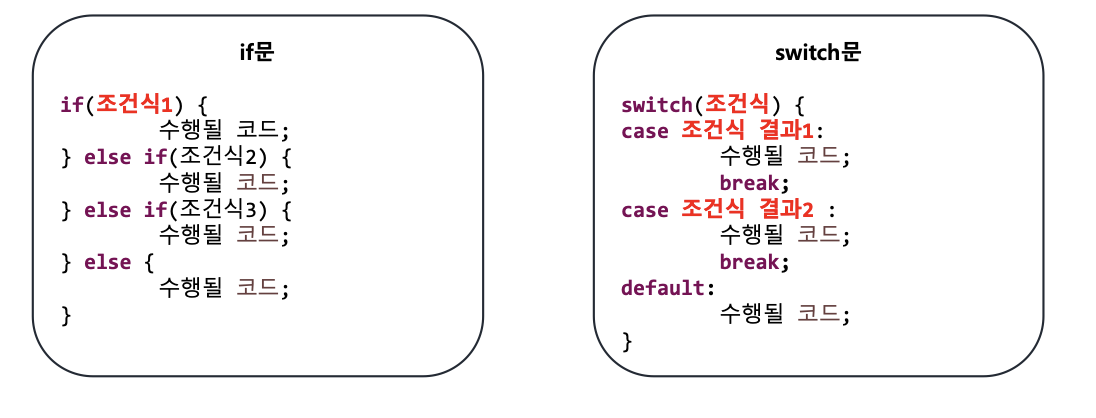
if문
- if문
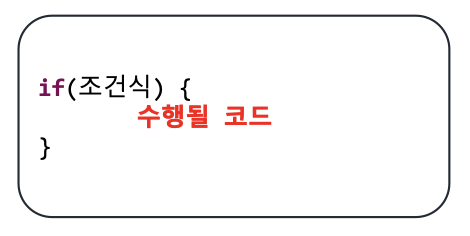
조건식의 결과 값이 true면 if문 내부 코드가 수행됨.
false면 실행하지 않음
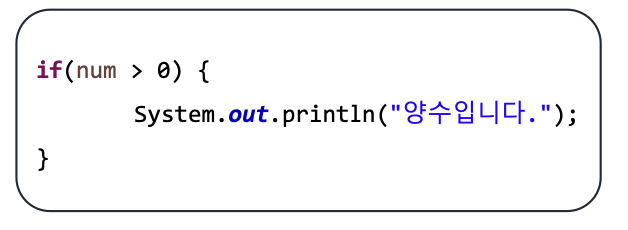
- if문 예시
class ConditionExample(ex1)
입력된 정수가 양수인지 구분
package edu.kh.control.condition;

import java.util.Scanner;

public class ConditionExample {

	public void ex1() {

		// if문
		// - 조건식이 true 일 때만 내부 코드 실행

		/* [작성법]
		 * if(조건식){
		 * 		조건식이 true일 때 수행할 코드
		 * }
		 *
		 * */

		Scanner sc = new Scanner(System.in);

		System.out.print("정수 입력 : ");
		int input = sc.nextInt();

		// 입력된 정수가 양수인지 검사
		if(input > 0) {
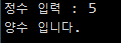
			System.out.println("양수 입니다.");
		}
		if(input <= 0) {
			System.out.println("양수가 아닙니다.");
			}
		}
}
- if~else문
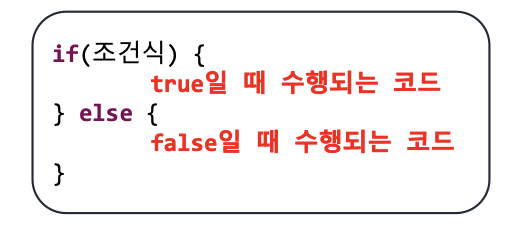
조건식의 결과 값이 true면 if 내의 코드가, false면 else 내의 코드가 수행됨
- if~else문 예시
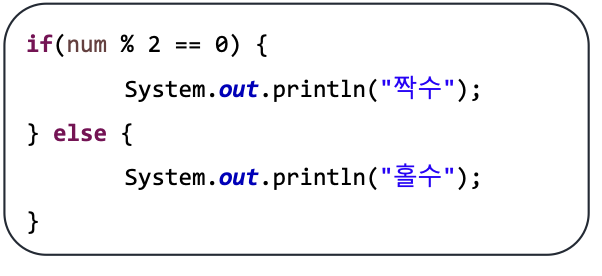
class ConditionExample(ex2)
정수입력 후 홀수, 0, 짝수인지 구분
package edu.kh.control.condition;

import java.util.Scanner;

public class ConditionExample {

	public void ex2() {
		// if - else문
		// - 조건식 결과가 true이면 if문,
		// false이면 else 구문 수행

		/* [작성법]
		 * if(조건식) {
		 * 		조건식이 true일 때 수행할 코드
		 * }
		 * else {
		 * 		조건식이 false일 때 수행할 코드
		 * }
		 * */

		Scanner sc = new Scanner(System.in);

		// 홀짝 검사
		System.out.print("정수 입력 : ");
		int input = sc.nextInt();

		if(input % 2 !=0) {
			System.out.println("홀수 입니다");
		} else { // 짝수 or 0 입력 시 수행
			// ** 중첩 if문 **
			if(input == 0) {
				System.out.println("0 입니다");
			} else {
			}
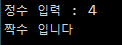
			System.out.println("짝수 입니다");
		}
	}
}
- if~else if~else
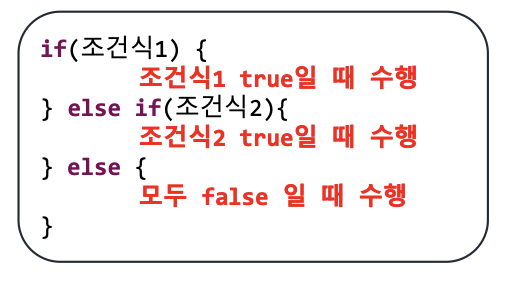
조건식1의 결과 값이 true면 if문 내 코드 수행
조건식2의 결과 값이 true면 else if 내 코드 수행
모두 false면 else 내 코드 수행
- if~else if~else문 예시
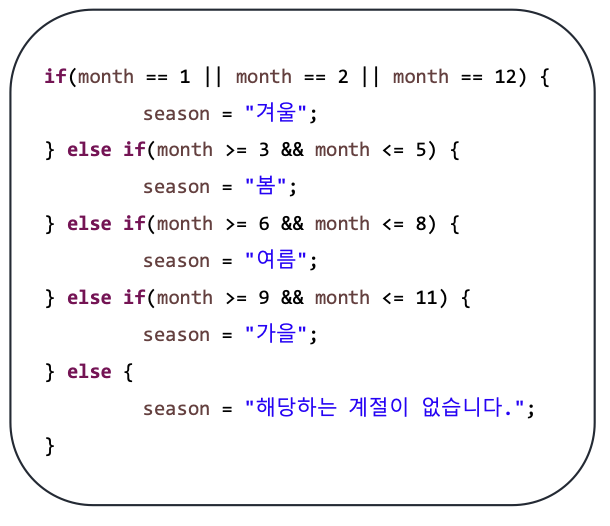
class ConditionExample(ex3)
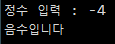
정수입력 후 양수, 음수, 0 판별
package edu.kh.control.condition;

import java.util.Scanner;

public class ConditionExample {

	public void ex3() {
		// if - else if - else

		// 양수, 음수, 0 판별
		Scanner sc = new Scanner(System.in);

		System.out.print("정수 입력 : ");
		int input = sc.nextInt();

		if(input > 0) { // input이 양수일 경우
		} else if(input < 0) { // input이 음수일 경우
			// 바로 위에 있는 if문이 만족되지 않은 경우 수행
		} else {
			// 모든 if, else if가 만족되지 않는 경우 수행
		}
	}
}
class ConditionExample(ex4)
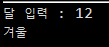
달(month)을 입력 받아 해당 달에 맞는 계절 구분
package edu.kh.control.condition;

import java.util.Scanner;

public class ConditionExample {


	public void ex4() {

		// 달(month)을 입력 받아 해당 달에 맞는 계절 출력

		Scanner sc = new Scanner(System.in);

		System.out.print("달 입력 : ");
		int month = sc.nextInt();

		String season; // 아래 조건문 수행 결과를 저장할 변수 선언

		// 봄 : 3, 4, 5
		if(month == 3 ||month == 4 || month == 5) {
			season = "봄";

		} else if (6 <= month && month <= 8) { // 여름 : 6, 7, 8
			season = "여름";

		} else if (9 <= month && month <= 11) { // 가을 : 9, 10, 11
			season = "가을";

		} else if (month == 12 ||month == 1 || month == 2) { // 겨울 : 12, 1, 2
			season = "겨울";
		}
		else { // if, else if가 모두 false인 경우
			season = "해당하는 계절이 없습니다";
		}
		System.out.println(season);
	}
}
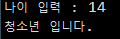
class ConditionExample(ex5)
어린이, 청소년, 성인 구분
package edu.kh.control.condition;

import java.util.Scanner;

public class ConditionExample {

	public void ex5() {
		//	나이를 입력 받아
		Scanner sc = new Scanner(System.in);

		System.out.print("나이 입력 : ");
		int age = sc.nextInt();


		//	13세 이하면 "어린이 입니다."
		if(age <= 13) {
			System.out.println("어린이 입니다.");
		}
		//	13세 초과 19세 이하면 "청소년 입니다."
		else if(13 < age && age <= 19) {
			System.out.println("청소년 입니다.");
		}
		else {
			System.out.println("성인 입니다.");
		}
		//	19세 초과 시 : "성인 입니다." 출력
	}
}
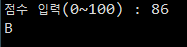
class ConditionExample(ex6)
점수로 A, B, C, D, F 등급 구분
package edu.kh.control.condition;

import java.util.Scanner;

public class ConditionExample {

	public void ex6() {

		// 점수(100점 만점)를 입력 받아
		// 90점 이상 : A
		// 80점 이상 90점 미만 : B
		// 70점 이상 80점 미만 : C
		// 60점 이상 70점 미만 : D
		// 60점 미만 : F
		// 0점 미만, 100 초과 : "잘못 입력하셨습니다."

		Scanner sc = new Scanner(System.in);

		System.out.print("점수 입력(0~100) : ");
		int score = sc.nextInt();

		String result; // 결과 저장용 변수

		if(score < 0 || score > 100) {
			result = "잘못 입력하셨습니다.";

		} else if(score >= 90) {
			result = "A";

		} else if(score >= 80) {
			result = "B";

		} else if(score >= 70) {
			result = "C";

		} else if(score >= 60) {
			result = "D";

		} else {
			result = "F";
		}

		System.out.println(result);
 	 }
 }
}
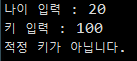
class ConditionExample(ex7)
놀이기구 탑승 제한 검사
package edu.kh.control.condition;

import java.util.Scanner;

public class ConditionExample {

	public void ex7() {

		// 놀이기구 탑승 제한 검사

		// 나이가 12세 이상, 키 140.0cm 이상 일 경우에만 "탑승 가능"
		// 나이가 12세 미만인 경우 : "적정 연령이 아닙니다."
		// 키가 140.0cm 미만인 경우 : "적정 키가 아닙니다."
		// 나이를 0세 미만, 100세 초과 시 : "잘못 입력 하셨습니다."


		Scanner sc = new Scanner(System.in);

		System.out.print("나이 입력 : ");
		int age = sc.nextInt();
		System.out.print("키 입력 : ");
		double height = sc.nextDouble();

		String result; // 결과 저장용 변수

		if(age < 0 || age > 100) {
			result = "잘못 입력하셨습니다.";
		}else if(age < 12) {
			result = "적정 연령이 아닙니다.";
		}else if(height < 140.0) {
			result = "적정 키가 아닙니다.";
		}else {
			result = "탑승 가능";
		}

		System.out.println(result);

		/* if(age < 0 || age > 100) {
		 * 		result = "잘못 입력하셨습니다.";
		 * }
		 * else {
		 * 		System.out.print("키 입력 : ");
		 * 		double height = sc.nextDouble();
		 * 		if(age < 12) {
		 * 				result = "적정 연령이 아닙니다.";
		 * 		} else if(height < 140.0) {
		 * 				result = "적정 키가 아닙니다.";
		 * 		} else {
		 * 				result = "탑승 가능";
		 * 				}
		 * }
		 *
		 *
		 *
		 * */
	}
}
class ConditionExample(ex8)
놀이기구 탑승 제한 검사(심화)
package edu.kh.control.condition;

import java.util.Scanner;

public class ConditionExample {

	public void ex8() {
		// 놀이기구 탑승 제한 검사 프로그램
		// 조건 - 나이 : 12세 이상
		//     -  키 : 140.0cm 이상

		// 나이를 0~100세 사이를 입력하지 않은 경우 : "나이를 잘못 입력 하셨습니다."
		// 키를 0~250.0cm 사이를 입력하지 않은 경우 : "키를 잘못 입력 하셨습니다."
		// -> 입력이 되자 마자 검사를 진행하여 잘못된 경우 프로그램 종료

		// 나이 O , 키 X : "나이는 적절하나, 키가 적절치 않음";
		// 나이 X , 키 O : "키는 적절하나, 나이는 적절치 않음";
		// 나이 X , 키 X : "나이와 키 모두 적절치 않음";
		// 나이 O , 키 O : "탑승 가능"


		Scanner sc = new Scanner(System.in);

		System.out.print("나이 입력 : ");
		int age = sc.nextInt();
		String result; // 결과 저장용 변수

		if (age < 0 || age > 100) {
			result = "나이를 잘못 입력하셨습니다";
		}
		else {
			System.out.print("키 입력 : ");
			double height = sc.nextDouble();

			if (height < 0 || height > 250.0) {
				result = "키를 잘못 입력 하셨습니다.";
			}
			else {
				if (age >= 12 && 140.0 > height) {
					result = "나이는 적절하나, 키가 적절치 않음";
				}
				else if (age < 12 && height >= 140.0) {
					result = "키는 적절하나, 나이는 적절치 않음";
				}
				else if (age < 12 && height < 140.0) {
					result = "나이와 키 모두 적절치 않음";
				}
				else {
					result = "탑승 가능";
				}
			}
		}
	}
}
class ConditionRun
package edu.kh.control.condition;

public class ConditionRun {
	public static void main(String[] args) {
		ConditionExample condition = new ConditionExample();

		condition.ex1();
		condition.ex2();
		condition.ex3();
		condition.ex4();
		condition.ex5();
		condition.ex6();
		condition.ex7();
		condition.ex8();
	}

}
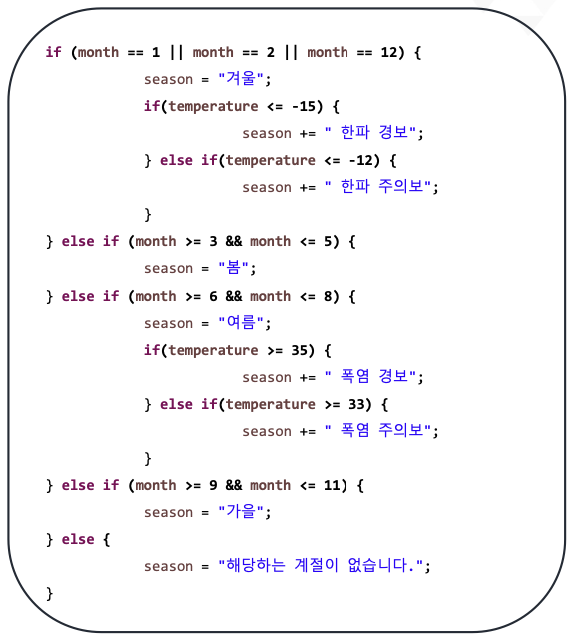
- 중첩 if문
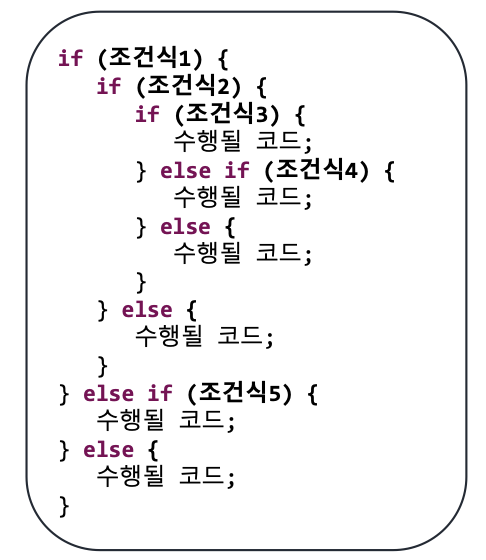
- 중첩 if문 예시
switch문
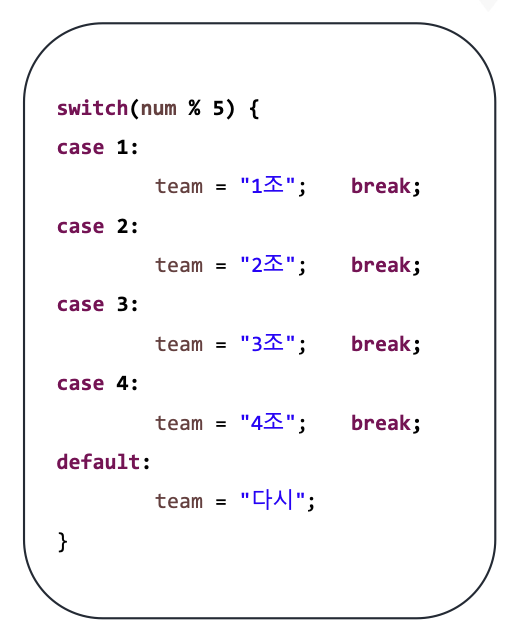
조건식 하나로 많은 경우의 수 처리할 때 사용하며 이때 조건식의 결과는 정수 또는 문자, 문자열 조건식의 결과 값과 일치하는 case문으로 이동
default문은 일치하는 case문이 없을 때 수행(= else )
- switch문 예시
class SwitchExample(ex1)
package edu.kh.control.condition;

import java.util.Scanner;

public class SwitchExample {
	/* switch 문
	 * - 식 하나의 결과로 많은 경우의 수를 처리할 때 사용하는 조건문
	 * -> 식의 결과로 얻은 값과 같은 case 구문이 수행된다.
	 *
	 * [작성법]
	 * switch(식{
	 *
	 * case 결과값1 : 수행코드1; break;
	 * case 결과값2 : 수행코드2; break;
	 * case 결과값3 : 수행코드3; break;
	 * ...
	 * default : case를 모두 만족하지 않을 경우 수행하는 코드;
	 *
	 * }
	 *
	 * */


	public void ex1() {
		// 키보드로 정수를 입력 받아
		// 1 이면 "빨간색"
		// 2 이면 "주황색"
		// 3 이면 "노란색"
		// 4 이면 "초록색"
		// 1~4 사이 숫자가 아니면 "흰색" 출력

		Scanner sc = new Scanner(System.in);
								// System.in : 키보드 입력

		System.out.print("정수 입력 : ");
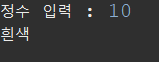
		int input = sc.nextInt();


		String color;

		/*
		if(input == 1) {
			color = "빨간색";
		} else if(input == 2) {
			color = "주황색";
		} else if(input == 3) {
			color = "노란색";
		} else if(input == 4) {
			color = "초록색";
		} else {
			color = "흰색";
		}
		*/

		// 여러 값이 나오는 식
		switch(input) {
		case 1 : color = "빨간색"; break;
		// input에 입력된 값이 1인 경우(case)
		// color 변수에 "빨강색"을 대입하고 switch 문을 멈춤(break)

		case 2 : color = "주황색"; break;
		case 3 : color = "노란색"; break;
		case 4 : color = "초록색"; break;
		default : color = "흰색"; // default = 기본값
		}
		System.out.println(color);

	}
class SwitchExample(ex2)
	public void ex2() {
		// 정수를 입력 받아 4팀으로 나누기
		Scanner sc = new Scanner(System.in);

		System.out.print("번호 입력 : ");
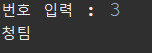
		int input = sc.nextInt();

		String team;

		// 1이면 백팀
		// 2이면 홍팀
		// 3이면 청팀
		// 나머지 흑팀

		switch(input % 4) {
		case 1 : team = "백팀"; break;
		case 2 : team = "홍팀"; break;
		case 3 : team = "청팀"; break;
		default : team = "흑팀";
		}
		System.out.println(team);
	}
class SwitchExample(ex3)
	public void ex3() {

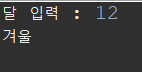
		// 달 입력 시 계절 판별(switch 버전)
		Scanner sc = new Scanner(System.in);

		System.out.print("달 입력 : ");
		int month = sc.nextInt();

		String season;

		switch(month) {
		case 1 : case 2 : case 12 : season = "겨울"; break;
		case 3 : case 4 : case 5 : season = "봄"; break;
		case 6 : case 7 : case 8 : season = "여름"; break;
		case 9 : case 10 : case 11 : season = "가을"; break;
		default : season = "잘못 입력"; break;
		}
		System.out.println(season);
	}
class SwitchExample(ex4)
	public void ex4() {

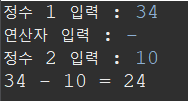
		// 정수 2개와 연산자(+ - * / %) 1를 입력 받아서 결과 출력
		Scanner sc = new Scanner(System.in);

		// ex)
		// 정수 1 입력 : 4
		// 연산자 입력 : *
		// 정수 2 입력 : 3

		// 계산 결과 :  4 * 3 = 12
		System.out.print("정수 1 입력 : ");
		int num1 = sc.nextInt();

		System.out.print("연산자 입력 : ");
		// sc.nextChar(); 스캐너는 문자 하나(char)를 입력 받는 기능이 별도로 존재하지 않음

		String op = sc.next(); // 다음 입력되는 한 단어(String) 읽어오기

		System.out.print("정수 2 입력 : ");
		int num2 = sc.nextInt();

		int cal;

		// case에 작성되는 값은 switch 식의 결과값 자료형은 리터럴 표기법
		switch(op) {
		case "+" : System.out.printf("%d + %d = %d\n", num1, num2, num1 + num2); break;
		case "-" : System.out.printf("%d - %d = %d\n", num1, num2, num1 - num2); break;
		case "*" : System.out.printf("%d * %d = %d\n", num1, num2, num1 * num2); break;
		case "/" :
			if (num2 == 0) {
				System.out.print("계산될 수 없다");
			}
			else {
				System.out.printf("%d / %d = %d\n", num1, num2, num1 / num2);
			}

			break;
		case "%" : System.out.printf("%d %% %d = %d\n", num1, num2, num1 % num2); break;
		default : System.out.println("존재하지 않는 연산자 입니다.");
		}
	}
}
class SwitchRun
package edu.kh.control.condition;

public class SwitchRun {
	public static void main(String[] args) {
		SwitchExample condition = new SwitchExample();

		// condition.ex1();
		// condition.ex2();
		// condition.ex3();
		condition.ex4();
	}
}