1. CSS style 상속
[1] CSS3 규칙 - 스타일 상속
: CSS3 스타일은 부모 태그로부터 상속한다.
1) 부모 태그 (부모 요소)
: 자신을 둘러싸는 태그
(1) 예시
<p style="color:green">안녕하세요
	<em style=“font-size:25px”>자식입니다</em>
</p><p>태그는<em>태그의 부모 태그이다.<em>태그의 출력 : 글자 크기는 25px, 글자 색은 부모를 상속받아 green
2. CSS style 중복 적용
Q. CSS에서 Style 속성이 중복될 경우 적용되는 방법은?
A. 가장 구체적인 내용을 해당 태그에 적용한다.
[1] css 파일, 태그의 style 속성의 경우
: 태그의 style 속성에 있는 것으로 적용된다.
1) 예시 코드
(1) html
<html>
  <head>
    <link rel= "stylesheet" type= "text/css" href= "mystyle.css"/>
  </head>
  <body>
    <h1 style = "color : blue">This is a paragraph. </h1>
</html>
(2) css
/* mystyle.css 의 내용*/
body { background-color : lightblue; }
h1 { color : navy ; margin-left : 20px; }
[2] class 내에서 중복되는 경우
1) 예시 코드
(1) html
<html>
  <head>
    <title> 헤드 퍼스트 라운지 건강 음료 </title>
    <link type = “text/css” rel = “stylesheet” href = “lounge.css” >
  </head>
  <body>
    <h1> 음료 목록 </h1>
    <h2> 시원한 녹차 </h2>
    <p class = "greentea raspberry blueberry" >
      <img src= " ./images/green.jpg"> 비타민과 미네랄이 가득한, 카밀레 꽃과 생강 한 조각이 들어간 건강에 좋은 녹차.
    </p>
  </body>
</html>
(2) css
p.greentea{
  color : green;
}
p.blueberry{
  color : purple
}
p.rasberry{
  color : blue
}
<p class="greentea">로 수정- 또는 css파일에서 p.greentea style을 가장 아래의 순서로 변경
3. CSS font
[1] font-style
1) 예시 코드
<html>
  <head>
    <style>
      p.normal { font-style: normal; }
      p.italic { font-style: italic; }
      p.oblique { font-style: oblique; }
    </style>
  </head>
  <body>
    <p class="normal">This is a paragraph in normal style.</p>
    <p class="italic">This is a paragraph in italic style.</p>
    <p class="oblique">This is a paragraph in oblique style.</p>
  </body>
</html>
[2] font-family
1) 예시 코드
<html>
  <head>
    <style>
      p {
        font-family : Arial, Helvetica, sans-serif;
      }
      #cursive-div {
        font-family : ‘Cool Linked Font’, cursive;
      }
    </style>
  </head>
  <body>
    <div id = “cursive-div”>
      <h3> Cursive </h3>
      <p> This paragraph is in a cursive font. </p>
    </div>
  </body>
</html>
2) Font-family에 있는 글꼴 집합
- Sans-serif: Arial, Arial Black, Tahoma, Trebuchet MS, Verdana
- Serif: Courier, Courier New, Georgia, Times, Times New Roman
- Monospace: Courier, Courier New
- Cursive(윈도우, mac만 지원): comic sans
- Fantasy(윈도우, mac만 지원): last ninja, impact
[3] font-size
1) 절대값(장치(화면크기)에 따라 크기 변경 불가)
- Px, pt 등의 단위로 지정
- Xx-small, x-small, small, medium, large, x-large, xx-large
- Medium이 기본값 12pt=16px=100%
2) 상대값(장치(화면크기)에 따라 크기 변경)
- em, %, smaller, larger
- em: 웹 문서에 사용되는 단위, 컴퓨터 외 모바일 등의 다른 장치 에서 크기 조절 가능
- 기본 설정 1em은 12pt, 16px의 크기를 의미
[4] font-variant
: 글꼴의 변형을 지정한다.
1) 속성
- normal : 브라우저에서 'small-caps'로 지정되지 않은 보통을 글꼴로 지정한다.
- small-caps : 브라우저에서 'small-caps'로 지정된 글꼴로 지정한다. small-caps는 소문-자 크기의 대문자를 말한다. small-caps는 두 종류의 활자 즉 '대문자', '소문자'가 있는 글꼴에만 적용되므로 한국어에서는 적용되지 않는다.
2) 예시 코드
<html>
  <head>
    <style>
      p.normal { font-variant: normal; }
      p.small { font-variant: small-caps; }
    </style>
  </head>
  <body>
    <p class="normal">Madagascar.</p>
    <p class="small">small-caps, Madagascar. </p>
  </body>
</html>
[5-1] CSS Colors (배경색, 글자색, 테두리색)
1) 배경색 : background-color
2) 글자색 : color
3) 테두리색 : border : 사이즈 종류 색상
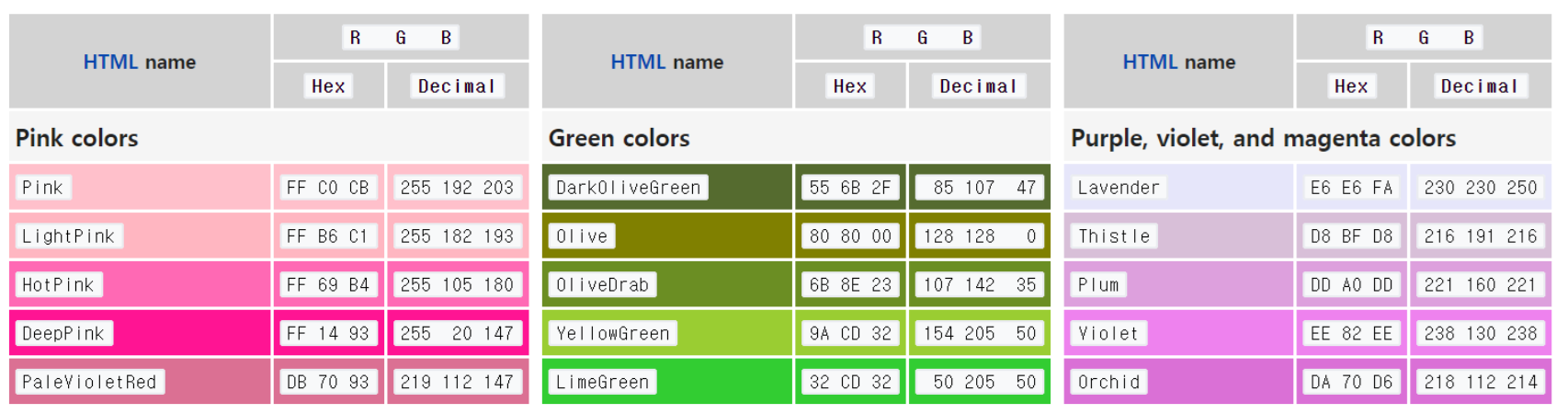
[5-2] CSS Colors (색을 설정하는 방식)
1) rgb, rgba 사용
- ex) rgb(60%, 40%, 55%)
- ex) rgba(255, 99, 71, 0.2)
2) hexcode 사용
- #rrggbb (red, green, blue)
- ex) #cc6600
3) Color name 사용
4. background
[1] CSS background
: 배경을 설정
1) 속성
- Background-color; 배경 색
- Background-image; 배경에 들어가는 사진
- Background-repeat; 사진이 들어갈 때 반복 여부 (repeat-x, repeat-y, no-repeat)
- Background-attachment; 사진이 들어 갈 때 고정된 위치 여부 지정(fixed, scroll, local)
- Background-position; 사진이 들어갈 때 위치 지정
- left top 왼쪽 상단
- left center 왼쪽 중앙
- left bottom 왼쪽 맨아래
- right top 오른쪽 상단
- right center 오른쪽 중앙
- right bottom 오른쪽 맨아래
- center top 가운데 상단
- center center 정 가운데
2) shorthand property
<html>
  <head>
    <style>
      body { background: url(background.jpg) no-repeat top right }
    </style>
  </head>
  <body>
    <h1>Hello World!</h1>
  </body>
</html>
5. summary
[1] CSS 스타일 상속
- 부모 태그의 스타일을 자식이 상속.
[2] CSS 스타일 중복 적용
- 태그의
style속성이 가장 우선. - 중복된 클래스는 마지막 적용된 스타일이 우선.
[3] 폰트 설정
font-style:normal,italic,oblique.font-family: 글꼴 지정, 대체 글꼴 설정 가능.font-size: px, em, %로 크기 지정.font-variant:normal,small-caps.
[4] 색상 설정
background-color,color,border로 배경색, 글자색, 테두리색 지정.rgb,rgba,hexcode, 색상 이름으로 색 지정.
[5] 배경 설정
background-color,background-image,background-position,background-repeat등 사용.- shorthand: 한 줄로 설정 가능.


안녕하세요, 사용자들의 문제 해결을 중심으로 하는 프론트엔드 개발자입니다. 티스토리로 전환했어요 : https://pangil-log.tistory.com