EJS 왜 써 ?
EJS 같은 템플레이팅 엔진을 사용하는 이유는 로직을 더하고 데이터를 보충해서 구성하기 위함이다. 쉽게 말하자면 반복이나 조건이 있는 여러 값이 들어가는 HTML의 성능을 올리는 것이 EJS의 주 목적이라고 할 수 있다.
📌 참고
EJS language support extension을 EJS 구문을 하이라이팅 해주기 때문에 기본 HTML 태그와 구분이 쉬워진다.
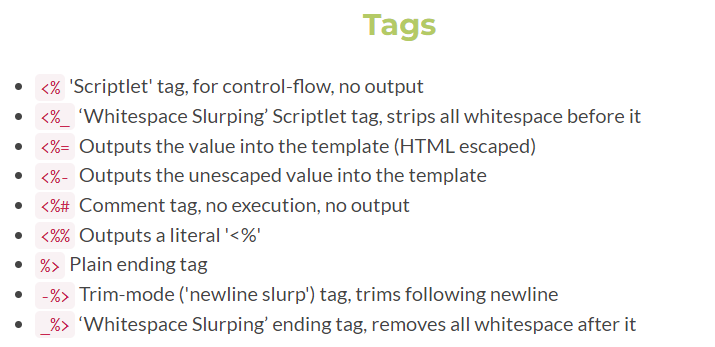
<%= %> 태그를 주로 사용하고, 해당 태그 내부의 내용은 Js 코드 취급이 되어 Js에서 사용하는 함수나, 연산을 사용할 수 있다. 즉, HTML 구문이 아니라 Js 구문이라고 인식을 하게 된다.
하지만 템플릿에서 로직을 더하는 것은 좋지 않은 방법이다 그 이유는 템플릿은 결과를 출력할 때 집중하는 것이 더 효율적이기 때문이다. 따라서 템플릿에서 로직을 실행하는 것보다 더 나은 방법으로 결과값을 만든 후 템플릿에게 전달하는 방식을 권장한다.
예를 들어 localhost:3000/bird를 요청하면 bird.ejs 가 렌더링 되도록 한다.
app.get("/bird", (req,res) => {
	res.render("bird");
});
<!DOCTYPE html>
<html lang="en">
<head>
<meta charset="UTF-8" />
<meta http-equiv="X-UA-Compatible" content="IE=edge" />
<meta name="viewport" content="width=device-width, initial-scale=1.0" />
<title>Bird Name</title>
</head>
<body>
<h1>Your bird is <%= "blackbird".toUpperCase() %></h1>
</body>
</html>템플릿에 로직을 더하는 것은 좋지 않기 때문에 이를 템플릿에 전달하는 방식으로 수정해보자.
app.get("/bird", (req,res) => {
	const birdName = "blackbird".toUpperCase();
  	res.render("bird", { bird : birName });
});
템플릿에서 전달된 객체를 사용할 때는 key값으로 사용하면 된다.
<!DOCTYPE html>
<html lang="en">
  <head>
    <meta charset="UTF-8" />
    <meta http-equiv="X-UA-Compatible" content="IE=edge" />
    <meta name="viewport" content="width=device-width, initial-scale=1.0" />
    <title>Random</title>
  </head>
  <body>
    <h1>Your bird is <%= birdName %></h1>
  </body>
</html>
req.params와 Ejs
app.get("/r/:subreddit", (req, res) => {
  const { subreddit } = req.params;
  res.render("subreddit", { subreddit });
});
<!DOCTYPE html>
<html lang="en">
<head>
<meta charset="UTF-8" />
<meta http-equiv="X-UA-Compatible" content="IE=edge" />
<meta name="viewport" content="width=device-width, initial-scale=1.0" />
<title><%= subreddit %></title>
</head>
<body>
<h1>Browsing The <%= subreddit %> subreddit</h1>
</body>
</html>해당 방식은 /r/:subreddit 의 요청을 받으면 입력한 매개변수를 req.params 프로퍼티를 이용해 가져와서 렌더링하는 ejs 템플릿 파일에 객체형식으로 전달하여 템플릿에 <%= 구문으로 데이터를 전달했다.
- 'hello'을 매개변수로 했을 때