🌿 JSONModel 기본 개념
let oModel = [
				{Material: "SPC_0002", Plant: "1002", Storage: "2001"},
				{Material: "SPC_0003", Plant: "1003", Storage: "2002"},
				{Material: "SPC_0004", Plant: "1004", Storage: "2003"}
			 ];

var vMaterial = "SPC_0001";

vMaterial = "PPP_01";
//앞에 v나오면 변수를 의미
//변수는 하나의 값만 가질 수 있음
{key: value, key: value, key: value}형태- Material 필드는 단독으로 존재하는게 아니라, oModel이라는 Json안에 Material 키로 존재함
- [ABAP] 3개 Field로 이루어진 4개 Record 가진 JSON 모델
- [ABAP] Value를
JSONModel-key로 표현
ex.oModel-Material="SPC_0001"
🌿 실습
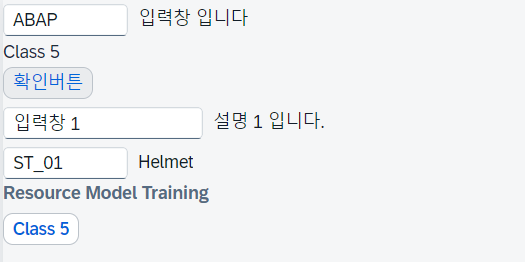
🌱 JSONModel 만들기
Controller
sap.ui.define([
    "sap/ui/core/mvc/Controller",
    "sap/ui/model/json/JSONModel"
],
function (Controller, JSONModel) {
    "use strict";

    return Controller.extend("sync5.cl5.fioritraining01.controller.JSONView", {
        onInit: function () {
            //JSON 모델(데이터) 생성
            let oData = {
                            InputSet: {name: "ABAP", desc: "입력창 입니다", width:"200px", update: true },
                            TextSet: {text: "Class 5", width: "30rem"},
                            ButtonSet: {btn_text: "확인버튼"},
                            InputSet1: {name: "입력창 1", desc: "설명 1 입니다.", width:"50rem"},
                            InputSet2: {name: "ST_01", desc: "Helmet", width: "200px"},
                            LabelSet: {text: "JSON Model Training 중", design: "Bold"}
                        },//콤마 !!
                oModel = new JSONModel(oData);

            //위에서 생성한 Data(Model)을 View의 메모리에 업로드
            this.getView().setModel(oModel);
        }
    });
});
View
    <VBox>
        <Input value="{/InputSet/name}"
               description="{/InputSet/desc}"
               valueLiveUpdate="{/InputSet/update}"
               width="{/InputSet/width}" />
        <Text text="{/TextSet/text}"
              width="{/TextSet/width}"/>
        <Button text="{/ButtonSet/btn_text}"/>
    </VBox>
    <VBox>
        <Input value="{/InputSet1/name}"
               description="{/InputSet1/desc}"
               width="{/InputSet1/width}" />
        <Input value="{/InputSet2/name}"
               description="{/InputSet2/desc}"
               width="{/InputSet2/width}" />
        <Label text="{/LabelSet/text}"
               design="{/LabelSet/design}" />
    </VBox>
🌱 setModel 여러 개 만들기
Controller
let oData2 = {
		      MatSet: {matnr: "SPC_0001", werks: "1001", mtart: "HALB"}
             };

this.getView().setModel(oModel);
this.getView().setModel(oModel2, "Mat");
View
<Button text="{Mat>/MatSet/matnr}"/>setModel 하나만 가능해서 하나의 JSON에 데이터를 모두 밀어 넣어야할까?
아니다 ! 다른 이름을 주고 setting 하면 여러 개의 Model 생성 가능하다
단, 다른 이름을 지정해주지 않는다면 마지막 모델이 덮어써서 마지막 결과물만 나오니 주의하자
위에서 작성했던 예시를 여러개의 JSON Model 로 분리해보면 아래와 같다
Controller
sap.ui.define([
    "sap/ui/core/mvc/Controller",
    "sap/ui/model/json/JSONModel"
],
function (Controller, JSONModel) {
    "use strict";

    return Controller.extend("sync5.cl5.fioritraining01.controller.JSONView", {
        onInit: function () {
            //JSON 모델(데이터) 생성
            let oData = {
                            InputSet: {name: "ABAP", desc: "입력창 입니다", width:"200px", update: true },
                            TextSet: {text: "SYNC Class 5", width: "30rem"},
                            ButtonSet: {btn_text: "확인버튼"},
                        };//콤마 !!!

            let oData2 = {
                            MatSet: {matnr: "SPC_0001", werks: "1001", mtart: "HALB"}
                         };

            let oData3 = {
                            InputSet1: {name: "입력창 1", desc: "설명 1 입니다.", width:"20rem"}
                         };

            let oData4 = {
                            InputSet2: {name: "ST_01", desc: "Helmet", width: "200px"},
                         };

            let oData5 = {
                            LabelSet: {text: "JSON Model Training 중", design: "Bold"}
                         };

            //Model 분리
            let oModel = new JSONModel(oData);
            let oModel2 = new JSONModel(oData2);
            let oModel3 = new JSONModel(oData3);
            let oModel4 = new JSONModel(oData4);
            let oModel5 = new JSONModel(oData5);
                //[ABAP] oModel-name

            //위에서 생성한 Data(Model)을 View의 메모리에 업로드
            this.getView().setModel(oModel);
            this.getView().setModel(oModel2, "Mat");
            this.getView().setModel(oModel3, "In1");
            this.getView().setModel(oModel4, "In2");
            this.getView().setModel(oModel5, "Lab");
        }
    });
});
View
    <VBox>
        <Input value="{/InputSet/name}"
               description="{/InputSet/desc}"
               valueLiveUpdate="{/InputSet/update}"
               width="{/InputSet/width}" />
        <Text text="{/TextSet/text}"
              width="{/TextSet/width}"/>
        <Button text="{/ButtonSet/btn_text}"/>
    </VBox>
    <VBox>
        <Input value="{In1>/InputSet1/name}"
               description="{In1>/InputSet1/desc}"
               width="{In1>/InputSet1/width}" />
        <Input value="{In2>/InputSet2/name}"
               description="{In2>/InputSet2/desc}"
               width="{In2>/InputSet2/width}" />
        <Label text="{Lab>/LabelSet/text}"
               design="{Lab>/LabelSet/design}" />
    </VBox>
여러개 모델로 데이터를 분리했다면 View에서 데이터 경로 작성 시 >/ 사용해서 경로를 표현한다
멋쟁이 토마토