포지션 맛보기
- 기본적으로 html은 위에서 아래로, 왼쪽에서 오른쪽으로 작성된다.
그렇다면 내가 임의로 지정해 줄 수 있는 방법이 있을까? ✔포지셔닝!
position : absolute;
position : relative;
position : fixed;
top : , right : , bottom : , left :
absolute와 relative의 차이가 뭘까?
컨테이닝 블록과 relative, absolute, fixed
- mdn 공식문서 활용
https://developer.mozilla.org/ko/docs/Web/CSS/Containing_block - 부모의 블록이 inline 형태면 적용이 안되고 더 높은 조상으로 올라간다.
- 모든 태그들은 기본적으로 static포지션을 사용한다. ( 정적인=멈춰있다. )
- position : relative -> 자신의 static위치를 기반으로 해서 현재 위치에서 이동 가능 ( 상대적인 )
- position : absolute -> 자신의 컨테이닝 블록을 기반으로해서 위치를 잡는다. 부모의 포지션을 보고 static을 제외한 relative, absolute, fixed가 있으면 부모 컨테이닝 박스안에 위치를 잡는다. ( 절대적인 )
- position : fixed -> 웹사이트 스크롤 올리거나 내려도 계속 따라옴 컨테이닝 블록은 뷰포트나 페이지(body) 영역이다.
세로 가운데 정렬
- 다양한 방법이 있다. display : flex, display : table-sell 등등..
nav 메뉴와 nth-child
- <- 리스트 스타일 변경
list-style : none // • 없애기
list-style : square // 네모로 변경하기
등등..- nth-child ( 유지보수가 어렵다.. ) -> 장기적으로 볼 때 ( 수정 ) 안좋다! class로 하는게 유지보수에는 더 좋음
nav li span:first-child {
    display: inline-block;
    background-image: url("./sp_nav.png");
    background-repeat: no-repeat;
    height: 16px;
}

nav li:first-child span:first-child {
    width: 25px;
    background-position: 0 -285px;
}

nav li:nth-child(2) span:first-child {
    width: 27px;
    background-position: -279px -52px;
}
css 우선순위
- 기본적으로 뒤에 나오는 css가 우선순위가 높다.
- !important ( 치트키 but 협업에는 안좋음 웬만하면 피하기 ) > inline style attribute > id > class > 다른 attribute ( 의사코드 포함 ) > tag element
- 우선순위가 같다면 개수가 많은 css가 우선순위가 높다.
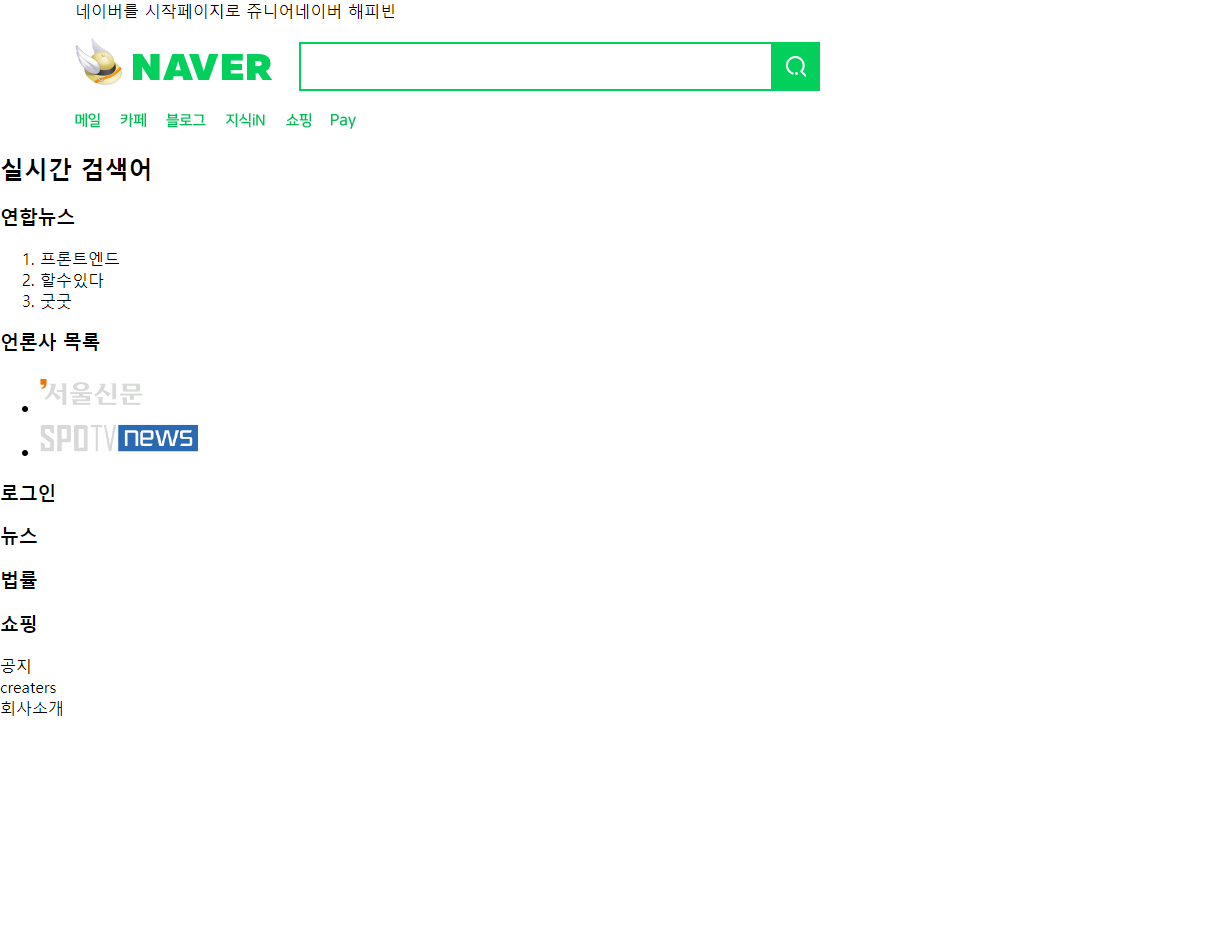
전체코드
- naver.html
<!DOCTYPE html>
<html lang="ko">

<head>
    <!-- meta태그는 문서에 대한 정보를 나타냄 -->
    <meta charset="UTF-8">
    <meta http-equiv="X-UA-Compatible" content="IE=edge">
    <meta name="viewport" content="width=device-width, initial-scale=1.0">
    <title>네이버</title>
    <!-- 파비콘 -->
    <link rel="shortcut icon" type="image/x-icon" href="image/favicon.ico">
    <link rel="stylesheet" href="./naver.css">
</head>

<body>
    <header>
        <div class="center-align"> <!-- 가운데 정렬용 div -->
            <!-- 속성명: 속성값; 속성명2: 속성값2 -->
            <span>네이버를 시작페이지로</span>
            <span>쥬니어네이버</span>
            <span>해피빈</span>
            <!-- <div style="display : inline-block">네이버를 시작페이지로</div>
            <div style="display : inline-block">쥬니어네이버</div>
            <div style="display : inline-block">해피빈</div> -->
            <div id="header-search">
                <!-- href 는 a태그의 부가정보 속성(attribute) -->
                <a href="https://www.naver.com">
                    <h1>
                        <span>네이버</span>
                    </h1>
                </a>
                <h2 class="blind">검색창</h2>
                <fieldset>
                    <input type="text">
                    <button>
                        <span class="blind">검색</span>
                        <span id="search-image"></span>
                    </button>
                </fieldset>
            </div>
        </div>
    </header>
    <nav>
        <div class="center-align">
            <ul> <!-- unordered list --> <!-- ol태그도 있음 ordered list -->
                <li><a href=""><span></span><span class="blind">메일</span></a></li> <!-- list item -->
                <li><a href=""><span></span><span class="blind">카페</span></a></li> <!-- list item -->
                <li><a href=""><span></span><span class="blind">블로그</span></a></li> <!-- list item -->
                <li><a href=""><span></span><span class="blind">지식인</span></a></li> <!-- list item -->
                <li><a href=""><span></span><span class="blind">쇼핑</span></a></li> <!-- list item -->
                <li><a href=""><span></span><span class="blind">네이버페이</span></a></li> <!-- list item -->
                <li><a href=""><span></span><span class="blind">네이버쇼핑</span></a></li> <!-- list item -->
            </ul>
        </div>
    </nav>

    <main>
        <h2>실시간 검색어</h2>
        <h3>연합뉴스</h3>
        <ol>
            <li>프론트엔드</li>
            <li>할수있다</li>
            <li>굿굿</li>
        </ol>
        <h3>언론사 목록</h3>
        <ul>
            <li><img src="image/서울신문.png" alt="서울신문"></li>
            <li><img src="image/스포티비.png" alt="스포티비"></li>
        </ul>
        <h3>로그인</h3>
        <h3>뉴스</h3>
        <h3>법률</h3>
        <h3>쇼핑</h3>
    </main>
    <footer>
        <div>공지</div>
        <div>creaters</div>
        <div>회사소개</div>
    </footer>
</body>

</html>- naver.css
/* *은 모든 태그 의미  */
* {
    box-sizing: border-box;
}

html,
body {
    margin: 0;
    padding: 0;
}

/* 선택자 (selector) */
.blind {
    position: absolute;
    clip: rect(0 0 0 0);
    width: 1px;
    height: 1px;
    margin: -1px;
    overflow: hidden;
}

.center-align {
    margin: 0 auto;
    width: 1080px;
}

/* 자식 선택자 */
div#header-search h1 {
    width: 198px;
    height: 48px;
    display: inline-block;
    /* background-image: url('./sp_search.png');
    background-position: -4px -10px;
    background-repeat: no-repeat; */
    background: url('./sp_search.png') -4px -4px no-repeat;
    vertical-align: middle;
    position: relative;
    top: -4px;
}

#header-search a {
    text-decoration: none;
    vertical-align: middle;
}

#header-search h1 span {
    display: none;
}

div#header-search h2 {
    display: none;
}

div#header-search fieldset {
    margin-left: 20px;
    padding: 12px 0px 12px 10px;
    border: 2px solid #03cf5d;
    width: 521px;
    height: 49px;
    display: inline-block;
    vertical-align: middle;
    position: relative;
}

#header-search fieldset input {
    border: none;
    padding: 0;
    outline: none;
    width: 405px;
    height: 23px;
    vertical-align: top;
}

#header-search fieldset button {
    width: 49px;
    height: 49px;
    border: none;
    padding: 0;
    background: #03cf5d;
    position: absolute;
    right: -2px;
    top: -2px;
}

#search-image {
    background-image: url(./sp_search.png);
    background-position: -3px -60px;
    background-repeat: no-repeat;
    width: 21px;
    height: 21px;
    display: inline-block;
    margin: 14px;
}

nav ul {
    margin: 0;
    padding: 0;
    list-style: none;
}

nav li {
    display: inline-block;
}

nav li span:first-child {
    display: inline-block;
    background-image: url("./sp_nav.png");
    background-repeat: no-repeat;
    height: 16px;
    margin-left: 14px;
}

nav li:first-child span:first-child {
    width: 25px;
    background-position: 0 -285px;
    margin-left: 0;
}

nav li:nth-child(2) span:first-child {
    width: 27px;
    background-position: -279px -52px;
}

nav li:nth-child(3) span:first-child {
    width: 40px;
    background-position: -100px -182px;
}

nav li:nth-child(4) span:first-child {
    width: 40px;
    background-position: -101px -156px;
}

nav li:nth-child(5) span:first-child {
    width: 26px;
    background-position: -279px -156px;
}

nav li:nth-child(6) span:first-child {
    width: 25px;
    background-position: -70px -285px;
}

/*
div#header-center h1 {
    자손 선택자
}
*/
안녕하세요