Android Context 기술 블로그에 작성 후 제출하기
-
context 키워드는 많이 봐왔지만 아직 개념을 정확히 모르는 것 같아 정리하려고 한다.
context는 사전적 의미로 문맥, 맥락 등을 의미한다. 안드로이드에서도 어플리케이션에 대해서 현재 상태를 나타내는 역할을 한다.
Android Context란?
-
어플리케이션의 현재 상태를 가지고 있다.
-
시스템이 관리하고 있는 액티비티, 어플리케이션의 정보를 얻기 위해 사용한다.
-
안드로이드 시스템 서비스에서 제공하는 API에 접근하기 위해 사용한다.
-
Activity, Application 클래스는 Context 클래스를 상속받은 클래스이다.
Application Context
- Application 생명주기에 귀속된다.
- 싱글톤 - 앱이 죽기 전까지 동일한 하나의 객체를 반환한다.
- getApplicationContext()를 통해 접근한다.
- 어떠한 Context보다도 오래 유지된다.
Activity Context
- Activity 생명주기에 귀속된다.
- getContext()를 통해 접근한다.
- Activity의 범위 내에서 Context를 전달한다.
Context를 언제 어떤 Context를 사용해야할까??
데이터베이스를 관장하는 AppDatabase 처럼 싱글톤으로 존재하는 경우 초기화할때 context가 필요하게 되는데 그때 activity context로 전달하게 된다면 Activity의 생명주기에 따라 어느 시점에 context는 소멸이 될것이다.
AppDatabase는 싱글톤이기 때문에 해당 Activity Context를 지속적으로 참조하게 되어 메모리 누수가 발생하게 되고 이럴때는 Application Context를 사용하는 것이 바람직하다.
GUI에 관련된 것들에는 Application Context가 정상적으로 동작하지 않을 수 있기 때문에 무조건적으로 Application Context를 쓰는 것은 바람직하지 않다.
즉, 생명주기에 따른 범위(Scope)를 명심하여 Context를 참조하여야 한다.
출처
https://velog.io/@haero_kim/Android-Context-%EB%84%88-%EB%8C%80%EC%B2%B4-%EB%AD%90%EC%95%BC
https://youngdroidstudy.tistory.com/entry/Kotlin-%EC%95%88%EB%93%9C%EB%A1%9C%EC%9D%B4%EB%93%9C-Context
강의내용 정리
Preference
-
프로그램의 설정 정보 (사용자의 옵션 선택 사항이나 프로그램의 구성 정보)를 영구적으로 저장하는 용도로 사용
-
XML 포맷의 텍스트 파일에 키-값 세트로 정보를 저장
-
SharedPreferences 클래스
- Preferences의 데이터(키-값 세트)를 관리하는 클래스
- 응용 프로그램 내의 액티비티 간에 공유하며 한쪽 액티비티에서 수정 시 다른 액티비티엣도 수정된 값을 읽을 수 있다.
- 응용 프로그램의 고유한 정보이므로 외부에서는 읽을 수 없다.
-
getSharedPreferences (name, mode)
- 여러개의 Shared Preference 파일들을 사용하는 경우
- name : 프레퍼런스 데이터를 저장할 XML 파일의 이름이다.
- mode : 파일의 공유 모드이다.
- MODE_PRIVATE : 생성된 XML 파일은 호출한 애플리케이션 내에서만 읽기 쓰기가 가능하다.
- MODE_WORLD_READABLE, MIDE_WORLD_WRITEABLE : 보안상 이유로 API level 17에서 deprecated 되었다.
ex)
val sharedPref = activity?.getSharedPreferences(
        getString(R.string.preference_file_key), Context.MODE_PRIVATE)
- getPreferences
- 한 개의 Shared Preference 파일을 사용하는 경우
- Activity 클래스에 정의된 메소드이므로 Activity 인스턴스를 통해 접근 가능
- 생성한 액티비티 전용이므로 같은 패키지의 다른 액티비티는 읽을 수 없다.
- 액티비티와 동일한 이름의 XML 파일 생성
ex)
val sharedPref = activity?.getPreferences(Context.MODE_PRIVATE)
실습
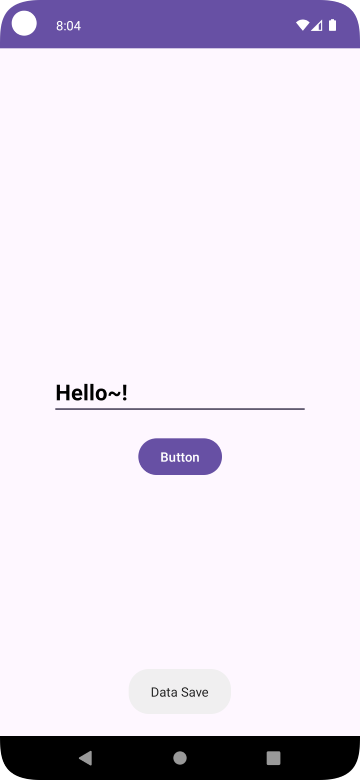
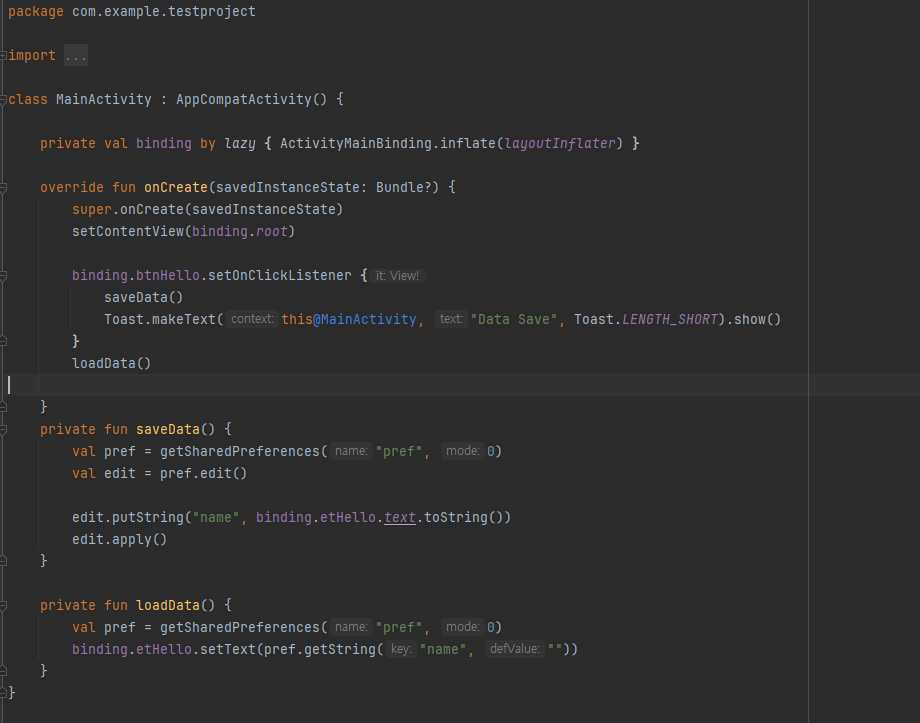
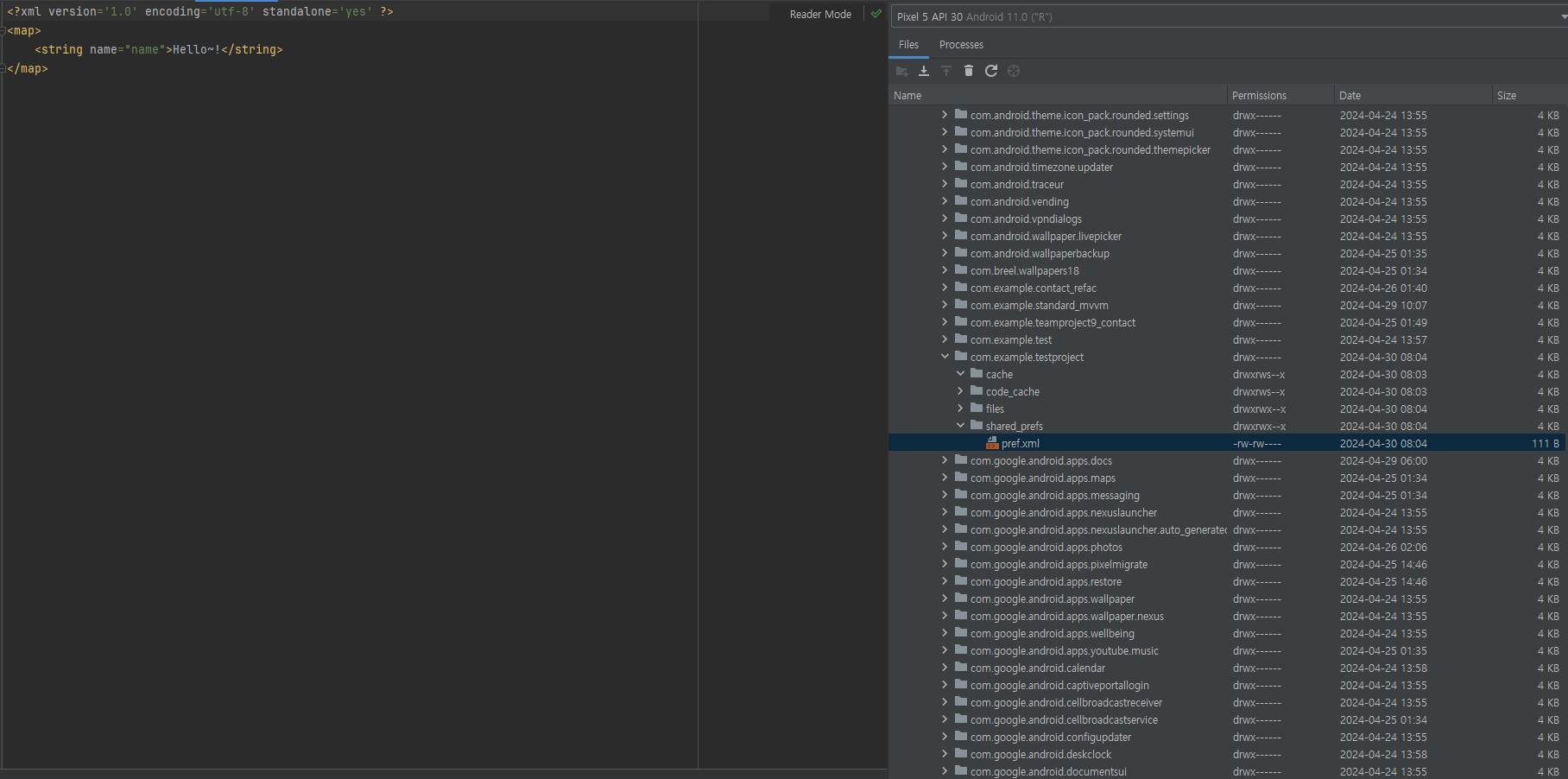
Room
- Room이란?
- SQLite를 쉽게 사용할 수 있는 데이터베이스 객체 매핑 라이브러리이다.
- 쉽게 Query를 사용할 수 있는 API를 제공하고 Query를 컴파일 시간에 검증한다.
- Query 결과를 LiveData로 하여 데이터베이스가 변경될 때마다 쉽게 UI를 변경할 수 있다.
- 사용시 gradle 파일에 다음과 같이 추가해야한다.
plugins {
		....
    id 'kotlin-kapt'
}
.....

dependencies {

    ......

    def room_version = "2.5.1"
    implementation "androidx.room:room-runtime:$room_version"
    annotationProcessor "androidx.room:room-compiler:$room_version"
    kapt "androidx.room:room-compiler:$room_version"
    // optional - Kotlin Extensions and Coroutines support for Room
    implementation "androidx.room:room-ktx:$room_version"
    // optional - Test helpers
    testImplementation "androidx.room:room-testing:$room_version"
}
(SQLite보다 Room을 사용할 것을 권장함)
- Room의 주요 3요소
- @Database : 클래스를 데이터베이스로 지정하는 annotation, RoomDatabase를 상속 받은 클래스여야한다.
- @Entity : 클래스를 테이블 스키마로 지정하는 annotation
- @Dao : 클래스를 DAO(Data Access Object)로 지정하는 annotation
- 기본적인 insert, delete, update SQL은 자동으로 만들어주며 복잡한 SQL은 직접 만들 수 있다.
Entity 생성
- Entity는 테이블 스키마 정의이다.
- CREATE TABLE student_table (student_id INTEGER PRIMARY KEY, name TEXT NOT NULL);
- @Entity data class Student
ex)
@Entity(tableName = "student_table")    // 테이블 이름을 student_table로 지정함
data class Student (
    @PrimaryKey
		@ColumnInfo(name = "student_id")
    val id: Int,
    val name: String
)
DAO 생성
- DAO는 interface나 abstract class로 정의되어야 한다.
- Annotation에 SQL 쿼리를 정의하고 그 쿼리를 위한 메소드를 선언한다.
- 가능한 annotation으로 @Insert, @Update, @Delete, @Query가 있다.
@Query("SELECT * from table") fun getAllData() : List<Data>- @Query로 리턴되는 데이터의 타입을 LiveData<>로 하면 나중에 이 데이터가 업데이트될 때 Observer를 통해 할 수 있다.
@Query("SELECT * from table") fun getAllData() : LiveData<List<Data>>- @Query에 SQL을 정의할 때 메소드의 인자를 사용할 수 있다.
@Query("SELECT * FROM student_table WHERE name = :sname")
suspend fun getStudentByName(sname: String): List<Student>
인자 sname을 여기에서 :sname으로 사용
-
fun 앞에 suspend는 Kotlin coroutine을 사용하는 것이다. 나중에 이 메소드를 부를 때는 runBlocking {} 내에서 호출해야 한다.
-
LiveData는 비동기적으로 동작하기 때문에 coroutine으로 할 필요가 없다.
@Dao
interface MyDAO {
    @Insert(onConflict = OnConflictStrategy.REPLACE)  // INSERT, key 충돌이 나면 새 데이터로 교체
    suspend fun insertStudent(student: Student)

    @Query("SELECT * FROM student_table")
    fun getAllStudents(): LiveData<List<Student>>        // LiveData<> 사용

    @Query("SELECT * FROM student_table WHERE name = :sname")
    suspend fun getStudentByName(sname: String): List<Student>

    @Delete
    suspend fun deleteStudent(student: Student); // primary key is used to find the student

    // ...
}
Database 생성
- RoomDatabase를 상속하여 자신의 Room 클래스를 만들어야 한다.
- 포함되는 Entity들과 데이터베이스 버전을 @Database annotation에 지정한다.
- 버전이 기존에 저장되어 있는 데이터베이스보다 높으면 migration을 수행하게 된다.
- migration 수행 방법은 RoomDatabase 객체의 addMigration() 메소드를 통해 알려준다.
- DAO를 가져올 수 있는 getter 메소드를 만든다. (실제 메소드 정의는 자동으로 생성)
- Room 클래스의 인스턴스는 하나만 있으면 되므로 Singleton 패턴을 사용
- Room 클래스의 객체 생성은 Room.databaseBuilder()를 이용한다.
@Database(entities = [Student::class, ClassInfo::class, Enrollment::class, Teacher::class], version = 1)
abstract class MyDatabase : RoomDatabase() {
    abstract fun getMyDao() : MyDAO

    companion object {
        private var INSTANCE: MyDatabase? = null
        private val MIGRATION_1_2 = object : Migration(1, 2) {
            override fun migrate(database: SupportSQLiteDatabase) { 생략 }
        }

        private val MIGRATION_2_3 = object : Migration(2, 3) {
            override fun migrate(database: SupportSQLiteDatabase) { 생략 }
        }
        fun getDatabase(context: Context) : MyDatabase {
            if (INSTANCE == null) {
                INSTANCE = Room.databaseBuilder(
                    context, MyDatabase::class.java, "school_database")
                    .addMigrations(MIGRATION_1_2, MIGRATION_2_3)
                    .build()
            }
            return INSTANCE as MyDatabase
        }
    }
}
Migration
- 앞에서 MyRoomDatabase 객체 생성 후 addMigrations() 메소드를 호출하여 Migration 방법을 지정했다. (여러개의 Migration 지정 가능)
Room.databaseBuilder(...).addMigrations(MIGRATION_1_2, MIGRATION_2_3)
>
private val MIGRATION_1_2 = object : Migration(1, 2) {   // version 1 -> 2
    override fun migrate(database: SupportSQLiteDatabase) {
        database.execSQL("ALTER TABLE student_table ADD COLUMN last_update INTEGER")
    }
}
>
private val MIGRATION_2_3 = object : Migration(2, 3) {   // version 2 -> 3
    override fun migrate(database: SupportSQLiteDatabase) {
        database.execSQL("ALTER TABLE class_table ADD COLUMN last_update INTEGER")
    }
}
UI와 연결
- 안드로이드 아키텍처에 따라 Repository와 ViewModel을 사용하길 권장한다.
- 여기에서는 Room과 LiveData 사용만 다루고 RoomDatabase 객체에서 DAO 객체를 받아오고 이 DAO 객체의 메소드를 호출하여 데이터베이스에 접근한다.
myDao = MyDatabase.getDatabase(this).getMyDao()
runBlocking { // (주의) UI를 블록할 수 있는 DAO 메소드를 UI 스레드에서 바로 호출하면 안됨
    myDao.insertStudent(Student(1, "james"))  // suspend 지정되어 있음
}
val allStudents = myDao.getAllStudents() // LiveData는 Observer를 통해 비동기적으로 데이터를 가져옴
UI와 연결 - LiveData
- 먼저 LiveData는 안드로이드 아키텍처 컴포넌트의 일부로 관찰 가능한 데이터 홀더 클래스이다.
이를 통해 UI 컴포넌트는 데이터의 변경 사항을 관찰하고 이에 반응할 수 있다.
LiveData의 핵심 특징
1. 수명주기 인식
2. UI와 데이터 상태의 일관성 유지
3. 중앙 집중적인 데이터 관리
4. 데이터 변경에 따른 자동 업데이트
- LiveData<> 타입을 리턴하는 DAO 메소드의 경우에 observe() 메소드를 이용하여 Observer를 지정해주면 데이터가 변경될 때마다 자동으로 Observer의 onChanged()가 호출되어 비동기적으로 데이터를 받기 때문에 UI스레드에서 직접 호출해도 문제가 없다.
val allStudents = myDao.getAllStudents()
allStudents.observe(this) {   // Observer::onChanged() 는 SAM 이기 때문에 lambda로 대체
    val str = StringBuilder().apply {
            for ((id, name) in it) {
                append(id)
                append("-")
                append(name)
                append("\n")
            }
        }.toString()
    binding.textStudentList.text = str
}
실습
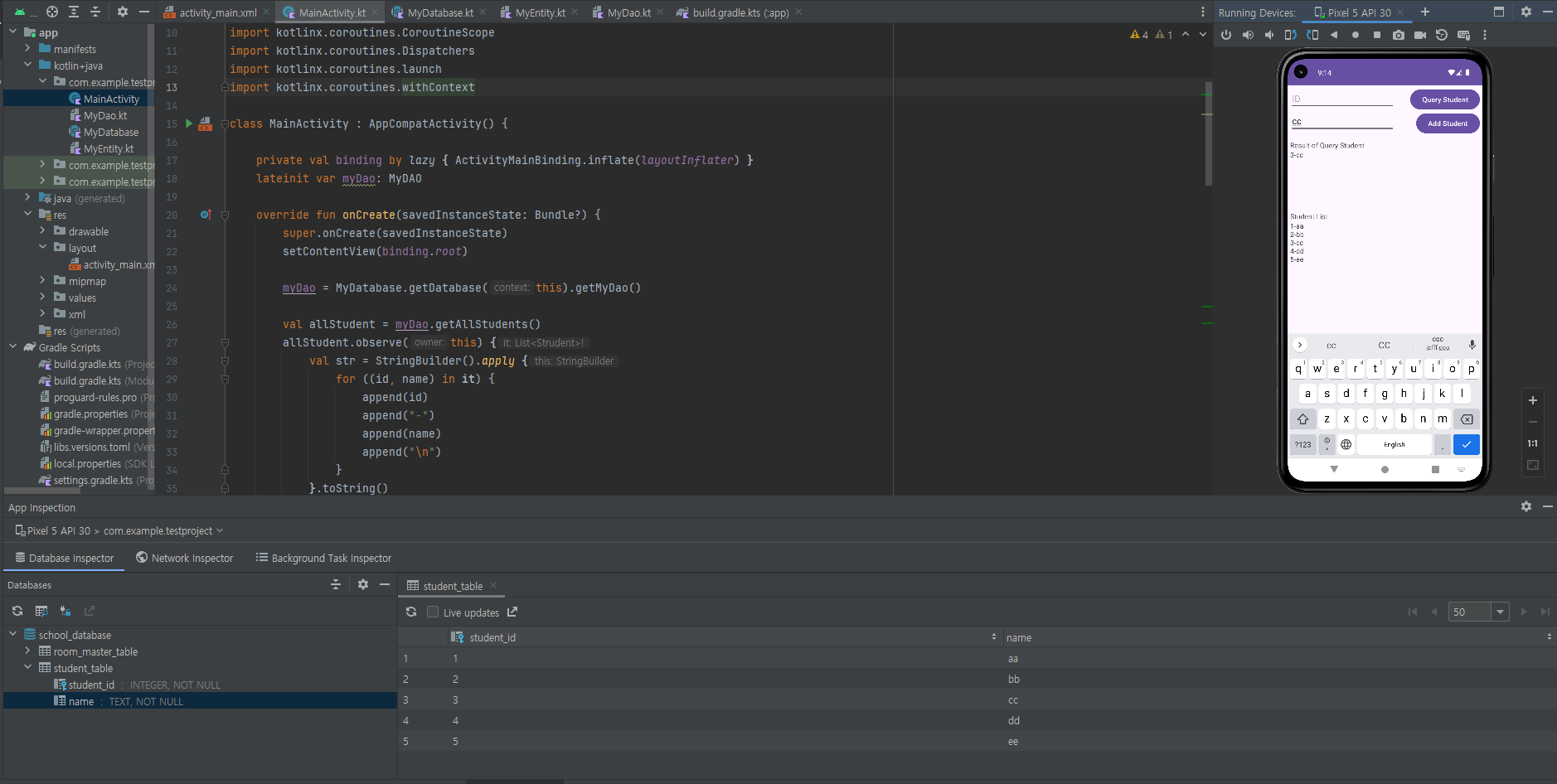
신기하당
사용자 위치 얻기
위치 접근 권한
- 사용자의 위치를 추적하기 위한 3가지 권한
- android.permission.ACCESS_COARSE_LOCATION: 와이파이나 모바일 데이터(또는 둘 다)를 사용해 기기의 위치에 접근하는 권한입니다. 도시에서 1블록 정도의 오차 수준입니다.
- android.permission.ACCESS_FINE_LOCATION: 위성, 와이파이, 모바일 데이터 등 이용할 수 있는 위치 제공자를 사용해 최대한 정확한 위치에 접근하는 권한입니다.
- android.permission.ACCESS_BACKGROUND_LOCATION: 안드로이드 10(API 레벨 29) 이상에서 백그라운드 상태에서 위치에 접근하는 권한입니다.
- 매니페스트에 권한을 추가해주어야 한다.
<manifest xmlns:android="http://schemas.android.com/apk/res/android"
    package="com.example.myapp">

    <!-- 정밀 위치 권한 요청 -->
    <uses-permission android:name="android.permission.ACCESS_FINE_LOCATION" />
    <uses-permission android:name="android.permission.ACCESS_COARSE_LOCATION"/>

    ...
</manifest>
   private fun requestLocationPermission() {
        if (ContextCompat.checkSelfPermission(
                this,
                Manifest.permission.ACCESS_FINE_LOCATION
            ) != PackageManager.PERMISSION_GRANTED
        ) {
            // 권한이 없을 경우, 사용자에게 요청
            ActivityCompat.requestPermissions(
                this,
                arrayOf(Manifest.permission.ACCESS_FINE_LOCATION),
                PERMISSION_REQUEST_ACCESS_FINE_LOCATION
            )
        } else {
            // 권한이 이미 있을 경우, 위치 정보를 사용할 수 있음
            getLocation()
        }
    }

    override fun onRequestPermissionsResult(
        requestCode: Int,
        permissions: Array<String>,
        grantResults: IntArray
    ) {
        when (requestCode) {
            PERMISSION_REQUEST_ACCESS_FINE_LOCATION -> {
                if ((grantResults.isNotEmpty() && grantResults[0] == PackageManager.PERMISSION_GRANTED)) {
                    // 권한이 부여되면 위치 정보를 사용할 수 있음
                    getLocation()
                } else {
                    // 권한이 거부되면, 기능 사용 불가
                }
                return
            }
        }
    }

    private fun getLocation
- requestLocationPermission : 앱에 위치 권한이 있는지 확인. 없다면 AcitivtyCompat.requestPermissions 메소드를 사용하여 권한을 요청
-
onRequestPermissionsResult : 권한이 없다면 처리
-
getLocation : 권한 부여시 getLocation 메소드를 호출하여 위치 정보 사용 가능
플랫폼 API의 위치 매니저
- 사용자의 위치를 얻을 때는 LocationManager라는 시스템 서비스를 이용한다.
val manager = getSystemService(LOCATION_SERVICE) as LocationManager- 현재 기기에 어떤 위치 제공자가 있는지 알고 싶다면 LocationManager의 allProviders 프로퍼티를 이용한다.
var result = "All Providers : "
val providers = manager.allProviders
for (provider in providers) {
		result += " $provider. "
}
Log.d("maptest", result)  // All Providers : passive, gps, network..
- 지금 사용할 수 있는 위치 제공자를 알아보려면 getProviders() 함수를 이용한다.
result = "Enabled Providers : "
val enabledProviders = manager.getProviders(true)
for (provider in enabledProviders) {
		result += " $provider. "
}
Log.d("maptest", result)  // Enabled Providers : passive, gps, network..
- 위치정보얻기
- LocationManager의 getLastKnownLocation() 함수를 이용한다.
- Location은 위치의 정확도, 위도, 경도, 획득 시간 등의 데이터를 포함한다.
- getAccuracy(): 정확도
- getLatitude(): 위도
- getLongitude(): 경도
- getTime(): 획득 시간
if (ContextCompat.checkSelfPermission(
                this,
                Manifest.permission.ACCESS_FINE_LOCATION
            ) == PackageManager.PERMISSION_GRANTED
        ) {
            val location: Location? = manager.getLastKnownLocation(LocationManager.GPS_PROVIDER)
            location?.let{
                val latitude = location.latitude
                val longitude = location.longitude
                val accuracy = location.accuracy
                val time = location.time
                Log.d("map_test", "$latitude, $location, $accuracy, $time")
            }
        }
- 계속 위치를 가져와야 한다면 LocationListener를 이용한다.
- onLocationChanged(): 새로운 위치를 가져오면 호출됩니다.
- onProviderEnabled(): 위치 제공자가 이용할 수 있는 상황이면 호출됩니다.
- onProviderDisabled(): 위치 제공자가 이용할 수 없는 상황이면 호출됩니다.
val listener: LocationListener = object : LocationListener {
            override fun onLocationChanged(location: Location) {
                Log.d("map_test,","${location.latitude}, ${location.longitude}, ${location.accuracy}")
            }
        }
        manager.requestLocationUpdates(LocationManager.GPS_PROVIDER, 10_000L, 10f, listener)
        // (.. 생략 ..) //
        manager.removeUpdates(listener)
구글 Play 서비스의 위치 라이브러리
- 구글에서는 최적의 알고리즘으로 위치 제공자를 지정할 수 있도록 Fused Location Provider라는 라이브러리를 제공한다.
다음과 같이 선언
implementation 'com.google.android.gms:play-services:12.0.1'
Fused Location Provider
-
FusedLocationProviderClient : 위치정보를 얻습니다.
-
GoogleApiClient: 위치 제공자 준비 등 다양한 콜백을 제공합니다.
-
GoogleApi Client에서는 GoogleApiClient.ConnectionCallbacks와 GoogleApiClient.OnConnection FailedListener 인터페이스를 구현한 객체를 지정한다.
val connectionCallback = object: GoogleApiClient.ConnectionCallbacks{
            override fun onConnected(p0: Bundle?) {
                // 위치 제공자를 사용할 수 있을 때
                // 위치 획득
            }

            override fun onConnectionSuspended(p0: Int) {
                // 위치 제공자를 사용할 수 없을 때
            }
        }
        val onConnectionFailCallback = object : GoogleApiClient.OnConnectionFailedListener{
            override fun onConnectionFailed(p0: ConnectionResult) {
                // 사용할 수 있는 위치 제공자가 없을 때
            }
        }
        val apiClient = GoogleApiClient.Builder(this)
            .addApi(LocationServices.API)
            .addConnectionCallbacks(connectionCallback)
            .addOnConnectionFailedListener(onConnectionFailCallback)
            .build()
- FusedLocationProviderClient 초기화
val providerClient = LocationServices.getFusedLocationProviderClient(this)
- GoogleApiClient 객체에 위치 제공자를 요청
apiClient.connect()
- onConnected() 함수에서 FusedLocationProviderClient의 getLastLocation() 함수 호출
// 위치 제공자를 사용할 수 있는 상황일 때
    override fun onConnected(p0: Bundle?) {
        if(ContextCompat.checkSelfPermission(this, Manifest.permission.ACCESS_FINE_LOCATION) === PackageManager.PERMISSION_GRANTED){
            providerClient.lastLocation.addOnSuccessListener(
                this@MainActivity,
                object: OnSuccessListener<Location> {
                    override fun onSuccess(p0: Location?) {
                        p0?.let {
                            val latitude = p0.latitude
                            val longitude = p0.longitude
                            Log.d("map_test", "$latitude, $longitude")
                        }
                    }
                }
            )
            apiClient.disconnect()
        }
    }
구글맵 실습중 manifest에 추가해도 권한 설정이 안불러와졌는데...
https://velog.io/@kang9366/Unresolved-reference-Manifest
블로그 보고 해결했다...후
하루의 마무리
- 어렵다 ㅠㅠ