
김영한 님의 '스프링 MVC 2편 - 백엔드 웹 개발 핵심 기술'을 듣고 적은 글입니다.
파일 업로드
HTML Form을 통한 파일 업로드를 이해하려면 먼저 폼을 전송하는 두가지 방식의 차이를 알아야한다.
application/x-www-form-urlencodedmultipart/form-data
applicaiton/x-www-form-urlencoded
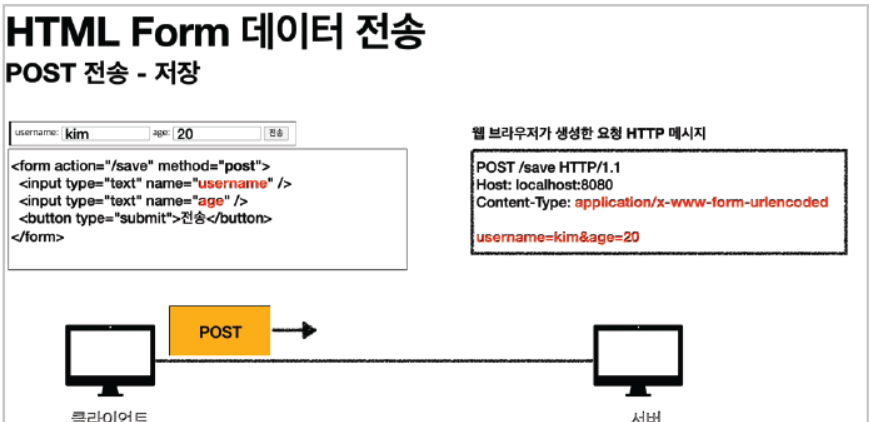
이 방식은 HTML 폼 데이터를 서버로 전송하는 가장 기본적인 방법이다. Form 태그에 별도의 enctype옵션이 없으면 웹 브라우저는 요청 HTTP 메시지의 헤더에 Content-Type : application/x-www-form-urlencoded 내용을 추가한다.
그리고 전송할 항목을 HTTP body에 문자로 적는데 이때 내용은 &로 구분해서 전송한다.
하지만 파일을 업로드 하려면 파일은 문자가 아니라 바이너리 데이터를 전송해야 한다. 문자를 전송하는 방식으론 파일을 전송하기 어렵다. 그리고 보통 폼을 전송해야 할 때는 문자와 바이너리를 동시에 전송해야 한다. 이 문제를 해결하기 위해 HTTP는 multipart/form-data 라는 방식을 제공한다.
multipart/form-data
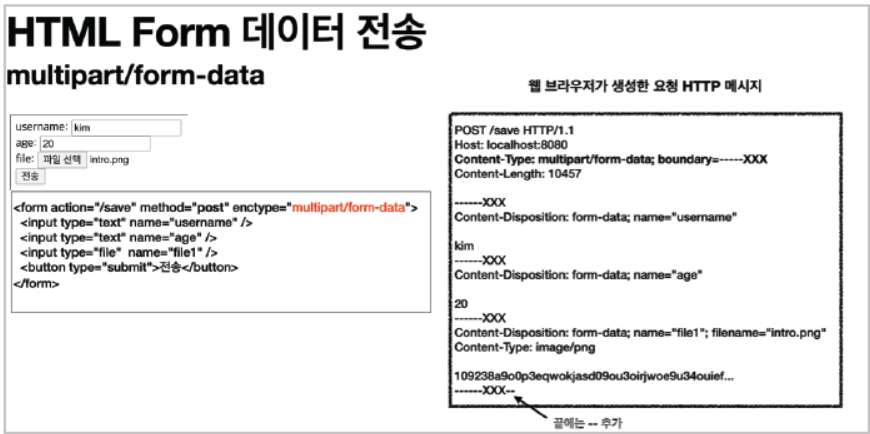
이 방식을 사용하려면 Form 태그에 별도의 enctype="multipart/form-data를 지정해야 한다. 이 방식은 다른 종류의 여러 파일과 폼의 내용을 함께 전달할 수 있다.
위 사진의 HTTP 메시지를 보면 각각 전송 항목이 구분되어 있는 것을 확인할 수 있다.
multipart/form-data는 application/x-www-form-urlencoded와 비교해 매우 복잡하고 각각의 부분으로 나누어져 있다.
서블릿과 파일업로드
서블릿을 통해 파일을 업로드 하기 위해 먼저 ServletUploadController.java라는 클래스를 만들어준다.
package hello.upload.controller;

import jakarta.servlet.ServletException;
import jakarta.servlet.http.HttpServletRequest;
import jakarta.servlet.http.HttpServletResponse;
import jakarta.servlet.http.Part;
import lombok.extern.slf4j.Slf4j;
import org.springframework.stereotype.Controller;
import org.springframework.web.bind.annotation.GetMapping;
import org.springframework.web.bind.annotation.PostMapping;
import org.springframework.web.bind.annotation.RequestMapping;

import java.io.IOException;
import java.util.Collection;

@Slf4j
@Controller
@RequestMapping("/servlet/v1")
public class ServletUploadControllerV1 {
    @GetMapping("/upload")
    public String newFile(){
        return "upload-form";
    }

    @PostMapping("/upload")
    public String saveFileV1(HttpServletRequest request) throws ServletException, IOException {
        log.info("request = {}", request);

        String itemName = request.getParameter("itemName");
        log.info("itemName = {}", itemName);

        Collection<Part> parts = request.getParts();
        log.info("parts={}", parts);

        return "upload-form";
    }
}
request.getParts() 메서드를 사용해 multipart/form-data 전송 방식에서 각각 나누어진 부분을 받아서 확인해 볼 수 있다.
해당 HTML을 만들고 우리가 남긴 로그를 살펴보면
Content-Type: multipart/form-data; boundary=----xxxx
------xxxx
Content-Disposition: form-data; name="itemName"
Spring
------xxxx
Content-Disposition: form-data; name="file"; filename="test.data"
Content-Type: application/octet-stream
sdklajkljdf...
이런 형태의 결과 로그를 확인해볼 수 있다.
이때 큰 파일을 무제한 업로드하게 둘 수 없으므로 application.properties 파일에서 업로드 사이즈를 제한할 수 있다. 사이즈를 넘으면 SizeLimitExceedException이 발생한다.
spring.servlet.multipart.max-file-size=1MB
spring.servlet.multipart.max-request-size=10MBmax-file-size: 파일 하나의 최대 사이즈, 기본 1MBmax-request-size: 멀티파트 요청 하나에 여러 파일을 업로드할 수 있는데, 그 전체 합을 말한다. 기본 10MB
경로 설정
application.properties에서 실제 파일이 저장되는 경로를 설정할 수 있다.
file.dir=파일 업로드 경로 설정

ex) xxx/xx/xx/
해당 경로에 실제 폴더를 미리 만들어 놓아야 하며, 마지막에 /가 꼭 포함되어야 한다.
스프링과 파일 업로드
스프링은 Multipart라는 인터페이스로 멀티파트 파일을 매우 편리하게 지원한다.
package hello.upload.controller;

import jakarta.servlet.http.HttpServletRequest;
import lombok.extern.slf4j.Slf4j;
import org.springframework.beans.factory.annotation.Value;
import org.springframework.stereotype.Component;
import org.springframework.stereotype.Controller;
import org.springframework.web.bind.annotation.GetMapping;
import org.springframework.web.bind.annotation.PostMapping;
import org.springframework.web.bind.annotation.RequestMapping;
import org.springframework.web.bind.annotation.RequestParam;
import org.springframework.web.multipart.MultipartFile;

import java.io.File;
import java.io.IOException;
@Slf4j
@Controller
@RequestMapping("/spring")
public class SpringUploadController {
    @Value("${file.dir}")
    private String fileDir;
    @GetMapping("/upload")
    public String newFile() {
        return "upload-form";
    }
    @PostMapping("/upload")
    public String saveFile(@RequestParam String itemName,
                           @RequestParam MultipartFile file, HttpServletRequest
                                   request) throws IOException {
        log.info("request={}", request);
        log.info("itemName={}", itemName);
        log.info("multipartFile={}", file);
        if (!file.isEmpty()) {
            String fullPath = fileDir + file.getOriginalFilename();
            log.info("파일 저장 fullPath={}", fullPath);
            file.transferTo(new File(fullPath));
        }
        return "upload-form";
    }
}file.getOriginalFilename(): 업로드 파일 명file.transferTo(...): 파일 저장