
코드를 실행하고 http://localhost8080/... 접근해야 하는 주소로 접근했는데 자꾸만 로그인창이 뜬다.
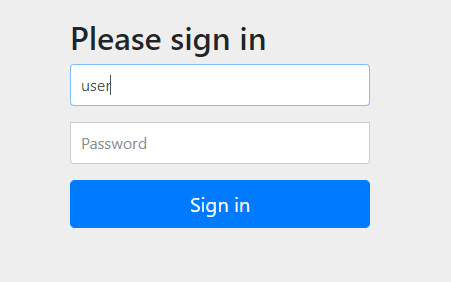
이런 창이 뜰 때에는 이 주소에 대한 접근을 스프링 security가 막고 있는 것이기에 우리는 우리가 부여받은 password로 로그인하면 된다.
스프링을 실행시키면 터미널 창에 Using generated security password : ... 문구가 뜨는데 이때 ... 위치에 있는 긴 password를 password칸에 입력해주고 id는 user로 로그인해주면 우리가 접근하고자 하는 페이지에 접근할 수 있다.
이런 로그인 창이 뜨게하지 않으려면 build.gradle 파일에
implementation 'org.springframework.boot:spring-boot-starter-security'
implementation 'org.springframework.security:spring-security-taglibs'
이 의존 관계를 주석처리해주면 된다.
이때 기본적으로 제공되는 아이디와 비밀번호가 아닌 내가 직접 설정한 아이디와 비밀번호를 사용하고 싶다면 SecurityConfig.java 파일을 만들어서 다음과 같이 코드를 작성하면 된다.
@Configuration
public class SecurityConfig {

    @Bean
    public PasswordEncoder passwordEncoder() {
        return new BCryptPasswordEncoder();
    }

    @Bean
    public UserDetailsService userDetailsService() {
        InMemoryUserDetailsManager manager = new InMemoryUserDetailsManager();
        manager.createUser(org.springframework.security.core.userdetails.User
                .withUsername("내가 지정한 ID")
                .password(passwordEncoder().encode("내가 지정한 PASSWORD"))
                .roles("USER")
                .build());
        return manager;
    }
}

공부 기록 공간 '◡'