NestJS) Auto Expose Interceptor 구현기
들어가며
API 반환 값을 정의하기 위해 Response DTO를 구현하는데요. NestJS에서는 class-transformer 라이브러리를 활용하여 객체를 직렬화할 수 있습니다.
Repository 계층에서 가져온 entity를 대상으로 Response DTO를 통해 필요한 데이터만 직렬화하고자 하였으나, DTO에 정의되지 않은 값들까지 직렬화 대상에 포함되는 문제가 있었는데요. 이는 class-transformer가 기본적으로 들어온 데이터를 모두 포함해 직렬화하기 때문입니다.
이 문제를 해결하기 위해 excludeExtraneousValues 옵션을 true로 설정하여 클래스에 정의되지 않은 속성들은 직렬화 시 자동으로 제외되도록 하였습니다. 해당 옵션을 활성화하면 @Expose 데코레이터가 붙은 멤버 변수만 직렬화 대상에 포함되어, 원하는 데이터만 반환할 수 있습니다.
다만, 직렬화 대상에 포함하고자 하는 멤버 변수에 일일이 @Expose 데코레이터를 추가하는 작업이 번거로웠습니다.
이러한 번거로움을 해결하기 위해 Auto Expose Interceptor를 구현해보았는데요.
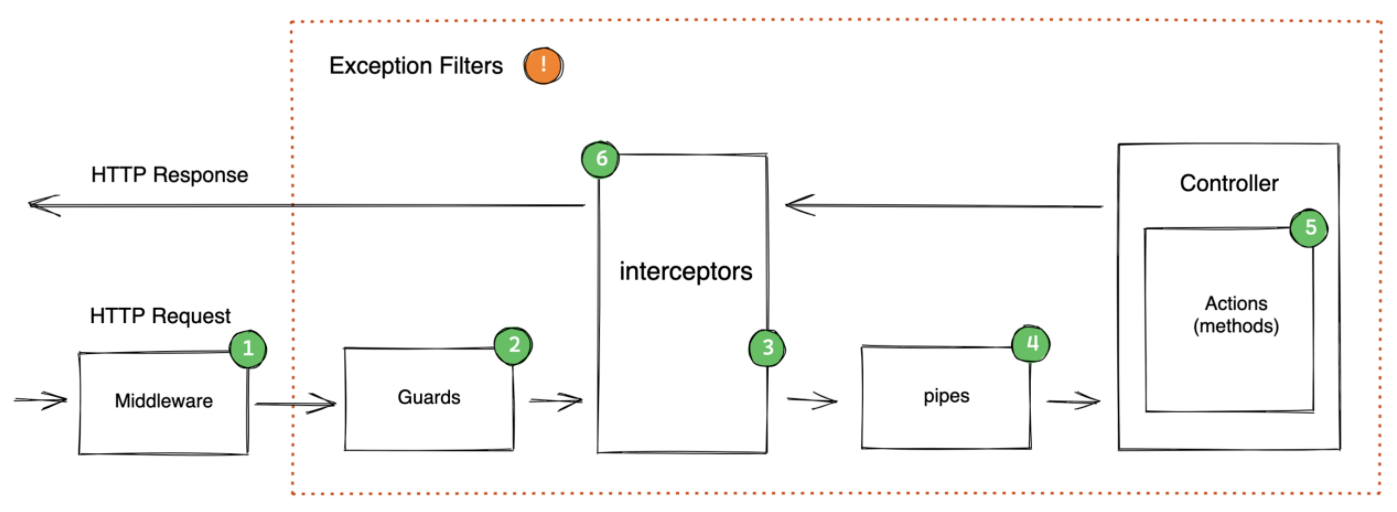
해당 인터셉터는 post-interceptor 단계에서 DTO의 클래스 멤버에 자동으로 @Expose 데코레이터를 적용하고, 이후 직렬화를 수행합니다.
이를 통해 원하는 속성만 쉽게 직렬화할 수 있도록 개선해보았습니다.
어떻게 구현할 지
- class의 프로토타입의 프로퍼티 가져오기
- class의 인스턴스 프로퍼티 가져오기
1. class의 프로토타입의 프로퍼티 가져오기
Object.getOwnPropertyNames(class.prototype)Object.getOwnPropertyNames(class.prototype)는 주어진 클래스의 프로토타입에 정의된 모든 속성 이름을 배열로 반환합니다. 이를 통해 클래스의 프로토타입에 정의된 메서드와 속성들을 가져올 수 있습니다.
다음은 Object.getOwnPropertyNames(class.prototype)을 사용하여 클래스의 프로토타입에 정의된 속성 이름을 가져오는 예제입니다.
예시 코드
class ExampleClass {
  property1: string;

  method1() {}

  get getterMethod2() {
    return this.property1 + " computed";
  }
}

const properties = Object.getOwnPropertyNames(ExampleClass.prototype);
console.log(properties);
반환값
["constructor", "method1", "getterMethod2"]=> Object.getOwnPropertyNames(ExampleClass.prototype)의 출력값을 통해 method에 접근할 수 있는 것을 알게되었습니다.
2. class의 프로토타입의 프로퍼티 가져오기
  const instance = new class(); // 클래스 인스턴스 생성
Object.getOwnPropertyNames(instance);Object.getOwnPropertyNames(instance)는 instance에 직접적으로 정의된 모든 속성 이름을 배열로 반환합니다. 여기에는 프로토타입에서 상속된 메서드나 속성은 포함되지 않고, 인스턴스에 직접 정의된 프로퍼티만 포함됩니다.
예시 코드
class ExampleClass {
  property1: string;

  method1() {}

  get getterMethod2() {
    return this.property1 + " computed";
  }
}

const instance = new ExampleClass()
const properties = Object.getOwnPropertyNames(instance);
console.log(properties);
반환값
[]예상한 대로 property1이 존재할 것이라고 생각했으나, 빈 배열이 반환되었는데요!
왜그럴까요?
TS -> JS 컴파일 과정
TypeScript 코드
class A {
    a1: string;
    a2: string;

}
JavaScript로 컴파일된 코드
class A {
}
TypeScript에서 멤버 변수를 정의할 때 초기화를 하지 않으면, JavaScript로 컴파일될 때 해당 속성이 클래스 프로토타입에 포함되지 않습니다. 이로 인해 Object.getOwnPropertyNames(instance)가 빈 배열을 반환하는 결과가 발생하였습니다.
TypeScript 코드
class A {
  a1: string;
  a2: string;

  constructor() {
    this.a1 = "value1"; // 초기화
    this.a2 = "value2"; // 초기화
  }
}
JavaScript로 컴파일된 코드
class A {
  constructor() {
    this.a1 = "value1"; // 초기화된 속성
    this.a2 = "value2"; // 초기화된 속성
  }
}
초기화를 통해 인스턴스에 속성을 추가하는 방법은 가능하지만, Response DTO의 경우 멤버 변수의 값을 초기화하기 애매한 케이스도 존재하였고, 이러한 방식으로 클래스를 정의하는 것은 번거롭기 때문에 보다 효율적인 해결책을 모색할 필요가 있었습니다.
useDefineForClassFields 옵션
Typescript compilerOptions에 대해서 찾아보던 중,
useDefineForClassFields가 해결책이 될 것 같았습니다.
useDefineForClassFields는 TypeScript의 컴파일러 옵션 중 하나로, 클래스 필드를 정의할 때의 동작 방식을 변경합니다. 이 옵션을 활성화하면, 클래스 필드는 인스턴스 생성 시점에 직접 정의됩니다.
TypeScript 코드
class A {
    a1: string;
    a2: string;

}
JavaScript로 컴파일된 코드
class A {
    a1;
    a2;
}
useDefineForClassFields 옵션이 활성화되면, 클래스 필드는 인스턴스가 생성되는 시점에 정의됩니다. 위의 TypeScript 코드에서 a1과 a2는 타입만 선언되고 초기화되지 않았습니다. JavaScript로 변환된 후에도 이러한 필드는 클래스 프로토타입에 포함되지 않으므로, 인스턴스를 생성할 때 필드가 자동으로 정의됩니다.
이전 예제로 다시 돌아와서, useDefineForClassFields 옵션을 활성화하면 다음과 같은 결과를 얻을 수 있습니다.
예시 코드
class ExampleClass {
  property1: string;

  method1() {}

  get getterMethod2() {
    return this.property1 + " computed";
  }
}

const instance = new ExampleClass()
const properties = Object.getOwnPropertyNames(instance);
console.log(properties);
반환값
["property1"]AutoExposeInterceptor 구현
응답 DTO의 모든 속성에 자동으로 @Expose 데코레이터를 추가하고, 응답 객체를 직렬화할 때 DTO에 정의된 속성만 포함되도록 AutoExposeInterceptor를 구현해봅시다.
주요 기능은 다음과 같습니다:
- getAllProperties: 클래스의 프로토타입과 인스턴스 프로퍼티를 가져와 중복을 제거한 후 배열로 반환합니다.
- addExposeDecorators: 주어진 클래스의 모든 프로퍼티에 @Expose 데코레이터를 추가합니다. 또한 중첩된 객체에 대해서도 재귀적으로 처리합니다.
- AutoExposeInterceptor: NestJS의 NestInterceptor를 구현하여, 응답 데이터를 처리할 때 plainToInstance 메서드를 사용하여 직렬화를 수행합니다. 이때 excludeExtraneousValues 옵션을 설정하여 DTO에 정의되지 않은 속성은 제외됩니다.
AutoExposeInterceptor 전체 코드
import { CallHandler, ExecutionContext, Injectable, NestInterceptor } from '@nestjs/common';
import { ClassConstructor, Expose, plainToInstance } from 'class-transformer';
import { Observable } from 'rxjs';
import { map } from 'rxjs/operators';
import 'reflect-metadata';

function getAllProperties(target: ClassConstructor<any>): string[] {
 const properties = new Set<string>();

 // 1. 프로토타입의 프로퍼티 가져오기
 Object.getOwnPropertyNames(target.prototype)
   .filter((prop) => prop !== 'constructor')
   .forEach((prop) => properties.add(prop));

 // 2. 클래스의 인스턴스 프로퍼티 가져오기
 const instance = new target();
 Object.getOwnPropertyNames(instance).forEach((prop) => properties.add(prop));

 return Array.from(properties);
}

function addExposeDecorators(target: ClassConstructor<any>) {
 // 모든 프로퍼티에 @Expose 데코레이터 추가
 const properties = getAllProperties(target);
 console.log('properties', properties);

 properties.forEach((property) => {
   Expose()(target.prototype, property);
 });

 // 중첩된 객체들에 대해서도 재귀적으로 처리
 properties.forEach((property) => {
   const propertyType = Reflect.getMetadata('design:type', target.prototype, property);
   if (
     propertyType &&
     typeof propertyType === 'function' &&
     propertyType !== Object &&
     propertyType !== Function &&
     propertyType !== Array &&
     propertyType !== String &&
     propertyType !== Number &&
     propertyType !== Boolean &&
     propertyType !== Date
   ) {
     addExposeDecorators(propertyType);
   }
 });

 (target as any).__exposedProperties = true;
 return target;
}

@Injectable()
export class AutoExposeInterceptor implements NestInterceptor {
 constructor(private readonly classType: ClassConstructor<unknown>) {}

 intercept(context: ExecutionContext, next: CallHandler): Observable<any> {
   return next.handle().pipe(
     map((data) => {
       const decoratedClassType = addExposeDecorators(this.classType);

       if (Array.isArray(data)) {
         return data.map((item) =>
           plainToInstance(decoratedClassType, item, {
             excludeExtraneousValues: true,
           }),
         );
       }

       return plainToInstance(decoratedClassType, data, {
         excludeExtraneousValues: true,
       });
     }),
   );
 }
}
AutoExposeInterceptor 사용 예시
import { Controller, Get, UseInterceptors } from '@nestjs/common';
import { AutoExposeInterceptor } from './auto-expose.interceptor'; // AutoExposeInterceptor 경로를 조정하세요

class ResponseDTO {
  id: number;
  name: string;

  get fullName() {
    return this.id + this.name;
  }
}

@Controller('example')
export class ExampleController {
  @Get()
  @UseInterceptors(new AutoExposeInterceptor(ResponseDTO))
  getExample() {
    return [
      { id: 1, name: 'Item 1', secret: 'This is a secret' },
      { id: 2, name: 'Item 2', secret: 'This is also a secret' },
    ];
  }
}
직렬화 결과
[
  { "id": 1, "name": "Item 1", "fullName": "1Item 1" },
  { "id": 2, "name": "Item 2", "fullName": "2Item 2" }
]
이와 같이 응답 DTO의 모든 속성에 자동으로 @Expose 데코레이터를 추가하고 DTO에 정의된 속성만 직렬화 대상이 되도록 AutoExposeInterceptor를 구현하였습니다.