
1. 모듈
- 기능 단위로 모아 둔 함수,변수,객체 등을 의미한다.
- 모듈명은 PascalCase로 작성한다. 즉, 대문자로 시작한다.
- 각각의 모듈은 독립적으로 존재한다.
- 누구나 만들 수 있고, 다른 사람이 만든 모듈을 사용할 수 있다.
- 재사용이 가능한 코드들의 모음이라고 생각하면 쉽다.
- 리액트의 Component보다 더 큰 개념이다.
1) module vs Component
module (모듈)
function sum(a, b) { return a + b }
-> 다음과 같은 코드가 있다고 가정할때, 이 코드는 바로 작동시킬 수 있으며 내가 원하는 데이터로 가공가능하다.
-> 설계 시점에서 의미있는, 스스로 동작할 수 있는 요소다.
Component (컴포넌트)
어떤 게시판의 글쓰기 버튼(컴포넌트)
-> 런타임 시점에서 의미가 있다. A게시판이 어떤 오류에 의해 접속할 수 없는 상태가 된다면 이 글쓰기 버튼은 컴포넌트로서의 기능을 상실하는 것이다. 즉, 사용자에 의해 사용될 수 있는 단위이며 실행시에만 유의미하다.
2. Common JS vs ES6
1) Common Js
- 이전에 사용되던 자바스크립트 표준이다.
- 모듈 사용할 때 require,export 키워드를 사용한다.
- Node.js에서 사용하는 방식이다.
2) ES6
- 가장 최근에 출시된 자바스크립트 표준이다. (2015)
- let, const, 템플릿리터럴, 화살표함수, 구조분해할당, for of, 클래스 등의 기능들이 추가된 버전이다.
- 모듈 사용하는 방법도 재정의 되었다.
-> 이전 프로젝트에서 사용하던 import, export 방식이다. - 만든 모듈을 export 하여 다른곳에서 사용하고, import 하여 모듈을 사용한다.
3. 모듈 실습
- 실습 전, 두 버전 모두 package.json 파일이 필요하다.
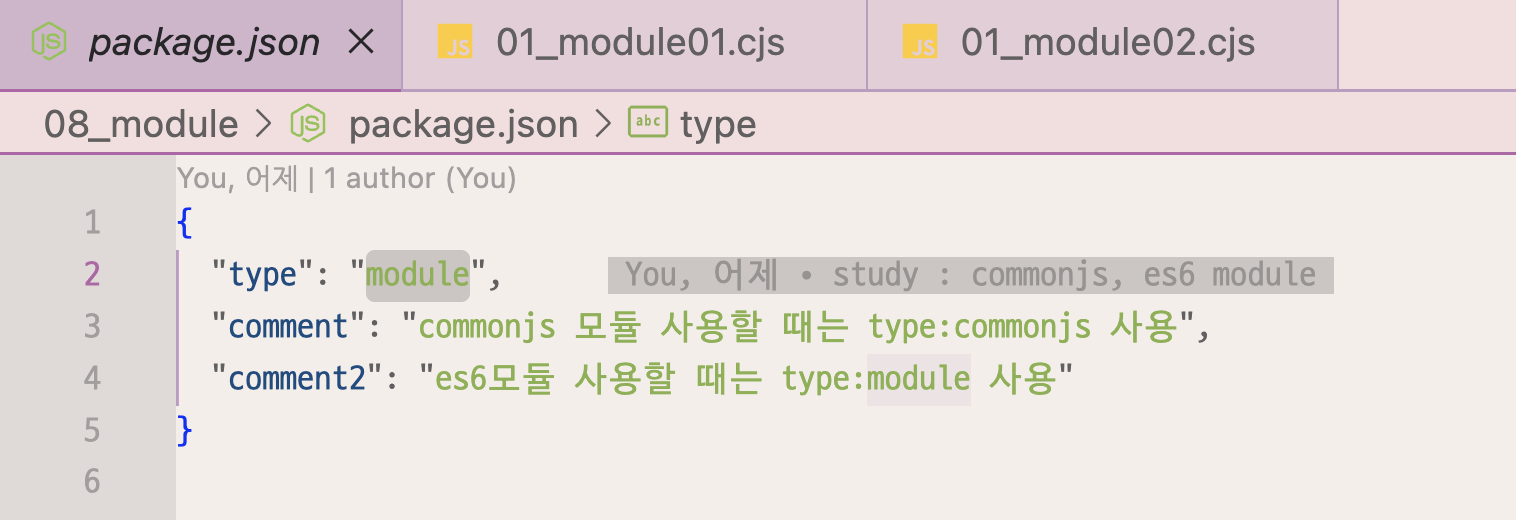
-> 이런식으로 type을 지정해야 하는데 각 버전에 맞는 type을 써야한다. - npm init 명령어 사용하면 자동으로 생성된다.
1) Common Js
- 파일명.cjs 로 작성한다. (commonjs임을 알림)
방법 1. 한번에 module export
01_module01.cjs (파일명)
const colors = ["pink", "blue", "yellow"];
const sayhi = function () {
  console.log("안녕하세요! 이 함수는 sayhi함수 입니다.");
};
function sayName(name) {
  console.log("my name is " + name + " 이 함수는 sayName함수 입니다.");
  sayhi();
}

class Person {
  constructor(name, age) {
    this.name = name;
    this.age = age;
  }

  getBornYear() {
    return new Date().getFullYear() - this.age;
  }
}
export 한다. ( 외부에서 사용하지 않을 경우 export 하지 않는다.)
export {Person, colors, sayName}방법 2. 선언과 동시에 export
01_module02.cjs (파일명)
export.colors2 = ["빨강","초록","노랑"];

exports.sayName2 = function (name) {
  console.log("제 이름은 " + name + ", 이 함수는 sayName2 함수입니다.");
};
사용하기 (방법1)
01_module_require.cjs (파일명)
- require 키워드를 사용해 작성할 수 있다.
const person = require("./01_module01.cjs");
cosole.log(person)
-> pwd를 통해 현재 경로 확인 뒤, cd 파일명 입력하여 현재 경로의 상위파일에 도착한 뒤, node 01_module_require.cjs를 입력하면 console.log가 찍혀서 보인다.

- person에 저장된 변수,클래스,함수 사용하기
// 변수 사용
console.log(person.colors);
// 함수 사용
console.log(person.sayName("장원영"));
// 클래스 사용
//  이렇게 작성하면 안됨! 오류. new 키워드 없어서
// console.log(person.Person("채원",20);
const chaewon = new person.Person("채원",20);
console.log(chaewon);
console.log(chaewon.getBornYear());

- 갖고 오고 싶은 클래스,변수,함수만 가져오기
// 구조분해할당 사용
const {sayName} = require("./01_module01.cjs");
sayName("안유진");
사용하기 (방법2)
// 구조분해 할당
const {colors2, sayName2} = require("./02_module02.cjs");
console.log("colors2")
sayName2("강동원");
2) ES6
- 파일명.js로 작성한다.
- package.json에서 type을 module로 수정한다.
방법 1. 한번에 export
02_module01.js
const flowers = ["cherry blossom", "rose", "tulip"];
function getFlowersLength() {
  console.log(flowers.length);
}
function getFlower(idx) {
  if (idx >= flowers.length || idx < 0) return "x";

  return flowers[idx];
}- export 한번에 할 수 있다.
export { flowers, getFlowersLen
\gth, getFlower };
방법 2. 선언과 동시에 export
02_module02.js
// es6
// 선언과 동시에 export 붙이기

export const animals = ["cat", "dog", "rabbit"];

export function showAnimals() {
  animals.forEach((ani) => console.log(ani));
}

// 한개만 추가 가능
export const addAnimal = (newAni) => {
  // animals 배열에 인자로 전달받은 newAni를 추가한 후
  animals.push(newAni);
  // 해당 배열을 반환하는 함수 만들기
  return animals;
};
export default
- 여러개의 메소드,객체 등을 export 하지 않고 하나의 큰 기능을 export 할 때 사용한다.
- 해당 파일에서는 export할 개체가 하나만 있다고 알려주는 키워드이다.
- import 할때는 {}를 사용하지 않고 불러온다.
// 방법 1. 마지막에 내보내기
function sayStatus (status) {
	console.log(`now I'm ${status}`);
}

export default sayStaus;
// 방법 2. 한번에 내보내기
export default function sayStaus2(status) {
console.log(`now I'm not ${status}`);
}
암튼 해보는 개발자호소인