
1. LifeCycle이란?
- 클래스형 컴포넌트의 기본 기능이다.
- 그런데 Hook이라는 기능의 등장으로 함수형 컴포넌트에서도 사용 가능해졌다.
- 함수형에서 사용할때는 useEffect()라는 hook 사용한다.
- 클래스형에서는 기본기능이라서 import 없이 자유롭게 사용한다.
- 특정 컴포넌트가 실행되거나, 업데이트(갱신)되거나 제거될때 특정이벤트를 발생시킬 수 있다.

1) 생성 (mount)
- 컴포넌트가 최초에 화면에 등장할 때를 의미한다.
- DOM이 생성되고 웹 브라우저상에 나타나는 것이다.
- constructor, render, getDerivedStateFromProps, componentDidMount 등의 메서드가 있다.
2) 업데이트 (update)
- props나 state가 바뀌었을 때 업데이트 하는 것이다.
- getDerivedStateFromProps , shouldComponentUpdate, componentDidUpdate 메서드가 있다.
3) 제거 (unmount)
- 컴포넌트가 화면에서 사라질(제거될) 때
- componentWillUnmount 메서드가 있다.
2. Hook
- 클래스 컴포넌트에서만 가능했던 state와 lifecycle이 가능하도록 도와주는 기능이다.
- 최상위 단계에서만 호출 가능하다.
-> 최상위 컴포넌트, 반복&조건&중첩된 함수 내부 등에서 호출 X - 오로지 react 함수형 컴포넌트 안에서만 호출 가능하다.
3. useEffect
- 첫번째 인자로 콜백함수, 두번째 인자로 배열을 반환한다.
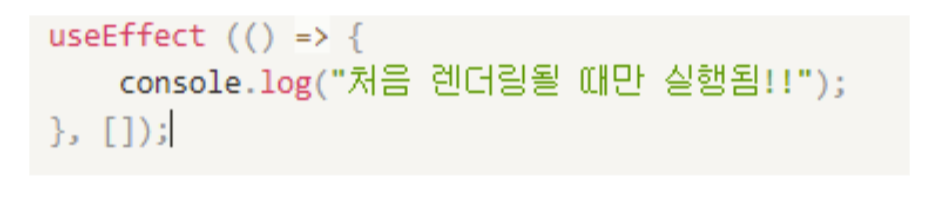
- mount
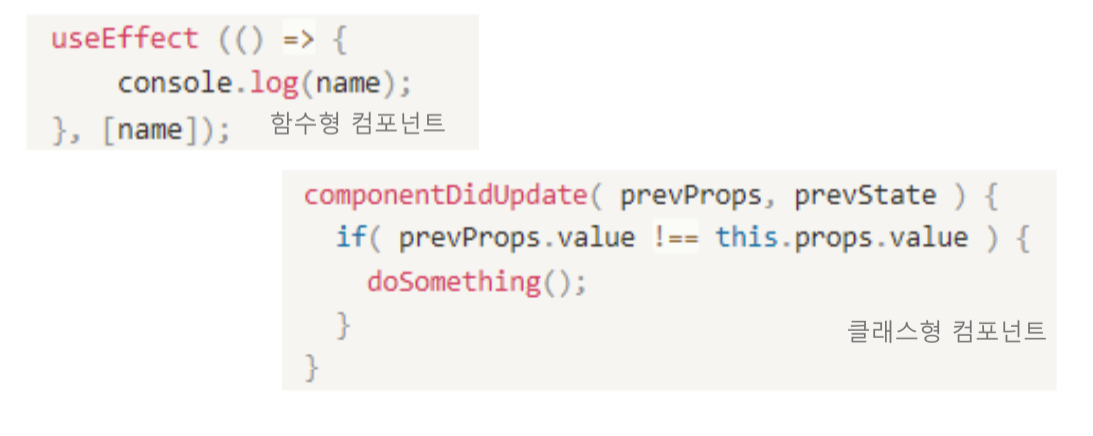
- update
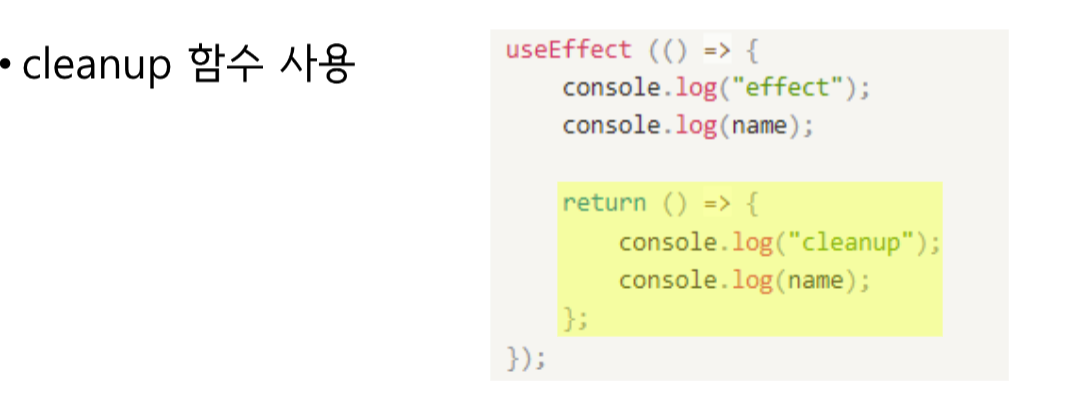
- 제거 (unmount)
-> unmount 되기 전에 실행!
1) Dependency Array
- useEffect는 두번째 인자로 dependency array를 받는다.
- 해당 array에는 변수를 넣을 수 있으며, useEffect 내부의 함수가 실행된다.
- 빈 배열을 넣으면 최초 마운트 시에만 실행된다.
4. 실습
1) 함수형
- MyComponent : useEffect() 사용한 컴포넌트
import {useState, useEffect} from "react";

const MyComponent = (props) => {
	const { number } = props;
    const [text, setText] = useState("");

    // 컴포넌트 Mount시 실행
    useEffect(()=> {
    	console.log("함수형 컴포넌트 Mount");

        // 컴포넌트 unmount시 실행
        return () => {
        	console.log("함수형 컴포넌트 Unmount");
        };
    },[]);

    // 컴포넌트 Mount & update시 실행 (number)
    useEffect(()=> {
    	console.log("함수형 컴포넌트 Update (number)");
    },[number]);

    // 컴포넌트 Mount & Update시 실행 (text)
    useEffect (()=>{
    	console.log("함수형 컴포넌트 Update (text)");
    },[text]);

    // 컴포넌트 Mount & Update시 실행
    useEffect (()=>{
    	console.log("함수형 컴포넌트 Mount&Update (의존성 배열 작성x)");
    });
    return (
    	<>
        	<div>MyComponent function형 : {number}</div>
            <input type="text" value={text} onChange={(e)=>setText(e.target.value)} />
            <div>text state: {text}</div>
        </>
    );
};- FunLifeCycle()
import {useState} from "react";
export default function FunLifeCycle() {
	const [number, setNumber] = useState(0);
    const [visible, setVisible] = useState(true);

    return (
    	<button onClick={()=>setNumber(number+1)}>number+1</button>
        <button onClick={()=>setVisible(!visible)}>컴포넌트 토글</button>
        {visible && <MyComponent number={number} />}
    );
}
2) 클래스형
- MyComponent
import {Component} from "react";

class MyComponent extends Component {
	componentDidMount() {
    	console.log("class형 컴포넌트 : Mount!");
    }
    componentDidUpdate() {
    	console.log("class형 컴포넌트 : Update!");
    }
    componentWillUnmount() {
    	console.log("class형 컴포넌트 : unmount!");
    }
    render() {
    	return <div>MyComponent Class형 {this.props.number}</div>;
    }
}- ClassLifeCycle
export default class ClassLifeCycle extends Component {
	state = {
    	number : 0,
        visible : true,
    };

    render() {
    	return (
        	<>
            	<button onClick={()=>this.setState({number: this.state.number +1})}>number+1</button>
                <button onClick={()=> this.setState({visible : !this.state.visible})}>MyComponent 토글</button>
                {this.state.visible && <MyComponent number={this.state.number} />}
            </>
        );
    }
}
암튼 해보는 개발자호소인