
1. 주의점
- 소문자가 아닌 카멜케이스를 사용한다. ex) onclick(x) -> onClick (o)
- JSX를 통해 이벤트 전달 (함수 자체를 전달)
- 기본 DOM요소에만 이벤트 설정 가능 (컴포넌트에 이벤트 설정 불가)
2. 합성 이벤트
- 리액트의 고유 이벤트 객체를 말한다. (synthetic event)
- onClick같은 이벤트들을 말한다.
- 클릭, 입력을 처리하기 위해 일반적인 DOM 이벤트 리스너(addEventListener) 대신에 리액트의 합성 이벤트를 사용한다.
- 이벤트가 발생할 때 리액트가 해당 이벤트를 감지하고 처리하는 과정을 합성이벤트라고 한다.
3. 함수 컴포넌트
1) event handling 사용
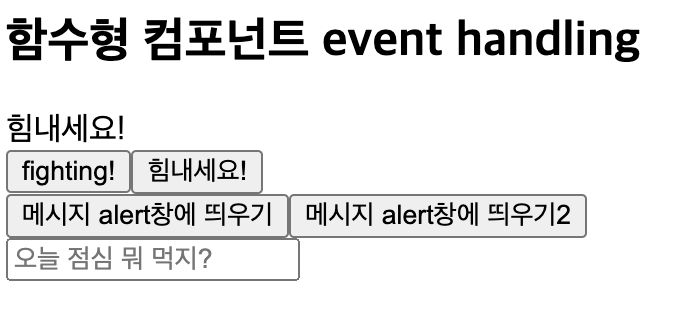
export default function FunEvent() {
	// 버튼 클릭 시 변경되는 데이터값
	const [msg,setMsg] = useState("힘내세요!");
    // 사용자가 입력한 menu 이름
    const [menu,setMenu] = useState("");

    // * 함수
    // 엔터입력 시 실행되는 함수
    const handleEnter = (e) => {
    	if(e.key === "Enter") {
        	console.log(`점심 메뉴는 ${menu}로 결정`);
        }
    };
    // 변경되는 메세지 함수 (영어로)
    const msgToEng = () => {
    	setMsg("fighting!");
    };
    // 변경되는 메세지 함수 (한글로)
    const msgToKor = () => {
    	setMsg("힘내세요!");
    };
    // alert창 띄우는 함수
    // 위 msg와 관련 X. 사용자가 입력한 값이 전달되어 msg로 쓰임
    const alertMsg = (msg) => {
    	alert(msg)
    };

    return (
    <>
    	 <h2>함수형 컴포넌트 event handling</h2>
         <div>{msg}</div>
         // 함수자체를 onClick이벤트에 전달 (호출x)
		 <button onClick={msgToEng}>fighting!</button>
         <button onClick={msgToKor}>힘내세요!</button>
		 <br/>
         // onClick이벤트에 익명함수 전달하고, 그 내부에서 실행 -> alertMsg 함수 자체를 호출한 것이 아님!
         <button onClick={()=>alertMsg("오늘은 금요일이잖아요.")}>메세지 alert창에 띄우기</button>
         // bind 메서드 사용
        <button onClick={alertMsg.bind(null, "끝까지 불태워 봅시다!")}>메시지 alert창에 띄우기2</button>
    </>
    );
}
-> bind : 화살표 함수를 사용하는 경우, 컴포넌트가 렌더링될 때마다 새로운 함수가 생성. 반면에 bind는 함수를 미리 준비해 두고 재사용할 수 있게 해, 이론적으로는 성능상 이점을 제공함.
2) synthetic 객체 사용

... return (
	<>
    	<input
        	type="text",
            value={menu},
            placeholder="오늘 점심 뭐먹지?",
            // 여기서 e는 브라우저의 native객체가 아닌,
            // react의 synthetic 객체
            onChange={{(e)=>{
            // 사용자가 입력한 값이 menu로 업데이트
				setMenu(e.tartget.value);
            }}
            // onKeyDown : 키보드에 키가 눌렸을때 이벤트 발생
            onKeyDown={handleEnter}
        />
    </>
);
3) 유의사항
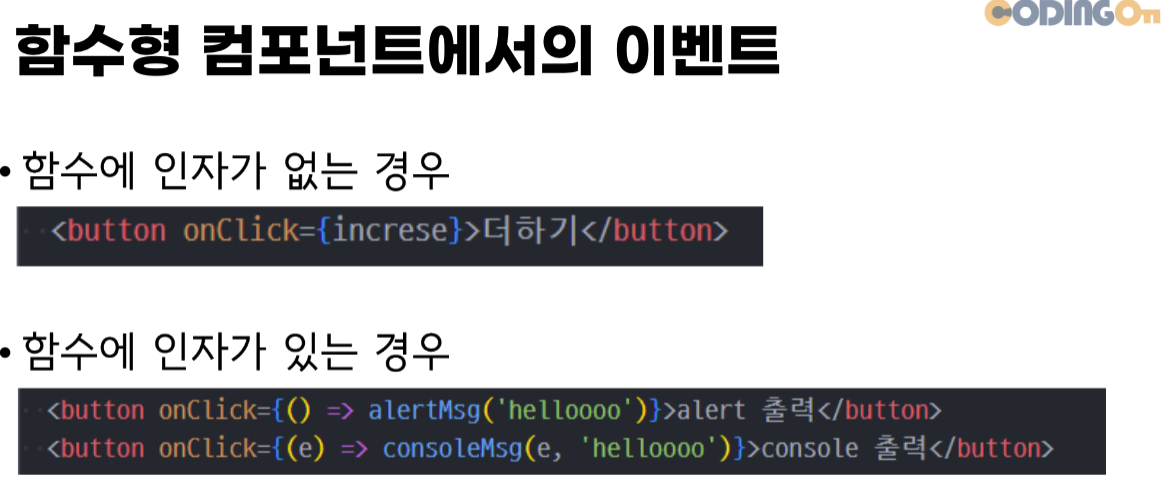
- 함수에 인자가 없을때는 함수 자체를 전달하지만, 인자가 있는 경우 익명함수나 다음과 같은 형태로 전달해야 무한루프를 돌지 않는다!
- <button. onClick={()=>setTextColor({color:"red", text:"빨간색 글씨"})}></button.>
4. 클래스 컴포넌트
1) event handling 사용
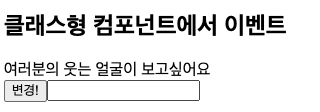
import {Component} from "react";

export default function ClassEvent extends Component {
	constructor(props) {
    	super(props);
        // handleClick 함수를 this에 영구적으로 바인딩하여 어디서 호출하든지간에 항상 올바른 this를 참조(handleClick)하도록 한다.
        // 이렇게 바인딩된 함수는 이벤트핸들러로 안전하게 사용가능
        this.handleClick = this.handleClick.bind(this);
    }

    // 기본 값 state로 설정
    state = {
    	msg: "여러분의 웃는 얼굴이 보고싶어요",
    };

    // 함수 내부의 this는 클래스의 this와 다른 자체적인 this
    // -> 생성자 함수 내부에서 this를 원하는 것으로 바인딩했음.
    handleClick() {
    	this.setState({msg: "웃어주세요!"});
    }
    render() {
    	return (
        <>
        	<h2>클래스형 컴포넌트에서 이벤트</h2>
            <div>{this.state.msg}</div>
            <button onClick={this.handleClick}>변경!</button>
            <input type="text" onChange={(e)=>{
            	console.log(e); //이벤트 객체 출력
                // 사용자가 입력한 값 출력
                console.log(e.target.value);
            }} />
        </>
        );
    }
}
암튼 해보는 개발자호소인