기억해야 할 것
Git / 업로드 관련 명령어
git lfs installgit initgit branch -M main- 기본 브랜치를
main으로 설정
- 기본 브랜치를
git status- 현재 추적 중인 파일 / ignore 적용 상태 확인
git add .git commit -m "Initial commit"git remote add origin <원격저장소주소>git lfs pull
언리얼에서 자주 기억할 코드 형식
- 미리선언
class UBoxComponent; // 헤더#include "Components/BoxComponent.h"//cppUStruct(BlueprintType)으로SpawnEntry.ActorClassSpawnCount관리- 에디터 보정
virtual void OnConstruction(const FTransform& Transform) override;

#if WITH_EDITOR
virtual void PostEditMove(bool bFinished) override;
#endif- 스폰 함수 기본형
void SpawnActor(const FSpawnEntry& Entry)
{
	if (!Entry.ActorClass)
	{
		return;
	}

	UWorld* World = GetWorld();
	if (!World)
	{
		return;
	}
FActorSpawnParameters Params;
Params.Owner = this;
Params.SpawnCollisionHandlingOverride =
ESpawnActorCollisionHandlingMethod::AdjustIfPossibleButDontSpawnIfColliding;AActor* SpawnedActor = World->SpawnActor<AActor>(
Entry.ActorClass,
SpawnLocation,
SpawnRotation,
Params
);SetBoxExtent(FVector)BoxVolume->GetScaledBoxExtent();SpawnVolume->GetComponentTransform().TransformPosition(LocalPoint): 로컬 좌표 월드좌표로 변환FVector::XAxisVector
[코드카타] 문자열 다루기 기본
문제 링크
문제 요약
- 문자열
s의 길이가 4 또는 6인지 먼저 확인해야 한다. - 문자열이 숫자로만 이루어져 있으면
true를 반환한다. - 숫자가 아닌 문자가 하나라도 포함되어 있으면
false를 반환한다.
내가 제출한 코드
#include <string>
#include <vector>
using namespace std;
bool solution(string s) {
bool answer = true;
if (s.size() != 4 && s.size() != 6) return false;
for (char a: s)
{
if(a<=47 || 58 <= a)
{
answer = false;
break;
}
}
return answer;
}피드백
47,58대신'0','9'를 사용하면 숫자 판별 의도가 더 잘 드러난다.answer = false;break;쓸거면 걍 거기서 바로return false해버려도 깔끔하긴 함
언리얼 프로젝트 업로드
- 기존에 배운 것도 있지만, .gitignore나 업로드 방법 등 다시 한번 리마인드 하기 위해 정리
프로젝트 폴더 git 설정
- 가장 먼저 프로젝트 폴더에 git 시작하기.
- 새로운 폴더에 옮기거나 할 필요 없이, 내가 현재 사용중인
E:\Unreal Projects폴더 하에 있는 프로젝트 폴더에git을 집어넣는 방법이다
-
.gitignore.gitattributes생성
- Git에 올릴 것은 Config, Content, Source, .uproject 정도
-.gitattributes는 큰 파일 전송용 Git LFS와 같이 쓰기 위해서 쓴다.
- 이건 AI의 도움을 받는 게 일단은 가장 편할 거 같다.
이번에 쓴 건/.vs /Binaries /DerivedDataCache /Intermediate /Saved *.sln *.opensdf *.sdf *.VC.db *.VC.opendb *.vsconfig *.suo *.user *.userprefs *_BuiltData.uasset Plugins/*/Binaries Plugins/*/Intermediate*.uasset filter=lfs diff=lfs merge=lfs -text *.umap filter=lfs diff=lfs merge=lfs -text -
Git LFS 초기화
- 프로젝트 폴더 주소칸에
cmd입력. git lfs install입력
- 프로젝트 폴더 주소칸에
-
Git 저장소 초기화
git init: 저장소 초기화git branch -M main:main브랜치 만들기git status치면 파일들 체크 가능 -> 여기서ignore되야 하는 파일들 ignore 되고있는지 확인
-
add/commit
- 일단 로컬 리포지토리에서 첫 커밋 완성 하고 올리는 과정.
git add .에서 더한다..에 주의git status로 확인git commit -m "Initial commit"으로 첫 커밋.- 이 과정 소스트리로 가능한지 나중에 확인해 볼 것
-
원격 저장소 생성
- GitHub에서 걍 새로 만들기.
.gitignore도 우리가 직접 만들었으니 필요 없다. git remote add origin https://주소로 원격 저장소 연결.- 이후 소스트리에서 해당 로컬 리포지토리 추가하고 push 하면 됨 하던대로.
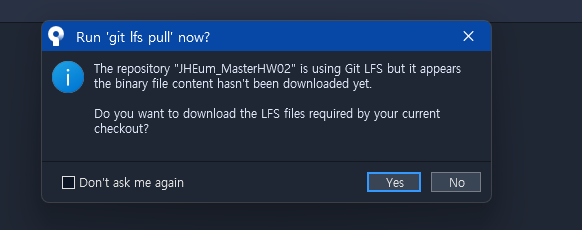
- 내 최초 로컬 리포지토리에선 이걸 할 필요가 없으니 no. 나중에 클론받거나 pull 할 때 쓰면 된다.
- GitHub에서 걍 새로 만들기.
-
Test
- 새 폴더 만들어 두고
- 소스트리 -
New tab-Clone에서 내 원격 저장소 URL 넣으면 된다. - 여기선
git lfs pullYes 하고 받아서 실행해 보면 완료.
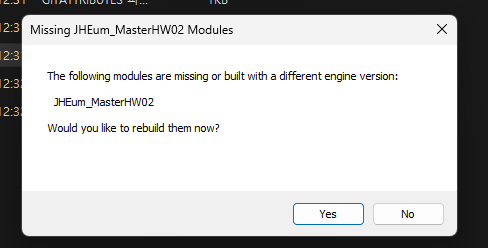
- 이 화면(모듈 리빌드) 뜨는 게 정상
- 삭제도 걍 자유롭게 삭제해도 된다.
과제 06번 - SpawnActor 생성
SpawnActor 헤더
UPROPERTY나 기본BeginPlay등을 제외한 헤더
SpawnEntry 구조체
class UBoxComponent; // Box collision 미리 선언
USTRUCT(BlueprintType)
struct FSpawnEntry
{
GENERATED_BODY()
TSubclassOf<AActor> ActorClass;
int32 SpawnCount = 1;
// 이 항목이 true면 Yaw를 랜덤하게 줌
bool bRandomYaw = false;
};ActorClass: 해당 스폰 액터가 받을 플랫폼 액터 등등SpawnCount: 몇개나 스폰할지- Editor에서 이
SpawnEntry구조체TArray에 원하는 액터/스폰갯수 집어넣는 식으로 스폰이 구현된다.
함수/변수
protected:
virtual void OnConstruction(const FTransform& Transform) override;
#if WITH_EDITOR
virtual void PostEditMove(bool bFinished) override;
#endif
public:
TObjectPtr<UBoxComponent> SpawnVolume;
TArray<FSpawnEntry> SpawnEntries;
bool bSpawnOnBeginPlay = true;
void SpawnActors();
FVector GetRandomPointInVolume() const;
private:
void SpawnSingleActor(const FSpawnEntry& Entry);
void FixRotation(); SpawnVolume: 얘를 위해UBoxComponent미리 선언함. 스폰이 일어날 박스 콜리전OnConstruction: 액터가 에디터에서 생성되거나, 디테일 패널에서 값이 바뀌거나, 블루프린트가 갱신되거나, 월드에 배치될 때 호출. 거기서 X축, Y축을FixRotation으로 잡아줌#if WITH_EDITOR: 에디터로 열 때만 컴파일되는 함수라는 의미.PostEditMove: 액터를 에디터에서 이동/회전시킨 후 호출된다. 여기서 다시FixRotation으로 잡아줌TArray<FSpawnEntry>로 스폰할 액터들 배열 만들어 주고, 여기서SpawnActors에서 각FSpawnEntry별로SpawnSingleActor해준다.
소스 코드
#include
#include "Components/BoxComponent.h": 미리 선언 해둔 박스 컴포넌트 여기서 사용#include "Engine/World.h": World 가져와서 실제 액터를 월드에 넣는 데 써야 한다.- 디버깅용으로 에디터에 선, 박스 등 그릴 거면
#include "DrawDebugHelpers.h"
SpawnVolume 세팅
- 기본적인 거지만 다시 Remind
- 스케일 조정 말고
SetBoxExtent(FVector)로 사이즈 설정.Extent는 Half Length
- 때문에 랜덤 좌표 생성기에선
const FVector Extent = SpawnVolume->GetScaledBoxExtent();
FMath::FRandRange(-Extent.X, Extent.X)
이런 식으로 XYZ 돌려서 랜덤 좌표 만든다. - 랜덤 좌표 반환값은
return SpawnVolume->GetComponentTransform().TransformPosition(LocalPoint);로SpawnVolume기준으로 계산한 로컬 좌표를 월드 좌표로 변환시켜 반환한다. SpawnVolume->SetCollisionEnabled(ECollisionEnabled::NoCollision);
Spawn 원리
void ASpawnActor::SpawnSingleActor(const FSpawnEntry& Entry)
{
if (!Entry.ActorClass)
{
return;
}
UWorld* World = GetWorld();
if (!World)
{
return;
}
const FVector SpawnLocation = GetRandomPointInVolume();- 들어온 Entry에 Actor가 등록이 안되어있으면 팅기고
- World 에 해당 액터 스폰해야 하므로
GetWorld() GetWorld()를 매번 스폰할 때마다 호출하는 이유GetWorld()는 포인터만 반환하는 함수이므로 그렇게 부담이 크지 않고- 해당 함수 내에서만 쓰는 지역 변수라는 걸 명확히 할 수 있고
- 월드의 문맥이 달라지는 경우에 해당 포인터가 꼬이는 걸 방지할 수 있음.
FRotator SpawnRotation = FRotator::ZeroRotator;
if (Entry.bRandomYaw)
{
SpawnRotation.Yaw = FMath::FRandRange(0.f, 360.f);
}- Rotation 관리해 주기.
Default를 먼저 집어넣고 필요한 경우에만 랜덤값 넣어주기
FActorSpawnParameters Params;
Params.Owner = this;
Params.SpawnCollisionHandlingOverride = ESpawnActorCollisionHandlingMethod::AdjustIfPossibleButDontSpawnIfColliding;- 추후에 쓰일
SpawnActor()함수에 넘길 파라미터들 지정해 주는 곳. 즉World.h에 속해 있는 함수다. Owner는 "누가 해당 액터를 스폰했는지 적는 칸.GetOwner등으로SpawnActor를 참조할 수 있게 만들어 준다.SpawnCollisionHandlingOverride: 스폰 위치가 겹칠 때 어떻게 할래? 묻는 것Adjust...여기는 위치를 조금 조정해서 스폰해 보고 그래도 해결 안되면 스폰 하지 마라는 뜻- 즉
SpawnSingleActor가 실패할 수 있다는 의미
AActor* SpawnedActor = World->SpawnActor<AActor>(
	Entry.ActorClass,
	SpawnLocation,
	SpawnRotation,
	Params
); SpawnEntry구조체인Entry의 멤버변수ActorClass의 액터를 스폰. Transform은SpawnLocation,SpawnRotation,Params내용도 전달하기- 해당 함수 반환값은 포인터다. 월드에 객체가 생성되는 거지 이 클래스 내부에서 생성되는 게 아니기 때문에.
AActor*포인터라MovingPlatform등등 다 대응 가능. 지역 변수라 함수 끝나면 포인터 소멸- 스폰된거 삭제->재생성 이런 거 하고 싶으면 클래스 멤버 변수로
TArray<AActor*>같은 거 만들어서 관리하기.- 생성 실패했을 때
nullptr이 들어갈 수 있음에 유의!
- 생성 실패했을 때
SpawnActors()
TArray<SpawnEntries>에 대한for문,Entry.SpawnCount로 두 번째for문 돌리면 됨.
Spawn 객체
SpawnVolume등을 알아야 하는 스폰 대상이 있을 수 있다.- 헤더에
class ASpawnActor* SpawnActor;하고 - 소스 코드에
#include "SpawnActor.h
피드백 포인트
방향랜덤설정 리팩토링
int32 RandomXYZ = FMath::RandRange(0, 2);
switch (RandomXYZ)
{
case 0:
	if (FMath::RandBool())
	{
		RealMoveVector = FVector(MoveSpeed, 0.f, 0.f);
		Destination = StartLocation + MaxRange * FVector(1.f, 0.f, 0.f);
		break;
	}
	RealMoveVector = FVector(-MoveSpeed, 0.f, 0.f);
	Destination = StartLocation + MaxRange * FVector(-1.f, 0.f, 0.f);
	break;


case 1:
	if (FMath::RandBool())
	{
		RealMoveVector = FVector(0.f, MoveSpeed, 0.f);
		Destination = StartLocation + MaxRange * FVector(0.f, 1.f, 0.f);
		break;
	}
	RealMoveVector = FVector(0.f, -MoveSpeed, 0.f);
	Destination = StartLocation + MaxRange * FVector(0.f, -1.f, 0.f);
	break;
case 2:
	RealMoveVector = FVector(0.f, 0.f, MoveSpeed);
	Destination = StartLocation + MaxRange * FVector(0.f, 0.f, 1.f);
	break;
default:
	break;
}- 경우의 수마다 전부 Case 넣고 복붙해서 수정하고 난리도 아니다.
case 0:
{
	const float Sign = FMath::RandBool() ? 1.f : -1.f;
	RealMoveVector = FVector::XAxisVector * MoveSpeed * Sign;
	Destination = StartLocation + FVector::XAxisVector * MaxRange * Sign;
	break;
}- 이런 식으로 좀 더 깔끔하고 읽기 쉽게 가능.
콜리전 설정
SpawnActor()실행 시 콜리전 체크 할 때 좀 더 넓은 범위의 콜리전 체크를 해도 좋을 거고RandTpActor는 순간이동 할 때마다 콜리전 체크를 수행하는 게 더 좋을 거고 (혹은 두 세 곳만 오가는 Teleport를 한다던지)MovingActor의 경우 시작점-끝점까지 범위 전체에 대해 Spawn을 방지해 줄 필요가 있다.
게임 기획 과제 03 - 시스템 기획서
- 게임 데이터 추출/직접 테스트 위해서 "치트 코드" 가 있는 게임이 정말 중요하다는 것을 다시 깨닫는다.
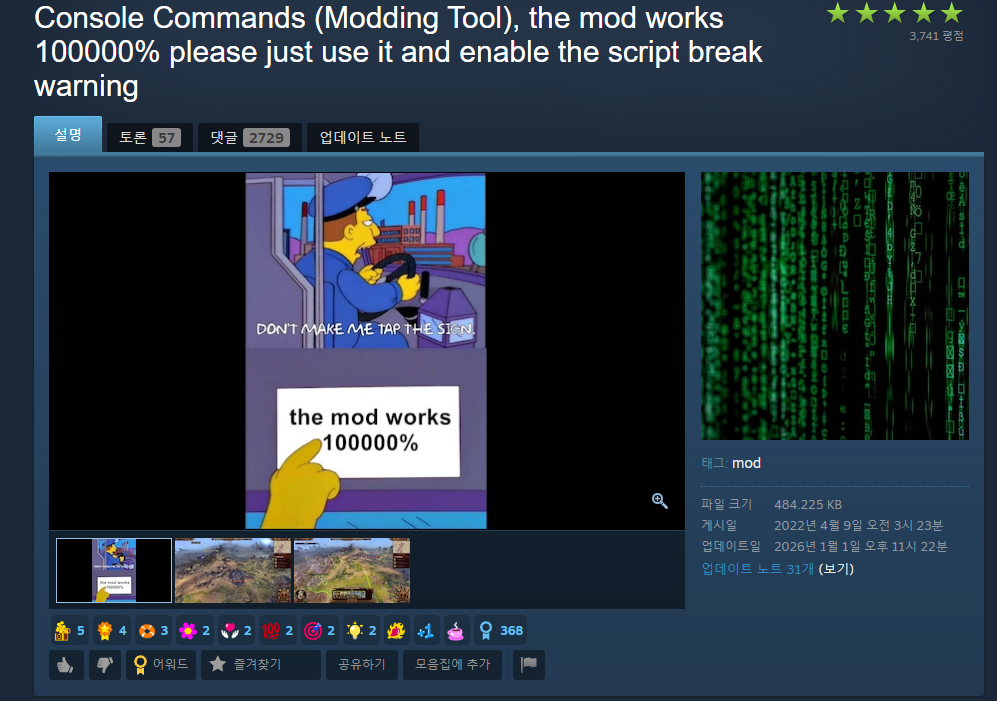
- Warhammer 3 의 유닛 랭크당 스탯 상승 공식
- 지수+계수 집어넣어서 기본공격력이 높을수록 랭크당 공격 증가폭이 높지만 정직하게 비례로 높지는 않은 수식을 만들어냈다.
| 랭크 | 누적 경험치량 | 다음 랭크까지 추가로 필요한 경험치 |
|---|---|---|
| 0 | 0 | 700 |
| 1 | 700 | 800 |
| 2 | 1,500 | 900 |
| 3 | 2,400 | 1,000 |
| 4 | 3,400 | 1,200 |
| 5 | 4,600 | 2,400 |
| 6 | 7,000 | 3,600 |
| 7 | 10,600 | 4,900 |
| 8 | 15,500 | 6,500 |
| 9 | 22,000 | - |
- 경험치 테이블을 봤을 때, 수제의 냄새가 난다. 4-5랭크 사이의 통곡의 벽이 존재. Playtest를 통해 산출해 내는 게 중요하다는 걸 보여주는 테이블이다.
개발지망생