
템플릿 조각
웹 페이지를 개발할 때, 상단 메뉴, 하단 정보, 사이드바와 같은 공통 영역을 모든 페이지에 동일하게 유지하려면 코드 복사만으로는 비효율적이다. 타임리프는 이런 반복 작업을 줄이기 위해 템플릿 조각과 레이아웃 기능을 제공한다. 예를 들어 여러 페이지에 하단의 copyright가 같다면 조각으로 만들어놓고 메서드 처럼 재사용한다.
컨트롤러
@Controller
@RequestMapping("/template")
public class TemplateController {
    @GetMapping("/fragment")
    public String template() {
        return "template/fragment/fragmentMain";
    }
}
resource/templates/template/fragment에 우선 여러 페이지에 사용하는 footer.html 조각을 만든다. th:fragment="" 를 통해 이름을 부여하고 다른 페이지에서 메서드 처럼 재사용이 가능하다.
<!DOCTYPE html>
<html xmlns:th="http://www.thymeleaf.org">
<body>
<footer th:fragment="copy">
    푸터 자리 입니다.
</footer>
<footer th:fragment="copyParam (param1, param2)">
    <p>파라미터 자리 입니다.</p>
    <p th:text="${param1}"></p>
    <p th:text="${param2}"></p>
</footer>
</body>
</html>
resource/templates/template/fragment/fragmentMain.html
<div th:insert="~{template/fragment/footer :: copy}"></div>해당 페이지에서 :: 뒤에 copy 를 통해 footer.html에 적용하였던 조각을 불러올수 있다.
1.th:insert: insert는 조각 그자체를 넣어 렌더링한다.
<div th:insert="~{template/fragment/footer :: copy}"></div>HTML 원본 페이지

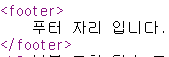
2.th:replace: 해당 태그를 지우고 조각 태그를 렌더링한다.
<div th:replace="~{template/fragment/footer :: copy}"></div>HTML 원본 페이지
템플릿 레이아웃
이전 템플릿 조각은 작은 요소 단위로 관리하며, 특정 위치에서 쉽게 호출하고 재사용할 수 있었다. 하지만 템플릿 레이아웃은 전체 페이지의 기본 구조(상단, 본문, 하단) 같은 틀을 잡아두고 이를 다른 페이지가 상속하여 사용하는 방식이다.
레이아웃 메인
<!DOCTYPE html>
<html xmlns:th="http://www.thymeleaf.org">
<head th:replace="template/layout/base :: common_header(~{::title},~{::link})">
    <title>메인 타이틀</title>
    <link rel="stylesheet" th:href="@{/css/bootstrap.min.css}">
    <link rel="stylesheet" th:href="@{/themes/smoothness/jquery-ui.css}">
</head>
<body>
메인 컨텐츠
</body>
</html>
base.html
<html xmlns:th="http://www.thymeleaf.org">
<head th:fragment="common_header(title,links)">
    <title th:replace="${title}">레이아웃 타이틀</title>
    <!-- 공통 -->
    <link rel="stylesheet" type="text/css" media="all" th:href="@{/css/awesomeapp.css}">
    <link rel="shortcut icon" th:href="@{/images/favicon.ico}">
    <script type="text/javascript" th:src="@{/sh/scripts/codebase.js}"></script>
 <!-- 추가 -->
 <th:block th:replace="${links}" />
 </head>
초기 레이아웃 메인에서 th:replace로 template/layout/base :: common_header 메서드를 지정하여 base.html로 메인 타이틀과 추가된 링크 2개가 base.html로 넘어가 상속 받으면서 렌더링된다.
HTML 원본 페이지

확장된 레이아웃
모든 페이지가 해당 틀을 가지며 title과 content만 다른 사이트를 개발한다 가정하면
<!DOCTYPE html>
<html th:fragment="layout (title, content)" xmlns:th="http://
 www.thymeleaf.org">
<head>
    <title th:replace="${title}">레이아웃 타이틀</title>
</head>
<body>
<h1>레이아웃 H1</h1>
<div th:replace="${content}">
    <p>레이아웃 컨텐츠</p>
</div>
<footer>
    레이아웃 푸터
</footer>
</body>
</html>
html 태그 자체에 th:fragment="layout (title,content)"가 있어 전체 페이지가 템플릿 자체가 된다.
<!DOCTYPE html>
<html th:replace="~{template/layoutExtend/layoutFile :: layout(~{::title},
~{::section})}"
      xmlns:th="http://www.thymeleaf.org">
<head>
    <title>메인 페이지 타이틀</title>
</head>
<body>
<section>
    <p>메인 페이지 컨텐츠</p>
    <div>메인 페이지 포함 내용</div>
</section>
</body>
layoutExtendMain.html 는 현재 페이지인데, html 자체를 th:replace를 사용해서 변경하는 것을 확인할 수 있다. 결국 layoutFile.html에 필요한 내용을 전달하면서 html 자체를 layoutFile.html 로 변경한다.
타임 리프에서 ~{...} 구문은 템플릿 내에서 URL이나 특정 fragment를 참조한다.(ex.~{::title})
장점은 레이아웃이 조금만 바뀌어도 전체 페이지에 대한 수정이 필요없어 시간이 절약된다.
단점은 체계적으로 관리해야 하고 복잡성이 늘어날수 있다.