코드카타
⏲️ 공부 시간 09 : 10 ~ 10 : 00
오늘은 수월하게 잘 풀렸당!
https://velog.io/@orinugoori_art/%EC%95%8C%EA%B3%A0%EB%A6%AC%EC%A6%98-CODEKATA-43-%EC%82%BC%EC%B4%9D%EC%82%AC
개인 과제
⏲️공부 시간
10 :50 ~ 13 : 30
14 : 45 ~ 15 : 00
17 : 30 ~ 19 : 00
레이아웃 구현
어제 만든 시안대로 안드로이드 스튜디오에서 xml 파일을 작성했다.
오늘의 난관
- 버튼에 색상 적용 안되는 문제
- 버튼을 이미지 버튼 안쓰고 그냥 버튼에 Background에 xml소스파일 만든걸 넣어줬는데 적용이 안되는 문제가 있었음
- 원인 : 기본적으로 적용되는 테마에 버튼 속성이 들어가있어서 그랬음.
이런식으로 res/values/themes 들어가보면 테마xml 파일이 있는데, 여기서 parent가 머터리얼3인데 아마 머터리얼3에 기본적으로 버튼 스타일이 정의되어있는 것같음. 그래서 내가 따로 버튼에 백그라운드를 줘도 무시해버린거였다.<resources xmlns:tools="http://schemas.android.com/tools"> <!-- Base application theme. --> <style name="Base.Theme.OrinugooriWorldApp" parent="Theme.Material3.DayNight.NoActionBar"> <!-- Customize your dark theme here. --> <!-- <item name="colorPrimary">@color/my_dark_primary</item> --> </style> </resources>
- 해결방법 : parent 뒤를 변경해줌
이런식으로 바꿔줌!kotlin <style name="Base.Theme.OrinugooriWorldApp" parent="Theme.AppCompat.Light">
-
어제 정해논 value값들이 잘못되었었음
- 어제 일러스트로 만들면서 정해논 폰트 크기들로 적용해서 해보니까 역시나 엄청 크게 나옴
- 원인 : 내가 어제 일러스트 대지크기를 잘못생성했었나? 어제도 뭔가 폰트 70pt 이러는거 보고 이상하다고 생각하긴했음 ㅋㅋ
- 해결 : 밸류 다시 정함.
<resources>
    <style name="TitleTextView" parent="@android:style/TextAppearance.Medium">
        <item name="fontFamily">@font/pretendard_extra_bold</item>
        <item name="android:textSize">24sp</item>
        <item name="android:gravity">left</item>
    </style>

    <style name="BoldTextView" parent="@android:style/TextAppearance.Medium">
        <item name="fontFamily">@font/pretendard_bold</item>
        <item name="android:textSize">13sp</item>
    </style>

    <style name="LightTextView" parent="@android:style/TextAppearance.Medium">
        <item name="fontFamily">@font/pretendard_light</item>
        <item name="android:textSize">13sp</item>
        <item name="color">#777777</item>
        <item name="android:gravity">left</item>
    </style>

    <style name="ButtonTextView" parent="@android:style/TextAppearance.Medium">
        <item name="fontFamily">@font/pretendard_regular</item>
        <item name="android:textSize">20sp</item>
        <item name="android:stateListAnimator">@null</item>
    </style>
이런식으로 styles.xml 파일에 폰트 종류에 따라 알맞은 설정 적용되게 스타일 정의해줌
-
회원가입 페이지 만드는데 constraintLayout이 고장남
- 맨날 코드로만 작성하다가 디자인뷰에서 GUI 방식으로도 해볼까 싶어서 필요한 요소들 먼저 드래그 해서 집어넣고 자세한 속성들은 코드로 하려고 했는데 constraint들을 적용하면 내가 생각한대로 안되고 지멋대로 가버림.
- 꿈인가? 했는데 그건아니고 그냥 오류였는지 한번 안드로이드스튜디오 껐다키니까 해결됨;;
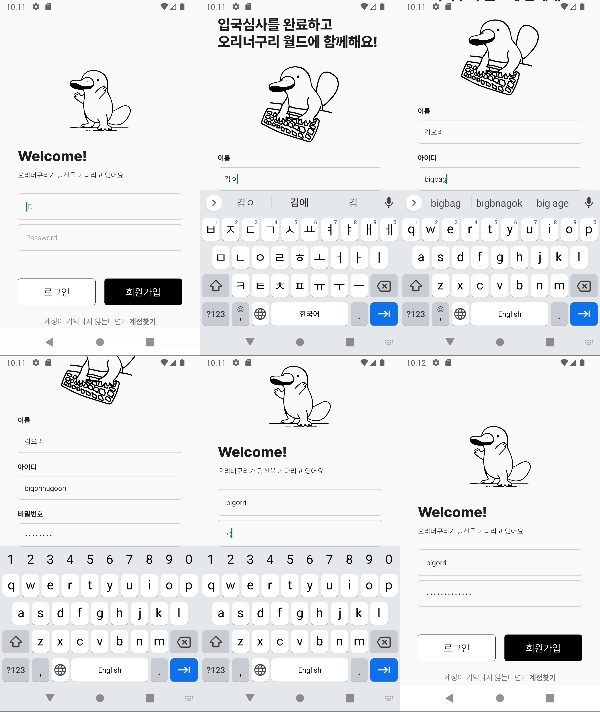
레이아웃 만든 구현한 거 자랑
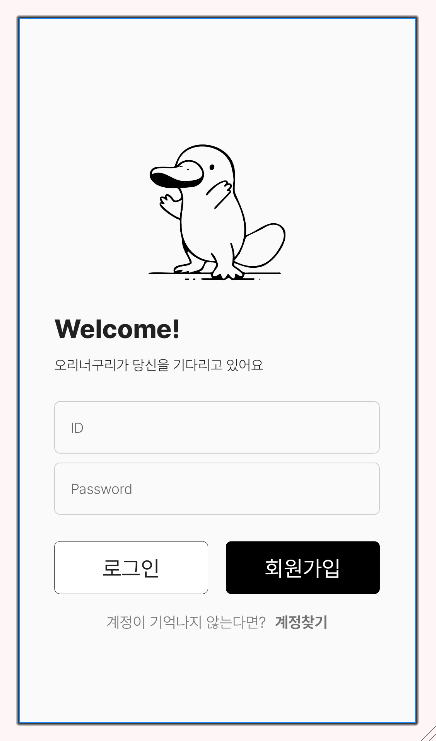
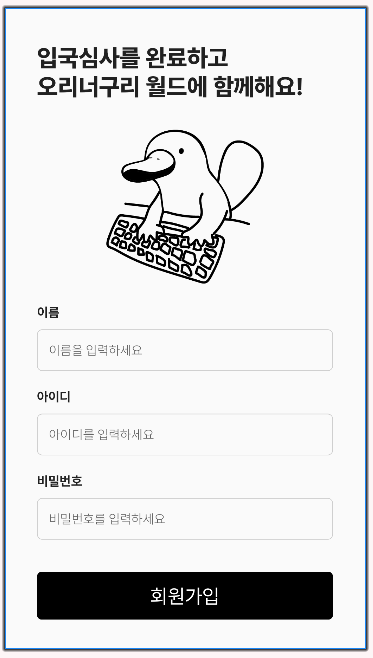
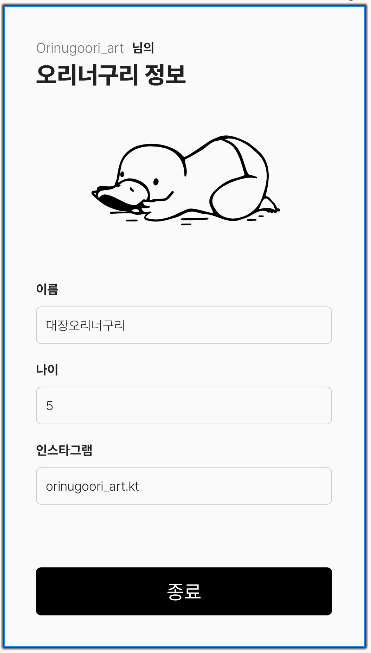
어제 만든 시안이랑 거의 비슷하게 만들었고,
달라진건 정보보여주는 HomeActivity의 오리너구리가 업드린 자세로 바뀌고,
회색 박스에 넣지않고 그냥 하얀 테두리만 줬다.
나머지는 폰트 크기나 위치같은걸 살짝 더 손봐준듯
Lv1 요구사항 구현하기
Lv1 요구사항
- 새 프로젝트를 만들고 MainActivity의 이름을 SignInActivity로 바꿔주세요.
- 로고 이미지는 원하는 이미지로 넣어주세요.
- 아이디, 비밀번호를 입력 받는 EditText를 넣어주세요.(미리보기 글씨(플레이스 홀더) 포함)
- 비밀번호 EditText는 입력 내용이 가려져야 합니다.(●●● 처리)
- 로그인 버튼을 누르면 HomeActivity가 실행되도록 구현합니다.
(Extra로 아이디를 넘겨줍니다.) - 아이디/비밀번호 모두 입력 되어야만 로그인 버튼이 눌리도록 구현합니다.
(“로그인 성공”이라는 토스트 메세지 출력하도록 구현) - 아이디/비밀번호 중 하나라도 비어 있다면
“아이디/비밀번호를 확인해주세요” 라는 토스트 메세지가 출력되도록 구현합니다. - 회원가입 버튼을 누르면 SignUpActivity가 실행되도록 구현합니다.
Lv2 요구사항 구현하기
Lv2 요구사항
- 타이틀 이미지는 원하는 이미지로 넣어주세요.
- 이름, 아이디, 비밀번호 모두 입력 되었을 때만 회원가입 버튼이 눌리도록 구현합니다.
셋 중 하나라도 비어있으면 “입력되지 않은 정보가 있습니다” 라는
토스트 메세지를 출력하도록 구현합니다. - 비밀번호 EditText는 입력 내용이 가려져야 합니다.(●●● 처리)
- 회원가입 버튼이 눌리면 SignInActivity로 이동하도록 구현합니다. (finish 활용)
Lv3 요구사항 구현하기
Lv 3 요구사항
- HomeActivity를 생성해 주세요.
- SignInActivity에서 받은 extra data(아이디)를 화면에 표시합니다.
- ImageView, TextView 외에 각종 Widget을 활용해 자유롭게 화면을 디자인 해주세요.
- 이름, 나이, MBTI 등 자기소개등이 들어가는 위젯을 자유롭게 디자인해주세요.
- 종료 버튼이 눌리면 SignInActivity로 이동하도록 구현합니다. (finish 활용)
오 엄청 금방 다했당
내가 겪은 고난
-
putExtra로 엑스트라 넘겨주는 과정에서 값이 제대로 안 넘어감
- 근데 뭔가 오류는 아니고 내가 뭘 잘못쓴거같아서 눈알 빠지게 봄
val etvID = findViewById<EditText>(R.id.etv_login_id)
val userIDStr = etvID.text.toString()
val etvPassword = findViewById<EditText>(R.id.etv_login_password)
val btnLogin = findViewById<Button>(R.id.btn_login)

btnLogin.setOnClickListener {
   if (isEmptyInput(etvID) || isEmptyInput(etvPassword)) {
       Toast.makeText(this, "아이디,비밀번호를 확인해주세요", Toast.LENGTH_SHORT).show()
   } else {
       Toast.makeText(this, "로그인 성공", Toast.LENGTH_SHORT).show()

				val intent = Intent(this, HomeActivity::class.java)
        intent.putExtra("UserID", userIDStr)
        startActivity(intent)
		}
}
원래 이랬는데 뭘까..하다가 저 userIDStr을 setonClickListener 안쪽으로 넣어줬는데 해결됨
         val etvID = findViewById<EditText>(R.id.etv_login_id)
        val etvPassword = findViewById<EditText>(R.id.etv_login_password)
        val btnLogin = findViewById<Button>(R.id.btn_login)

        btnLogin.setOnClickListener {
            if (isEmptyInput(etvID) || isEmptyInput(etvPassword)) {
                Toast.makeText(this, "아이디,비밀번호를 확인해주세요", Toast.LENGTH_SHORT).show()
            } else {
                Toast.makeText(this, "로그인 성공", Toast.LENGTH_SHORT).show()

                val userIDStr = etvID.text.toString()
                val intent = Intent(this, HomeActivity::class.java)
                intent.putExtra("UserID", userIDStr)
                startActivity(intent)
            }
        }
요런식으루다가..
이거 빼면 헤멘 부분없는듯?
결과물

오리너구리입니다