기본적인 class
class Animal{
    constructor(name){
        console.log("Animal Constructor");
        this.name = name;
    }

    run(){
        console.log("Animal ", this.name, " run");
    }
}

const animal = new Animal("animal");
상속
class Animal{
    constructor(name){
        console.log("Animal Constructor");
        this.name = name;
    }

    run(){
        console.log("Animal ", this.name, " run");
    }
}


class Tiger extends Animal{
}

const tiger = new Tiger("animal tiger");
tiger.run();

//출력
//Animal Constructor
//Animal  animal tiger  run
오버라이딩 / 오버로딩
부모클래스에서 정의된 메서드를 자식 클래스에서 다시 재정의 하는것을 오버라이딩 이라고 하는데,
위의 예시코드를 조금 변경하면
class Animal{
    constructor(name){
        console.log("Animal Constructor");
        this.name = name;
    }

    run(){
        console.log("Animal ", this.name, " run");
    }
}


class Tiger extends Animal{
	constructor(name){
	    super(name);
        console.log("자식클래스에서 생성자 오버라딩시 모조건 부모클래스의 생성자 호출");
    }
	run(){
    	console.log("Tiger ", this.name, " run");
    }
}

const tiger = new Tiger("animal tiger");
tiger.run();

//출력
//Animal Constructor
//자식클래스에서 생성자 오버라딩시 모조건 부모클래스의 생성자 호출
//Tiger  animal tiger  run
오버로딩의 경우 Javascript에서는 딱히 오버로딩이 없음.
(가장 아래에 정의되어있는 함수 호출)
function show(arg1) {
    console.log(arg1);
}

function show(arg1, arg2) {
    console.log(arg1, arg2);
}

show("show");
//출력
//show undefined
그래서 직접 분기점을 만들어서 사용해야함.
function show(arg1, arg2) {
    if(arguments.length == 1){
        console.log(arg1);
    }else if(arguments.length == 2){
        console.log(arg1, arg2);
    }

}

show("show");
show("show", "show2");

//출력
//show
//show show2
멤버변수
class Animal{
    size = 0; //public 멤버변수 클래스 밖에서 접근 가능.
    #size2 = 0; //private 멤버변수 클래스 밖에서 접근 제한
    constructor(name){
        console.log("Animal Constructor");
        this.name = name;
    }

    run(){
        console.log("Animal ", this.name, " run");
    }
}

const animal = new Animal("animal");
animal.size = 100;
console.log(animal.size);

animal.#size2 = 1000;
console.log(animal.#size2);
출력
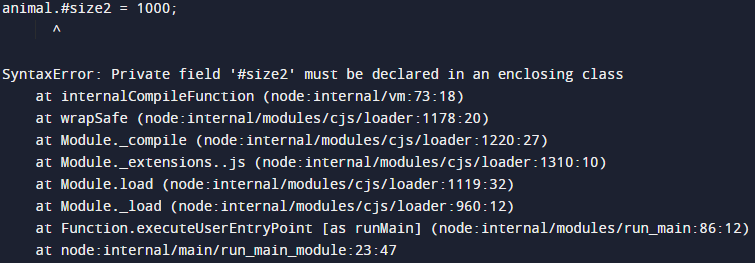
아래링크에 자세히 설명되어있음.
https://developer.mozilla.org/ko/docs/Web/JavaScript/Reference/Classes

조금씩 앞으로