👨💻 기본 지식 반복
이번 강의에서는 코딩을 해보았다면 알 수 있는(특히 자바 공부를 해보았다면) 내용들을 설명해서 간단하게만 정리하겠다.
- js에서도 try-catch 구문을 사용할 수 있다.
const fs = require('fs');

function readFile() {
	let fileData;
	try{
		fileData = fs.readFileSync('data.json');
	}catch{
		console.log('An error occurred!');
	}
	console.log(fileData);
	console.log('Hi there!');
}

readFile();-
블록 안에서 만든 변수는 블록 안에서만 접근 가능. (블록 -> 중괄호)
-
클래스 생성이 가능하다
class Job{
	constructor(jobTitle, place, salary) { // 생성자
		this.title = jobTitle;
		this.location = place;
		this.salary = salary;
	}

	describe() { // 함수
		console.log(
			`I'm a ${this.title}, I work in ${this.location} and I earn ${this.salary}.`
		)
	}
}

const developer = new Job('Developer', 'New York', 5000);
const cook = new Job('Cook', 'Munich', 35000);

// console.log(developer);
developer.describe();
이와 같이 가능한데, 자바에서는 변수들을 미리 선언해놓고 그다음 this.변수이름 이런식으로 했던 것 같은데, JS에서는 바로 this를 사용해서 신기하다.
👨💻 배열, 객체 비구조화
const input = ['Harry', 'Ron'];
const [ first , second] = input;
이와 같이 하면 변수 first와 second에 배열 값들을 분리해서 넣어줄 수 있다.
const job = {title:'Developer', location: 'New York'};
const { title } = job;
const { title: Name } = job;
객체도 마찬가지로 이와 같이 하며 title이란 변수에 'Developer'값이 들어간다.
그리고 다른 변수 이름에 저장하고 싶으면 3번 줄과 Name이라는 변수이름에 넣는 것 같이 해주면 된다.
👨💻 비동기식으로 파일 읽기
const fs = require('fs');

function readFile() {
	let fileData;

	fs.readFile('data.txt', function(error, fileData) {
		console.log('File parsing done!');
		console.log(fileData.toString());
	});


	console.log('Hi there!');
}

readFile();
원래 동기식으로 읽으면 readFileSync를 이용하지만 비동기식으로 읽으려면 readFile만 사용하면 된다.
반환을 하지 않고 파일 읽기가 완료될 때까지 기다리지 않고 바로 다음 줄을 실행하기에 콜백함수에 파일과 관련된 일들을 처리해야 하며 프로그램 속도를 높일 수 있다.
👨💻 프로미스
이제 위에서 비동기식으로 파일 읽기를 배웠는데, 위에서 말한 이점들 덕분에 대부분의 프로그램에서는 비동기식을 사용한다.
그런데 만약 콜백 함수 안에 트리거가 있고 또 그안에 트리거가 있다면 밑과 같이 구조적으로 보기 좋지 않은 코드가 작성되게 된다.
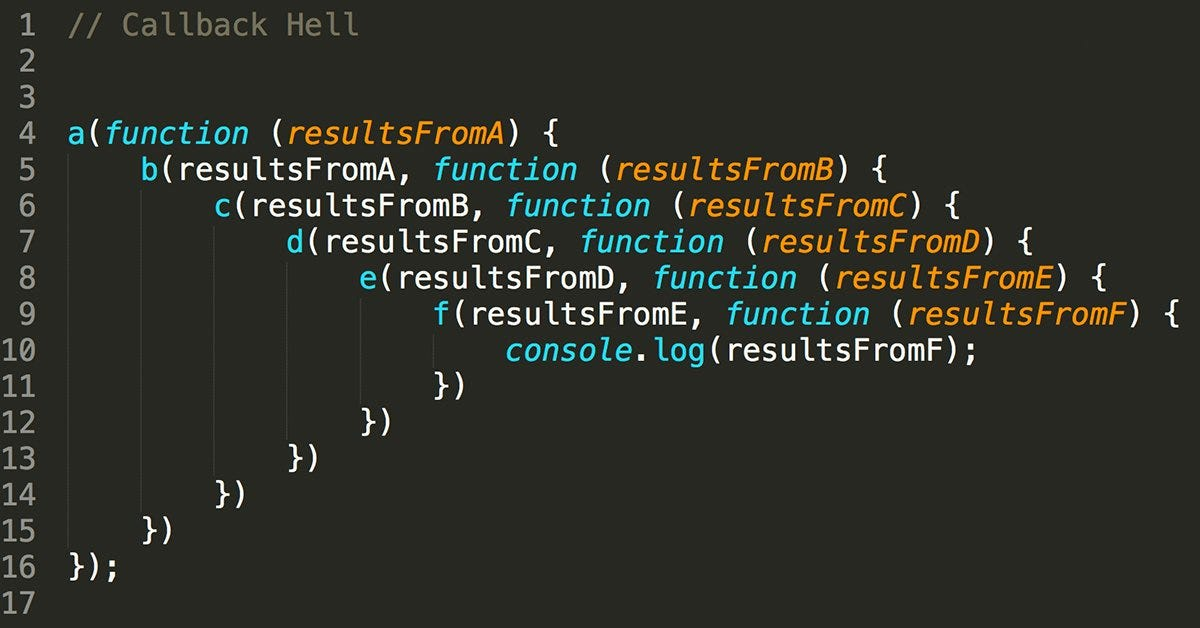
이렇때 사용할 수 있는 패키지가 프로미스이다.
const fs = require('fs/promises');

function readFile() {
	let fileData;

	// fs.readFile('data.txt', function(error, fileData) {
	// 	console.log('File parsing done!');
	// 	console.log(fileData.toString());
	// });

	fs.readFile('data.txt')
		.then(function(error, fileData) {
		console.log('File parsing done!');
		console.log(fileData.toString());
      	//return anotherAsyncOperation;
	})
  		.then(function() {});

	console.log('Hi there!');
}

readFile();
이런 식으로 then을 이용하면 콜백함수에서 트리거가 발생해도 구조적으로 밑으로 then을 이용해 붙여서 깔끔하게 정리할 수 있다.
👨💻 후기
휴가 갔다가 오랜만에 코딩하니까 기억 안날 줄 알았는데 다행이도 전에 써놓은 글들 보니 기억이 나서 수월하게 작성했다.
또 오늘 기본적인 내용들도 많았어서 휴가복귀 후에 수월하게 했다.
곧 데베 들어갈텐데, 동기식이나 파일 읽는 거 관련한 내용이 나오는게 데이터베이스 강의를 준비하는 걸로 보인다. 여기서 잘 배워둬야 할 듯:0