기본 표현식
- 타임리프 사용 선언
<html xmlns:th="http://www.thymeleaf.org">
</html>
- 텍스트 (text, utext)
<span th:text="${data}"></span>

컨텐츠 안에서 직접 출력하기(함수에 변수로 처리할때도 사용) = [[${data}]]
기본적으로 타임리프는 Escape 를 지원.
text : Escape 적용
utext : Escape 적용 안함
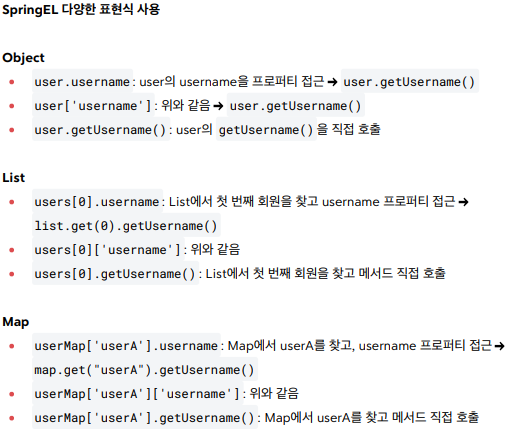
- SpringEL 표현식
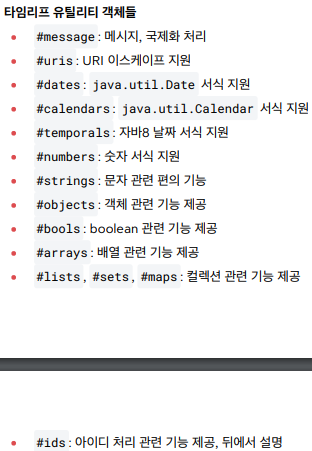
- 타임리프 유틸리티 객체 (추후 참고)
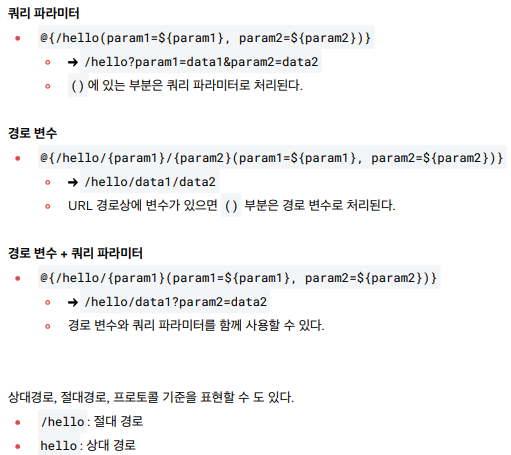
- URL 링크 처리
<ul>
	<li><a th:href="@{/hello}">basic url</a></li>
	<li><a th:href="@{/hello(param1=${param1},param2=${param2})}">hello query param</a></li>
	<li><a th:href="@{/hello/{param1}/{param2}(param1=${param1}, param2=${param2})}">path variable</a></li>
	<li><a th:href="@{/hello/{param1}(param1=${param1}, param2=${param2})}">pathvariable + query parameter</a></li>
</ul>
- 리터럴 (편리한 사용)
<span th:text="|hello ${data}|">결과값 : ex) hello Spring!</span>
- 타임리프 연산
<li>Elvis 연산자
	<ul>
		<li>${data}?: '데이터가 없습니다.' = <span th:text="${data}?: '데이터가 없습니다.'"></span></li>
		<li>${nullData}?: '데이터가 없습니다.' = <span th:text="${nullData}?: '데이터가 없습니다.'"></span></li>
 	</ul>
 </li>

Comment : 엘비스 연산자는 데이터가 없을 시 처리
<li>No-Operation
	<ul>
		<li>${data}?: _ = <span th:text="${data}?: _">데이터가 없습니다.</span></li>
		<li>${nullData}?: _ = <span th:text="${nullData}?: _">데이터가 없습니다.</span></li>
	</ul>
</li>

Comment : _ 처리로 조건부 출력을 할 수 있다.

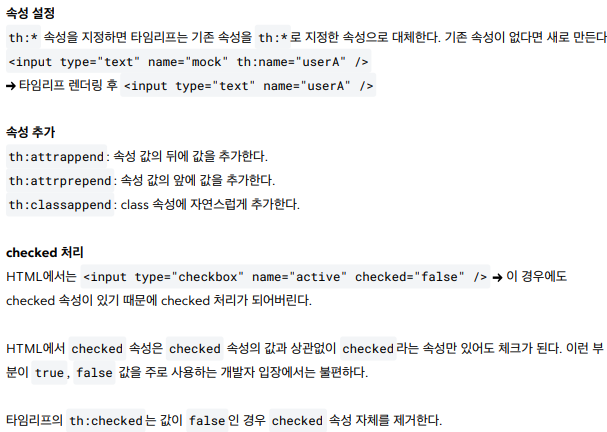
- 타임리프 속성 값 설정
<h1>속성 추가</h1>
- th:attrappend = <input type="text" class="text" th:attrappend="class='large'" /><br/>
- th:attrprepend = <input type="text" class="text" th:attrprepend="class='large'" /><br/>
- th:classappend = <input type="text" class="text" th:classappend="large" /><br/>

<h1>checked 처리</h1>
- checked o <input type="checkbox" name="active" th:checked="true" /><br/>
- checked x <input type="checkbox" name="active" th:checked="false" /><br/>
- checked=false <input type="checkbox" name="active" checked="false" /><br/>
- 타임리프 반복
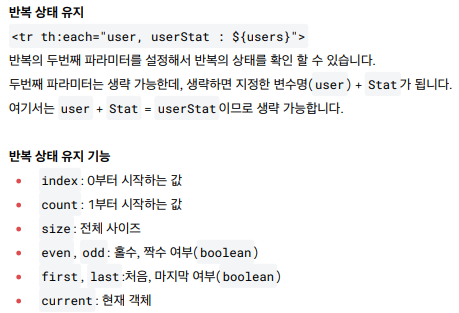
<tr th:each="user, userStat : ${users}"></tr>

Comment : userStat 이라는 상태값을 추가로 지원하는데 해당 지원 상태 값은 아래와 같다.
- 타임리프 조건부 평가
<tr th:each="user, userStat : ${users}">
  <td th:text="${userStat.count}">1</td>
  <td th:text="${user.username}">username</td>
  <td>
    <span th:text="${user.age}">0</span>
    <span th:text="'미성년자'" th:if="${user.age lt 20}"></span>
    <span th:text="'미성년자'" th:unless="${user.age ge 20}"></span>
  </td>
</tr>

if, unless
타임리프는 해당 조건이 맞지 않으면 태그 자체를 렌더링하지 않는다.
만약 다음 조건이 false 인 경우 <span>...<span> 부분 자체가 렌더링 되지 않고 사라진다.
<tr th:each="user, userStat : ${users}">
  <td th:text="${userStat.count}">1</td>
  <td th:text="${user.username}">username</td>
  <td th:switch="${user.age}">
    <span th:case="10">10살</span>
    <span th:case="20">20살</span>
    <span th:case="*">기타</span>
  </td>
</tr>

* 은 만족하는 조건이 없을 때 사용하는 디폴트이다
- 타임리프 블록(*)
<th:block th:each="user : ${users}">
  <div>
    사용자 이름1 <span th:text="${user.username}"></span>
    사용자 나이1 <span th:text="${user.age}"></span>
  </div>
  <div>
    요약 <span th:text="${user.username} + ' / ' + ${user.age}"></span>
  </div>
</th:block>

타임리프의 특성상 HTML 태그안에 속성으로 기능을 정의해서 사용하는데,
위 예처럼 이렇게 사용하기 애매한 경우에 사용하면 된다. <th:block> 은 렌더링시 제거된다.
자바스크립트 인라인
<script th:inline="javascript">
var username = [[${user.username}]];
var age = [[${user.age}]];
var user = [[${user}]];
var username2 = "test username";
</script>
Comment : 타임리프 자바스크립트 인라인 처리시
- 텍스트 렌더링 : 문자, 숫자 등 타입에 맞게 렌더링 처리 해줌
- 내추럴 템플릿 : 상단 코드 username2 처럼 변수를 주석 처리 해놓으면 변수 처리시에
변수값이 없으면 "test username" 변수 값이 있으면 해당 변수 값을 출력 해줌
- 객체 : JSON 형태로 변환 처리 해 줌.
<script th:inline="javascript">
  [# th:each="user, stat : ${users}"]
  var user[[${stat.count}]] = [[${user}]];
  [/]
</script>

Comment : 이건 안 쓸 듯. 객체를 받아서 JSON 으로 Loop 를 돌려야 훨씬 더 명확 할 것 같다.
템플릿 조각

th:insert 를 사용하면 현재 태그( div ) 내부에 추가한다.
<div th:insert="~{template/fragment/footer :: copy}"></div>

th:replace 를 사용하면 현재 태그( div )를 대체한다.
<div th:replace="template/fragment/footer :: copy"></div>

다음과 같이 파라미터를 전달해서 동적으로 조각을 렌더링 할 수도 있다.

<div th:replace="~{template/fragment/footer :: copyParam ('데이터1', '데이터2')}"></div>
출처 김영한의 스프링 로드맵 - 스프링 MVC 2편 - 백엔드 웹 개발 핵심 기술
