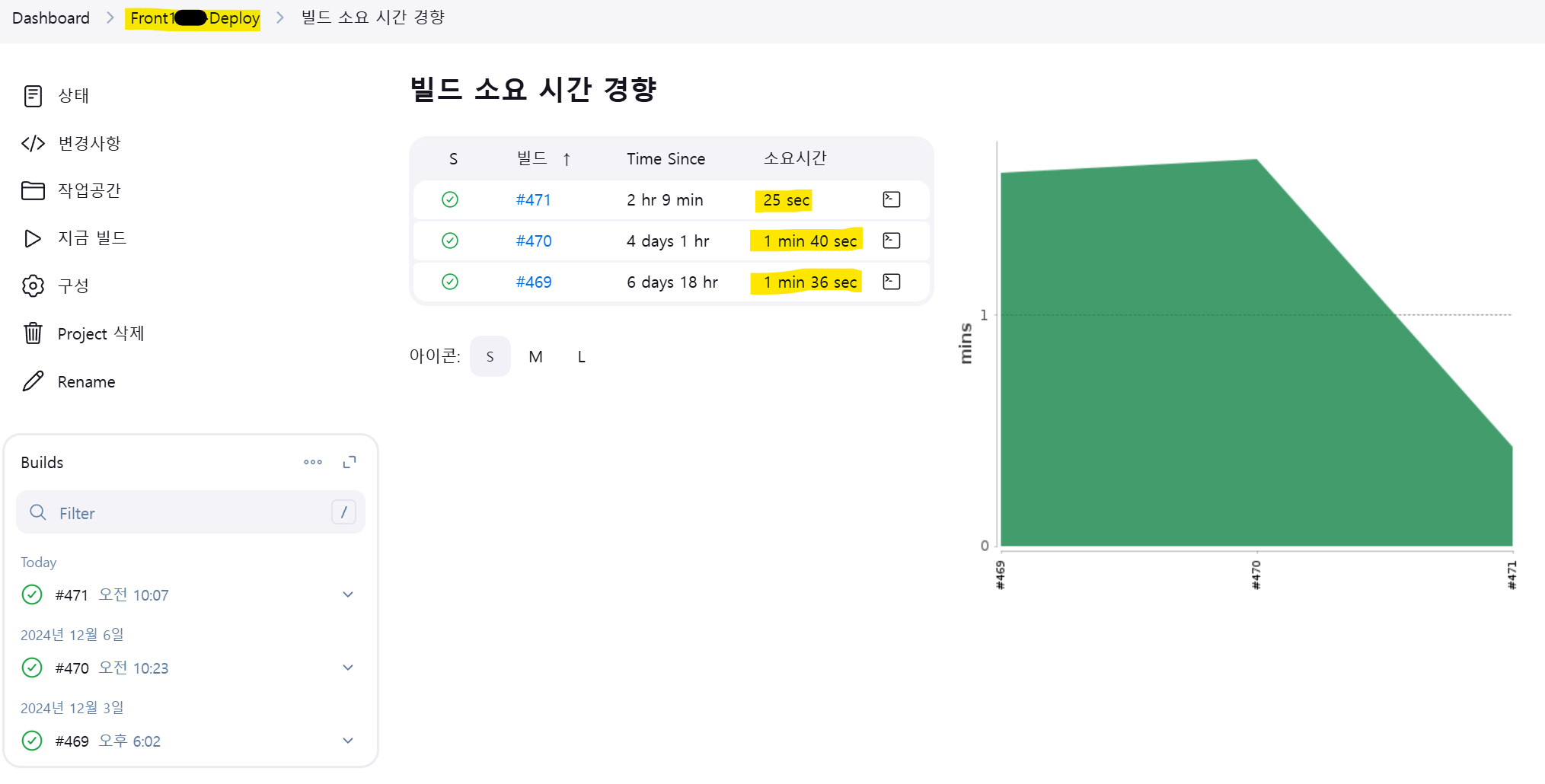
Jenkins 기반 CI/CD 프로세스 개선: 배포 시간 단축과 리소스 최적화
필자의 서비스는 Jenkins를 이용하여 CI/CD를 하고 있다.
프로젝트를 각 deploy 서버에서 배포할 때, 각 서버의 CPU와 MEMORY 사용량이 튀는(갑자기 증가하는) 현상을 발견하였다. 또한 빌드 시간이 오래 걸리는 문제도 있어 이를 해결하고자 했다.
Jenkins의 build 서버에서 GitLab의 repository를 Jenkins 워크스페이스로 가져와 shell script를 실행할 때, 기존의 실행 코드는 아래와 같은 순서로 이루어지고 있었다.
기존의 shell script
build 서버
# 1. 기존의 압축파일(front.tar) 과 node_modules, package-lock.json 등등의 재설치 및 빌드파일을 제거.
rm -f front.tar
rm -rf node_modules
rm package-lock.json
rm -rf .git
rm -rf .next

# 2. npm install 실행. - 패키지 설치
npm install

# 3. npm build (.next) - 프로젝트 빌드.
npm run build

# 4. 로컬 디렉토리를 front.tar 파일로 압축.
tar -cvf front.tar ./

# 5. 로컬의 front.tar 압축파일을 첫 번째 deploy 서버와 두 번째 deploy 서버에 복사.
cp -f /var/lib/jenkins/workspace/Front-Build/front.tar /var/lib/jenkins/workspace/Front1-Deploy/front.tar
cp -f /var/lib/jenkins/workspace/Front-Build/front.tar /var/lib/jenkins/workspace/Front2-Deploy/front.tar
deploy 서버
# 1. /opt/front.tar 기존 파일을 front.tar.back으로 이름을 변경하여 백업.
mv -f /opt/front.tar /opt/front.tar.back

# 2. /home/service-name/jenkins-target/front.tar 파일을 /opt/front.tar로 이동. 새로운 빌드파일을 /opt 디렉토리에 배치.
mv -f /home/service-name/jenkins-target/front.tar /opt/front.tar

# 3. /opt/front 디렉토리를 초기화하기 위해 삭제 후, 새로운 /front 디렉토리 생성.
cd /opt
rm -rf front
mkdir front

# 4. /opt/front.tar 파일을 /opt/front/front.tar로 복사.
cp -f /opt/front.tar /opt/front/front.tar

# 5. front.tar 파일에 권한(읽기, 쓰기, 실행)을 부여.
chmod 777 /opt/front/front.tar

# 6. front.tar 파일을 현재 디렉토리(/opt/front)에 압축 해제.
cd /opt/front
tar -xvf front.tar

# 7. /opt/front 디렉토리와 모든 하위 파일의 소유권을 root 사용자 및 그룹으로 변경.
sudo chown -R root:root /opt/front

# 8. 새로 빌드된 어플리케이션을 실행하기 위해 기존 프로세스를 정리 - PM2 프로세스 종료.
pm2 kill

# 9. package.json에 정의된 모든 의존성 패키지를 설치.
npm install

# 10. 프로젝트 빌드 - 배포 파일 생성.
npm run build

# 11. 프로젝트 시작.
npm run start
문제점
위의 기존 파이프라인에서 발견된 문제점은 다음과 같다.
- 중복된 작업
- 빌드 서버에서 이미 npm install과 npm run build를 실행하여 빌드 파일을 생성했음에도, 배포 서버에서 다시 npm install과 npm run build를 실행하고 있었다.
이는 불필요한 리소스 낭비를 초래하고 CPU와 메모리 사용량을 급증시켰다.
- 비효율적인 배포 시간
- 중복된 작업으로 인해 배포 시간이 불필요하게 길어졌다.
개선된 Shell Script
개선 방향
- 빌드 서버에서 이미 npm install 및 npm run build를 완료했기 때문에, 배포 서버에서는 이 과정을 다시 실행하지 않는다.
- 배포 서버는 빌드 서버에서 전달된 front.tar 파일을 압축 해제하고, 프로젝트를 실행하는 역할만 수행하도록 변경하였다.
개선된 build 서버 script
기존 build서버의 script는 build서버에서 npm install 및 npm run build 후 해당 디렉토리의 파일을 front.tar로 압축시켜 각 deploy 서버의 디렉토리로 이동시키는 역할을 하고있기에, 그대로 수행시키도록 한다.
따라서, 기존의 deploy 서버의 실행 script의 개선을 진행하였다.
프로세스는 앞서 말한 것처럼 중복된 npm install 및 npm run build 실행문을 제거하고 build서버에서 build후 압축된 front.tar 압축파일을 압축 해제한 후, 해당 프로젝트를 npm run start로 실행만 할 수 있도록 하여 기존의 불필요한 중복 실행 script를 개선하였다.
개선된 deploy 서버 shell script
# 1. /opt/front.tar 기존 파일을 front.tar.back으로 이름을 변경하여 백업.
mv -f /opt/front.tar /opt/front.tar.back

# 2. /home/service-name/jenkins-target/front.tar 파일을 opt/front.tar로 이동. 새로운 빌드파일을 /opt 디렉토리에 배치.
mv -f /home/service-name/jenkins-target/front.tar /opt/front.tar

# 3. /opt/front 디렉토리를 초기화 하기 위해 삭제 후, 새로운 /front 디렉토리 생성.
cd /opt
rm -rf front
mkdir front

# 4. /opt/front.tar 파일을 /opt/front/front.tar로 복사.
cp -f /opt/front.tar /opt/front/front.tar

# 5. front.tar 파일에 권한(읽기, 쓰기, 실행)을 부여.
# 파일 권한 문제로 스크립트가 중단되는 상황을 피하기 위해 권한을 부여한다.
chmod 777 /opt/front/front.tar

#6. front.tar 파일을 현재 디렉토리(/opt/front)에 압축 해제.
cd /opt/front
tar -xvf front.tar

# 7. /opt/front 디렉토리와 모든 하위 파일의 소유권을 root 사용자 및 그룹으로 변경.
sudo chown -R root:root /opt/front

# 8. 새로 빌드된 어플리케이션을 실행하기 위해 기존 프로세스를 정리 - PM2 프로세스 종료.
pm2 kill

# 9. 프로젝트 시작.
npm run start
결과
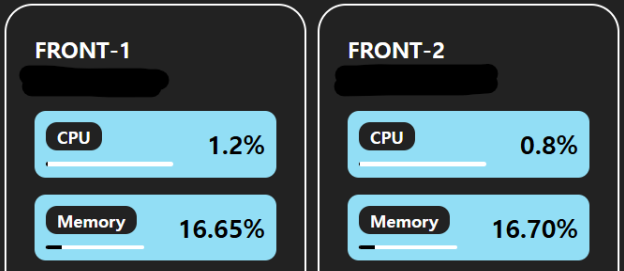
- 리소스 사용량 개선
- 배포시간 단축.
배포 시 CPU와 MEMORY 사용량이 안정적으로 유지되는 것을 확인할 수 있었다.
배포 시간 단축
개선 전에는 약 1분 40초가 소요되던 배포가, 개선 후 약 25초로 단축되었다.
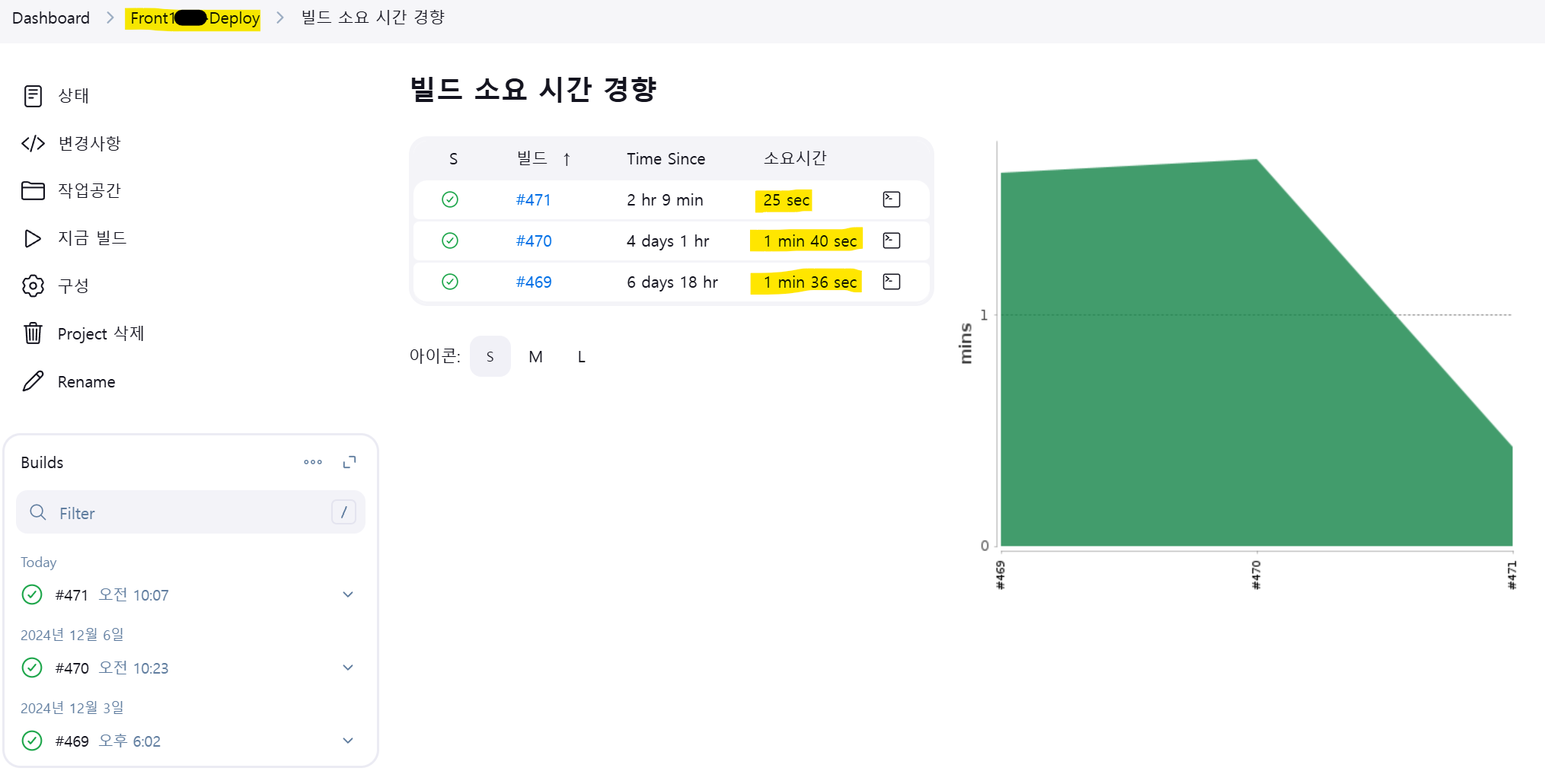
최근 script 를 개선하기 전과 후의 소요시간 그래프이다.
개선전 1분40초 가량 소요되던 deploy소요 시간이 25초로 감소하여 개선된 것을 확인 할 수 있다.
이렇게 기존의 중복된 작업을 제거하고, 빌드 서버와 배포 서버의 역할을 명확히 분리함으로써 리소스 낭비를 줄이고 효율적인 배포 프로세스를 구성할 수 있었다.
