⛳️ 인프런 - cs 지식의 정석 강의를 듣고 학습한 내용입니다.
HTTP 상태 코드
HTTP 상태코드는 서버가 클라이언트의 요청을 처리한 결과를 숫자로 나타낸다.
상태코드는 1xx, 2xx, 3xx, 4xx, 5xx로 나뉘며, 각 범위는 특정 의미를 가진다.
1xx (정보)
- 요청을 잘 받았으며 프로세스를 계속 진행 중임을 나타냄
- 100 Continue: 클라이언트가 요청을 계속해도 됨을 의미
2xx (성공)
- 요청이 성공적으로 처리되었음을 나타냄
- 200 OK: 요청 성공 및 정상 처리
- 201 Created: 요청 성공 및 새로운 리소스 생성
3xx (리다이렉션)
- 추가 작업이 필요하거나 리소스 위치가 변경되었음을 의미
- 301 Moved Permanently: 요청한 리소스의 URI가 영구적으로 변경됨
4xx (클라이언트 오류)
- 클라이언트의 잘못된 요청으로 인해 서버가 처리할 수 없음을 나타냄
- 400 Bad Request: 잘못된 요청으로 서버가 이해할 수 없음
- 401 Unauthorized: 인증되지 않은 요청
- 404 Not Found: 요청한 리소스를 찾을 수 없음
- 예시: 잘못된 URL 접근 시
404발생
- 예시: 잘못된 URL 접근 시
5xx (서버 오류)
- 서버가 정상적인 요청을 처리하지 못할 때 발생
- 500 Internal Server Error: 서버 내부 오류
- 502 Bad Gateway: 게이트웨이/프록시 서버 오류
- 504 Gateway Timeout: 게이트웨이/프록시 서버의 요청 처리 시간 초과
iOS 개발에서도 통신을 하면 상태코드를 받아볼 수 있는데,
앞으로 통신 로직을 짤 때 상태코드를 잘 활용해서 디버깅 해봐야겠다는 생각을 했다.
HTTP Methods
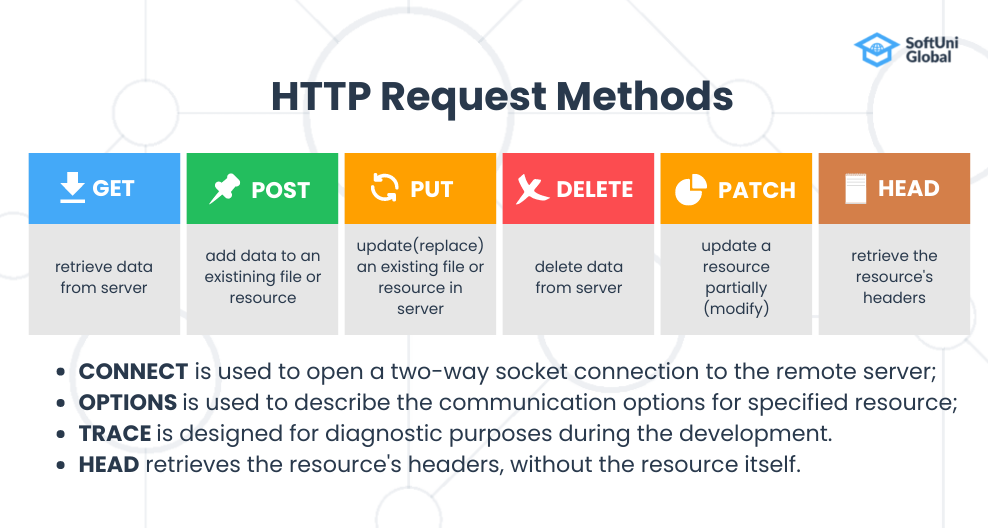
HTTP 메서드는 다음과 같이 여러가지가 있다.
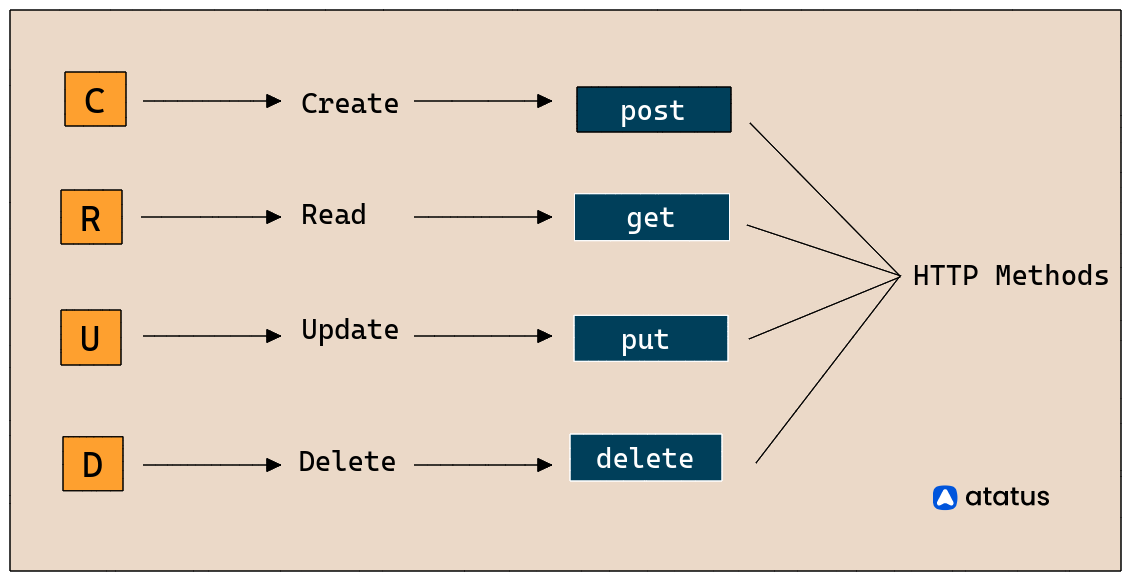
CRUD로 나누면 다음과 같음.
이 중 정리해두지 않으면 헷갈리는 GET과 POST의 차이점과
PUT과 PATCH에 대해 정리!
GET과 POST
1) GET 메서드
데이터를 조회(읽기)할 때 사용하는 메서드.
- URL을 기반으로 데이터를 요청하는 방식.
- 길이 제한(2000자 미만)이 존재한다.
- 성공 시 HTTP 상태코드 200을 반환.
- 캐싱 가능 → 같은 요청을 반복하면 브라우저가 응답을 저장할 수도 있음.
- 요청 시 쿼리스트링(URL 파라미터)에 데이터가 노출됨 → 보안상 취약.
- ASCII 문자열만 전송 가능 → 바이너리 데이터는 전송 불가능.
- 사용자 이름, 비밀번호 같은 민감한 정보는 전달하지 않는 것이 원칙.
예시
https://search.shopping.naver.com/catalog/338039986182) POST 메서드
데이터를 생성할 때 사용하는 메서드.
- HTTP message body를 통해 데이터를 전달.
- 길이 제한이 없음 → 대량의 데이터 전송 가능.
- 성공 시 HTTP 상태코드 201(Created)을 반환 (일반적으로).
- 캐싱 불가능 → 요청마다 서버에서 처리.
- 쿼리스트링이 아니라 body에 데이터를 담아 요청 → 브라우저 기록에 남지 않음.
- ASCII뿐만 아니라 모든 유형의 데이터를 전송 가능.
- 로그인, 회원가입 같은 민감한 정보 전송 시 반드시 사용해야 함.
📌 실습 사이트
- https://resttesttest.com/
- GET은 URL에 정보가 노출되므로, 회원가입이나 로그인 같은 요청은 반드시 POST로!
PUT과 PATCH
둘 다 데이터를 수정할 때 사용하지만, 전체 수정(Replace)과 일부 수정(Update)의 차이가 있다.
3) PUT 메서드
데이터를 전체 수정(Replace) 할 때 사용.
- 요청 시 전체 데이터를 보내야 함.
- 기존 데이터가 없다면 새롭게 생성됨.
- 교체(Overwrite) 개념 → 기존 필드를 유지하려면 다시 포함해서 전송해야 함.
예시
{
  "id": 2,
  "email": "kundol@naver.com",
  "first_name": "Janet",
  "last_name": "Weaver",
  "avatar": "https://reqres.in/img/faces/2-image.jpg"
}
→ PUT 요청 시 위와 같이 모든 필드를 다시 보내야 함.
Javascript PUT 요청 코드
const PutRequest = () => {
  fetch("https://reqres.in/api/users/2", {
    headers: {
      "Accept": "application/json",
      "Content-Type": "application/json"
    },
    method: "PUT",
    body: JSON.stringify({
      "id": 2,
      "email": "kundol@naver.com",
      "first_name": "Janet",
      "last_name": "Weaver",
      "avatar": "https://reqres.in/img/faces/2-image.jpg"
    })
  }).then(res => res.json())
    .then(data => console.log(data))
};
PutRequest();
4) PATCH 메서드
데이터를 일부 수정(Update) 할 때 사용.
- 요청 시 수정할 부분만 보내면 됨.
- 기존 데이터는 유지되며, 변경된 값만 적용됨.
예시
{
  "email": "kundol@naver.com"
}
→ PATCH 요청 시 위와 같이 변경할 필드만 보내면 됨.
Javascript PATCH 요청 코드
const PatchRequest = () => {
  fetch("https://reqres.in/api/users/2", {
    headers: {
      "Accept": "application/json",
      "Content-Type": "application/json"
    },
    method: "PATCH",
    body: JSON.stringify({
      "email": "kundol@naver.com"
    })
  }).then(res => res.json())
    .then(data => console.log(data))
};
PatchRequest();
정체되지 않는 성장