
결과물 👇🏻
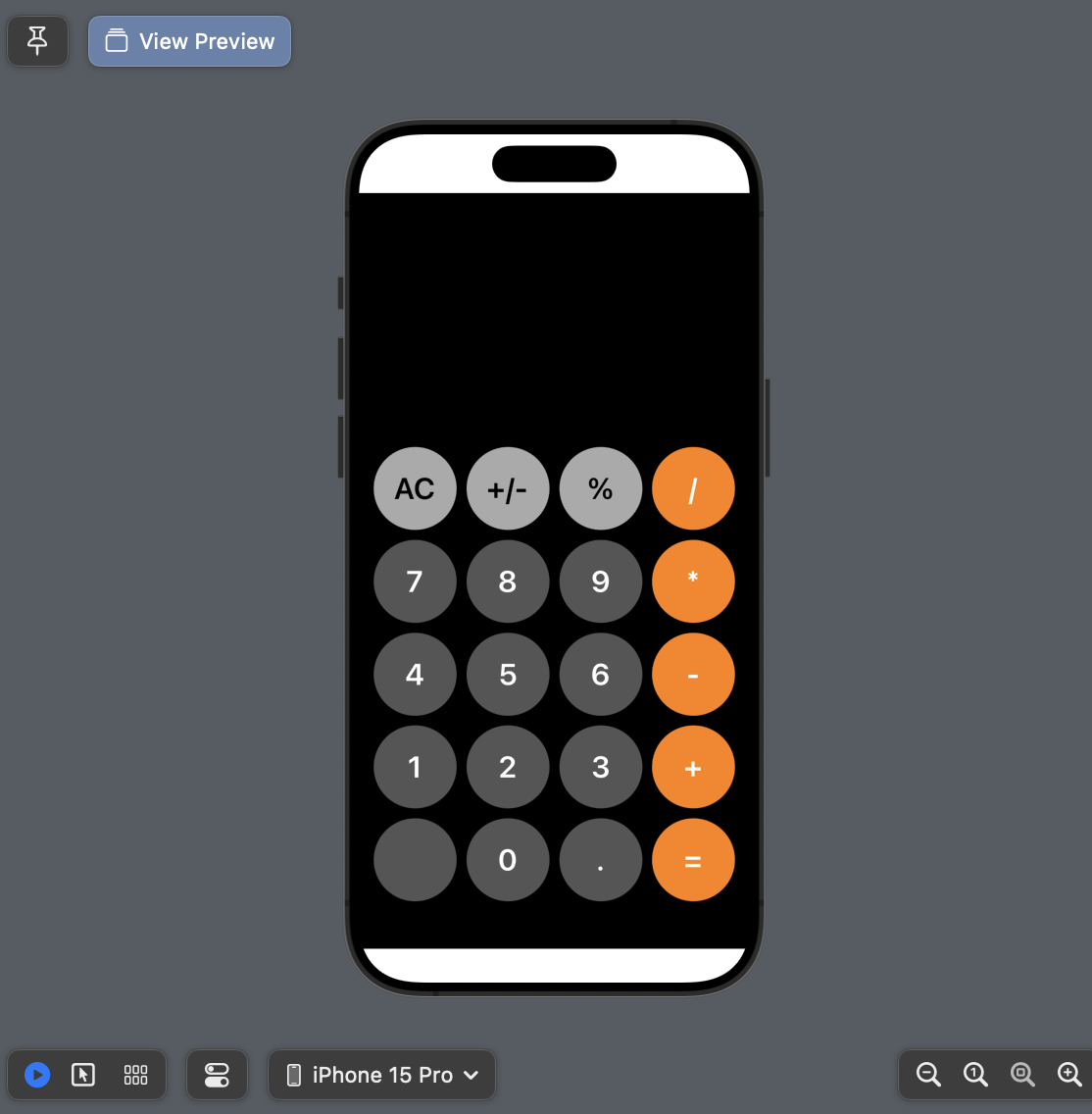
Main.swift
import UIKit
import SwiftUI

class Main: UIViewController {

    var showLabel = UILabel()
    let CalCollectionView : UICollectionView = {
        let flowLayout = UICollectionViewFlowLayout()
        let cv = UICollectionView(frame: .zero, collectionViewLayout: flowLayout)
        return cv
    }()
    let buttonTitles: [[String]] = [
            ["AC", "+/-", "%", "/"],
            ["7", "8", "9", "*"],
            ["4", "5", "6", "-"],
            ["1", "2", "3", "+"],
            ["", "0", ".", "="]]


    override func viewDidLoad() {
        super.viewDidLoad()
        self.view.backgroundColor = .black
        CalCollectionView.dataSource = self
        CalCollectionView.delegate = self
        configCollectionView()

    }

    func configCollectionView() {
        view.addSubview(CalCollectionView)

        CalCollectionView.translatesAutoresizingMaskIntoConstraints = false

        CalCollectionView.leftAnchor.constraint(equalTo: view.leftAnchor, constant: 10).isActive = true
        CalCollectionView.rightAnchor.constraint(equalTo: view.rightAnchor, constant: -10).isActive = true
        CalCollectionView.bottomAnchor.constraint(equalTo: view.safeAreaLayoutGuide.bottomAnchor).isActive = true
        CalCollectionView.topAnchor.constraint(equalTo: view.topAnchor, constant: 250).isActive = true

        CalCollectionView.backgroundColor = .clear

        CalCollectionView.register(CalCollectionViewCell.self, forCellWithReuseIdentifier: "calCell")
    }
}

extension Main: UICollectionViewDataSource {

    func numberOfSections(in collectionView: UICollectionView) -> Int {
        return buttonTitles.count
    }
    func collectionView(_ collectionView: UICollectionView, numberOfItemsInSection section: Int) -> Int {
        return buttonTitles[section].count
    }
    func collectionView(_ collectionView: UICollectionView, cellForItemAt indexPath: IndexPath) -> UICollectionViewCell {
        let cell = CalCollectionView.dequeueReusableCell(withReuseIdentifier: "calCell", for: indexPath) as! CalCollectionViewCell
        let title = buttonTitles[indexPath.section][indexPath.item]
        cell.configButton(with: title, displayLabel: showLabel, calculator: Calculator())
        return cell
    }


}

extension Main: UICollectionViewDelegate {

}

extension Main: UICollectionViewDelegateFlowLayout {
    func collectionView(_ collectionView: UICollectionView, layout collectionViewLayout: UICollectionViewLayout, sizeForItemAt indexPath: IndexPath) -> CGSize {
        return CGSize(width: (view.frame.width - 60) / 4, height: (view.frame.width - 60) / 4 )
    }

    func collectionView(_ collectionView: UICollectionView, layout collectionViewLayout: UICollectionViewLayout, insetForSectionAt section: Int) -> UIEdgeInsets {
        return UIEdgeInsets(top: 5 , left: 5, bottom: 5, right: 5)
    }
}


// Canvas 설정
struct ViewControllerRepresentable: UIViewControllerRepresentable {
    typealias UIViewControllerType = Main

    func makeUIViewController(context: Context) -> Main {
        return Main()
    }

    func updateUIViewController(_ uiViewController: Main, context: Context) {
    }
}

@available(iOS 13.0.0, *)
struct ViewPreview: PreviewProvider {
    static var previews: some View {
        ViewControllerRepresentable()
    }
}
CalCollectionViewCell.swift
import UIKit

class CalCollectionViewCell: UICollectionViewCell {

    static let identifier = "calCell"
    var button: CalButtons?

    override init(frame: CGRect) {
        self.button = CalButtons()
        super.init(frame: frame)
    }

    required init?(coder: NSCoder) {
        fatalError("init(coder:) has not been implemented")
    }

    func configButton(with title: String, displayLabel: UILabel, calculator: Calculator) {

        if ["AC", "+/-", "%"].contains(title) {
            button = EtcButtons(displayLabel: displayLabel, calculator: calculator)
        } else if ["+", "-", "*", "/", "="].contains(title) {
            button = OpButtons(displayLabel: displayLabel, calculator: calculator)
        } else {
            button = NumButtons(displayLabel: displayLabel, calculator: calculator)
        }
        guard let button = button else { return }

        button.setTitle(title, for: .normal)
        contentView.addSubview(button)

        NSLayoutConstraint.activate([
            button.centerXAnchor.constraint(equalTo: contentView.centerXAnchor),
            button.centerYAnchor.constraint(equalTo: contentView.centerYAnchor),
            button.widthAnchor.constraint(equalTo: contentView.widthAnchor),
            button.heightAnchor.constraint(equalTo: contentView.heightAnchor)
        ])
    }

}
CalButtons.swift
+class NumButtons, OpButtons, EtcButtons
import UIKit

class CalButtons: UIButton {

    var displayLabel: UILabel?
    var calculator: Calculator?
    var firstNumber: Double?
    var secondNumber: Double?
    var currentOperator: String?

    //상속받는 클래스의 생성자 호출
    override init(frame: CGRect) {
        super.init(frame: frame)
        configCalButtonLayout()
    }

    //필수생성자 호출 - 원래는 자동상속되지만, 지정생성자가 있는 경우 선언해줘야 함.
    required init?(coder: NSCoder) {
        fatalError("init(coder:) has not been implemented")
    }

    // CalButtons 클래스의 생성자
    init(displayLabel: UILabel, calculator: Calculator) {
        self.displayLabel = displayLabel
        self.calculator = calculator
        super.init(frame: .zero)
        configCalButtonLayout()
    }

    func configCalButtonLayout() {
        self.translatesAutoresizingMaskIntoConstraints = false
        self.addTarget(self, action: #selector(buttonTapped), for: .touchUpInside) //addTarget 함수: 버튼이 눌렸을 때 buttonTapped() 함수 호출
    }

    override func layoutSubviews() {
        super.layoutSubviews()
        self.layer.cornerRadius = self.bounds.width / 2 // 반값을 주면 원으로 그려짐
    }

    // @IBAction 대신 @objc로 tap action 구현
    @objc func buttonTapped() {

    }
}

class NumButtons: CalButtons {
    override func configCalButtonLayout() {
        super.configCalButtonLayout()
        self.backgroundColor = .darkGray
        self.setTitleColor(.white, for: .normal)
        self.titleLabel?.font = UIFont.boldSystemFont(ofSize: 30)
    }
}


class OpButtons: CalButtons {
    override func configCalButtonLayout() {
        super.configCalButtonLayout()
        self.backgroundColor = .orange
        self.setTitleColor(.white, for: .normal)
        self.titleLabel?.font = UIFont.boldSystemFont(ofSize: 30)
    }
}

class EtcButtons: CalButtons {
    override func configCalButtonLayout() {
        super.configCalButtonLayout()
        self.backgroundColor = .lightGray
        self.setTitleColor(.black, for: .normal)
        self.titleLabel?.font = UIFont.boldSystemFont(ofSize: 30)
    }
}
계산 클래스는 일단 이렇게 빼둠
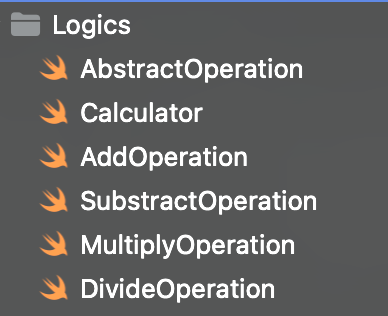
+ 수정 예정
- 입출력되는 숫자 나오는 Label UI 추가하기
- 계산 클래스들 로직 연결하기
참고자료

정체되지 않는 성장
우와 이렇게도 할 수 있구나