01. 5주차 오늘 배울 것
02. AWS 가입하기 및 보안설정하기
- 1) AWS 루트계정 가입하기
-
[코드스니펫] AWS 가입하기
[https://portal.aws.amazon.com/billing/signup#/start](https://portal.aws.amazon.com/billing/signup#/start) -
해외결제가 가능한 유효한 결제 수단을 넣어야 가입이 정상적으로 이루어집니다. Visa 또는 Master 겸용의 신용카드를 추천드립니다. 가입이 정상적으로 이루어지지 않을 경우 5주차에 수업을 진행할 수 없으므로 사전에 해외결제가 가능한지 반드시 확인 부탁드립니다.
-
AWS는 개인에게 클라우드 환경의 가상서버를 제공합니다. 기본 사양의 서버(EC2)를 1년 동안 무료로 사용할 수 있습니다.
-
가입 시 결제된 금액은 다시 반환됩니다. (일종의 결제 테스트 목적)
-
EC2 서버를 아직 만들지 마세요! 함께 진행할 것이에요!
혹시 미리 만들어버린 EC2 서버 종료하는 방법 (1년 후 자동결제 방지!)
-
    💡 **중지 또는 종료하는 법. 무료 기간(1년) 후 결제가 되기 전에, 이렇게 종료하세요!**

    대상 인스턴스에 마우스 우클릭 > '인스턴스 상태' 를 클릭합니다. 중지 또는 종료 중 하나를 클릭하면 명령을 실행합니다.
- 2) IAM 사용자 생성하기
- (1) IAM이 무엇인가요?
🤔 IAM은 AWS의 서비스를 안전하게 제어할 수 있는 계정 내의 계정이에요! - AWS 계정을 처음 가입할 때는 루트 계정이라는 하나의 아이디로 생성되는데요! **이것을 바로 사용하면 굉장히 위험합니다!** - 그 이유는 바로 루트 계정이 AWS에서 **결제와 관련된 모든 접근 권한이 승인**되어 있기 때문이에요! - 원래라면 다른 서비스도 마찬가지이지만요, AWS는 그 서비스가 굉장히 다양하고 폭넓고 가격도 다양해요! - 그래서 **루트계정으로 일상적인 작업을 하지 않는것을 AWS가 강력히 권장**합니다! - 우리는 AWS의 가이드라인에 맞춰 `IAM계정을 생성하고, 관리`하는 것으로 큰 과금을 막고, 해킹당하더라도 적은 피해와 구제받을 수 있는 초석을 갖춰놓읍시다!(**당하지 않더라도 예방을 철저하게!**)👀 참조 링크(AWS 공식문서 IAM)
- (2) IAM 사용자 생성과정 😎 IAM 사용자그룹을 생성합시다! - IAM 그룹으로 사용할 정책권한을 설정하고, 여러 명이 IAM 사용자를 각각 만들어 사용할 수 있어요! - 아래의 예시에 의하면 우리는 모든 권한을 사용할 수 있는 Bob처럼 **관리자 권한설정**을 할거에요! 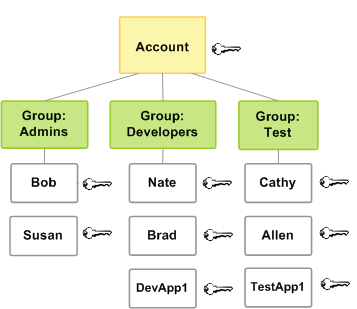 출처: AWS IAM 공식문서 - 루트계정 로그인 상태에서 화면 오른쪽 위 계정이름을 클릭하고 `보안 자격 증명`을 클릭합니다!  - 보안 자격 증명 탭에서 `사용자 그룹`을 클릭합니다!  - 사용자 그룹 탭에서 `그룹 생성`을 클릭합니다!  - 사용자 그룹 이름을 입력하고 권한 정책 연결에서 `AdministratorAccess`를 검색해 체크합니다!  --- 😎 IAM 사용자를 생성합시다! - 정책이 들어있는 그룹을 만들었다면, 이제 사용자를 만들어봅시다! - 이름과 비밀번호가 있는 사용자계정으로 우리는 쭉 로그인해서 사용할거에요! - 화면 왼쪽의 보안 자격 증명(IAM) 탭에서 액세스관리→`사용자`를 클릭합니다!  - 사용자 탭에서 사용자 추가를 클릭합니다!  - 사용자 추가 탭에서 사용자를 추가합니다 1. `사용자 이름을 입력`합니다 2. AWS 자격 증명 유형 선택에서 `암호-AWS 관리 콘솔 액세스`를 선택합니다 3. 콘솔 비밀번호를 `사용자 지정 비밀 번호`로 선택하고 입력합니다 4. 비밀번호 재설정 필요에 `체크를 해제`하고 `다음:권한`을 클릭합니다  - `생성한 그룹에 체크`해주세요! 그리고 `다음` 클릭!  - 태그 추가 항목은 `다음`으로 바로 넘겨주시면 돼요!  - 검토로 이름과 그룹을 확인해주세요! `다음` 클릭!  - 사용자 생성에 성공하면 링크를 복사해주세요!  - 링크를 들어가보면 계정번호가 입력된 상태일거에요! 사용자 `이름과 비밀번호를 입력하고 로그인!`  😎 이 방식으로 쭉 로그인할거에요! 링크를 보관해주세요~ - 📌 링크를 잃어버렸다면? - 루트 계정으로 로그인 한 뒤, 화면 오른쪽 위에서 계정이름을 클릭한 뒤, `보안 자격 증명` 클릭 - 보안 자격 증명 탭에서 `대시보드`를 클릭해주세요! - 화면 오른쪽의 이 계정의 IAM 사용자를 위한 로그인 URL을 복사해주세요! 
- (1) IAM이 무엇인가요?
- 3) MFA 이중인증 등록하기 😎 starling 2fa를 사용합시다! - 앱스토어, 플레이스토어에서 starling 2fa를 설치해주세요!  아이폰, 아이패드 앱스토어  갤럭시 구글 플레이 스토어 - 어플을 실행하면 개인인증을 시작합니다! - 전화번호를 입력해주세요! - 국가를 South Korea(+82)를 선택합니다 - 전화번호를 입력합니다   전화번호 확인 화면입니다. Yes를 클릭!  어떤 방식으로 인증할 것인지 묻는거에요! Receive SMS message를 눌러 문자를 받아주세요  문자에서 온 6자리의 숫자를 입력해주세요!  요 화면이 떴다면 등록준비가 되었습니다! - 이메일을 입력합니다 - AWS 웹페이지 보안자격증명 탭에서 MFA를 클릭하고 MFA 디바이스 할당을 선택합니다  - 기기 이름을 등록하고, 가상 MFA 디바이스를 선택합니다  - starling 2fa 앱에서 Scan QR Code를 클릭해 카메라를 허용합니다 - QR코드 보기를 클릭해 QR코드를 스캔합니다  - 등록된 MFA 코드를 연속으로 두 번 입력합니다  - 등록 성공 
03. [버킷리스트] - 프로젝트 세팅
🔥 **sparta → proejcts → 04.bucket 폴더에서 시작!**- 1) 문제 분석 - 완성작부터 보기!
- 2) 프로젝트 세팅 - Flask 폴더 구조 만들기 😎 templates 폴더 + [app.py](http://app.py) 만들기! 기억나시죠? 👀 04. bucket 폴더 구조 - - - prac |— venv |— [app.py](http://app.py) (서버) |— templates |— index.html (클라이언트 파일)  😎 Flask는 만들 프로젝트의 폴더 구조가 정해져 있어요! 규칙을 지켜주세요! - 폴더 안에 [`app.py`](http://app.py) 파일을 생성합니다! - 폴더 안에 `templates` 폴더를 생성합니다! - templates 폴더 안에 `index.html` 파일을 생성합니다! 🤔 아무 이름이나 쓰면 안되나요? → **몇 가지 규칙이 있습니다!** - `templates` 폴더는 반드시 고정해야 합니다! Flask의 규칙이에요! - `app.py`는 변경해도 좋습니다만, **라이브러리 이름과 같은 것을 이름으로 사용하면 안돼요!** - `index.html`은 변경해도 좋습니다만, 첫 페이지는 일반적으로 index.html을 사용해요! 🔥 준비가 끝났다면 화면 상단 `File > Open Folder`로 04. bucket 폴더로 이동합니다!
- 3) 가상환경 생성, 패키지 설치하기
- 1) 가상환경 생성, 활성화
- 화면 상단
Terminal > New Terminal을 클릭! python(맥 python3) -m venv venv입력 후 엔터!- 화면 오른쪽 아래의 파이썬 버전을 선택!
venv로 골라주기 - 터미널 오른쪽의 십자버튼을 클릭!
- (venv) 라고 뜨면 활성화까지 완료!
- 화면 상단
- 2) 패키지 설치 🔥 이번에 필요한 패키지는 3개 : `flask`, `pymongo`, `dnspython` - 화면 상단 `Terminal > New Terminal` 을 클릭!(열려있다면 그대로 진행!) - **[코드스니펫] 패키지 설치코드** ```bash pip install flask pymongo dnspython ``` - 여러 개를 설치할 때는 띄어쓰기로 구분해요! - 📌 원하는 라이브러리를 확인해보려면? - 터미널에서 `pip freeze`를 입력하고 엔터! - 터미널에서 flask, pymongo, dnspython을 찾아보죠! > 😎 제가 찾던 라이브러리 여기 있네요! 내용이 뭐가 많다구요? 우리가 사용하는 라이브러리가 다른 라이브러리를 필요로 해서 그것도 설치해주는 거에요! > > >  >
- 1) 가상환경 생성, 활성화
04. [버킷리스트] - 뼈대 준비하기
- 1) 프로젝트 준비 - app.py 준비하기
- [코드스니펫] 버킷리스트 - app.py
from flask import Flask, render_template, request, jsonify
app = Flask(__name__)

@app.route('/')
def home():
    return render_template('index.html')

@app.route("/bucket", methods=["POST"])
def bucket_post():
    sample_receive = request.form['sample_give']
    print(sample_receive)
    return jsonify({'msg': 'POST 연결 완료!'})

@app.route("/bucket", methods=["GET"])
def bucket_get():
    return jsonify({'msg': 'GET 연결 완료!'})

if __name__ == '__main__':
    app.run('0.0.0.0', port=5000, debug=True)
- [코드스니펫] 버킷리스트 - app.py
- 2) 프로젝트 준비 - index.html 준비하기
- [코드스니펫] 버킷리스트 - index.html
<!DOCTYPE html>
<html lang="en">
  <head>
    <meta charset="UTF-8" />
    <meta http-equiv="X-UA-Compatible" content="IE=edge" />
    <meta name="viewport" content="width=device-width, initial-scale=1.0" />

    <link
      href="https://cdn.jsdelivr.net/npm/bootstrap@5.0.2/dist/css/bootstrap.min.css"
      rel="stylesheet"
      integrity="sha384-EVSTQN3/azprG1Anm3QDgpJLIm9Nao0Yz1ztcQTwFspd3yD65VohhpuuCOmLASjC"
      crossorigin="anonymous"
    />
    <script src="https://ajax.googleapis.com/ajax/libs/jquery/3.5.1/jquery.min.js"></script>
    <script
      src="https://cdn.jsdelivr.net/npm/bootstrap@5.0.2/dist/js/bootstrap.bundle.min.js"
      integrity="sha384-MrcW6ZMFYlzcLA8Nl+NtUVF0sA7MsXsP1UyJoMp4YLEuNSfAP+JcXn/tWtIaxVXM"
      crossorigin="anonymous"
    ></script>

    <link
      href="https://fonts.googleapis.com/css2?family=Gowun+Dodum&display=swap"
      rel="stylesheet"
    />

    <title>인생 버킷리스트</title>

    <style>
      * {
        font-family: "Gowun Dodum", sans-serif;
      }
      .mypic {
        width: 100%;
        height: 200px;

        background-image: linear-gradient(
            0deg,
            rgba(0, 0, 0, 0.5),
            rgba(0, 0, 0, 0.5)
          ),
          url("https://images.unsplash.com/photo-1601024445121-e5b82f020549?ixid=MnwxMjA3fDB8MHxwaG90by1wYWdlfHx8fGVufDB8fHx8&ixlib=rb-1.2.1&auto=format&fit=crop&w=1189&q=80");
        background-position: center;
        background-size: cover;

        color: white;

        display: flex;
        flex-direction: column;
        align-items: center;
        justify-content: center;
      }
      .mypic > h1 {
        font-size: 30px;
      }
      .mybox {
        width: 95%;
        max-width: 700px;
        padding: 20px;
        box-shadow: 0px 0px 10px 0px lightblue;
        margin: 20px auto;
      }
      .mybucket {
        display: flex;
        flex-direction: row;
        align-items: center;
        justify-content: space-between;
      }

      .mybucket > input {
        width: 70%;
      }
      .mybox > li {
        display: flex;
        flex-direction: row;
        align-items: center;
        justify-content: center;

        margin-bottom: 10px;
        min-height: 48px;
      }
      .mybox > li > h2 {
        max-width: 75%;
        font-size: 20px;
        font-weight: 500;
        margin-right: auto;
        margin-bottom: 0px;
      }
      .mybox > li > h2.done {
        text-decoration: line-through;
      }
    </style>
    <script>
      $(document).ready(function () {
        show_bucket();
      });
      function show_bucket() {
        fetch('/bucket').then(res => res.json()).then(data => {
                // console.log(data)
            })
      }

      function save_bucket() {
        let formData = new FormData();
        formData.append("sample_give", "샘플데이터");

        fetch('/bucket', {method: "POST",body: formData,}).then((response) => response.json()).then((data) => {
            alert(data["msg"]);
            window.location.reload();
          });
      }

    </script>
  </head>
  <body>
    <div class="mypic">
      <h1>나의 버킷리스트</h1>
    </div>
    <div class="mybox">
      <div class="mybucket">
        <input
          id="bucket"
          class="form-control"
          type="text"
          placeholder="이루고 싶은 것을 입력하세요"
        />
        <button onclick="save_bucket()" type="button" class="btn btn-outline-primary">기록하기</button>
      </div>
    </div>
    <div class="mybox" id="bucket-list">
      <li>
        <h2>✅ 호주에서 스카이다이빙 하기</h2>
        <button onclick="done_bucket(5)" type="button" class="btn btn-outline-primary">완료!</button>
      </li>
      <li>
        <h2 class="done">✅ 호주에서 스카이다이빙 하기</h2>
      </li>
      <li>
        <h2>✅ 호주에서 스카이다이빙 하기</h2>
        <button type="button" class="btn btn-outline-primary">완료!</button>
      </li>
    </div>
  </body>
</html>
- [코드스니펫] 버킷리스트 - index.html
- 3) 프로젝트 준비 - mongoDB Atlas 창 띄워두기
- [코드스니펫] mongoDB Atlas 주소
https://cloud.mongodb.com/ - mongoDB 데이터베이스 들어가는 법 😎 지난 주차에서 mongoDB Atlas! 기억나시죠? - 아직 연결한 것은 없으니까 보이는 것은 없지만, 이따 확인하려면 미리 띄워둬야죠! > 화면 왼쪽의 Database를 클릭한 뒤 `Cluster 0` 클릭해주세요! > > >  > > 화면 가운데의 여러 탭 중 `Collection` 탭을 클릭해주세요! > > >  >
- [코드스니펫] mongoDB Atlas 주소
05. [버킷리스트] - POST 연습하기(버킷리스트 기록)
- 1) API 만들고 사용하기 - 버킷리스트 기록 API(Create→POST) 😎 데이터 생성은 POST 방식! 기억나시죠? - 1) 데이터 명세 - 1. 요청 정보 : URL= `/bucket`, 요청 방식 = `POST` - 2. 클라(fetch) → 서버(flask) : `bucket` - 3. 서버(flask) → 클라(fetch) : 메시지를 보냄 (버킷리스트 저장 완료!) - 2) 클라이언트와 서버 연결 확인하기 [서버 코드 - [`app.py`](http://app.py)] ```python @app.route("/bucket", methods=["POST"]) def bucket_post(): sample_receive = request.form['sample_give'] print(sample_receive) return jsonify({'msg': 'POST 연결 완료!'}) ``` [클라이언트 코드 - `index.html`] ```jsx function save_bucket() { let formData = new FormData(); formData.append("sample_give", "샘플데이터"); fetch('/bucket', {method: "POST",body: formData,}).then((response) => response.json()).then((data) => { alert(data['msg']) }); } 기록하기 ``` - 3) 서버부터 만들기 > 데이터베이스에 연결해줍시다! > > > ```jsx > from pymongo import MongoClient > > client = MongoClient('내 URL') > db = client.dbsparta > ``` > - bucket 정보를 받아서, 저장하면 되겠죠? - `bucket_receive = request.form[’bucket_give’]` - 우리가 일전에 만들어둔 [dbtest.py](http://dbtest.py) 에서 코드를 불러와봅시다! - 잘 입력되었다는 표시를 해주기 위한 메시지를 바꿔봅시다! ```python @app.route("/bucket", methods=["POST"]) def bucket_post(): bucket_receive = request.form['bucket_give'] print("리시브",bucket_receive) doc = { 'bucket' : bucket_receive } db.myBucket.insert_one(doc) return jsonify({'msg': '🥰 버킷리스트가 저장되었습니다!'}) ``` - 4) 클라이언트 만들기 - 이번엔 `bucket` 정보를 보내주면 되겠죠? - `let bucket = $(’#bucket’).val()` - formData에 데이터를 넣고, 보내줍니다! - 저장되면, 새로고침을 해서 다시 보여줄 준비를 합시다! - `window.location.reload()` ```jsx function save_bucket() { let bucket = $("#bucket").val(); let formData = new FormData(); formData.append("bucket_give", bucket); fetch('/bucket', {method: "POST", body: formData,}).then((res) => res.json()).then((data) => { alert(data["msg"]); window.location.reload(); }); } ``` - 5) 완성 확인하기 - 데이터를 입력하고 - DB에 잘 들어갔는지 확인해보면 되겠죠? 
06. [버킷리스트] - GET 연습하기(버킷리스트 보여주기)
- 1) API 만들고 사용하기 - 버킷리스트 조회 API(Read→GET) 😎 데이터 조회는 GET 방식! 기억나시죠? - 1) 데이터 명세 - 1. 요청 정보 : URL= `/bucket`, 요청 방식 = `GET` - 2. 클라(fetch) → 서버(flask) : 없음 - 3. 서버(flask) → 클라(fetch) : 전체 버킷을 보여주기 - 2) 클라이언트와 서버 연결 확인하기 [서버 코드 - [`app.py`](http://app.py)] ```python @app.route("/bucket", methods=["GET"]) def bucket_get(): return jsonify({'msg': 'GET 연결 완료!'}) ``` [클라이언트 코드 - `index.html`] ```jsx $(document).ready(function () { show_bucket(); }); function show_bucket() { fetch('/bucket').then(res => res.json()).then(data => { console.log(data) alert(data['msg']) }) } ``` - 3) 서버부터 만들기 > 받을 것 없이 `myBucket` 에 주문정보를 담아서 내려주기만 하면 됩니다! > > > ```python > @app.route("/bucket", methods=["GET"]) > def bucket_get(): > bucket_list = list(db.myBucket.find({}, {'_id': False})) > return jsonify({'bucket_list': bucket_list}) > ``` > - 4) 클라이언트 만들기 - 버킷리스트는 말 그대로 리스트 형식이겠죠? - `forEach`문으로 반복하면서 데이터를 뽑아냅시다! - 가져온 데이터를 temp_html로 뼈대에 데이터를 담아 제이쿼리로 `append`! - 기존 html 코드들을 지워줄 수 있도록 `empty()` 사용하기! ```jsx function show_bucket() { $('#bucket-list').empty() fetch('/bucket') .then(res => res.json()) .then(data => { // console.log(data) data['bucket_list'].forEach((row) => { let bucket = row['bucket'] let temp_html = `
-
✅ ${bucket}
`
$('#bucket-list').append(temp_html)
})
})
}
```
- 5) 완성 확인하기
👉 **동작 테스트:** 화면을 새로고침 했을 때, DB에 저장된 리뷰가 화면에 올바르게 나타나는지 확인합니다.
명세
요청정보 /bucket 요청방식 get
클라 서버 없음
서버 클라 전체데이터 보여주기
- 2) 전체 완성 코드 확인하기
- [💻. 코드][app.py](http://app.py) - 버킷리스트 서버
from flask import Flask, render_template, request, jsonify from pymongo import MongoClient client = MongoClient("내 URL") db = client.dbsparta app = Flask(__name__) @app.route('/') def home(): return render_template('index.html') @app.route("/bucket", methods=["POST"]) def bucket_post(): bucket_receive = request.form['bucket_give'] print("리시브",bucket_receive) doc = { 'bucket' : bucket_receive } db.myBucket.insert_one(doc) return jsonify({'msg': '🥰 버킷리스트가 저장되었습니다!'}) @app.route("/bucket", methods=["GET"]) def bucket_get(): bucket_list = list(db.myBucket.find({}, {'_id': False})) return jsonify({'bucket_list': bucket_list}) if __name__ == '__main__': app.run('0.0.0.0', port=5001, debug=True) - [💻 코드] index.html - 버킷리스트 클라이언트
<!DOCTYPE html>
<html lang="en">
  <head>
    <meta charset="UTF-8" />
    <meta http-equiv="X-UA-Compatible" content="IE=edge" />
    <meta name="viewport" content="width=device-width, initial-scale=1.0" />

    <link
      href="https://cdn.jsdelivr.net/npm/bootstrap@5.0.2/dist/css/bootstrap.min.css"
      rel="stylesheet"
      integrity="sha384-EVSTQN3/azprG1Anm3QDgpJLIm9Nao0Yz1ztcQTwFspd3yD65VohhpuuCOmLASjC"
      crossorigin="anonymous"
    />
    <script src="https://ajax.googleapis.com/ajax/libs/jquery/3.5.1/jquery.min.js"></script>
    <script
      src="https://cdn.jsdelivr.net/npm/bootstrap@5.0.2/dist/js/bootstrap.bundle.min.js"
      integrity="sha384-MrcW6ZMFYlzcLA8Nl+NtUVF0sA7MsXsP1UyJoMp4YLEuNSfAP+JcXn/tWtIaxVXM"
      crossorigin="anonymous"
    ></script>

    <link
      href="https://fonts.googleapis.com/css2?family=Gowun+Dodum&display=swap"
      rel="stylesheet"
    />

    <title>인생 버킷리스트</title>

    <style>
      * {
        font-family: "Gowun Dodum", sans-serif;
      }
      .mypic {
        width: 100%;
        height: 200px;

        background-image: linear-gradient(
            0deg,
            rgba(0, 0, 0, 0.5),
            rgba(0, 0, 0, 0.5)
          ),
          url("https://images.unsplash.com/photo-1601024445121-e5b82f020549?ixid=MnwxMjA3fDB8MHxwaG90by1wYWdlfHx8fGVufDB8fHx8&ixlib=rb-1.2.1&auto=format&fit=crop&w=1189&q=80");
        background-position: center;
        background-size: cover;

        color: white;

        display: flex;
        flex-direction: column;
        align-items: center;
        justify-content: center;
      }
      .mypic > h1 {
        font-size: 30px;
      }
      .mybox {
        width: 95%;
        max-width: 700px;
        padding: 20px;
        box-shadow: 0px 0px 10px 0px lightblue;
        margin: 20px auto;
      }
      .mybucket {
        display: flex;
        flex-direction: row;
        align-items: center;
        justify-content: space-between;
      }

      .mybucket > input {
        width: 70%;
      }
      .mybox > li {
        display: flex;
        flex-direction: row;
        align-items: center;
        justify-content: center;

        margin-bottom: 10px;
        min-height: 48px;
      }
      .mybox > li > h2 {
        max-width: 75%;
        font-size: 20px;
        font-weight: 500;
        margin-right: auto;
        margin-bottom: 0px;
      }
      .mybox > li > h2.done {
        text-decoration: line-through;
      }
    </style>
    <script>
      $(document).ready(function () {
        show_bucket();
      });
      function show_bucket() {
        $('#bucket-list').empty()
        fetch('/bucket')
            .then(res => res.json())
            .then(data => {
                // console.log(data)
                data['bucket_list'].forEach((row) => {
                    let bucket = row['bucket']
                    let temp_html = `<li>
                                        <h2>✅ ${bucket}</h2>
                                    </li>`
                    $('#bucket-list').append(temp_html)
                })
            })
      }

      function save_bucket() {
        let bucket = $("#bucket").val();

        let formData = new FormData();
        formData.append("bucket_give", bucket);

        fetch('/bucket', {method: "POST", body: formData,}).then((res) => res.json()).then((data) => {
            alert(data["msg"]);
            window.location.reload();
          });
      }

    </script>
  </head>
  <body>
    <div class="mypic">
      <h1>나의 버킷리스트</h1>
    </div>
    <div class="mybox">
      <div class="mybucket">
        <input
          id="bucket"
          class="form-control"
          type="text"
          placeholder="이루고 싶은 것을 입력하세요"
        />
        <button onclick="save_bucket()" type="button" class="btn btn-outline-primary">기록하기</button>
      </div>
    </div>
    <div class="mybox" id="bucket-list">
      <li>
        <h2>✅ 호주에서 스카이다이빙 하기</h2>
        <button onclick="done_bucket(5)" type="button" class="btn btn-outline-primary">완료!</button>
      </li>
      <li>
        <h2 class="done">✅ 호주에서 스카이다이빙 하기</h2>
      </li>
      <li>
        <h2>✅ 호주에서 스카이다이빙 하기</h2>
        <button type="button" class="btn btn-outline-primary">완료!</button>
      </li>
    </div>
  </body>
</html>
- [💻. 코드][app.py](http://app.py) - 버킷리스트 서버
07. [팬명록] - 프로젝트 세팅
🔥 **sparta → proejcts → 05.fan 폴더에서 시작!**- 1) 문제 분석 - 완성작부터 보기!
- 2) 프로젝트 세팅 - Flask 폴더 구조 만들기 😎 templates 폴더 + [app.py](http://app.py) 만들기! 기억나시죠? 👀 05. fan 폴더 구조 - - - prac |— venv |— [app.py](http://app.py) (서버) |— templates |— index.html (클라이언트 파일)  😎 Flask는 만들 프로젝트의 폴더 구조가 정해져 있어요! 규칙을 지켜주세요! - 폴더 안에 [`app.py`](http://app.py) 파일을 생성합니다! - 폴더 안에 `templates` 폴더를 생성합니다! - templates 폴더 안에 `index.html` 파일을 생성합니다! 🤔 아무 이름이나 쓰면 안되나요? → **몇 가지 규칙이 있습니다!** - `templates` 폴더는 반드시 고정해야 합니다! Flask의 규칙이에요! - `app.py`는 변경해도 좋습니다만, **라이브러리 이름과 같은 것을 이름으로 사용하면 안돼요!** - `index.html`은 변경해도 좋습니다만, 첫 페이지는 일반적으로 index.html을 사용해요! 🔥 준비가 끝났다면 화면 상단 `File > Open Folder`로 05. fan 폴더로 이동합니다!
- 3) 가상환경 생성, 패키지 설치하기
- 1) 가상환경 생성, 활성화
- 화면 상단
Terminal > New Terminal을 클릭! python(맥 python3) -m venv venv입력 후 엔터!- 화면 오른쪽 아래의 파이썬 버전을 선택!
venv로 골라주기 - 터미널 오른쪽의 십자버튼을 클릭!
- (venv) 라고 뜨면 활성화까지 완료!
- 화면 상단
- 2) 패키지 설치 🔥 이번에 필요한 패키지는 3개 : `flask`, `pymongo`, `dnspython` - 화면 상단 `Terminal > New Terminal` 을 클릭!(열려있다면 그대로 진행!) - **[코드스니펫] 패키지 설치코드** ```bash pip install flask pymongo dnspython ``` - 여러 개를 설치할 때는 띄어쓰기로 구분해요! - 📌 원하는 라이브러리를 확인해보려면? - 터미널에서 `pip freeze`를 입력하고 엔터! - 터미널에서 flask, pymongo, dnspython을 찾아보죠! > 😎 제가 찾던 라이브러리 여기 있네요! 내용이 뭐가 많다구요? 우리가 사용하는 라이브러리가 다른 라이브러리를 필요로 해서 그것도 설치해주는 거에요! > > >  >
- 1) 가상환경 생성, 활성화
- 4) 프로젝트 준비 - app.py 준비하기
- [코드스니펫] 팬명록 뼈대 - app.py
from flask import Flask, render_template, request, jsonify
app = Flask(__name__)

@app.route('/')
def home():
   return render_template('index.html')

@app.route("/guestbook", methods=["POST"])
def guestbook_post():
    sample_receive = request.form['sample_give']
    print(sample_receive)
    return jsonify({'msg': 'POST 연결 완료!'})

@app.route("/guestbook", methods=["GET"])
def guestbook_get():
    return jsonify({'msg': 'GET 연결 완료!'})

if __name__ == '__main__':
   app.run('0.0.0.0', port=5000, debug=True)
- [코드스니펫] 팬명록 뼈대 - app.py
- 5) 프로젝트 준비 - index.html 준비하기
- [코드스니펫] 팬명록 뼈대 - index.html
<!DOCTYPE html>
<html lang="en">
  <head>
    <meta charset="UTF-8" />
    <meta http-equiv="X-UA-Compatible" content="IE=edge" />
    <meta name="viewport" content="width=device-width, initial-scale=1.0" />

    <link
      href="https://cdn.jsdelivr.net/npm/bootstrap@5.0.2/dist/css/bootstrap.min.css"
      rel="stylesheet"
      integrity="sha384-EVSTQN3/azprG1Anm3QDgpJLIm9Nao0Yz1ztcQTwFspd3yD65VohhpuuCOmLASjC"
      crossorigin="anonymous"
    />
    <script src="https://ajax.googleapis.com/ajax/libs/jquery/3.5.1/jquery.min.js"></script>
    <script
      src="https://cdn.jsdelivr.net/npm/bootstrap@5.0.2/dist/js/bootstrap.bundle.min.js"
      integrity="sha384-MrcW6ZMFYlzcLA8Nl+NtUVF0sA7MsXsP1UyJoMp4YLEuNSfAP+JcXn/tWtIaxVXM"
      crossorigin="anonymous"
    ></script>

    <title>초미니홈피 - 팬명록</title>

    <link
      href="https://fonts.googleapis.com/css2?family=Noto+Serif+KR:wght@200;300;400;500;600;700;900&display=swap"
      rel="stylesheet"
    />
    <style>
      * {
        font-family: "Noto Serif KR", serif;
      }
      .mypic {
        width: 100%;
        height: 300px;

        background-image: linear-gradient(
            0deg,
            rgba(0, 0, 0, 0.5),
            rgba(0, 0, 0, 0.5)
          ),
          url("https://cdn.topstarnews.net/news/photo/201807/456143_108614_510.jpg");
        background-position: center 30%;
        background-size: cover;

        color: white;

        display: flex;
        flex-direction: column;
        align-items: center;
        justify-content: center;
      }

      .mypost {
        width: 95%;
        max-width: 500px;
        margin: 20px auto 20px auto;

        box-shadow: 0px 0px 3px 0px black;
        padding: 20px;
      }

      .mypost > button {
        margin-top: 15px;
      }

      .mycards {
        width: 95%;
        max-width: 500px;
        margin: auto;
      }

      .mycards > .card {
        margin-top: 10px;
        margin-bottom: 10px;
      }
    </style>
    <script>
      $(document).ready(function () {
        set_temp();
        show_comment();
      });
      function set_temp() {
        fetch("http://spartacodingclub.shop/sparta_api/weather/seoul").then((res) => res.json()).then((data) => {
						console.log(data)
          });
      }
      function save_comment() {
        let formData = new FormData();
        formData.append("sample_give", "샘플데이터");

        fetch('/guestbook', {method: "POST",body: formData,}).then((res) => res.json()).then((data) => {
            //console.log(data)
            alert(data["msg"]);
          });
      }
      function show_comment() {
        fetch('/guestbook').then((res) => res.json()).then((data) => {
						alert(data["msg"])
				})
      }
    </script>
  </head>
  <body>
    <div class="mypic">
      <h1>십센치(10cm) 팬명록</h1>
      <p>현재기온: <span id="temp">36</span>도</p>
    </div>
    <div class="mypost">
      <div class="form-floating mb-3">
        <input type="text" class="form-control" id="name" placeholder="url" />
        <label for="floatingInput">닉네임</label>
      </div>
      <div class="form-floating">
        <textarea
          class="form-control"
          placeholder="Leave a comment here"
          id="comment"
          style="height: 100px"
        ></textarea>
        <label for="floatingTextarea2">응원댓글</label>
      </div>
      <button onclick="save_comment()" type="button" class="btn btn-dark">
        댓글 남기기
      </button>
    </div>
    <div class="mycards" id="comment-list">
      <div class="card">
        <div class="card-body">
          <blockquote class="blockquote mb-0">
            <p>새로운 앨범 너무 멋져요!</p>
            <footer class="blockquote-footer">호빵맨</footer>
          </blockquote>
        </div>
      </div>
      <div class="card">
        <div class="card-body">
          <blockquote class="blockquote mb-0">
            <p>새로운 앨범 너무 멋져요!</p>
            <footer class="blockquote-footer">호빵맨</footer>
          </blockquote>
        </div>
      </div>
      <div class="card">
        <div class="card-body">
          <blockquote class="blockquote mb-0">
            <p>새로운 앨범 너무 멋져요!</p>
            <footer class="blockquote-footer">호빵맨</footer>
          </blockquote>
        </div>
      </div>
    </div>
  </body>
</html>
- [코드스니펫] 팬명록 뼈대 - index.html
- 6) 프로젝트 준비 - mongoDB Atlas 창 띄워두기
- [코드스니펫] mongoDB Atlas 주소
https://cloud.mongodb.com/ - mongoDB 데이터베이스 들어가는 법 😎 지난 주차에서 mongoDB Atlas! 기억나시죠? - 아직 연결한 것은 없으니까 보이는 것은 없지만, 이따 확인하려면 미리 띄워둬야죠! > 화면 왼쪽의 Database를 클릭한 뒤 `Cluster 0` 클릭해주세요! > > >  > > 화면 가운데의 여러 탭 중 `Collection` 탭을 클릭해주세요! > > >  >
- [코드스니펫] mongoDB Atlas 주소
08. [팬명록] - 조각기능. 날씨 API 적용하기
- 1) OpenAPI를 활용해 조각기능 구현하기 명세
- Q. 문제 😎 스파르타코딩클럽에서 제공하는 서울 날씨 API를 적용해봅시다! - OpenAPI를 가져다 쓰는 법을 우린 배웠었어요! - 게다가 날씨 API도 어디선가 해보신 것 같지 않나요? - **[코드스니펫] 서울 날씨 OpenAPI** ```jsx "http://spartacodingclub.shop/sparta_api/weather/seoul" ``` - **[코드스니펫] index.html 날씨 API 뼈대 코드** ```jsx $(document).ready(function () { set_temp(); }); function set_temp() { fetch("http://spartacodingclub.shop/sparta_api/weather/seoul").then((res) => res.json()).then((data) => { console.log(data) }); } ```
- 💡 힌트!
-
2주차 숙제에서 붙였었습니다!
-
OpenAPI도 결국 API입니다! -
API 주소로 접속해볼까요?
우리가 데이터를 가져오는 JSON 형식!
데이터를 읽는 것은 무엇이었죠?(Read→GET)
-
- A. 정답보기! 😎 OpenAPI도 결국 API입니다! - 1) 데이터명세 - 1.요청정보 : URL = `"http://spartacodingclub.shop/sparta_api/weather/seoul"` 요청방식 = `GET` - 2.클라(fetch) → 서버(OpenAPI) : 없음 - 3.서버(OpenAPI) → 클라(fetch) : 서울 날씨 정보를 불러옴 - 2) 클라이언트와 서버 연결 확인하기 ```jsx $(document).ready(function () { set_temp(); show_comment(); }); function set_temp() { fetch("http://spartacodingclub.shop/sparta_api/weather/seoul").then((res) => res.json()).then((data) => { console.log(data) }); } ``` > 개발자 도구를 열어 `console.log()` 가 우리가 접속하는 데이터가 잘 붙어서 오는지 확인해보세요! > > >  > - 3) 서버만들기? 👀 OpenAPI는 이미 데이터베이스가 구축된 서버에요! 😎 우리는 가져다가 보여줄 클라이언트만 만들면 된다는 말씀! - 4) 클라이언트 만들기 - 우리가 보여줄 값은 여러 개가 아닌 서울 지금의 날씨 딱 하나입니다! →`반복문을 쓸 필요 없다는 사실!` - 가져온 데이터를 temp_html로 뼈대에 담아 제이쿼리로 `append`! ```jsx function set_temp() { fetch("http://spartacodingclub.shop/sparta_api/weather/seoul").then((res) => res.json()).then((data) => { console.log(data) $("#temp").text(data["temp"]); }); ``` - 5) 완성 확인하기 👉 **동작 테스트:** 화면을 새로고침 했을 때, DB에 저장된 리뷰가 화면에 올바르게 나타나는지 확인합니다.
09. [팬명록] - POST 연습하기(응원 등록하기)
- 1) API 만들고 사용하기 - 응원 게시하기 API(Create→POST) 😎 데이터 생성은 POST 방식! 기억나시죠? - 1) 데이터명세 - 1.요청정보 : URL = `/guestbook`, 요청방식 = `POST` - 2.클라(fetch) → 서버(flask) : `name`, `comment` - 3.서버(flask) → 클라(fetch) : 메시지를 보냄 (응원 완료!) - 2) 클라이언트와 서버 연결 확인하기 [서버 코드 - [`app.py`](http://app.py)] ```python @app.route("/guestbook", methods=["POST"]) def guestbook_post(): sample_receive = request.form['sample_give'] print(sample_receive) return jsonify({'msg': 'POST 연결 완료!'}) ``` [클라이언트 코드 - `index.html`] ```jsx function save_comment() { let formData = new FormData(); formData.append("sample_give", "샘플데이터"); fetch('/guestbook', {method: "POST",body: formData,}).then((response) => response.json()).then((data) => { alert(data['msg']) }); } 기록하기 ``` - 3) 서버부터 만들기 > 데이터베이스에 연결해줍시다! > > > ```jsx > from pymongo import MongoClient > > client = MongoClient('내 URL') > db = client.dbsparta > ``` > - `name`, `comment` 정보를 받아서, 저장하면 되겠죠? - `name_receive = request.form[’name_give’]` - `comment_receive = request.form[’comment_give’]` - 우리가 일전에 만들어둔 [dbtest.py](http://dbtest.py) 에서 코드를 불러와봅시다! - 잘 입력되었다는 표시를 해주기 위한 메시지를 바꿔봅시다! ```python @app.route("/guestbook", methods=["POST"]) def guestbook_post(): name_receive = request.form["name_give"] comment_receive = request.form["comment_give"] doc = { 'name': name_receive, 'comment': comment_receive } db.guestbook.insert_one(doc) return jsonify({'msg':'응원 완료!'}) ``` - 4) 클라이언트 만들기 - 이번엔 `name`, `comment` 정보를 보내주면 되겠죠? - formData에 데이터를 넣고, 보내줍니다! - 저장되면, 새로고침을 해서 다시 보여줄 준비를 합시다! - `window.location.reload()` ```jsx function save_comment() { let name = $("#name").val(); let comment = $("#comment").val(); let formData = new FormData(); formData.append("name_give", name); formData.append("comment_give", comment); fetch('/guestbook', {method: "POST",body: formData,}).then((res) => res.json()).then((data) => { //console.log(data) alert(data["msg"]); window.location.reload(); }); } ``` - 5) 완성 확인하기 - 데이터를 입력하고 - DB에 잘 들어갔는지 확인해보면 되겠죠? 
10. [팬명록] - GET 연습하기(응원 보여주기)
- 1) API 만들고 사용하기 - 버킷리스트 조회 API(Read→GET)
😎 데이터 조회는 GET 방식! 기억나시죠?
- 1) 데이터 명세
- 1. 요청 정보 : URL= `/guestbook`, 요청 방식 = `GET`
- 2. 클라(fetch) → 서버(flask) : 없음
- 3. 서버(flask) → 클라(fetch) : 전체 응원 목록을 보여주기
- 2) 클라이언트와 서버 연결 확인하기
[서버 코드 - [`app.py`](http://app.py)]
```python
@app.route("/guestbook", methods=["GET"])
def guestbook_get():
return jsonify({'msg': 'GET 연결 완료!'})
```
[클라이언트 코드 - `index.html`]
```jsx
$(document).ready(function () {
set_temp()
show_bucket()
});
function show_comment() {
fetch('/guestbook').then(res => res.json()).then(data => {
console.log(data)
alert(data['msg'])
})
}
```
- 3) 서버부터 만들기
> 받을 것 없이 `guestbook` 에 주문정보를 담아서 내려주기만 하면 됩니다!
>
>
> ```python
> @app.route("/guestbook", methods=["GET"])
> def guestbook_get():
> comment_list = list(db.guestbook.find({},{'_id':False}))
> return jsonify({'comments':comment_list})
> ```
>
- 4) 클라이언트 만들기
- 응원 목록을 `forEach`문으로 반복하면서 데이터를 뽑아냅시다!
- 가져온 데이터를 temp_html로 뼈대에 데이터를 담아 제이쿼리로 `append`!
- 기존 html 코드들을 지워줄 수 있도록 `empty()` 사용하기!
```jsx
function show_comment() {
$("#comment-list").empty();
fetch('/guestbook').then((res) => res.json()).then((data) => {
//console.log(data)
let comments = data['comments']
comments.forEach((row) => {
let name = row["name"];
let comment = row["comment"];
let temp_html = ``; $("#comment-list").append(temp_html); }); }); } ``` - 5) 완성 확인하기 👉 **동작 테스트:** 화면을 새로고침 했을 때, DB에 저장된 리뷰가 화면에 올바르게 나타나는지 확인합니다.
${comment}
${name} - 2) 전체 완성 코드 확인하기
- [💻 코드][app.py](http://app.py) - 팬명록 서버
from flask import Flask, render_template, request, jsonify app = Flask(__name__) from pymongo import MongoClient client = MongoClient("내 URL") db = client.sparta @app.route('/') def home(): return render_template('index.html') @app.route("/guestbook", methods=["POST"]) def guestbook_post(): name_receive = request.form["name_give"] comment_receive = request.form["comment_give"] doc = { 'name': name_receive, 'comment': comment_receive } db.guestbook.insert_one(doc) return jsonify({'msg':'응원 완료!'}) @app.route("/guestbook", methods=["GET"]) def guestbook_get(): comment_list = list(db.guestbook.find({},{'_id':False})) return jsonify({'comments':comment_list}) if __name__ == '__main__': app.run('0.0.0.0', port=5000, debug=True) - [💻 코드] index.html - 팬명록 클라이언트
<!DOCTYPE html>
<html lang="en">
  <head>
    <meta charset="UTF-8" />
    <meta http-equiv="X-UA-Compatible" content="IE=edge" />
    <meta name="viewport" content="width=device-width, initial-scale=1.0" />

    <link
      href="https://cdn.jsdelivr.net/npm/bootstrap@5.0.2/dist/css/bootstrap.min.css"
      rel="stylesheet"
      integrity="sha384-EVSTQN3/azprG1Anm3QDgpJLIm9Nao0Yz1ztcQTwFspd3yD65VohhpuuCOmLASjC"
      crossorigin="anonymous"
    />
    <script src="https://ajax.googleapis.com/ajax/libs/jquery/3.5.1/jquery.min.js"></script>
    <script
      src="https://cdn.jsdelivr.net/npm/bootstrap@5.0.2/dist/js/bootstrap.bundle.min.js"
      integrity="sha384-MrcW6ZMFYlzcLA8Nl+NtUVF0sA7MsXsP1UyJoMp4YLEuNSfAP+JcXn/tWtIaxVXM"
      crossorigin="anonymous"
    ></script>

    <title>초미니홈피 - 팬명록</title>

    <link
      href="https://fonts.googleapis.com/css2?family=Noto+Serif+KR:wght@200;300;400;500;600;700;900&display=swap"
      rel="stylesheet"
    />
    <style>
      * {
        font-family: "Noto Serif KR", serif;
      }
      .mypic {
        width: 100%;
        height: 300px;

        background-image: linear-gradient(
            0deg,
            rgba(0, 0, 0, 0.5),
            rgba(0, 0, 0, 0.5)
          ),
          url("https://cdn.topstarnews.net/news/photo/201807/456143_108614_510.jpg");
        background-position: center 30%;
        background-size: cover;

        color: white;

        display: flex;
        flex-direction: column;
        align-items: center;
        justify-content: center;
      }

      .mypost {
        width: 95%;
        max-width: 500px;
        margin: 20px auto 20px auto;

        box-shadow: 0px 0px 3px 0px black;
        padding: 20px;
      }

      .mypost > button {
        margin-top: 15px;
      }

      .mycards {
        width: 95%;
        max-width: 500px;
        margin: auto;
      }

      .mycards > .card {
        margin-top: 10px;
        margin-bottom: 10px;
      }
    </style>
    <script>
      $(document).ready(function () {
        set_temp();
        show_comment();
      });
      function set_temp() {
        fetch("http://spartacodingclub.shop/sparta_api/weather/seoul").then((res) => res.json()).then((data) => {
            console.log(data)
            $("#temp").text(data["temp"]);
          });
      }
      function save_comment() {
        let name = $("#name").val();
        let comment = $("#comment").val();

        let formData = new FormData();
        formData.append("name_give", name);
        formData.append("comment_give", comment);

        fetch('/guestbook', {method: "POST",body: formData,}).then((res) => res.json()).then((data) => {
            //console.log(data)
            alert(data["msg"]);
            window.location.reload();
          });
      }
      function show_comment() {
        $("#comment-list").empty();
        fetch('/guestbook').then((res) => res.json()).then((data) => {
            //console.log(data)
            let comments = data['comments']
            comments.forEach((row) => {
              let name = row["name"];
              let comment = row["comment"];

              let temp_html = `<div class="card">
                            <div class="card-body">
                                <blockquote class="blockquote mb-0">
                                    <p>${comment}</p>
                                    <footer class="blockquote-footer">${name}</footer>
                                </blockquote>
                            </div>
                        </div>`;
              $("#comment-list").append(temp_html);
            });
          });
      }
    </script>
  </head>
  <body>
    <div class="mypic">
      <h1>십센치(10cm) 팬명록</h1>
      <p>현재기온: <span id="temp">36</span>도</p>
    </div>
    <div class="mypost">
      <div class="form-floating mb-3">
        <input type="text" class="form-control" id="name" placeholder="url" />
        <label for="floatingInput">닉네임</label>
      </div>
      <div class="form-floating">
        <textarea
          class="form-control"
          placeholder="Leave a comment here"
          id="comment"
          style="height: 100px"
        ></textarea>
        <label for="floatingTextarea2">응원댓글</label>
      </div>
      <button onclick="save_comment()" type="button" class="btn btn-dark">
        댓글 남기기
      </button>
    </div>
    <div class="mycards" id="comment-list">
      <div class="card">
        <div class="card-body">
          <blockquote class="blockquote mb-0">
            <p>새로운 앨범 너무 멋져요!</p>
            <footer class="blockquote-footer">호빵맨</footer>
          </blockquote>
        </div>
      </div>
      <div class="card">
        <div class="card-body">
          <blockquote class="blockquote mb-0">
            <p>새로운 앨범 너무 멋져요!</p>
            <footer class="blockquote-footer">호빵맨</footer>
          </blockquote>
        </div>
      </div>
      <div class="card">
        <div class="card-body">
          <blockquote class="blockquote mb-0">
            <p>새로운 앨범 너무 멋져요!</p>
            <footer class="blockquote-footer">호빵맨</footer>
          </blockquote>
        </div>
      </div>
    </div>
  </body>
</html>
- [💻 코드][app.py](http://app.py) - 팬명록 서버
11. og 태그
- 1) og 태그 만들기
- 스파르타피디아에서 배웠던 og:image, og:title, og:description 태그 기억하시나요? 👉 내 프로젝트도 카톡/페이스북/슬랙에 공유했을 때 예쁘게 나오도록, 미리 꾸며봅시다! 
- static 폴더 아래에 이미지 파일을 넣고, 각자 프로젝트 HTML의 ~ 사이에 아래 내용을 작성하면 og 태그를 개인 프로젝트에 사용할 수 있습니다.
-
[코드스니펫] og태그 넣기
```jsx
<meta property="og:title" content="내 사이트의 제목" />
<meta property="og:description" content="보고 있는 페이지의 내용 요약" />
<meta property="og:image" content="이미지URL" />
```
-
- 참고! 이미지를 바꿨는데 이전 ogimage가 그대로 나와요! 👉 그것은 페이스북/카카오톡 등에서 처음 것을 한동안 저장해놓기 때문입니다. - 페이스북 og 태그 초기화 하기: [https://developers.facebook.com/tools/debug/](https://developers.facebook.com/tools/debug/) - 카카오톡 og 태그 초기화 하기: [https://developers.kakao.com/tool/clear/og](https://developers.kakao.com/tool/clear/og)
12. 내 프로젝트를 서버에 올리기
- 1) 웹서비스 런칭에 필요한 개념 소개 😎 이제 내가 만든 프로그램을 배포해봅시다. 웹 서비스를 런칭하는 거죠! - 1) 로컬 서버에서 클라우드 서버로! > `로컬 개발 환경`! 기억나시나요? 우리는 컴퓨터가 한 개니까 서버와 클라이언트를 하나의 컴퓨터에서 동작시켰어요! > > >  > 😎 이젠 내 컴퓨터를 켜놓지 않아도 접근할 수 있는 웹 서비스를 목표로 가봅시다! - 웹 서비스를 런칭하기 위해 클라이언트의 요청에 항상 응답해줄 수 있는 서버에 프로젝트를 실행시켜줄 거에요. - 언제나 요청에 응답하려면, 1) 컴퓨터가 **항상** 켜져있고 프로그램이 실행되어 있어야하고, 2) 모두가 접근할 수 있는 공개 주소인 공개 IP 주소(Public IP Address)로 나의 웹 서비스에 **접근할 수 있도록** 해야해요. - 서버는 그냥 컴퓨터라는거 기억나시죠? 외부 접속이 가능하게 설정한 다음에 내 컴퓨터를 서버로 사용할 수도 있어요. - 2) 컴퓨터 구매하기 😎 내 컴퓨터 대신 계속 켜놓을 컴퓨터를 구매해야합니다! 그걸 `서버`라고 불러요! > 이렇게 생긴 서버, 미디어에서 보신 적이 있나요? > > > [photo-1571786256017-aee7a0c009b6.avif](https://s3-us-west-2.amazonaws.com/secure.notion-static.com/f8b0aed8-3e47-4ab1-a86d-a8b56ca266fc/photo-1571786256017-aee7a0c009b6.avif) > 🤔 이런 컴퓨터를 살 돈이 없다구요? 걱정 마세요, 빌릴거니깐요! - 우리는 컴퓨터를 직접 사지 않을 겁니다! AWS라는 클라우드 서비스에서 `컴퓨터를 빌릴겁니다!` - AWS 들어보신적 있으신가요? Amazon Web Service는 우리가 배포할 수 있도록 **컴퓨터를 빌려주는 곳이에요!** - Amazon이 위 이미지와 같이 구축해놓은 데이터센터의 컴퓨터 한 개를 빌려서 우리도 배포를 해보는 거죠! - 3) 업로드하기 - 마지막으로 내가 만든 코딩 파일들을 업로드하고 실행시켜두면 끝!
- 2) AWS Elastic Beanstalk 😎 너무너무 쉬운 AWS의 배포서비스를 사용해봐요! - AWS는 컴퓨터를 빌려주는 서비스부터 배포와 관련된 정~말 많은 서비스를 제공해요! - 그렇지만 배포는 초보자가 하기에 아주 쉽지는 않아요! 신경써야 하는 내용이 많고 복잡해서.. - 그래서 초보자를 위해서 **빠르게 뚝딱 배포할 수 있는 서비스**도 제공한답니다! - 그것이 바로 `AWS Elastic Beanstalk`! 🤩 엘라스틱 빈스톡의 장점은 바로! 1. AWS에서 제공하는 **쉬운 배포서비스**입니다! 2. **코드를 압축하여 업로드**하고, AWS의 다양한 **서비스를 알아서 연결**해준답니다! 3. **배포링크**를 통해 쉽게 공유가 가능하고, **코드 업데이트 기능**까지 제공해줍니다!
13. AWS Elastic Beanstalk으로 배포하기
- 👀 참고 영상! 2022-11-19 16-30-03.mkv
- [코드스니펫] AWS Elastic Beanstalk
https://ap-northeast-2.console.aws.amazon.com/elasticbeanstalk/home?region=ap-northeast-2#/welcome - [코드스니펫] 배포 명령어 모음
**- 터미널 준비하기 -** mkdir deploy cp app.py deploy/application.py cp -r templates deploy/templates pip freeze > deploy/requirements.txt cd deploy **- appication.py 세팅하기 -** application = app = Flask(__name__) app.run() **- 패키지 설치하기 -** pip install awsebcli **- 보안 자격증명 -** eb init **- 초기 설정 -** eb create myweb **- 코드 수정 & 업데이트 -** eb deploy myweb - 1) 액세스 키 가져오기 😎 내 컴퓨터에서 로그인을 하려면 보안 자격이 필요합니다! - AWS 콘솔에 들어가, 오른쪽 위 부분의 계정이름을 클릭합니다! > `보안 자격 증명`을 클릭! > > >  > > 보안 자격 증명에서 액세스 키를 열고, `새 액세스 키 만들기` 클릭! > > >  > > 액세스 키 보기를 눌러 `액세스 키 ID`와 `보안 액세스 키`를 복사해서 메모장에 붙여주세요! > > >  > 🤩 sparta → aws.txt 파일로 저장하시면, 나중에 볼 때 편하겠죠?
- 2) 터미널 명령어로 준비완료하기! 😎 터미널에서 명령어를 따라 입력해 보면서 간단하게 준비해봅시다! - `mkdir deploy` - deploy라는 폴더를 하나 만듭니다! - `cp [app.py](http://app.py) deploy/application.py` - app.py라는 파일을 deploy 폴더에 application.py라는 이름으로 바꿔서 복제합니다! - `cp -r templates deploy/templates` - templates라는 폴더를 deploy 폴더 안에 통째로 복제합니다! - `pip freeze > deploy/requirements.txt` - 내가 pip 명령어로 설치한 라이브러리들의 목록을 deploy 폴더 안에 requirements.txt 파일에 기록합니다! - `cd deploy` - deploy 폴더 안으로 들어갑니다!(폴더 더블클릭과 똑같은 기능이네요!)
- 3) 약간의 파일 설정 바꿔주기!
👀 AWS 공식문서 참조 ([**링크**](https://docs.aws.amazon.com/ko_kr/elasticbeanstalk/latest/dg/create-deploy-python-flask.html))
- Elastic Beanstalk 배포를 위해 필요한 것이 있어요!
- [`application.py`](http://application.py) ← app.py에서 이름을 바꿔줘야해요!
- templates폴더와 index.html
- `requirements.txt` ← 우리가 설치한 패키지들의 이름이 담긴 txt파일이에요!
- **폴더 안에 venv가 있으면 안돼요!**
- [application.py](http://application.py) 설정(`그대로 파일을 가져다 쓴다면!`)
- app.py를 application.py로 바꿔주세요!
- `application`을 읽을 수 있도록 코드를 바꿔주세요!
- `app.run()` 내용을 지워주세요!
```jsx
from flask import Flask, render_template, request, jsonify
application = app = Flask(__name__)
from pymongo import MongoClient
client = MongoClient("내 URL")
db = client.sparta
@app.route('/')
def home():
return render_template('index.html')
@app.route("/guestbook", methods=["POST"])
def guestbook_post():
name_receive = request.form["name_give"]
comment_receive = request.form["comment_give"]
doc = {
'name': name_receive,
'comment': comment_receive
}
db.guestbook.insert_one(doc)
return jsonify({'msg':'응원 완료!'})
@app.route("/guestbook", methods=["GET"])
def guestbook_get():
comment_list = list(db.guestbook.find({},{'_id':False}))
return jsonify({'comments':comment_list})
if __name__ == '__main__':
app.run()
```
☝ 강의를 따라하신다면 위를, 스니펫을 사용하신다면 아래를 참조해주세요!
- **[코드] - [application.py](http://app.py) 배포 코드**
```python
from flask import Flask, render_template, request, jsonify
application = app = Flask(__name__)
from pymongo import MongoClient
client = MongoClient("내 URL")
db = client.sparta
@app.route('/')
def home():
return render_template('index.html')
@app.route("/guestbook", methods=["POST"])
def guestbook_post():
name_receive = request.form["name_give"]
comment_receive = request.form["comment_give"]
doc = {
'name': name_receive,
'comment': comment_receive
}
db.guestbook.insert_one(doc)
return jsonify({'msg':'응원 완료!'})
@app.route("/guestbook", methods=["GET"])
def guestbook_get():
comment_list = list(db.guestbook.find({},{'_id':False}))
return jsonify({'comments':comment_list})
if __name__ == '__main__':
app.run()
```
- `application.py`에서 **mongoDB 연결 링크 부분만 다시 작성해주세요!**
- **[코드] - index.html 배포 코드**
```jsx
초미니홈피 - 팬명록
십센치(10cm) 팬명록
현재기온: 36도
닉네임응원댓글댓글 남기기```새로운 앨범 너무 멋져요!
호빵맨새로운 앨범 너무 멋져요!
호빵맨새로운 앨범 너무 멋져요!
호빵맨 - 4) awsebcli 패키지 설치하기 😎 내 컴퓨터 터미널에서 배포를 해본다구요! - 터미널을 열어봅니다! - `pip install awsebcli` 입력하고 엔터!
- 5) awsebcli로 AWS Elastic Beanstalk 배포하기
- (1) Eb init 😎 이제 간단하게 내 컴퓨터에서 Elastic Beanstalk을 초기 설정을 진행 해볼게요! - 터미널에서 `pip install awscli`를 입력하고 엔터! - 다운로드가 완료되었다면, `eb init`을 입력하고 엔터! - 👀 **아래와 같은 문장들이 나온다면 따라하세요!** - 📌 **참조) 만약 액세스키를 입력하는데 오류가 발생한다면?** > 내 컴퓨터 → C 드라이브 → 사용자 → (사용자이름) → .aws 폴더에서 config, credential 파일을 삭제해주세요! > > > .png) > ``` Select a default region : 10 (seoul) AWS Access Key ID [None]: 발급된 액세스 키 ID (복사 붙여넣기) AWS Secret Access Key [None]: 발급된 비밀 액세스 키 (복사 붙여넣기) Enter Application Name (default is "deploy") : enter It appears you are using Python. Is this correct? : Y Select a platform branch (default is 1) : enter Do you want use Codecommit? : N --- Cannot setup CodeCommit because there is no Source Control setup, continuing with initialization Do you want to set up SSH for your instances? : Y Select a keypair : [Create new Keypair] Type a keypair name : enter Enter passphrase : enter Enter same passphrase again : enter ``` - 전부 입력하면 초기 세팅 끝!
- (2) Eb create 😎 이젠 정말 간단해요 명령어를 입력해서 배포뚝딱! > `eb create 환경이름` 을 입력해주시고 엔터! > > >  > > 생성까지 몇 분 걸려요! 이 화면이 터미널에서 뜬다면 완료! > > >  >
- (3) 배포 환경 접속하기 😎 화면에서 배포주소를 클릭해 내가 배포한 웹서비스를 확인해보세요! > AWS에 접속 → AWS 콘솔 연결하기 → Elastic Beanstalk > > >  > > 생성한 환경 이름 확인 → OK 표시가 되어있는 지 확인 > > >  >
- (4) Eb deploy 😎 코드를 수정하고 쉽게 업데이트 해봅시다! - deploy 폴더에서 변경할 코드를 적고 저장해주세요! - 터미널을 열어줍니다! - 터미널에서 `eb deploy 환경이름` 을 입력하고 엔터! - 조금 기다리면 적용이 됩니다!
- 📌 주의사항

Walk on the water!