1. 실시간에서 사용되는 방법
- 실시간 웹 애플리케이션 구현할 경우 사용되는 대표적인 방법은 polling / websocket / SSE
참고) https://velog.io/@wnguswn7/Project-SseEmitter%EB%A1%9C-%EC%95%8C%EB%A6%BC-%EA%B8%B0%EB%8A%A5-%EA%B5%AC%ED%98%84%ED%95%98%EA%B8%B0
https://tecoble.techcourse.co.kr/post/2022-10-11-server-sent-events/✔️Polling (client pull)
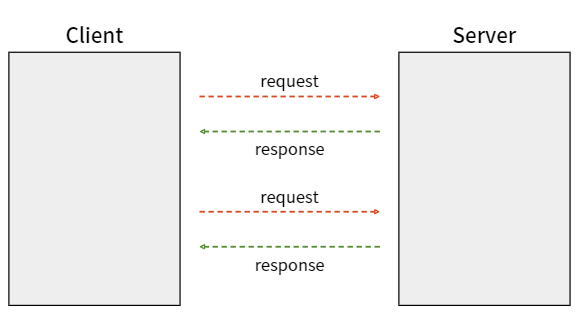
- 클라이언트가 일정한 주기로 서버에 업데이트 요청을 보내는 방식
- 지속적인 HTTP 요청이 발생하므로 리소스 낭비가 발생
✔️WebSocket (Server Push)
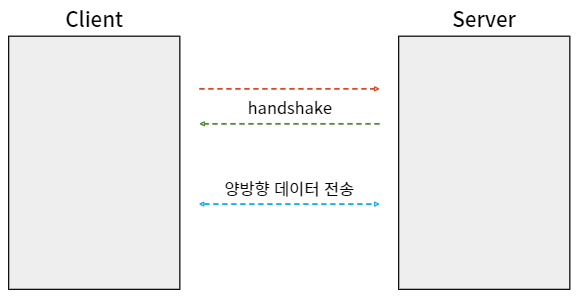
- 실시간 양방향 통신을 위한 스펙
- 서버와 브라우저가 지속적으로 연결된 TCP라인을 통해 실시간으로 데이터를 주고받는다
- 연결을 유지하며 클라이언트-서버 간 양방향 통신이 가능
- 주로 채팅, 게임, 주식 차트 등에 사용
✔️SSE (Server Push)
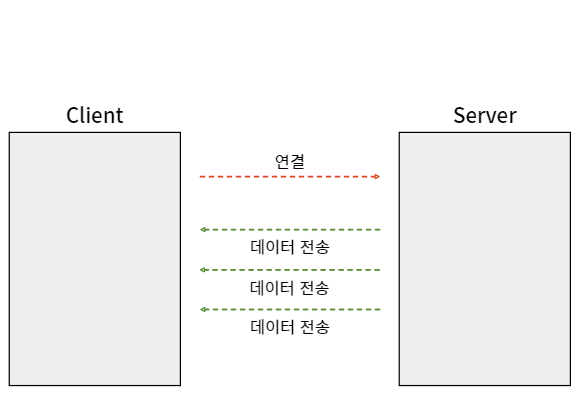
- 이벤트가 [서버 -> 클라이언트] 방향으로만 흐르는 단방향 통신
- 클라이언트가 주기적으로 HTTP요청을 보낼 필요가 없이 HTTP연결을 통해 서버에서 클라언트로 데이터 전달 가능
2. SSE (Server-Sent-Events)
- polling은 지속적인 요청을 보내야해서 낭비가 있을것 같다
- WebSocket처럼 양방향 통신도 필요없기 때문에
- 웹소켓에 비해 가볍고 단방향 소통을 지원하는 SSE방식이 알림에 나은 선택지가 될것같다
1). 특징
- 실시간 업데이트: 서버에서 클라이언트로 실시간으로 데이터 전송 가능
- 단방향 통신: 클라이언트는 서버에 요청을 보내고, 서버는 이벤트를 푸시하는 방식으로 동작
- HTTP 프로토콜 사용: 기존의 HTTP 프로토콜을 사용하므로 별도 라이브러리 필요 X
- 접속에 문제가 있으면 자동으로 재연결 시도
2). 단점
- SSE는 결국 지속적인 연결이라 네트워크 연결을 소비하게 되고, 많은 수의 클라이언트가 동시에 연결을 유지하면 서버의 처리 부하가 증가할 수 있다
3). 통신개요
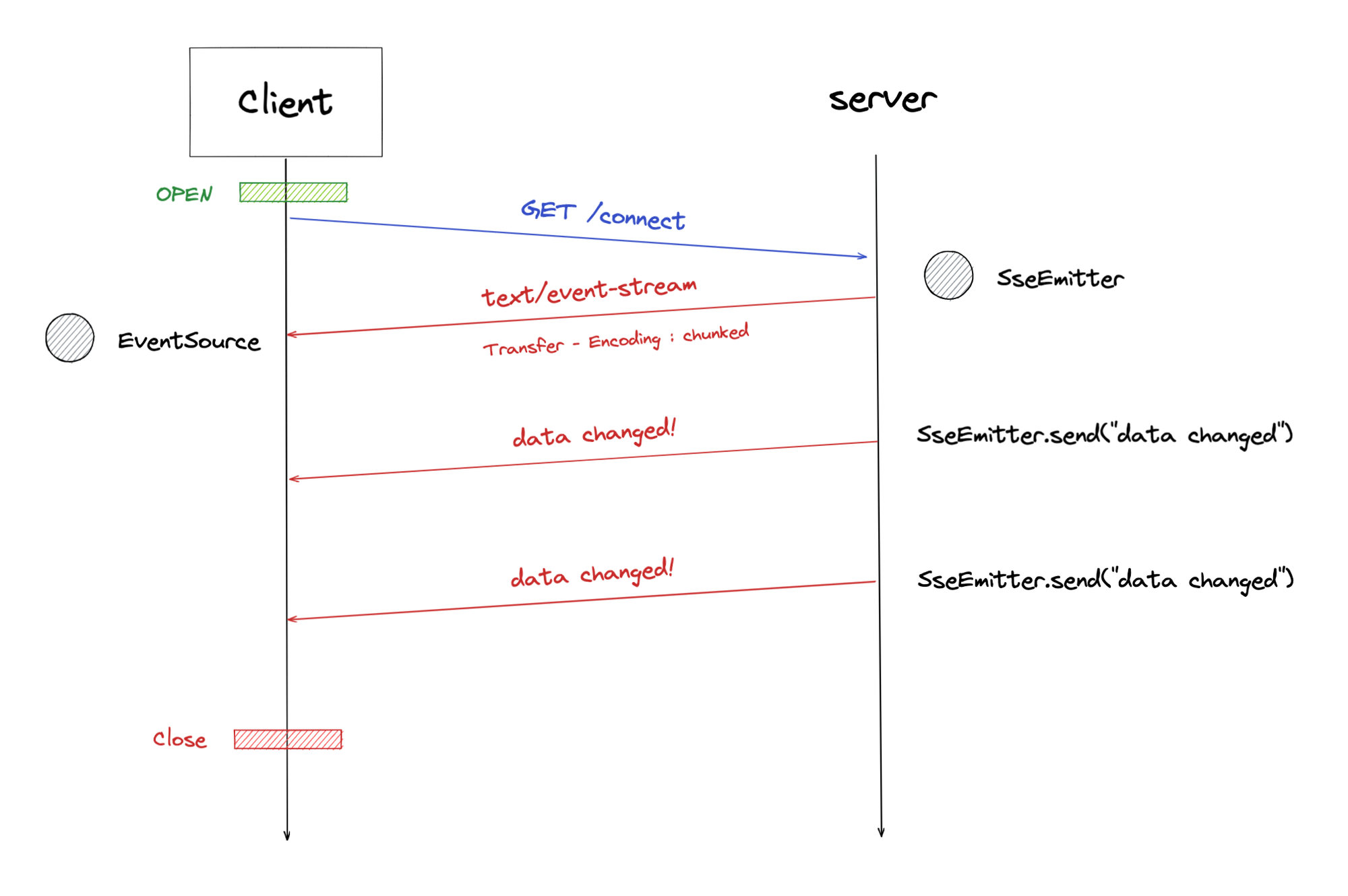
Client: SSE Subscribe 요청
- 우선 클라이언트에서 서버의 이벤트를 구독하기 위한 요청을 보내야 한다
- 이벤트의 미디어 타입은
text/enet-stream이 표준으로 정해져 있다
GET /connect HTTP/1.1
Accept: text/event-stream
Cache-Control: no-cache
Server: Subscription에 대한 응답
- 응답의 미디어 타입은 text/event-stream이다
- 이때 Transfer-Encoding은 chunked로 설정한다. 서버는 동적으로 생성된 컨텐츠를 스트리밍하기 때문에 본문의 크기를 미리 알 수 없기 때문이다.
HTTP/1.1 200
Content-Type: text/event-stream;charset=UTF-8
Transfer-Encoding: chunked
Server: 이벤트 전달
- 클라이언트에서 subscribe를 하고나면 서버는 해당 클라이언트에게 비동기적으로 데이터를 전송할 수 있다
- 이 때 데이터는 UTF-8로 인코딩된 텍스트 데이터만 가능하다 (바이너리 데이터는 불가능)
- 서로 다른 이벤트는 줄바꿈 문자 두개(\n\n)로 구분되며 각각의 이벤트는 한 개 이상의
name:value필드로 구성되며 이들은 줄바꿈 문자 하나로 구분된다
event: type1
data: An event of type1.

event: type2
data: An event of type2.
3. 스프링에서의 SSE
- Spring에서 SSE 프로토콜을 지원하기 위해 SseEmitter라는 클래스를 만들었다
- 비동기적으로 통신 가능하며 재시도 처리도 가능하고, 이벤트를 잃지 않도록 처리 가능
- SseEmitter는 여러 클라이언트와 동시에 통신이 가능하다
0). 스프링에서 SSE
- SSE는 지속적인 연결이기 때문에 커넥션풀이 부족해질 가능성이 있다
- 트랜잭션을 사용하지 않더라도 웹소켓과 달리 HTTP 연결을 지속하기 때문에 부족하다
- WebFlux처럼 비동기로 처리하거나 프론트(React, Vue.js)와 연결해서 하지 않는 이상 한계점이 명확하다
- 스프링부트는 스레드기반(servlet)이기 때문에 서버자원이 크게 소모될 가능성이 있다
1). Emitter Repository
package techit.gongsimchae.domain.portion.notifications.repository;

import lombok.extern.slf4j.Slf4j;
import org.springframework.stereotype.Repository;
import org.springframework.web.servlet.mvc.method.annotation.SseEmitter;

import java.util.Map;
import java.util.concurrent.ConcurrentHashMap;
import java.util.stream.Collectors;

@Repository
@Slf4j
public class EmitterRepository {

    private final Map<String, SseEmitter> emitters = new ConcurrentHashMap<>();
    private final Map<String, Object> eventCache = new ConcurrentHashMap<>();

    /**
     * SseEmitter 저장하는 메서드
     */
    public SseEmitter save(String id, SseEmitter sseEmitter) {
        emitters.put(id, sseEmitter);
        return sseEmitter;
    }

    /**
     * 데이터를 InMemory로 저장하는 메서드
     */
    public void saveEventCache(String id, Object event) {
        eventCache.put(id, event);
    }

    public Map<String, SseEmitter> findAllStartById(String id) {
        return emitters.entrySet().stream()
                .filter(entry -> entry.getKey().startsWith(id))
                .collect(Collectors.toMap(Map.Entry::getKey, Map.Entry::getValue));
    }

    public Map<String, Object> findAllEventCacheStartWithId(String id) {
        return eventCache.entrySet().stream()
                .filter(entry -> entry.getKey().startsWith(id))
                .collect(Collectors.toMap(Map.Entry::getKey, Map.Entry::getValue));
    }

    public void deleteById(String id) {
        emitters.remove(id);
    }

    public void deleteAllEmitterStartWithId(String id) {
        emitters.forEach(
                (key, emitter) -> {
                    if(key.startsWith(id)) {
                        emitters.remove(key);
                    }
                }
        );
    }

    public void deleteAllEventCacheStartWithId(String id) {
        eventCache.forEach(
                (key, event) ->{
                    if(key.startsWith(id)) {
                        eventCache.remove(key);
                    }
                }
        );
    }


}
2). NotificationService
Service
@RequiredArgsConstructor
@Slf4j
public class NotificationService {
    private static final Long DEFAULT_TIMEOUT = 1000 * 60 * 5L;
    private static final String INQUIRY_URL = "/mypage/inquiry/list";
    private final NotificationRepository notificationRepository;
    private final EmitterRepository emitterRepository;
    private final UserRepository userRepository;
    private final ObjectMapper objectMapper;

    public SseEmitter subscribe(PrincipalDetails principalDetails, String lastEventId) {
        Long userId = getCurrentUser(principalDetails).getId();
        String id = userId + "_" + System.currentTimeMillis();

        SseEmitter emitter = emitterRepository.save(id, new SseEmitter(DEFAULT_TIMEOUT));

        emitter.onCompletion(() -> emitterRepository.deleteById(id));
        emitter.onTimeout(() -> emitterRepository.deleteById(id));


        // 오류방지를 위한 더미 이벤트 전송
        sendToClient(emitter, id, new NotificationResponse("EventStream Created, [userId=" + id+"]"));

        // 클라이언트가 미수신한 Event 목록이 존재할 경우 전송하여 Event 유실을 방지
        if (!lastEventId.isBlank()) {
            Map<String, Object> events = emitterRepository.findAllEventCacheStartWithId(String.valueOf(userId));
            events.entrySet().stream()
                    .filter(entry -> lastEventId.compareTo(entry.getKey()) < 0)
                    .forEach(entry -> sendToClient(emitter, entry.getKey(), entry.getValue()));
        }
        return emitter;

    }

    /**
     * 1:1 문의 답변이 왔을 때 알려주는 메서드
     */
    @Transactional
    public void alertAboutInquiry(User receiver, String content) {
        Notifications notifications = Notifications.builder()
                .user(receiver).isRead(0).url(INQUIRY_URL).content(content).notificationType(NotificationType.INQUIRY).build();
        notificationRepository.save(notifications);
        NotificationResponse notificationResponse = new NotificationResponse(notifications);

        Map<String, SseEmitter> sseEmitters = emitterRepository.findAllStartById(String.valueOf(receiver.getId()));
        log.debug("sseEmitters: {}", sseEmitters);
        sseEmitters.forEach(
                (key, emitter) -> {
                    emitterRepository.saveEventCache(key, notifications);
                    sendToClient(emitter, key, notificationResponse);
                }
        );
    }

    public  NotificationResponse getAllNotifications(PrincipalDetails principalDetails) {
        User user = userRepository.findByLoginId(principalDetails.getUsername()).orElseThrow(() -> new CustomWebException("not found user"));
        List<NotificationRespDtoWeb> result = notificationRepository.findAllUserId(user.getId()).stream()
                .map(NotificationRespDtoWeb::new).collect(Collectors.toList());

        long unreadCount = result.stream().filter(n -> !n.getIsRead().equals(0)).count();
        return new NotificationResponse(result, unreadCount);
    }

    /**
     * 모든 알림창을 읽음표시로 해주는 메서드
     */
    @Transactional
    public void readNotification(PrincipalDetails principalDetails) {
        User user = userRepository.findByLoginId(principalDetails.getUsername()).orElseThrow(() -> new CustomWebException("not found user"));
        notificationRepository.findAllUnreadNotificationsByUser(user.getId()).forEach(Notifications::read);
    }

    private void sendToClient(SseEmitter emitter, String id, Object data) {

        try{
            emitter.send(SseEmitter.event()
                    .id(id)
                    .name("sse")
                    .data(objectMapper.writeValueAsString(data)));
            log.debug("emitter {}, id = {}, data = {}",emitter,id,data);
        } catch (IOException e) {
            emitterRepository.deleteById(id);
            log.error("SSE 연결 오류! ", e);
        }
    }

    /**
     * SecurityContext에서 유저를 찾는 메서드
     */
    private User getCurrentUser(PrincipalDetails principalDetails) {
        return userRepository.findByLoginId(principalDetails.getUsername()).orElseThrow(() -> new RuntimeException("User not found"));
    }
}
3). Js
    const eventSource = new EventSource("http://localhost:8081/subscribe");

    eventSource.addEventListener('sse', async function (event) {
        console.log(event.data);

        const data = JSON.parse(event.data);
        console.log(data.content)
        console.log(data.body)
        console.log(data.title)
        console.log(data)
        if (data.content.startsWith('EventStream')) {
            console.log("EventStream 데이터 무시");
            return;
        }

        // 알림을 표시하는 함수
        const showNotification = () => {
            const notification = new Notification(data.notificationType, {
                body: data.content
            });

            setTimeout(() => {
                notification.close();
            }, 10 * 1000); // 10초 후에 알림 닫기

            notification.addEventListener('click', () => {
                window.open(data.url, '_blank');
            });
        };

        // 알림 권한 확인 및 요청
        if (Notification.permission === 'granted') {
            showNotification();
        } else if (Notification.permission === 'default') {
            const permission = await Notification.requestPermission();
            if (permission === 'granted') {
                showNotification();
            }
        }
    });

    // SSE 연결 오류 처리
    eventSource.addEventListener('error', function (event) {
        console.error('SSE 연결 오류:', event);
    });