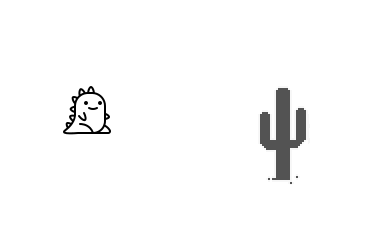
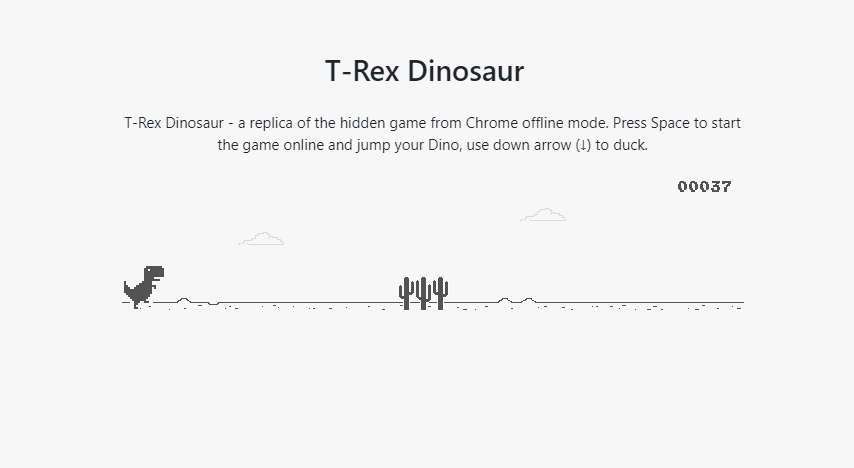
자바스크립트를 이용하여 공룡게임을 만들어보자. 장애물을 피하면서 달리는 간단한 게임이다.
예시 )
1. 세팅
index.html과 main.js 파일을 생성한다.
- index.html
<body>
  <canvas id="canvas"></canvas>
  <script src="main.js"></script>
</body>- main.js
var canvas = document.getElementById("canvas");
var ctx = canvas.getContext("2d");

canvas.width = window.innerWidth - 100;
canvas.height = window.innerHeight - 100; // width와 height는 마음대로 설정해도 된다
canvas를 사용하기 위한 세팅이다.
2. 주인공(공룡) 만들기
장애물을 피해다니는 이 게임의 주인공을 만들어보자.
var dino = {
  x: 10,
  y: 200,
  width: 50,
  height: 50,
  draw() {
    ctx.fillStyle = "green";
    ctx.fillRect(this.x, this.y, this.width, this.height);
    // x, y좌표만큼 떨어진 곳에서 width, height크기만큼 초록색 사각형을 그려줌
  },
};

dino.draw();
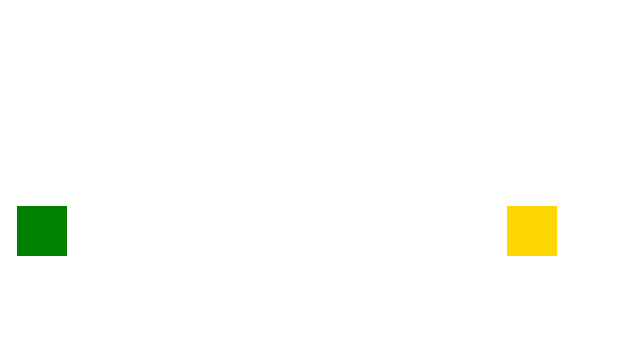
일단 간단하게 공룡을 초록색 사각형으로 만들어놓으려고 한다.
내가 만들 공룡의 속성을 오브젝트에 저장해놓았다. dino.draw() 를 사용하면 내가 지정한 속성대로 사각형이 하나 그려진다.

3. 장애물(선인장) 만들기
장애물의 속성도 오브젝트에 저장하면 좋을 것 같다. 장애물 클래스를 생성한다.
class Cactus {
  constructor() {
    this.x = 500;
    this.y = 200;
    this.width = 50;
    this.height = 50;
  }
  draw() {
    ctx.fillStyle = "gold";
    ctx.fillRect(this.x, this.y, this.width, this.height);
  }
}

var cactus = new Cactus();
cactus.draw();
장애물도 일단 사각형으로 만들것이기 때문에 위의 코드와 비슷하다.
4. 애니메이션 효과 주기
requestAnimationFrame() 를 사용하면 인자로 넣은 함수를 1초당 60번정도(사용자의 모니터 주사율에 따라 다름) 실행할 수 있다.
function movement() {
  requestAnimationFrame(movement);

  ctx.clearRect(0, 0, canvas.width, canvas.height); // 캔버스 초기화
  dino.x++; // x 1 증가
  dino.draw(); // dino 그리기
}
캔버스를 비우고, x를 1증가시키고, x를 1 증가시킨 사각형을 그리는 과정을 1초에 60번 반복실행하는 코드이다. 부드럽게 사각형이 움직인다.
장애물 구현하기
- 장애물이 일정 시간마다 생성되어 공룡에게 다가오는 효과를 구현해보자. 공룡이 달리는 것처럼 보이게 할 수 있다.
var timer = 0; // 장애물 생성시간 제어를 위한 변수 생성
var cacti = []; // 장애물을 담아놓기 위한 array생성

function movement() {
  requestAnimationFrame(movement);
  timer++; // 1초에 120 증가
  ctx.clearRect(0, 0, canvas.width, canvas.height);

  if (timer % (120 * 1.5) === 0) { // 1.5초마다
    var cactus = new Cactus(); // 장애물 생성
    cacti.push(cactus); // array에 저장
  }

  cacti.forEach((a, i, o) => {
    if (a.x + a.width < 0) { // 장애물이 화면 밖으로 나가면
      o.splice(i, 1); // array맨 앞 요소 삭제
    }
    a.x--;
    a.draw();
  });
  dino.draw();
}

movement();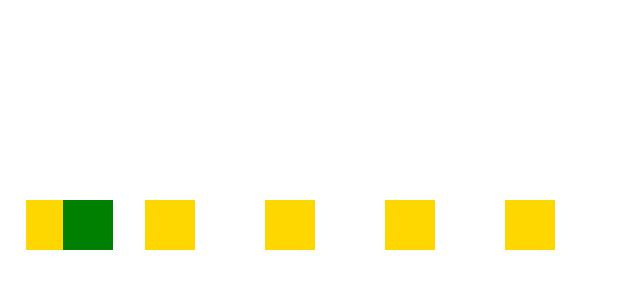
내 컴퓨터를 확인해보니 requestAnimationFrame()함수를 1초당 120번 실행시키고 있었다. 그래서 if문에서 120 * 초로 장애물 생성시간을 설정하였다.
점프 구현하기
var timer = 0;
var cacti = [];
var jumpTimer = 0; // 추가된 코드
var jumpSpeed = 3; // 추가된 코드 (점프 속도를 변경하려면 이 값을 변경한다)
var jump = false; // 추가된 코드

document.addEventListener("keydown", function (e) { // 추가된 코드
  if (e.code === "Space") {
    jump = true; // 스페이스바를 누르면 jump변수를 true로 변경
  }
});

function movement() {
  requestAnimationFrame(movement);
  timer++;
  ctx.clearRect(0, 0, canvas.width, canvas.height);

  if (timer % (120 * 2) === 0) {
    var cactus = new Cactus();
    cacti.push(cactus);
  }

  cacti.forEach((a, i, o) => {
    if (a.x + a.width < 0) {
      o.splice(i, 1);
    }
    a.x -= 3;
    a.draw();
  });
  // 여기까지 기존 코드

  if (jump == true) { // jump변수가 true이면
    dino.y -= jumpSpeed; // y축의 값이 감소하면서 위로 점프
    jumpTimer++; // jumpTimer 증가
  }

  if (jumpTimer > 60) { // jumpTimer가 60이 넘으면
    jump = false; // jump변수 false로 변경(y축 값 감소효과 사라짐)
    jumpTimer = 0; // jumpTimer 초기화
  }

  if (jump == false) { // jump변수가 false이면
    if (dino.y < 250) { // 기존 좌표로 내려올때까지
      dino.y += jumpSpeed; // y축 증가
    }
  }
  dino.draw();
}

movement();
5. 충돌 확인하기
공룡과 장애물의 충돌은 좌표간의 차이를 계산해서 구현해볼것이다.
- 앞에서 충돌
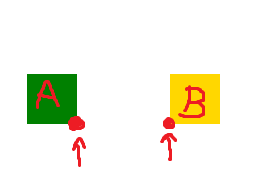
B의 왼쪽 x좌표-A의 오른쪽 x좌표<0
- 위에서 충돌
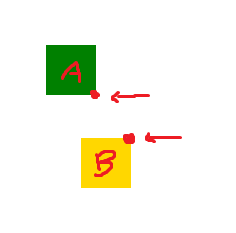
B의 위쪽 y좌표-A의 아래쪽 y좌표<0
1번과 2번을 동시에 만족하면 충돌로 간주한다.
var animation;

function movement() {
  animation = requestAnimationFrame(movement); // cancelAnimationFrame()을 사용하기 위해 변수에 담는다
  // ... 이하생략
}

function checkCollision(dino, cactus) {
  var xDistance = cactus.x - (dino.x + dino.width);
  var yDistance = cactus.y - (dino.y + dino.height);
  if (xDistance < 0 && yDistance < 0) { // 동시에 만족하면
    cancelAnimationFrame(animation); //requestAnimationFrame() 중지
  }
}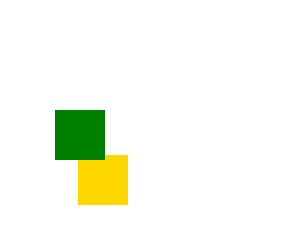
서로 충돌하니 게임이 종료되었다.
6. 이미지 넣기
네모 대신 이미지를 넣어보자
var cactusPic = new Image();
cactusPic.src = "cactus.png";

var dinoPic = new Image();
dinoPic.src = "dino.png";
원하는 이미지를 같은 경로에 저장하고 다음과 같이 이미지 객체를 생성하고 src를 지정해준다.
var dino = {
  x: 70,
  y: 250,
  width: 50,
  height: 50,
  draw() {
    // ctx.fillStyle = "green";
    // ctx.fillRect(this.x, this.y, this.width, this.height);

    ctx.drawImage(dinoPic, this.x, this.y);
  },
};

class Cactus {
  constructor() {
    this.x = 600;
    this.y = 250;
    this.width = 50;
    this.height = 50;
  }
  draw() {
    // ctx.fillStyle = "gold";
    // ctx.fillRect(this.x, this.y, this.width, this.height);
    ctx.drawImage(cactusPic, this.x, this.y);
  }
}
dino와 Cactus의 draw() 함수에 drawImage()함수를 이용하여 이미지를 넣는다.
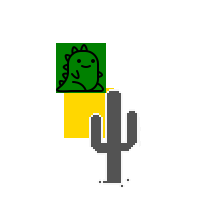
- 주석을 해제하면 원래 쓰던 사각형(히트박스)를 확인할 수 있다.
- 히트박스를 보면서 이미지에 맞게 충돌 좌표를 설정하면 좋을 것 같다.
7. 전체코드
index.html
<!DOCTYPE html>
<html lang="en">
  <head>
    <meta charset="UTF-8" />
    <meta name="viewport" content="width=device-width, initial-scale=1.0" />
    <title>공룡 게임</title>
  </head>
  <body>
    <canvas id="canvas" style="border: 1px solid black"></canvas>
    <script src="main.js"></script>
  </body>
</html>
main.js
var canvas = document.getElementById("canvas");
var ctx = canvas.getContext("2d");

canvas.width = 750;
canvas.height = 450;

var timer = 0;
var cacti = [];
var jumpTimer = 0;
var jumpSpeed = 3; // 점프속도 조절
var animation;
var controlHeight = 250; // 높이조절(dino, cactus, 점프 바닥)

var cactusPic = new Image();
cactusPic.src = "cactus.png";

var dinoPic = new Image();
dinoPic.src = "dino.png";

var dino = {
  x: 70,
  y: controlHeight,
  width: 50,
  height: 50,
  draw() {
    // ctx.fillStyle = "green";
    // ctx.fillRect(this.x, this.y, this.width, this.height);
    ctx.drawImage(dinoPic, this.x, this.y);
  },
};

class Cactus {
  constructor() {
    this.x = 600;
    this.y = controlHeight;
    this.width = 50;
    this.height = 50;
  }

  draw() {
    // ctx.fillStyle = "gold";
    // ctx.fillRect(this.x, this.y, this.width, this.height);
    ctx.drawImage(cactusPic, this.x, this.y);
  }
}

function movement() {
  animation = requestAnimationFrame(movement);
  timer++;
  ctx.clearRect(0, 0, canvas.width, canvas.height);

  if (timer % (120 * 2) === 0) {
    var cactus = new Cactus();
    cacti.push(cactus);
  }

  cacti.forEach((a, i, o) => {
    if (a.x + a.width < 0) {
      o.splice(i, 1);
    }

    checkCollision(dino, a);
    a.x -= 3;
    a.draw();
  });

  if (jump == true) {
    dino.y -= jumpSpeed;
    jumpTimer++;
  }

  if (jump == false) {
    if (dino.y < controlHeight) {
      dino.y += jumpSpeed;
    }
  }

  if (jumpTimer > 60) {
    jump = false;
    jumpTimer = 0;
  }

  dino.draw();
}

var jump = false;
document.addEventListener("keydown", function (e) {
  if (e.code === "Space") {
    jump = true;
  }
});

function checkCollision(dino, cactus) {
  var xDistance = cactus.x - (dino.x + dino.width);
  var yDistance = cactus.y - (dino.y + dino.height);
  if (xDistance < 0 && yDistance < 0) {
    cancelAnimationFrame(animation);
  }
}

movement();