컨테이닝 블록 Containing Block 이란?
어떠한 요소의 크기와 위치에 영향을 주는 영역으로, 대부분 가장 가까운 블록 레벨 조상의 콘텐츠 영역이 컨테이닝 블록이 된다. (예외도 있다)
width,height,padding,margin값과 절대 위치(absolute,fixed등)로 설정된 요소의 offset 값은 자신의 컨테이닝 블록으로부터 계산됨- offset:
top,bottom,left,right
- offset:
- 초기 컨테이닝 블록은 루트 요소인
html으로 viewport 또는 페이지 영역(페이지로 나뉘는 매체일 경우)의 크기와 같음
컨테이닝 블록의 조건
해당 요소의 position 속성값에 따라 어떤 요소를 컨테이닝 블록으로 삼을지 조건이 달라진다. 속성값 별로 컨테이닝 블록을 구성하는 요소를 알아보자.
static, relative, sticky 일 경우
- 조상 블록 컨테이너(
inline-block,block,list-item등)의 콘텐츠 영역 경계 - 가장 가까우면서 서식 맥락을 형성하는 조상 요소:
table,flex,grid, 또는 블록 컨테이너 자기 자신
absolute 일 경우
position속성이static이 아닌 가장 가까운 조상의 내부 영역
- 조상이inline일 때: 패딩을 포함한 콘텐츠 영역을 따라 위치가 지정됨
- 조상이inline이 아닐 때: 패딩을 제외한 콘텐츠 영역 경계를 따라 위치가 지정됨
fixed 일 경우
- viewport
- 페이지 영역(페이지로 나뉘는 매체인 경우)
absolute 또는 fixed 인 경우
transform,perspective,fillter속성이none이 아닌 것will-change속성이transform이나perspective인 것- firefox는
will-change속성이filter일 때도 적용
- firefox는
contain속성이paint인 것
예제
예제를 통해 position: absolute의 컨테이닝 블록이 transform 속성에 따라 달라지는 것을 살펴보자.
아래와 같이 HTML 문서가 작성되었을 때를 비교로 하면
<div class="relative-item">
  이 요소는 position: relative입니다.
  <div class="transform-item">
    이 요소는 transform 속성을 껐다 켰다
    <span class="absolute-item">이 요소는 position: absolute입니다</span>
  </div>
</div>
먼저, transform 속성이 선언되지 않았을 경우,

.relative-item {
  position: relative;
  width: 400px;
  height: 300px;
  background-color: lightblue;
  border: 2px solid black;
}

.transform-item {
  width: 50%;
  height: 140px;
  margin-top: 100px;
  margin-right: 100px;
  color: #fff;
  background-color: blue;
}

.absolute-item {
  position: absolute;
  top: 80px;
  left: 80px;
  width: 50%;
  background-color: orange;
}
가장 상위의 relative-item에게는 position: relative를 선언하고, 가장 하위의 absolute-item에게는 position: absolute를 선언한다. 그러면, 위 그림과 같이 absolute-item은 relative-item을 기준으로 위치가 지정된 것을 볼 수 있다.
다음은 transform 속성이 선언된 경우,
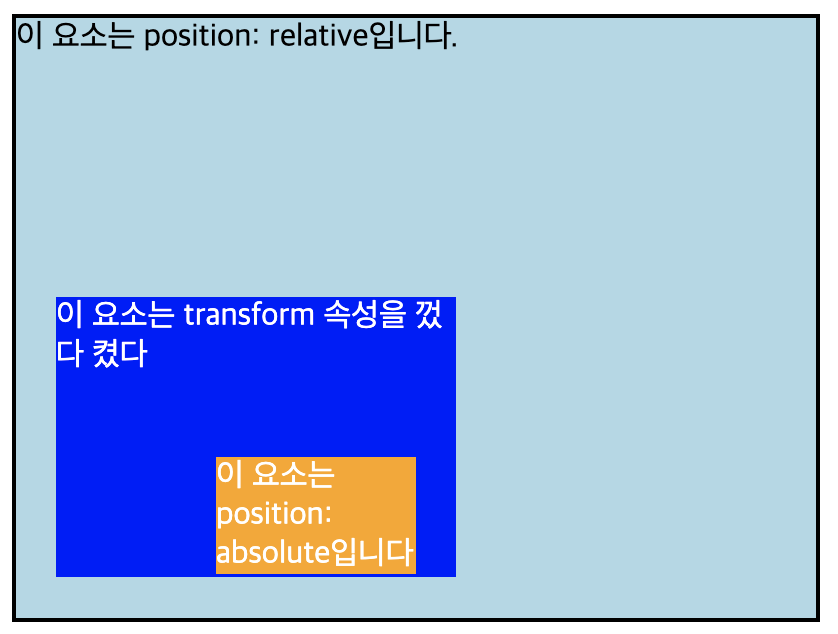
.relative-item {
  position: relative;
  width: 400px;
  height: 300px;
  background-color: lightblue;
  border: 2px solid black;
}

.transform-item {
  width: 50%;
  height: 140px;
  margin-top: 100px;
  margin-right: 100px;
  color: #fff;
  background-color: blue;
  transform: translate(20px, 20px);
}

.absolute-item {
  position: absolute;
  top: 80px;
  left: 80px;
  width: 50%;
  background-color: orange;
}
transform: translate(20px, 20px)을 선언하자, absolute-item가 가장 상위 요소인 relative-item에 선언했던 position: relative를 무시하고 transform-item을 기준으로 위치가 지정된 것을 볼 수 있다.
컨테이닝 블록으로 요소의 크기, 위치 값 구하기
컨테이닝 블록의 height 값에 영향을 받는 속성
- 요소의
height,top,bottom
- 컨테이닝 블록의height값을 이용하여 위 속성의 백분율을 계산함
- 컨테이닝 블록의position이relative거나static이면 컨테이닝 블록의 height값이 명시되지 않았기 때문에 요소의 백분율은 0이 됨
컨테이닝 블록의 width 값에 영향을 받는 속성
- 요소의
width,left,right,padding,margin
- 컨테이닝 블록의width값을 이용하여 위 속성의 백분율을 계산함
참고

박선우