Code Splitting
Tanstack Router도 코드 스플릿팅을 지원한다. 이걸로 번들 사이즈 줄여서 로드 퍼포먼스를 올려보자.
Tanstack Router가 코드 스플릿팅을 하는 전략
1. Critical Route Configuration
현재 route를 렌더하고 데이터 로딩 프로세스를 최대한 빨리 하는데 필요한 코드를 취하는 전략
- Path Parsing/Serialization
- Search Param Validation
- Loaders, Before Load
- Route Context
- Meta
- Links
- Scripts
- Styles
- All other route configuration not listed below
2. Non-Critical/Lazy Route Configuration
현재 route에서 필요 없고 수요에 의해 로드되는 코드를 취하는 전략
- Route Component
- Error Component
- Pending Component
- Not-found Component
Using the .lazy.tsx suffix
파일 기반 라우팅을 사용하면 .lazy.tsx로 파일명을 만들고 createLazyFileRoute 함수를 사용해서 Code Splitting을 쉽게 구현할 수 있다.
Exception __root.tsx
__root.tsx는 Code Splitting을 지원하지 않는다. 당연하다. 현재 라우트에 영향받지 않는 최상단 라우터이기 때문이다.
왜 도대체 파일 하나로 Code Splitting을 지원하지 않는거야?
Tanstack Router는 거의 대부분의 프레임워크에서 지원하는 코드 추출 기능을 채택하지 않았다. 단순성을 유지하기 위함이다(이게 핑계가 되나...). 근데 이게 번들러도 내가 원하는 데로 CLI에서 선택할 수 있게 만들어 줘서 Code Splitting을 지원하는 번들러를 개발자가 따로 적용할 수 있다.
// dashbaord/route.tsx
import { getDashboard } from '@/service/getDashboard';
import { createFileRoute } from '@tanstack/react-router';

export const Route = createFileRoute('/dashboard')({
  loader: getDashboard,
});

// dashboard/route.lazy.tsx
import { createLazyFileRoute } from '@tanstack/react-router';

const Page = () => {
  ...
}

export const Route = createLazyFileRoute('/dashboard')({
  component: Page,
});
routeTree.gen.ts의 결과는 다음과 같이 나온다. Dashboard의 route는 lazy loading으로 불러온 것을 알 수 있다.
/* prettier-ignore-start */

/* eslint-disable */

// @ts-nocheck

// noinspection JSUnusedGlobalSymbols

// This file is auto-generated by TanStack Router

// Import Routes

import { Route as rootRoute } from './routes/__root';
import { Route as IndexImport } from './routes/index';
import { Route as DashboardRouteImport } from './routes/dashboard/route';


// Create/Update Routes

const IndexRoute = IndexImport.update({
  path: '/',
  getParentRoute: () => rootRoute,
} as any);

const DashboardRouteRoute = DashboardRouteImport.update({
  path: '/vendor/dashboard',
  getParentRoute: () => rootRoute,
} as any).lazy(() => import('./routes/dashboard/route.lazy').then((d) => d.Route));

// Populate the FileRoutesByPath interface

declare module '@tanstack/react-router' {
  interface FileRoutesByPath {
    '/': {
      preLoaderRoute: typeof IndexImport;
      parentRoute: typeof rootRoute;
    };
    '/vendor/dashboard': {
      preLoaderRoute: typeof VendorDashboardRouteImport;
      parentRoute: typeof rootRoute;
    };
  }
}

// Create and export the route tree

export const routeTree = rootRoute.addChildren([
  IndexRoute,
  DashboardRouteRoute,
]);

/* prettier-ignore-end */
빌드된 결과는 아래와 같다. lazy loading을 위해 하나의 파일이 따로 빌드된 것을 알 수 있다.
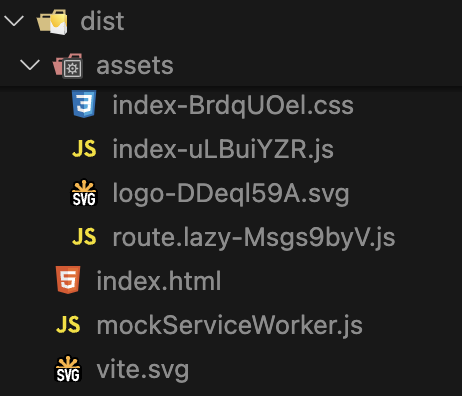
lazy loading되는 파일 하나로 묶기
- Before
posts.tsx
posts.lazy.tsx

- After
posts
|_ route.tsx
|_ route.lazy.tsx
Virtual Routes
만약 Route에서 모든 것을 다 분리했다면 Route가 빈 껍데기로 남을 수 있다.
import { createFileRoute } from '@tanstack/react-router';

export const Route = createFileRoute('/dashboard')({
  // empty
});
그럴 때는 그냥 route.tsx를 지우면 된다. 그래도 generator가 알아서 route를 생성해준다.
/* prettier-ignore-start */

/* eslint-disable */

// @ts-nocheck

// noinspection JSUnusedGlobalSymbols

// This file is auto-generated by TanStack Router

import { createFileRoute } from '@tanstack/react-router'

// Import Routes

import { Route as rootRoute } from './routes/__root'
import { Route as IndexImport } from './routes/index'

// Create Virtual Routes
// 여기서 route를 알아서 생성해 줌
const DashboardRouteLazyImport = createFileRoute('/dashboard')()

// Create/Update Routes

const IndexRoute = IndexImport.update({
  path: '/',
  getParentRoute: () => rootRoute,
} as any)

const DashboardRouteLazyRoute = DashboardRouteLazyImport.update({
  path: '/dashboard',
  getParentRoute: () => rootRoute,
} as any).lazy(() =>
  import('./routes/dashboard/route.lazy').then((d) => d.Route),
)


// Populate the FileRoutesByPath interface

declare module '@tanstack/react-router' {
  interface FileRoutesByPath {
    '/': {
      preLoaderRoute: typeof IndexImport
      parentRoute: typeof rootRoute
    }
    '/dashboard': {
      preLoaderRoute: typeof DashboardRouteLazyImport
      parentRoute: typeof rootRoute
    }
  }
}

// Create and export the route tree

export const routeTree = rootRoute.addChildren([
  IndexRoute,
  DashboardRouteLazyRoute,
])

/* prettier-ignore-end */
Route Inclusion/Exclusion
prefix나 ignorePrefix를 이용해서 특정 파일만 골라 route를 생성할 수 있다. 이건 route 디렉토리에 route가 아닌 파일을 제거하는데 유용하다.
이걸 하려면 선행작업부터 이루어져야 한다.
먼저 tanstack/cli를 설치한다.
pnpm install @tanstack/router-cli그리고 최상위 디렉토리에 config 파일을 하나 만든다.
// tsr.config.json

{
  "routesDirectory": "./src/routes",
  "generatedRouteTree": "./src/routeTree.gen.ts",
  "routeFileIgnorePrefix": "-",
  "quoteStyle": "single"
}
config 파일 속성은 아래에서 찾아보고 필요한 걸 넣어보자
https://tanstack.com/router/latest/docs/framework/react/guide/file-based-routing#options
Route Inclusion Example
라우터 포함은 routerFilePrefix 속성에 ~를 넣는 것이 국룰이다.
{
  "routeFilePrefix": "~",
  "routesDirectory": "./src/routes",
  "generatedRouteTree": "./src/routeTree.gen.ts"
}
Route Exclusion Example
라우터 제외는 routerFileIgnorePrefix 속성에 -를 넣는 것이 국룰이다.
{
  "routeFilePrefix": "~",
  "routesDirectory": "./src/routes",
  "generatedRouteTree": "./src/routeTree.gen.ts"
}