들어가며
자바 웹프로젝트에서 회원정보나 게시글 내용과 같은 것을 저장하고 조회하려면 데이터베이스를 연동해야 한다.
Spring과 Spring boot에서는 다른 방법으로 데이터베이스를 연동하지만 자바의 기본 라이브러리에서는 JDBC를 통해서 데이터를 추가, 수정, 삭제, 조회하는 SQL문을 실행할 수 있다.
준비
JDBC
JDBC는 데이터베이스 관리 시스템에 접근할 수 있는 자바 API이다. 이 글에서는 자바를 MariaDB에 연결하여 사용할 것이다.
Java connector 다운로드
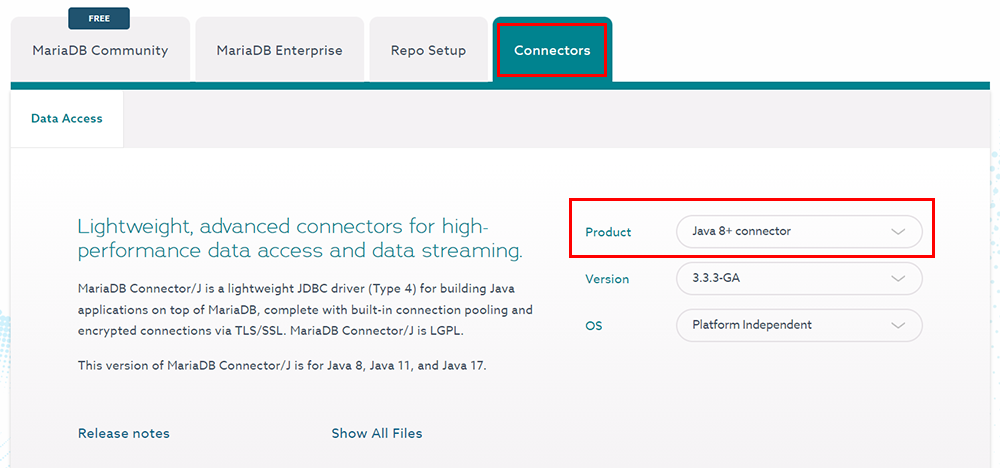
MariaDB 공식 사이트에서 download를 누르고 Connectors > Java connector를 선택하여 mariadb-java-client파일을 다운로드 받는다.
라이브러리에 connector 추가
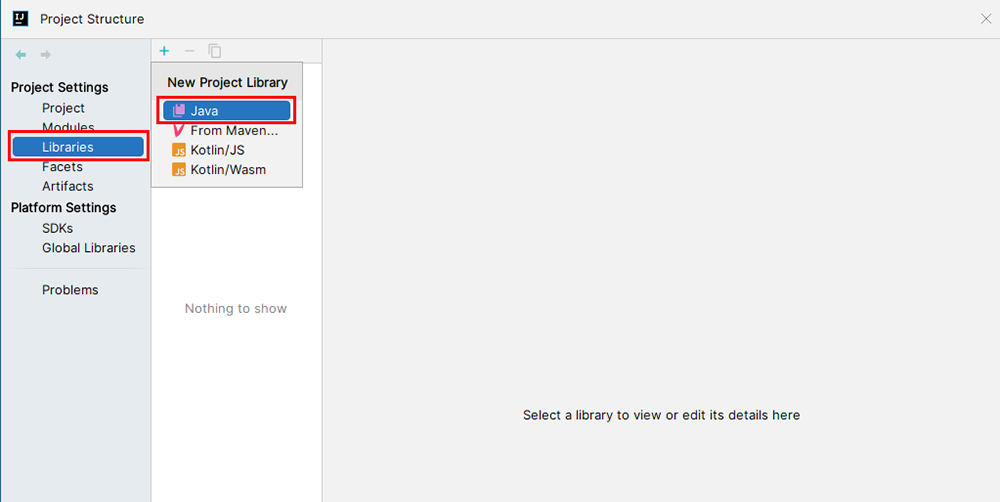
인텔리제이의 Project Structure에서 Libraries를 누르고 Java를 선택한다. 그리고 앞에서 다운로드 받은 Java connector 파일을 선택하고 OK를 누른다.
데이터 추가/변경/삭제
Statement 활용
public static void insertUser(String id, String name) {
	Connection con = null;
    Statement stmt = null;

    String sql = String.format("insert into user (id, name) values ('%s', '%s')", id, name);

    try {
		con = DriverManager.getConnection("jdbc:mariadb://localhost:3306/testdb", "user", "password");
        stmt = con.createStatement(); // 연결된 데이터베이스로 SQL문을 보내는 Statement 객체 생성
        int count = stmt.executeUpdate(sql);
    } catch(SQLException e) {
        e.printStackTrace();
    } finally {
    	try {
        	if (stmt != null) {
            	stmt.close();
            }
            if (con != null) {
            	con.close();
            }
        } catch (SQLException e) {
        	e.printStackTrace();
        }
    }
}
데이터를 추가, 변경, 삭제하는 작업은 다음과 같이 진행된다.
Connection객체 생성Connection을 통해Statement객체 생성- SQL문 실행
- DB 연결 해제
try-catch-finally 구문을 사용하는 이유는 예외가 발생하는 경우에도 finally를 실행하여 DB와의 연결을 해제하기 위해서이다. 데이터의 변경과 제거의 경우에도 SQL문을 알맞게 바꿔서 위와 같이 실행하면 된다.
getConnection()은 DriverManager가 주어진 데이터베이스의 URL로 연결을 시도한다.
executeUpdate()는 괄호 안의 sql문을 실행시키고 영향을 받은 행의 수를 리턴한다.
close()는 개체의 데이터베이스와 JDBC 리소스를 자동으로 해제될 때까지 기다리지 않고 즉시 해제한다.
PreparedStatement 활용
public static void insertUser(String id, String name) {
	Connection con = null;
    PreparedStatement pstmt = null;

    String sql = "insert into user (id, name) values (?, ?)";

    try {
		con = DriverManager.getConnection("jdbc:mariadb://localhost:3306/testdb", "user", "password");
        pstmt = con.prepareStatement(sql); // 연결된 데이터베이스로 SQL문을 보내는 PreparedStatement 객체 생성
        pstmt.setString(1, id); // 첫번째 물음표에 id 대입
        pstmt.setString(2, name); // 두번째 물음표에 name 대입
        int count = pstmt.excuteUpdate();
    } catch(SQLException e) {
        e.printStackTrace();
    } finally {
    	try {
        	if (pstmt != null) {
            	pstmt.close();
            }
            if (con != null) {
            	con.close();
            }
        } catch (SQLException e) {
        	e.printStackTrace();
        }
    }
}Statement의 코드를 PreparedStatement를 사용하는 코드로 바꿨다. 데이터베이스에 같은 작업이 수행되지만 PreparedStatement에서는 파라미터(물음표)를 사용한 SQL문을 보낸다.
setString()은 지정된 파라미터(물음표)에 String형식의 값을 대입한다.
데이터 조회
한 개의 데이터 조회
public static void viewUser(String id) {
	Connection con = null;
    Statement stmt = null;
    ResultSet rs = null;

    String sql = String.format("select id, name from user where id = '%s'", id);

    try {
		con = DriverManager.getConnection("jdbc:mariadb://localhost:3306/testdb", "user", "password");
        stmt = con.createStatement();
        rs = stmt.executeQuery(sql);
        if(rset != null && rs.next()) {
        	String resultId = rs.getString("id");
            String resultName = rs.getString("name");
            System.out.println(resultId + "," + resultName);
        }
    } catch(SQLException e) {
        e.printStackTrace();
    } finally {
    	try {
        	if (rs != null) {
            	rs.close();
            }
        	if (stmt != null) {
            	stmt.close();
            }
            if (con != null) {
            	con.close();
            }
        } catch (SQLException e) {
        	e.printStackTrace();
        }
    }
}
데이터 조회는 다음과 같이 진행된다.
Connection객체 생성Connection을 통해Statement객체 생성- SQL문 실행 후
ResultSet반환 ResultSet에서 컬럼 값 조회- DB 연결 해제
select문은 데이터베이스로부터 결과를 받아와야 하는데 그 결과가 ResultSet에 저장된다. 따라서 ResultSet을 통해 컬럼의 값을 조회할 수 있다.
executeQuery()는 SQL문을 전달하고 ResultSet을 반환한다.
getString()은 지정된 컬럼의 값을 String 형식으로 가져온다.
여러 개의 데이터 조회
public static void viewAllUsers() {
	Connection con = getConnection();
    Statement stmt = null;
    ResultSet rs = null;
    String sql = "select * from user";
    try {
    	stmt = con.createStatement();
        rs = stmt.executeQuery(sql);
        if(rs != null) {
        	while(rs.next()) {
            String resultId = rs.getString(1);
            String resultName = rs.getString(2);
            System.out.println("id : " + resultId + ", name : " + resultName);
            }
        }
    } catch(SQLException e) {
    	e.printStackTrace();
    } finally {
    	try {
        	if (rs != null) {
            	rs.close();
            }
            if (stmt != null) {
            	stmt.close();
            }
            if (con != null) {
            	con.close();
            }
        } catch (SQLException e) {
        	e.printStackTrace();
        }
    }
}
여러 개의 데이터는 반복문을 사용하여 조회할 수 있다. next()는 현재 위치에서 다음 행이 있으면 true, 다음 행이 없으면 false를 반환한다. 따라서 다음 행이 있으면 조회하는 작업이 반복되어서 여러 개의 데이터를 가져올 수 있다.
정리
자바와 데이터베이스를 연결하여 데이터를 저장하거나 불러올 수 있다. 이 작업은 일정한 순서에 따라 진행되며 데이터를 추가, 변경, 삭제를 할 때와 조회할 때의 방식이 달랐다.
JDBC를 이용하는 방식이 많이 쓰이지는 않지만 DB를 다루는 방법 중 가장 기본이 되기 때문에 알아두면 다른 기술을 익히는데 도움이 될 것이다.
참고
