Flutter / Native FCM 정리
1. Flutter
foreground
void main() async {
  /// Firebase연동
  WidgetsFlutterBinding.ensureInitialized();
  await Firebase.initializeApp(
    options: DefaultFirebaseOptions.currentPlatform,
  );

  /// FCM
  fcmInit();
  fcmHandler();

  runApp(MyApp());
}


late final AndroidNotificationChannel channel;
late final FlutterLocalNotificationsPlugin flutterLocalNotificationsPlugin;

Future<void> fcmInit() async {

  // Android 버전 8 (API 26) 이상부터는 채널 설정이 필수
  channel = const AndroidNotificationChannel(
    'high_importance_channel',
    'High Importance Notifications',
    description: 'This channel is used for important notifications.',
    importance: Importance.max,
  );


    // foreground에서의 푸시 알림 표시를 위한 local notifications 설정
  flutterLocalNotificationsPlugin = FlutterLocalNotificationsPlugin();
   await flutterLocalNotificationsPlugin
      .resolvePlatformSpecificImplementation<
      AndroidFlutterLocalNotificationsPlugin>()
      ?.createNotificationChannel(channel);


  /// iOS background권한 체킹, 요청
  await FirebaseMessaging.instance.requestPermission(
    alert: true,
    // 권한요청 알림 화면 표시 (default true)
    announcement: true,
    // 시리를 통해 알림의 내용을 자동으로 읽을 수 있는 권한 요청 (default false)
    badge: true,
    // 뱃지 업데이트 권한 요청 (default true)
    carPlay: true,
    // carPlay 환경에서 알림 표시 권한 요청 (default false)
    criticalAlert: true,
    // 중요 알림에 대한 권한 요청, 해당 알림 권한을 요청하는 이유를 appStore등록시 명시해야 함
    provisional: true,
    // 무중단 알림 권한 요청 (default false)
    sound: true, // 알림 소리 권한 요청 (default true)
  );


  /// iOS forground notification 권한
  await FirebaseMessaging.instance.setForegroundNotificationPresentationOptions(
    alert: true,
    badge: true,
    sound: true,
  );

  // Token
  await getToken();

}


Future<String?> fcmHandler() async {

  /// foreground 수신처리
  FirebaseMessaging.onMessage.listen((message) {
        _flutterNotificationShow(message);
        _moveToMessageScreen(message);
  });


  // background 처리
  FirebaseMessaging.onBackgroundMessage(_firebaseMessagingBackgroundHandler);

}


/// FCM 토큰 값
Future<String?> getToken() async {
  String? token = await FirebaseMessaging.instance.getToken();

  return token;
}

/// FCM Message 형태 설정
void _flutterNotificationShow(RemoteMessage message) {

    flutterLocalNotificationsPlugin?.show(
      message.hashCode,
      message.data['title'].toString(),
      message.data['body'].toString(),

      // message.notification?.title.toString(),
      // message.notification?.body.toString(),
      NotificationDetails(
          android: AndroidNotificationDetails(
            channel!.id,
            channel!.name,
            channelDescription: channel!.description,
            icon: 'app_icon', // 알람 앱바 이미지
            largeIcon:
            DrawableResourceAndroidBitmap('@drawable/app_icon'), // 알람 내 이미지
          ),
          iOS: DarwinNotificationDetails(badgeNumber: 1)
      ),
    );

}
Background
/// Android background Handler
Future<void> _firebaseMessagingBackgroundHandler(RemoteMessage message) async {

  AndroidNotificationChannel channel = const AndroidNotificationChannel(
    'high_importance_channel',
    'High Importance Notifications',
    description: 'This channel is used for important notifications.',
    importance: Importance.max,
  );

  // foreground에서의 푸시 알림 표시를 위한 local notifications 설정
  FlutterLocalNotificationsPlugin flutterLocalNotificationsPlugin =
  FlutterLocalNotificationsPlugin();
  await flutterLocalNotificationsPlugin
      .resolvePlatformSpecificImplementation<
      AndroidFlutterLocalNotificationsPlugin>()
      ?.createNotificationChannel(channel);

  // _flutterNotificationShow(message);
  // 위 함수를 호출하면 flutterLocalNotificationPlugin이 lateInit이므로 background에서 초기화되지 않았단는 에러로 메시지 노출이 안됨.
  flutterLocalNotificationsPlugin?.show(
    message.hashCode,
    message.data['title'].toString(),
    message.data['body'].toString(),

    // message.notification?.title.toString(),
    // message.notification?.body.toString(),
    NotificationDetails(
        android: AndroidNotificationDetails(
          channel!.id,
          channel!.name,
          channelDescription: channel!.description,
          icon: 'app_icon', // 알람 앱바 이미지
          largeIcon:
          DrawableResourceAndroidBitmap('@drawable/app_icon'), // 알람 내 이미지
        ),
        iOS: DarwinNotificationDetails(badgeNumber: 1)
    ),
  );

}
Notification setting
/// FCM Message 형태 설정
void _flutterNotificationShow(RemoteMessage message) {

    flutterLocalNotificationsPlugin?.show(
      message.hashCode,
      message.data['title'].toString(),
      message.data['body'].toString(),

      // message.notification?.title.toString(),
      // message.notification?.body.toString(),
      NotificationDetails(
          android: AndroidNotificationDetails(
            channel!.id,
            channel!.name,
            channelDescription: channel!.description,
            color: const Color.fromARGB(0, 255, 0, 0),
            icon: '@mipmap/logo', // 알람 앱바 이미지
            largeIcon:
            DrawableResourceAndroidBitmap('@mipmap/ico_manager'), // 알람 내 이미지
          ),
          iOS: DarwinNotificationDetails(badgeNumber: 1)
      ),
    );

}
2. Native방식
MainActivity
@Override
public void onCreate(Bundle savedInstanceState) {
	super.onCreate(savedInstanceState);

	// FCM초기화
	// get Token
	Task<String> token = FirebaseMessaging.getInstance().getToken();
	token.addOnCompleteListener(new OnCompleteListener<String>() {
		@Override
		public void onComplete(@NonNull Task<String> task) {
			if(task.isSuccessful()){
				WMLog.d("FCM Token", task.getResult());
			}
		}
	});
	Intent fcm = new Intent(this , MYFirebaseMessagingService.class);
	startService(fcm);

 }
MyFirebaseMessagingService
public class MyFirebaseMessagingService extends FirebaseMessagingService {

    @Override
    public void onNewToken(@NonNull String newToken) {
        super.onNewToken(newToken);

        // token refresh

    }

    // fore,background 모두 해당 메소드 호출
    @Override
    public void onMessageReceived(@NonNull RemoteMessage remoteMessage) {
        super.onMessageReceived(remoteMessage);

        // 수신한 메시지 처리
        // Data 형식
        if (remoteMessage.getData().size() > 0) {
            fcmInit(remoteMessage);
        }

    }


    private void fcmInit(RemoteMessage remoteMessage) {


        String title = remoteMessage.getData().get("title");
        String message = remoteMessage.getData().get("body");
//        String test = remoteMessage.getData().get("testMessage");
//
//        WMLog.d("###" , "### testMesssage : " + test);

        Resources resources = this.getResources();
        Bitmap largeIcon = BitmapFactory.decodeResource(resources , R.drawable.profile_001);

        final String CHANNEL_ID = "ChannerID";
        NotificationManager mManager = (NotificationManager)getSystemService(Context.NOTIFICATION_SERVICE);
        if(Build.VERSION.SDK_INT >= Build.VERSION_CODES.O) {
            final String CHANNEL_NAME = "ChannerName";
            final String CHANNEL_DESCRIPTION = "ChannerDescription";
            final int importance = NotificationManager.IMPORTANCE_HIGH;

            // add in API level 26
            NotificationChannel mChannel = new NotificationChannel(CHANNEL_ID, CHANNEL_NAME, importance);
            mChannel.setDescription(CHANNEL_DESCRIPTION);
            mChannel.enableLights(true);
            mChannel.enableVibration(true);
            mChannel.setVibrationPattern(new long[]{100, 200, 100, 200});
            mChannel.setLockscreenVisibility(Notification.VISIBILITY_PRIVATE);
            mManager.createNotificationChannel(mChannel);
        }

        // 알람 세부 설정
        NotificationCompat.Builder builder = new NotificationCompat.Builder(this, CHANNEL_ID);
        builder.setSmallIcon(R.drawable.ico_manager);
        builder.setLargeIcon(largeIcon);
        builder.setAutoCancel(true);
        builder.setDefaults(Notification.DEFAULT_ALL);
        builder.setWhen(System.currentTimeMillis());
        builder.setContentTitle(title);
        builder.setContentText(message);
        if(Build.VERSION.SDK_INT < Build.VERSION_CODES.O) {
            builder.setContentTitle(title);
            builder.setVibrate(new long[]{500, 500});
        }
        mManager.notify(0, builder.build());


    }


}
포그라운드에서는 onMessageReceived가 불려서 설정한 값대로 알람 데이터가 뿌려지는데,
백그라운드에서는 해당 함수를 타지 않는다.
같은 값을 지정해주려면 remoteMessage를 getNotification가 아닌 data로 코드단에서 설정하던가 서버에서 보낼 때 "data"형식으로만 보내면 된다.
FCM 테스트
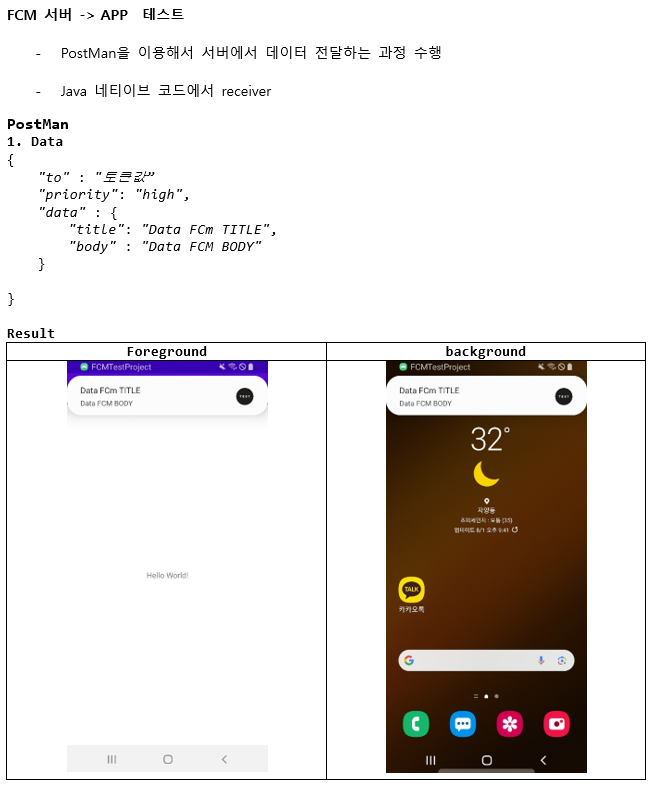

AOS + IOS 메시지 정보 전달
postman
POST : https://fcm.googleapis.com/fcm/send
Headers
Content-Type : application/json
Authorization : key=Firebase Cloud Messaging API(서버키)입력
Body
	"to" : "기기 토큰 값",
    "priority": "high",
    "content_available" : true,

    "notification" : {},

    "data" : {
        "title" : "data title",
        "body" : "data body"
    },

    // 플랫폼 별 전송 옵션 메시지
    // AOS
		"android" : {
			...
		},

    // IOS
    "apns": {
        "payload" : {
            "aps" : {
				...
            }
        }
}- priority : "low , high"
- 해당 메시지의 중요도를 높임
- content_available : bool
- IOS에서 백그라운드 알람을 받기위한 설정
- notification : { }
- data : { }
- 원하는 데이터를 넣어서 보낼 수 있는 커스텀 데이터
- title, body이외에 다른 값들도 map형식으로 넣어서 보내주고 읽을 수 있다.
플랫폼 별 전송 옵션 메시지
기본 전송 옵션은 모든 플랫폼의 공통 알림 제목과 콘텐츠를 보내지만, 플랫폼 별로 재정의하여 보냅니다.
- android : { }
- AOS메시지 옵션 추가
- apns : { }
- IOS메시지 옵션 추가

많은 것을 배웠습니다, 감사합니다.