📌 Intro
- 이번 포스트은 깃허브의 메인 페이지인 프로필을 꾸미는 방법을 공유하기 위해 작성되었습니다.
- 포스트 목차는 다음과 같습니다~!
Step 1. Special Repository 생성
Step 2. Header 꾸미기
Step 3. Body 꾸미기
☝ Step 1. Special Repository 생성
Repository > New 클릭
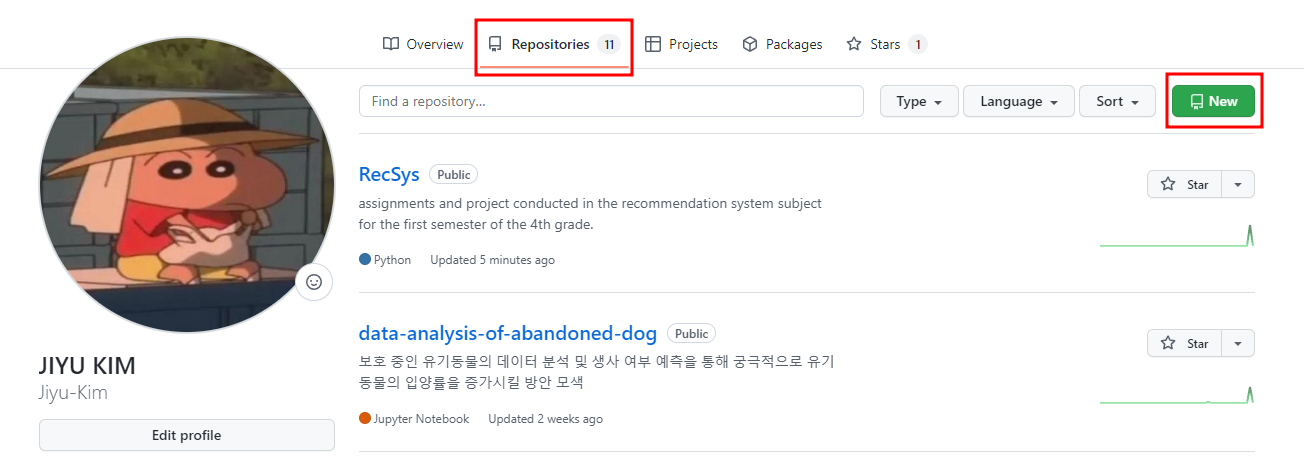
이제 Special Repository를 본격적으로 생성할 겁니다.
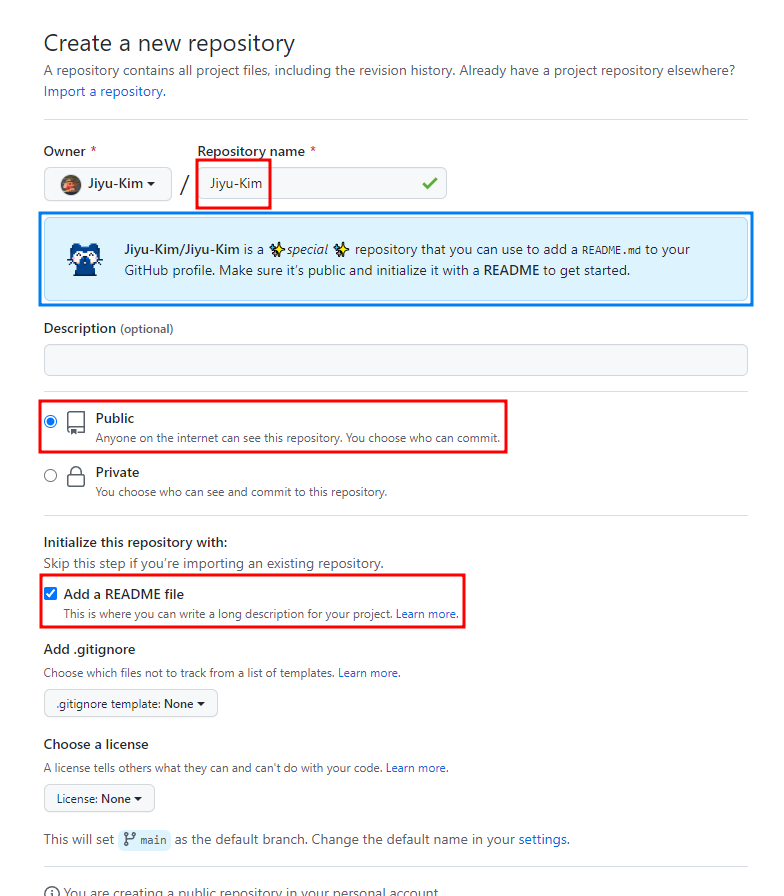
🚨 첫 번째 빨간 박스 안에 적는 Repository name은 반드시 본인 Github user name과 동일해야 합니다.
동일하게 적으면 바로 아래 파란 박스와 같이 Github profile를 위한 special repsitory라고 알려주는 고양이가 나타납니다. (안 나타나면 Repository name을 잘못 적으신 겁니다🙄)
🚨 두 번째 빨간 박스와 같이 Repository를 Public으로 설정해주세요.
🚨 세 번째 빨간 박스와 같이 Repository에 Add a README file을 설정해주세요.
이제 Create repository를 클릭하시면 프로필을 위한 Special Repository 생성을 마치신겁니다!
☝ Step 2. Header 꾸미기
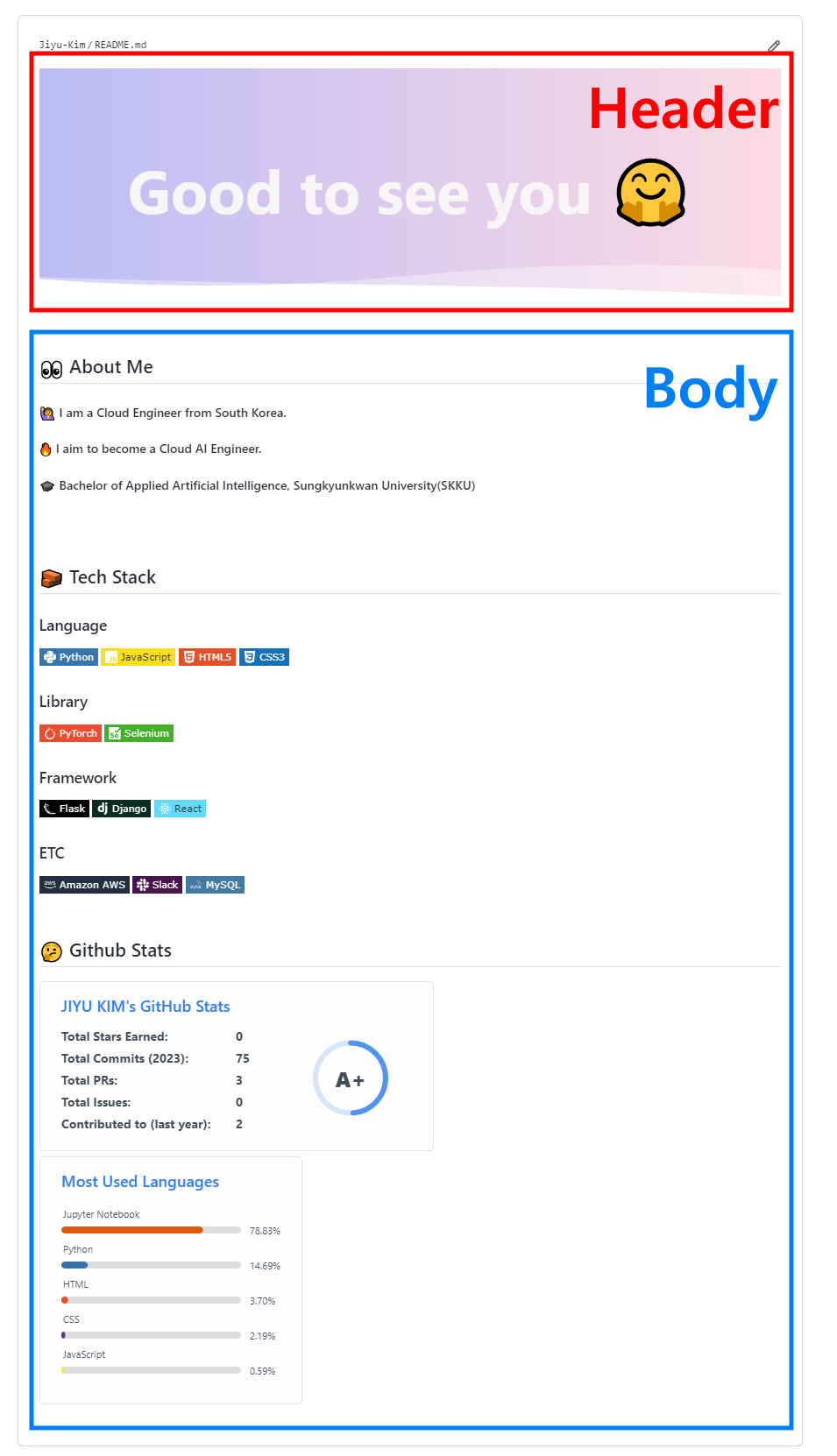
아래와 같이 프로필을 Header 부분과 Body 부분으로 나누어 작업을 진행할 것입니다.
프로필 Header는 아래의 Repository를 이용해 꾸밉니다.
🔗 https://github.com/kyechan99/capsule-render#soft
-
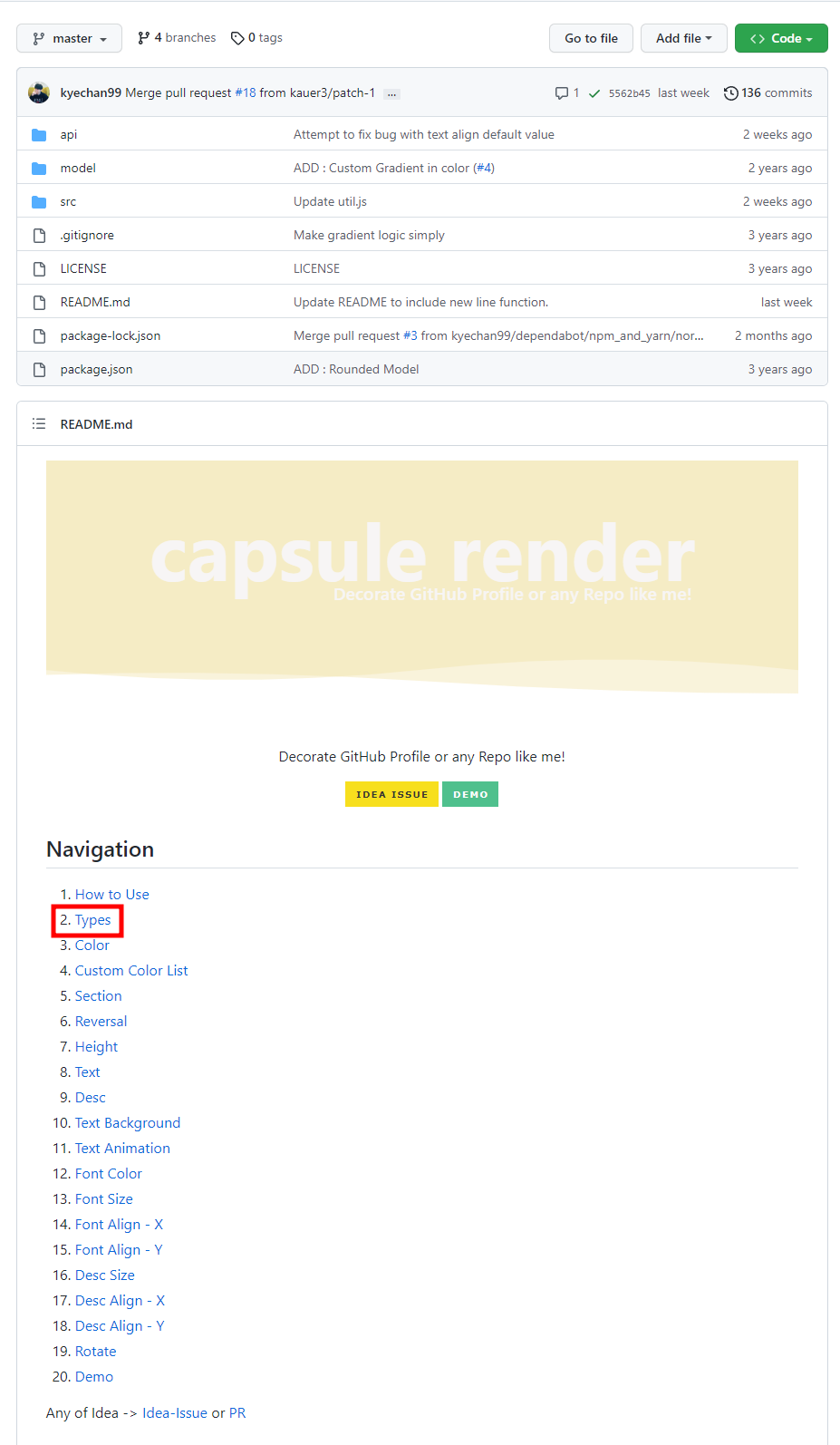
링크를 타고 레포지토리에 들어가서
Navigation아래 있는2. Type을 클릭합니다.
-
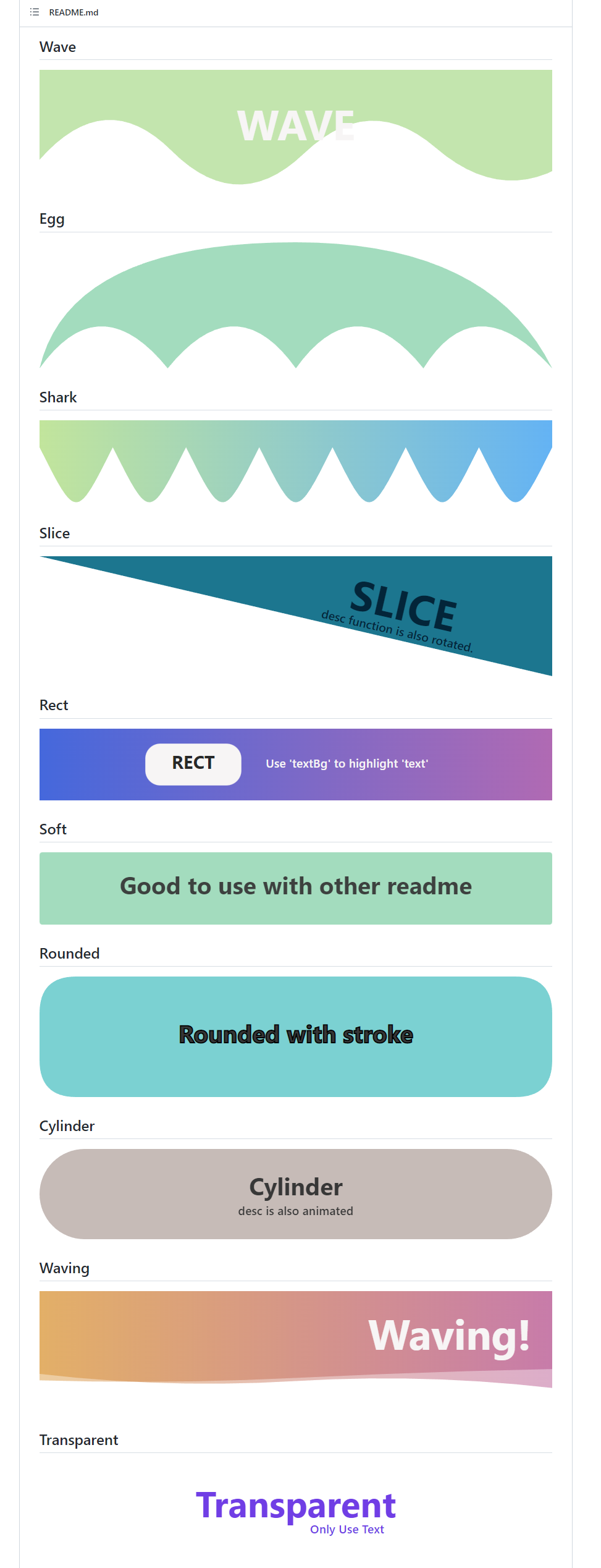
원하는 type을 고르고, type 이름을 기억해둡니다. (저는 Waving을 선택했습니다🌊)
-
코드를 복사한 후 Step 1에서 만든 레포지토리 README.md에 붙여넣기 합니다.
README.md에 붙혀넣은 후type=slice부분의slice를 위에서 고른 type 이름으로 바꾸어 줍니다.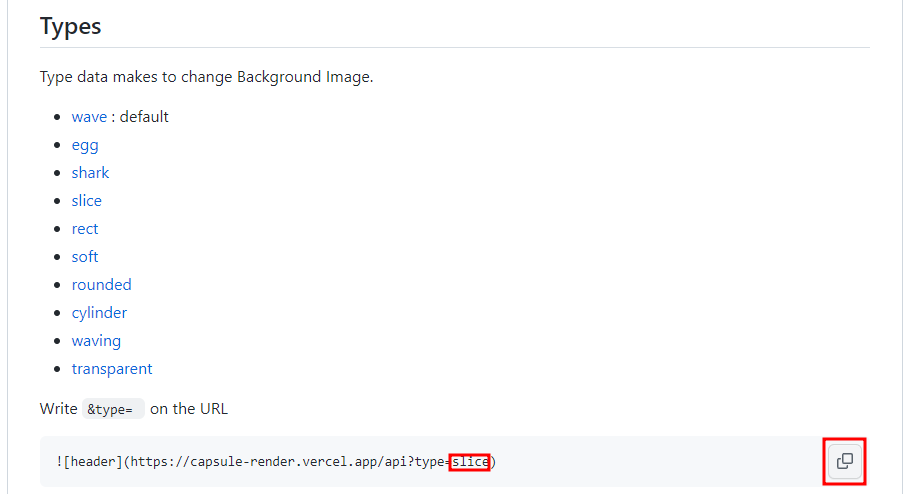
-
코드를 각자의 입맛에 맞게 수정합니다.

저 같은 경우에는 아래와 같이 수정했습니다.참고로, text는 띄어쓰기를 위해서는
%20, 줄바꿈을 위해서는-nl-을 입력하시면 됩니다.tpye = wavingheight = 300text = Good%20to%20see%20you%20%F0%9F%A4%97(= Good to see you🤗)color = gradient
// Header 코드

// 예시 코드
☝ Step 3. Body 꾸미기
Body를 꾸밀 수 있는 README.md 전용 위젯은 정말 다양합니다.
그 중 오늘은 제가 사용했던 아래 3가지만 소개하겠습니다.
Github Emoji
👀🦕🦦🐬🐟🙄😲🤢🤮🥝🥥🍇🍑🍒🍓🌴🍀
Tech Stack Badge

GitHub Stats Card
Top Languages Card
-
Github Emoji
🔗 https://gist.github.com/rxaviers/7360908
위의 링크로 들어가서 이모지 별 코드를 복사한 후 , Step 1에서 만든 레포지토리 README.md에 가서 붙혀넣기 합니다.
-
Tech Stack Badge
🔗 https://simpleicons.org/?q=api
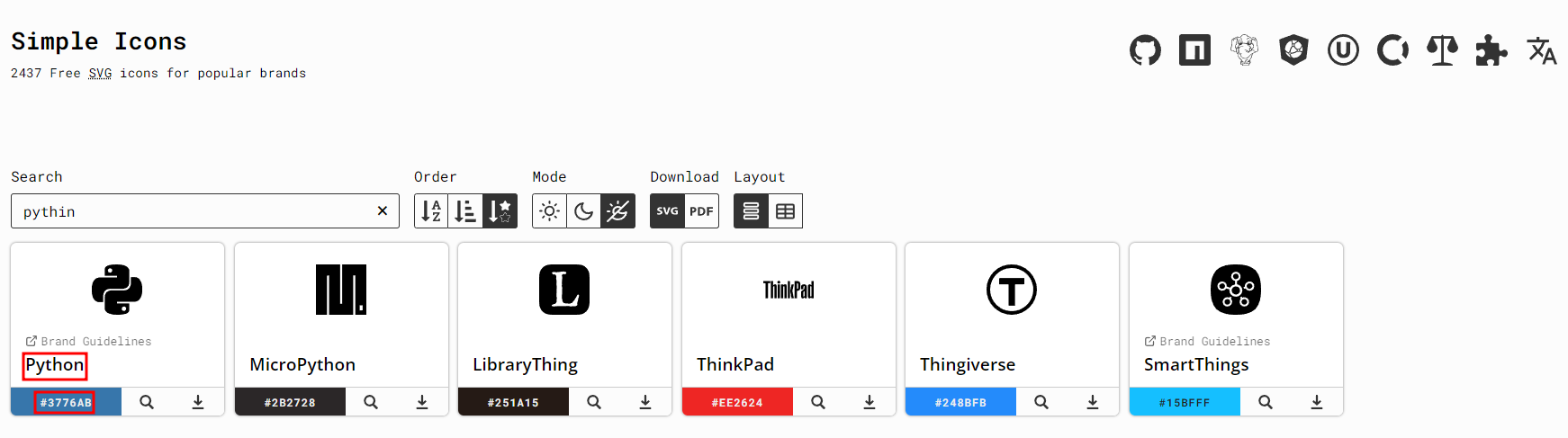
위의 링크로 들어가서 기술 별 공식 명칭과 색상 코드를 찾아 복사한 후, Step 1에서 만든 레포지토리 README.md에 가서 아래 코드와 함께 붙혀넣기 합니다.
// 배지 코드
<img src="https://img.shields.io/badge/공식_명칭-공식_색상_코드?style=flat-square&logo=공식_명칭&logoColor=white"/>

// 파이썬 배지 코드 예시
<img src="https://img.shields.io/badge/Python-3776AB?style=flat-square&logo=Python&logoColor=white"/>

// 자바스크립트 배지 코드 예시
<img src="https://img.shields.io/badge/JavaScript-F7DF1E?style=flat-square&logo=JavaScript&logoColor=white"/>

// Mysql 배지 코드 예시
<img src="https://img.shields.io/badge/MySQL-4479A1?style=flat-square&logo=MySQL&logoColor=white"/>
-
Github Stats
🔗 https://github.com/anuraghazra/github-readme-stats
위의 링크로 들어가서 코드를 찾아 복사한 후, Step 1에서 만든 레포지토리 README.md에 가서 아래 코드를 붙혀넣기 합니다.
🚨 코드에서
username은 반드시 본인 Github username으로 바꿔줍니다.
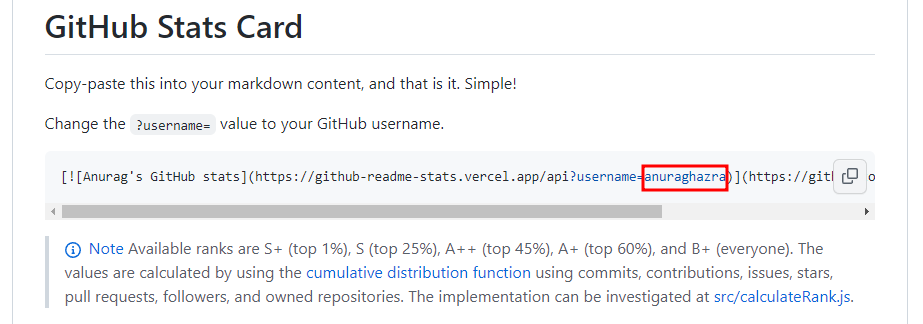
// Github Stats Card 코드 [](https://github.com/anuraghazra/github-readme-stats) // 예시 코드 [](https://github.com/anuraghazra/github-readme-stats)
-
Top Languages Card
🔗 https://github.com/anuraghazra/github-readme-stats
위의 링크로 들어가서 코드를 찾아 복사한 후, Step 1에서 만든 레포지토리 README.md에 가서 아래 코드를 붙혀넣기 합니다.
🚨 코드에서
username은 반드시 본인 Github username으로 바꿔줍니다.
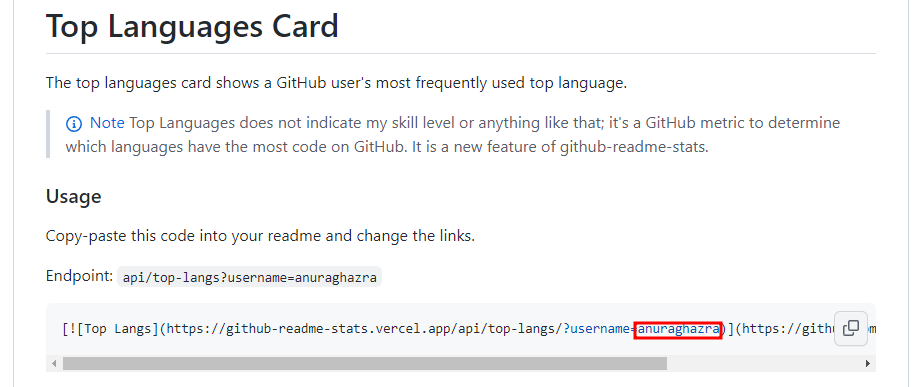
// Top Languages 코드 [](https://github.com/anuraghazra/github-readme-stats) // 예시 코드 [](https://github.com/anuraghazra/github-readme-stats)
🤦♀️'난 도저히 모르겠다...!' 하시는 분
제 프로필 README.md 입니다.
사용하세요~!
<div>
<!--Header-->

</div>
<div>
<!--Body-->
## 👀 About Me
#### :raising_hand: I am a Cloud Engineer from South Korea.<br/>
#### :fire: I aim to become a Cloud AI Engineer.<br/>
#### :mortar_board: Bachelor of Applied Artificial Intelligence, Sungkyunkwan University(SKKU)
<br/>
<br/>
## 🧱 Tech Stack
### Language
<!--Python-->
<img src="https://img.shields.io/badge/Python-3776AB?style=flat-square&logo=Python&logoColor=white"/>
<!--JavaScript-->
<img src="https://img.shields.io/badge/JavaScript-F7DF1E?style=flat-square&logo=JavaScript&logoColor=white"/>
<!--HTML5-->
<img src="https://img.shields.io/badge/HTML5-E34F26?style=flat-square&logo=HTML5&logoColor=white"/>
<!--CSS-->
<img src="https://img.shields.io/badge/CSS3-1572B6?style=flat-square&logo=CSS3&logoColor=white"/>
<br/>
### Library
<!--PyTorch-->
<img src="https://img.shields.io/badge/PyTorch-EE4C2C?style=flat-square&logo=PyTorch&logoColor=white"/>
<!--Selenium-->
<img src="https://img.shields.io/badge/Selenium-43B02A?style=flat-square&logo=Selenium&logoColor=white"/>
<br/>
### Framework
<!--Flask-->
<img src="https://img.shields.io/badge/Flask-000000?style=flat-square&logo=Flask&logoColor=white"/>
<!--Django-->
<img src="https://img.shields.io/badge/Django-092E20?style=flat-square&logo=Django&logoColor=white"/>
<!--React-->
<img src="https://img.shields.io/badge/React-61DAFB?style=flat-square&logo=React&logoColor=white&Color=white"/>
<br/>
### ETC
<!--Amazon AWS-->
<img src="https://img.shields.io/badge/Amazon AWS-232F3E?style=flat-square&logo=Amazon AWS&logoColor=white"/>
<!--Slack-->
<img src="https://img.shields.io/badge/Slack-4A154B?style=flat-square&logo=Slack&logoColor=white"/>
<!--MySQL-->
<img src="https://img.shields.io/badge/MySQL-4479A1?style=flat-square&logo=MySQL&logoColor=white"/>
<br/>
<br/>
## 🤔 Github Stats
[](https://github.com/anuraghazra/github-readme-stats)
<br/>
[](https://github.com/anuraghazra/github-readme-stats)
</div>
<!--
**Jiyu-Kim/Jiyu-Kim** is a ✨ _special_ ✨ repository because its `README.md` (this file) appears on your GitHub profile.
Here are some ideas to get you started:
- Hi there 👋
- 🔭 I’m currently working on ...
- 🌱 I’m currently learning ...
- 👯 I’m looking to collaborate on ...
- 🤔 I’m looking for help with ...
- 💬 Ask me about ...
- 📫 How to reach me: ...
- 😄 Pronouns: ...
- ⚡ Fun fact: ...
-->
🔗 참고한 사이트
https://velog.io/@somm/Github-readme-%EA%BE%B8%EB%AF%B8%EA%B8%B0