6가지 Layout 조사하기
xmlns 은 무엇인가?
- Layout 선언시 xmlns 은 무엇인가?
<androidx.constraintlayout.widget.ConstraintLayout xmlns:android="http://schemas.android.com/apk/res/android" xmlns:app="http://schemas.android.com/apk/res-auto" android:layout_width="match_parent" android:layout_height="match_parent">- xmls:android → android 라는 변수에 어떤 속성을 동작하게 할지를 import
- xmls:app → app 이라는 변수에 어떤 속성을 동작하게 할지를 import
- 따라서 android: 으로는 고유속성, app: 으로는 해당 컴포넌트 속성을 부여할 수 있다
gravity 와 layout_gravity
-
gravity : 모든 View 들의 공통된 속성
- center : 가운데에 뷰를 배치
- center_vertical : 세로 가운데에 뷰를 배치
- center_horizontal : 가로 가운데에 뷰를 배치
- top : 위에서부터 뷰를 배치
- bottom : 아래서부터 뷰를 배치
- start : 왼쪽부터 뷰를 배치
- end : 오른쪽부터 뷰를 배치
- | 로 여러가지를 혼합해서 사용
-
layout_gravity : 모든 layout 들의 공통된 속성
- 여유공간 속에서 뷰의 위치를 정렬.
- 여유공간이란? 해당 뷰가 위치하게 됨으로써, 다른 뷰가 위치할 수 없게 되는 공간
- 설정값은 gravity 와 같다
- 여유공간 속에서 뷰의 위치를 정렬.
LinearLayout
개요 )
- View를 수평 또는 수직 방향으로 배치 할 수 있는 레이아웃
속성 )
-
부모뷰의 속성
- orientation 속성을 통해 배치방향 결정 가능!
- horizontal : 하위뷰들을 수평방향으로 배치
- vertical : 하위 뷰들을 수직방향으로 배치
- orientation 속성을 통해 배치방향 결정 가능!
-
자식컴포넌트에 따로 부여할 속성은 없다
<LinearLayout
    android:layout_width="413dp"
    android:layout_height="118dp"
    android:background="@color/colorPrimary"
    android:gravity="bottom"
    android:orientation="horizontal">

</LinearLayout>

// orientation : 배치방향 결정
// gravity : 하위 뷰들에 대한 중력 방향 결정
RelativeLayout
개요 )
- 부모view 또는 자식view 의 상대적 위치관계르 정의하여 배치하는 레이아웃
속성 )
<RelativeLayout xmlns:android="http://schemas.android.com/apk/res/android"
    xmlns:tools="http://schemas.android.com/tools"
    android:layout_width="match_parent"
    android:layout_height="match_parent">

</RelativeLayout>- 자식뷰들의 속성
| layout_alignParentTop | 부모의 상단에 객체를 배치 |
|---|---|
| layout_alignParentBottom | 부모의 하단에 객체를 배치 |
| layout_alignParentRight | 부모의 우측에 객체를 배치 |
| layout_alignParentLeft | 부모의 좌측에 객체를 배치 |
| layout_centerHorizontal | 부모의 가로축 중앙에 객체를 배치 |
| layout_centerVertical | 부모의 세로축 중앙에 객체를 배치 |
| layout_centerInParent | 부모의 가로, 세로 축 중앙에 객체를 배치 |
- =”true” 로 속성부여하면 됨!
- RelativeLayout 자체가 부모가 되거나, 한겹 더 들어갈시에는, 감싸는 컴포넌트가 부모가 된다
<TextView
    android:layout_width="50dp"
    android:layout_height="50dp"
    android:text="TextView08"
    android:background="#5c6bc0"
    android:layout_alignParentBottom="true"
    android:layout_centerHorizontal="true"/>

<TextView
    android:layout_width="50dp"
    android:layout_height="50dp"
    android:text="TextView09"
    android:background="#f06292"
    android:layout_alignParentBottom="true"
    android:layout_alignParentRight="true"/>
FrameLayout
개요 )
- 여러개의 뷰를 중첩하고, 그중 하나를 레이아웃 전면에 표시할 때 사용됨!
- Frame 은 액자를 의미!
속성 )
- 특정한 속성이 있는게 아니라, 위에서 밑으로 갈수록 화면에 나타나지는 우선순위가 늘어난다!
- 위에서부터 차례대로 덮어서 추가시킨다고 생각하면 됨
<FrameLayout
    android:layout_width="match_parent"
    android:layout_height="match_parent">

    <Button
        android:id="@+id/button31"
        android:layout_width="301dp"
        android:layout_height="162dp"
        android:text="Button3" />

    <Button
        android:id="@+id/button32"
        android:layout_width="147dp"
        android:layout_height="90dp"
        android:background="@color/colorPrimary"
        android:text="Button2" />

    <Button
        android:id="@+id/button33"
        android:layout_width="wrap_content"
        android:layout_height="wrap_content"
        android:background="@color/colorAccent"
        android:text="Button1" />
</FrameLayout>
TableLayout
개요 )
- View 들을 표처럼 배치하는 layout
- 일반적인 Table 처럼 행과 열로 구성되어있다
- LinearLayout을 상속받기 때문에, LinearLayout 속성 그대로 받음
속성 )
- 자식뷰 속성
- wieght : 가중치를 추가해줌
- TableRow 나 그 하위요소에 둘다 부여 가능
- 같은 scope에 있는 컴포넌트끼리의 가중치 반영됨
- layout_span=”정수” : 지정한 정수만큼 행을 합쳐줌 / weight 와 따로사용 권장
- wieght : 가중치를 추가해줌
<TableLayout
    android:layout_width="0dp"
    android:layout_height="wrap_content"
    android:layout_margin="8dp">

    <TableRow>
        . . .
    </TableRow>
    <TableRow>
        . . .
    </TableRow>

</TableLayout>
GridLayout
개요)
- TableLayout의 단점을 보완한 레이아웃
- 2차원 격자무늬 형태의 행과 열의 집합으로 이루어짐
- 다른 레이아웃과 중첩으로 사용할 필요가 없어, 메모리 사용량 줄일 수 있다!
속성)
-
부모뷰의 속성
- orientation : 자식뷰들이 GridLayout의 각 셀에 배치되는 방향을 결정
- horizontal : 수평방향으로 정렬
- vertical : 수직방향으로 정렬
- rowCount : GridLayout 의 행의 개수 지정
- columnCount : GridLayout 의 열의 개수를 지정
- orientation : 자식뷰들이 GridLayout의 각 셀에 배치되는 방향을 결정
-
자식뷰의 속성
- layout_column : 자식뷰의 열 좌표 지정
- layout_row : 자식뷰의 행 좌표 지정
- layout_columnSpan : 자식뷰가 차지하는 열 수를 지정. 디폴트는 1 (column 병합)
- layout_rowSpan : 자식뷰가 차지하는 행 수를 지정. 디폴트는 1 (row 병합)
<GridLayout
    android:layout_width="match_parent"
    android:layout_height="350dp"
    android:orientation="horizontal"
    android:columnCount="3">

    <Button android:text="6" android:layout_width="200dp"/>

    <Button android:text="7" android:layout_column="1"/>

    <Button android:text="8" android:layout_column="0"/>

    <Button android:text="9" android:layout_row="3" android:layout_column="2"/>

    <Button android:text="10" android:layout_row="3" android:layout_column="2"/>

    <Button android:text="11" android:layout_columnSpan="2" android:layout_gravity="fill_horizontal"/>

		<Button android:layout_rowSpan="2" android:layout_gravity="fill_vertical"/>

</GridLayout>
ConstraintLayout
개요)
- 내부 컴포넌트의 위치를 일일히 설정해야 하는 Layout
<androidx.constraintlayout.widget.ConstraintLayout xmlns:android="http://schemas.android.com/apk/res/android"
    xmlns:app="http://schemas.android.com/apk/res-auto"
    android:layout_width="match_parent"
    android:layout_height="match_parent">

		// 내용

</androidx.constraintlayout.widget.ConstraintLayout>- android Jetpack 에 속한 컴포넌트
- 내부요소들을 감싸며 선언한 후, 내부요소들 각각에 속성을 부여하여 위치 컨트롤
속성)
<TextView
        android:layout_width="wrap_content"
        android:layout_height="wrap_content"
        android:text="카테고리"
        app:layout_constraintBottom_toBottomOf="parent"
        app:layout_constraintEnd_toEndOf="parent"
        app:layout_constraintStart_toStartOf="parent"
app:layout_constraintTop_toTopOf="parent" />-
app:layout_constraint( A )_to( B )Of=””
- A, B는 상하좌우중 하나
- 현재 뷰의 A를 “”안의 B에 맞추겠다 라는 뜻
- A, B가 꼭 같지 않아도 됨!!
- ex) Bottom 을 Top에 맞추겠다 가능
- “” 에는 id값, 또는 parent 가 주로 들어간다
-
app:layout_constraintDimensionRatio
- height 기준으로 width와 의 비율을 정의
- app:layout_constraintDimensionRatio=”w, 1:1”
- width와 1대 1 비율로 설정해줘 라는
6가지 Layout을 사용해서 자유롭게 화면 만들어보기
1. 넷플릭스 프로필 설정 화면 클론
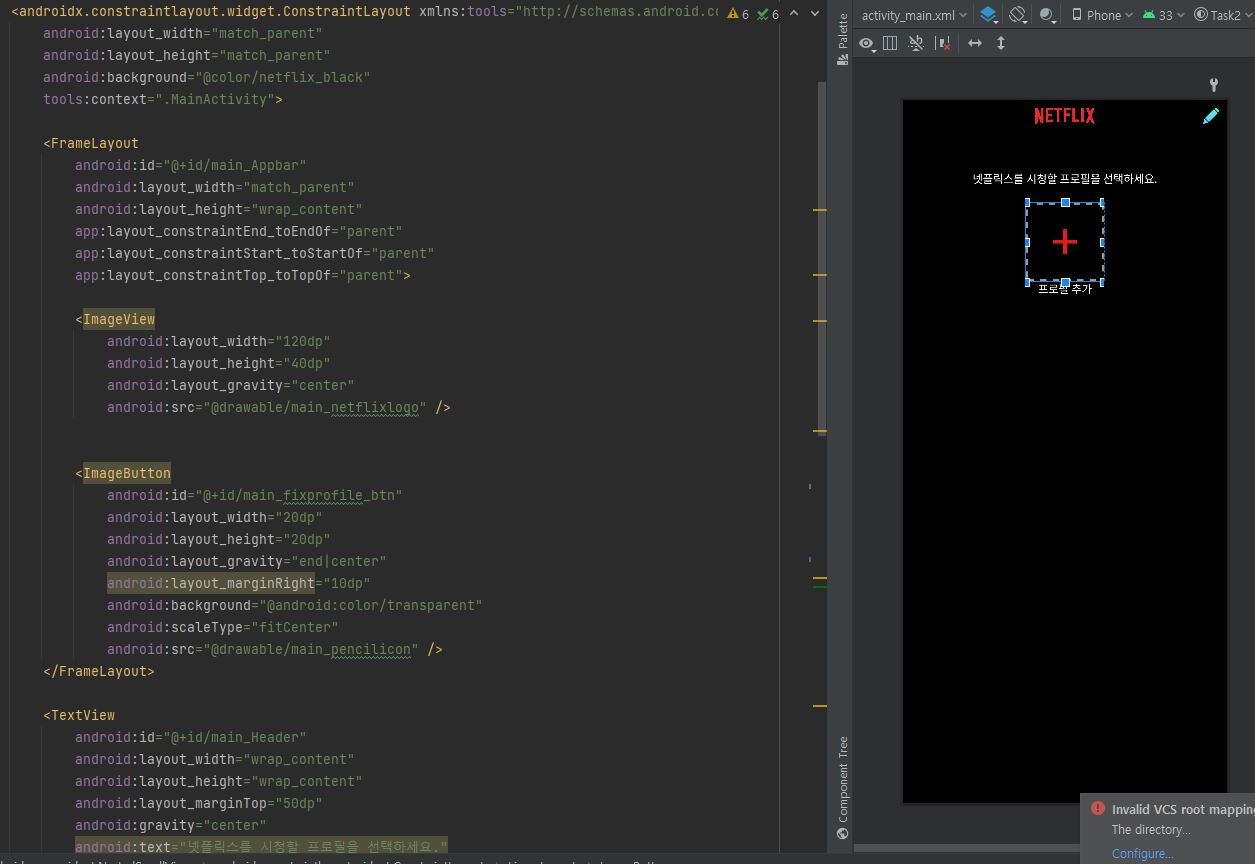
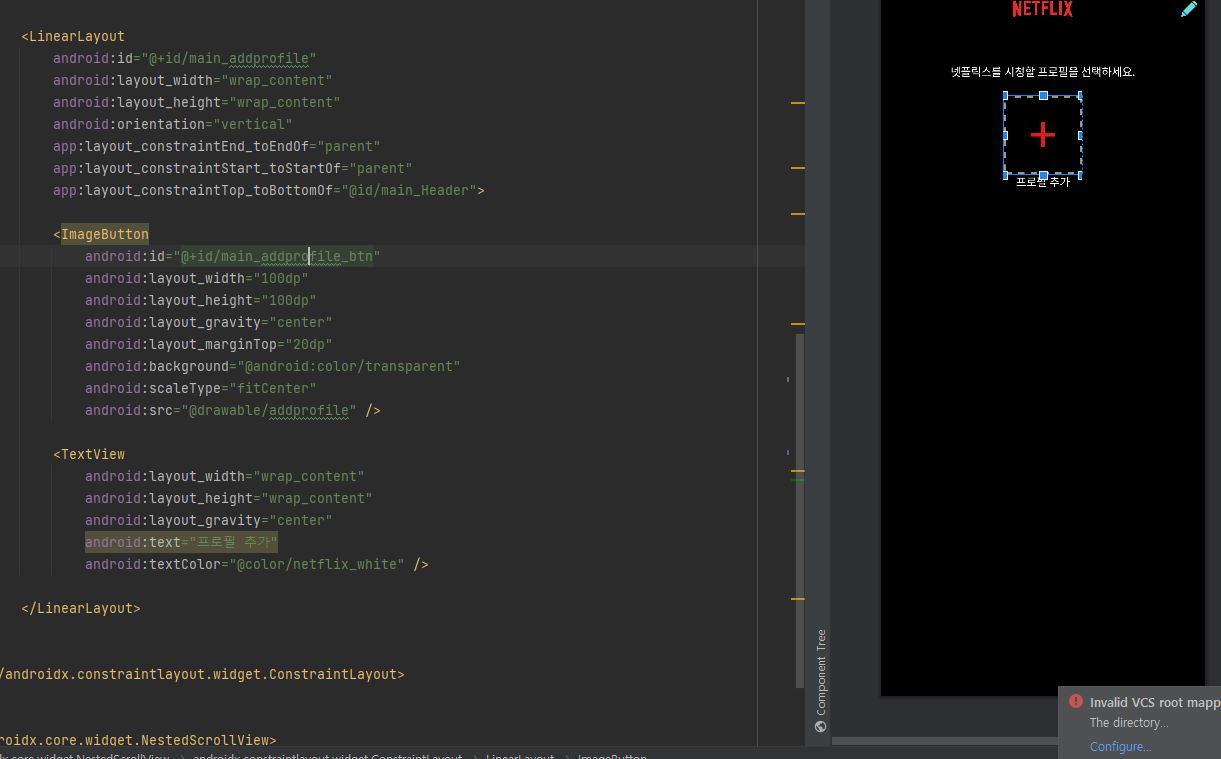
- ConstraintLayout 으로 전체 활용
- FrameLayout 으로 AppBar 디자인
- LinearLayout 으로 아래 화면 디자인
2. 계산기 화면 클론
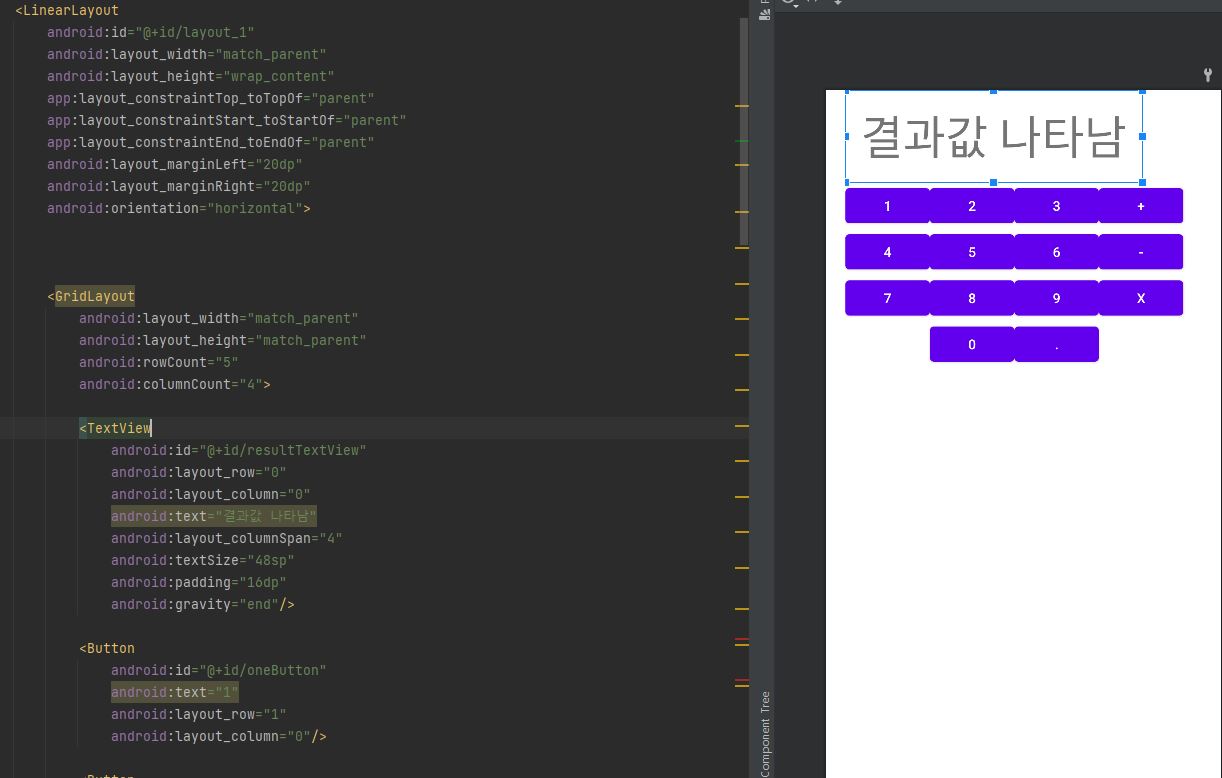
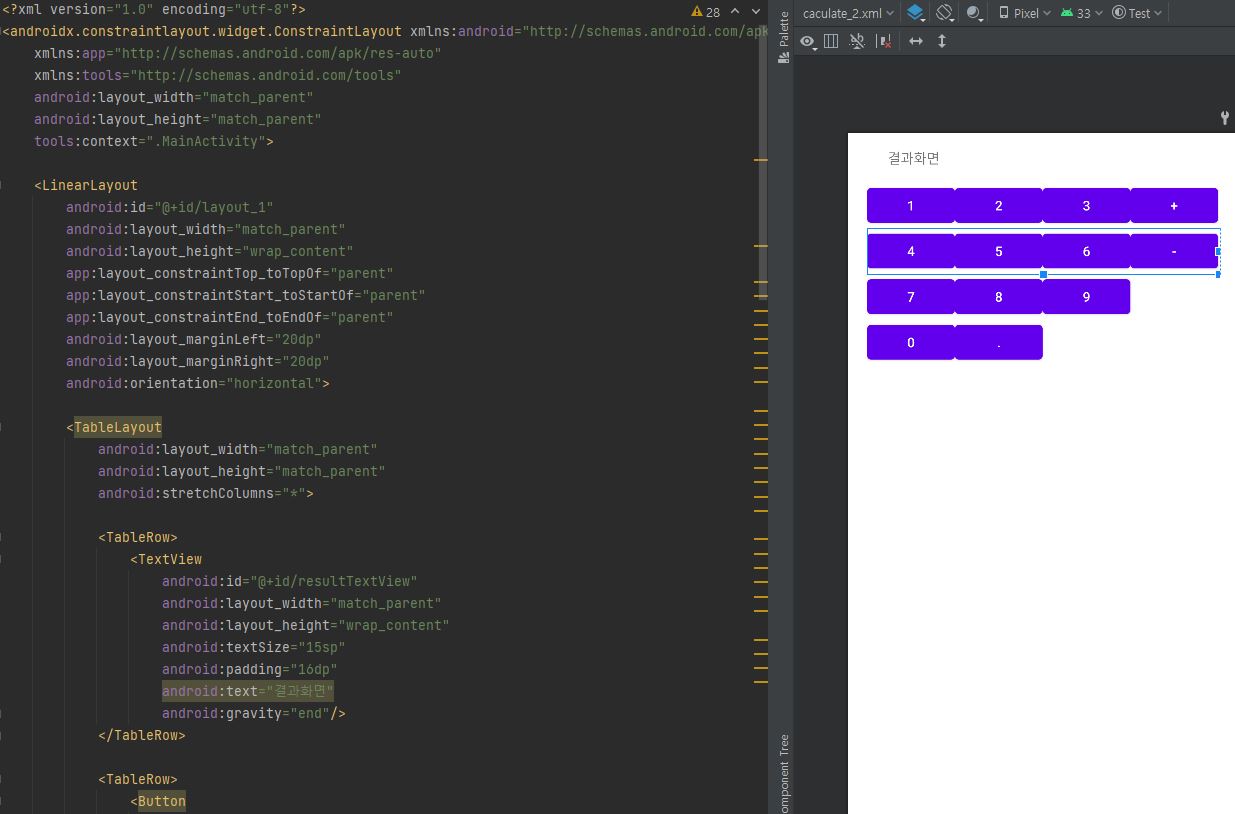
- Gridlayout / TableLayout 각각으로 계산기 화면 클론

Android Developer