📝 학습 목표
- Platform에 대해서 설명할 수 있다.
- Android에 대해서 설명할 수 있다.
- API에 대해서 설명할 수 있다.
- 공식 문서의 중요성을 이해한다.
🎯 핵심 키워드
💡 주요 내용들에 대해 조사해보고, 자신만의 생각을 통해 정리해보세요! 레퍼런스를 참고하여 정의, 속성, 장단점 등을 적어주셔도 됩니다. 조사는 공식 홈페이지 **Best**, 블로그(최신 날짜) **Not Bad**
플랫폼이란 무엇인가요?
- 정의: 사람이 많이 몰리는 공간으로, 다양한 형태의 비즈니스가 이루어지는 공간
- 특징:
- 비즈니스 경계파괴 : 산업의 경계가 모호해진다
- 생태계 기반 : 플랫폼 주요 구성원, 기술사, 기업 모두 포함된다
- 네트워크 효과가 발생한다 : 참여자들 간의 상호작용으로 가치가 올라감
- 승자독식 수익구조 : 플랫폼 매력도 증가 → 사용자 증가
- 양면 시장 구조 : 2개 이상의 고객집단이 있다
- 종류:
- 하드웨어 플랫폼 : 하드웨어를 대량으로 판매함으로서 이익을 추구하는 프로세스 자체가 플랫폼이 된다
- 소프트웨어 플랫폼 : 여러 가지 기능들을 제공해주는 공통 실행환경을 일컫는 말
- 서비스 플랫폼 : 오늘날 가장 다양한 플랫폼. 구글플레이처럼 판매를 하거나, 우버처럼, 판매자와 사용자를 연결시켜 주거나, 네이버처럼 서로다른 가치를 연결시켜주는 경우이다
- 예시:
- 개발하기쉽게 여러 환경을 제공해주는 개발 플랫폼
- 트위터, 페이스북
운영체제 (OS)란 무엇인가요?
- 운영체제의 정의:
- 사용자가 컴퓨터를 사용하기 위해 필요한 소프트웨어이다.
- 운영체제의 종류:
- Mac OS, Android OS, Window, Linux, 등등..
- 운영체제의 기능:
- 컴퓨터 또는 전자기기의 성능을 높이고, 사용자에게 편리함을 제공하며, 하드웨어를 관리하는 프로그램
Android OS란 무엇인가요?
- 정의:
- 스마트폰, 태블릿 PC 같은 터치스크린 모바일 장치 용으로 디자인된 운영체제이자 수정된 리눅스 커널 버전을 비롯한 오픈 소스 소프트웨어에 기반을 둔 모바일 운영 체제
다
- 스마트폰, 태블릿 PC 같은 터치스크린 모바일 장치 용으로 디자인된 운영체제이자 수정된 리눅스 커널 버전을 비롯한 오픈 소스 소프트웨어에 기반을 둔 모바일 운영 체제
- 특징:
- 운영체제 커널이 리눅스로 되어 있다.
- 자바, 코틀린으로 응용 프로그램 개발이 가능하다.
- 오픈소스 지향으로 많은 정보가 공개되어 있고 적용하기 쉽다.
- 안드로이드 스튜디오라고 하는 전용의 개발 도구를 무료로 제공 한다.
- Firebase 등 구글 클라우드 서비스와 손쉽게 연동이 가능 하다.
- 플레이스토어를 통해 앱을 공개하고 판매가 가능 하다
Android의 Architecture
- 안드로이드의 권장 아키텍쳐는 무엇일까요?
- 화면에 데이터를 표시하는 UI Layer
- 앱의 로직, 데이터를 처리하는 Data Layer
- 그리고 위의 두 Layer 를 상호작용 시키는 Domain Layer 세가지로 구성된 아키텍쳐 구조
- 딱 한단계 아래 Layer 에만 종속되어있다!!
굳이 나누자면 VIewModel 과 Repository 가 DomainLayer의 역할을 한다고 보여짐
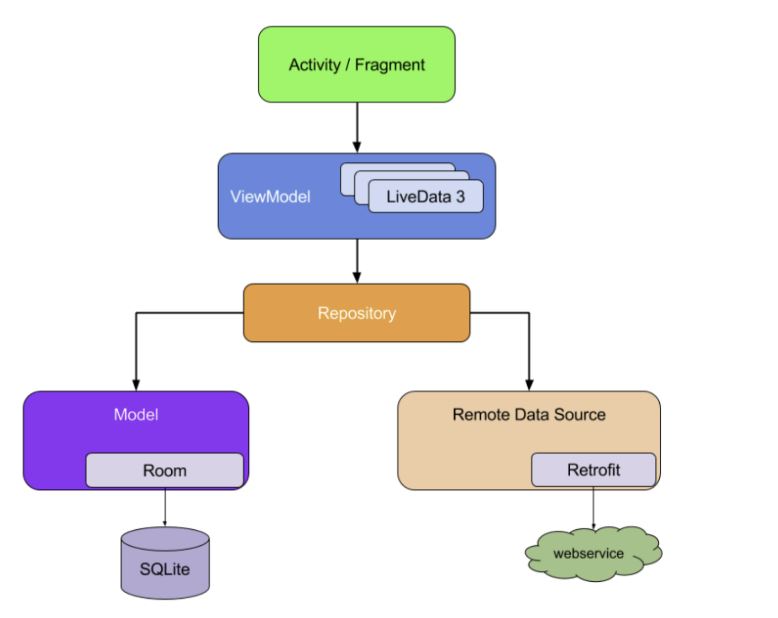
안드로이드 아키텍쳐 컴포넌트 (AAC)는 무엇일까요?
- Android JetPack 중 하나로, 테스트와 유지관리가 쉬운 앱을 디자인하도록 돕는 라이브러리
- Lifecycle : 앱의 수명주기를 관리
- Livedata : 기본 데이터베이스가 변경되면 뷰에 알리는 데이터 객체 빌드
- ViewModel : 앱 회전 시 제거되지 않는 UI 관련 데이터 저장
- Room : SQLite 개체 매핑 라이브러리
- DataBinding : 프로그래매틱 방식이 아닌 선언적 형식으로 UI 구성요소를 앱의 데이터 소스와 매핑
- Navigation : 프래그먼트의 진행을 보기 쉽게 정리해줌
- Paging : 페이징 기법을 쉽게 적용
- WorkManager : 지연 가능한 비동기 작업을 쉽게 에약할 수 있는 API
Interface란 무엇인가요?
- 인터페이스의 정의
- 사물과 사물 사이 또는 사물과 인간 사이의 경계에서, 상호 간의 소통을 위해 만들어진 물리적 매개체나 프로토콜을 말한다.
- 인터페이스의 유형
- 하드웨어 인터페이스
- 정의 : 컴퓨터 내부 장치나 구성 요소 간의 상호 접속을 가능하게 하는 인터페이스
- 특징 : 다양한 입출력 기기 내부에 존재한다
- 예시 : 플러그, 커넥터, 카드 등
- 소프트웨어 인터페이스
- 정의 : 컴퓨터의 하드웨어의 동작을 지시하고 제어하는 프로그램들이 상호 작용하는 인터페이스
- 특징 : 다양한 레벨에서 다양한 종류의 인터페이스가 존재한다
- 예시 : 운영체제(OS)와 하드웨어들 사이의 인터페이스, 운영체제와 응용 프로그램이 상호 작용하는 인터페이스, 객체 지향 프로그래밍에서 응용 내의 객체들이 서로 상호 작용할 수 있도록 하는 메소드 등
- 유저 인터페이스
- 정의 : 컴퓨터(전자기기)와 사용자(인간) 사이의 상호 작용과 정보 교환을 위한 인터페이스
- 특징 : 사용자 인터페이스는 크게 입력과 출력의 두 가지 방법을 제공한다. 입력은 사용자가 시스템을 조작하는 방법을 정의하고, 출력은 사용자가 조작에 따라 시스템이 생성한 결과를 제시하는 수단이다
- 예시 : 그래픽 사용자 인터페이스(GUI) / 명령 줄 인터페이스(CLI) / 터치 인터페이스 / 음성 사용자 인식 인터페이스 등등
- 하드웨어 인터페이스
API란 무엇인가요?
- 정의:
- 소프트웨어를 빌드하고 통합하기 위한 정의 및 프로토콜 세트인 애플리케이션 프로그래밍 인터페이스(Application Programming Interface)를 뜻합니다.
- 역할:
- 두 애플리케이션 간의 서비스 계약이라고 할 수 있습니다. 이 계약은 요청과 응답을 사용하여 두 애플리케이션이 서로 통신하는 방법을 정의합니다. API 문서에는 개발자가 이러한 요청과 응답을 구성하는 방법에 대한 정보가 들어 있습니다.
- 유형
- Private API: 내부 API로, 회사 개발자가 자체 제품과 서비스를 개선하기 위해 내부적으로 발행합니다. 따라서 제 3자에게 노출되지 않습니다.
- Public API: 개방형 API로, 모두에게 공개됩니다. 누구나 제한 없이 API를 사용할 수 있는 게 특징입니다.
- Partner API: 기업이 데이터 공유에 동의하는 특정인들만 사용할 수 있습니다. 비즈니스 관계에서 사용되는 편이며, 종종 파트너 회사 간에 소프트웨어를 통합하기 위해 사용됩니다.
✅ 실습 체크리스트
- manifest의 존재 이유와 항목 조사하기
- Pallete 항목 조사하기
- 6가지 Layout 조사하기
- 6가지 Layout을 사용해서 자유롭게 화면 만들어보기
☑️ 실습 인증 파트
manifest의 존재 이유와 항목 조사하기
용도
- 앱의 필수정보 저장하는 파일
- 앱을 만들때 반드시 필요하다
- 안드로이드 앱의 패키지명, 구성요소, 권한 등을 정의
A. manifest / user-permission / user-feature
manifest 태그
- 최상위 태그. 유일하다
- manifest 태그 package=”” : 프로젝트명 선언
- 반드시 package 속성에 해당 앱 패키지 명이 들어가야 한다
<manifest xmlns:android="http://schemas.android.com/apk/res/android"
package="com.example.app">uses-permission 태그
→ Permission 설정
- 앱이 특정 시스템 기능을 사용할때, 권한을 요청.
- android:name=”android.permission.기능명” 으로 각각 선언
<manifest ... >

		// 인터넷 접근 허용
		<uses-permission android:name="android.permission.INTERNET" />
		<uses-permission android:name="android.permission.ACCESS_NETWORK_STATE"/>

		// SMS 접근 허용
		<uses-permission android:name="android.permission.SEND_SMS"/>

		// Camera 접근 허용
		<uses-permission android:name="android.permission.CAMERA" />

...
</manifest>
uses-feature 태그
→ Device Compatibility 설정
- 앱이 필요로하는 HW/SW 특징을 명시할 수 있다
- ex) 카메라앱 : 카메라 있는 기기에서만 Play Store 에서 해당 앱 다운로드 가능하게끔 명시
- 카메라가 없는기기에서는, 다운로드 시도시 “다운로드 받을 수 없는 기기입니다” 라고 문구 뜸
<manifest ... >

		// 컴퍼스 센서가 있는 기기에서만 다운로드 가능하게끔 명시
    <uses-feature android:name="android.hardware.sensor.compass"
                  android:required="true" />

    ...
</manifest>
B. application
-
차상위 태그. 유일하다
-
manifest 파일에는 반드시 단 하나의 application 태그가 포함되어야 함
-
하위속성으로 앱의 구성요소(4대 컴포넌트) 를 정의
-
속성
-
모든속성 참조 : https://developer.android.com/guide/topics/manifest/application-element?hl=ko
-
allowBackup
- 사용자데이터를 구글드라이브에 25MB 까지 자동백업함
- true / false 로 설정
-
icon
- 앱설치시, 사용자에게 보이는 기본 앱 아이콘 resource 설정
- mipmap 폴더에 아이콘 resource 추가해서 사용!!
- mipmap 폴더에는 앱 아이콘 resource만 추가해야함!
-
roundIcon
- 앱설치시, 사용자에게 보이는 원형 앱 아이콘 resource 설정
- 핸드폰 기기마다, 앱아이콘 형태가 다름! 그래서 두개 존재하는것임
-
supportsRtl
- 한국어 : 왼쪽부터 읽히는 Ltr 언어
- 한국어와다르게 오른쪽부터 시작하는 Rtl 언어도 존재
- 그 Rtl 언어를 지원하는 기능들을 활성화시킬지 결정
-
theme : themes.xml 에있는 theme 정의한 컴포넌트를 참조.
- 앱의 전체적인 테마 설정
-
laebl : 앱 아이콘 하단에 표시될, 앱 이름을 설정
- string xml 파일의 app_name과 연결되어있음.<application android:allowBackup="true" android:icon="@mipmap/ic_launcher" android:label="@string/app_name" android:roundIcon="@mipmap/ic_launcher_round" android:supportsRtl="true" android:theme="@style/Theme.Example">
-
C. 4대 컴포넌트
→ application 태그 하위에 존재.
→ 각 컴포넌트들은 Intent를 통해 서로 상호작용 함
→ 각 컴포넌트들은 하나의 독립적인 형태로 존재
→ 각 컴포넌트들은 고유의 기능을 수행함

1. Intent
-
개요 : 애플리케이션 컴포넌트(구성요소) 간에 작업 수행을 위한 통신수단
- ex) Activity 간의 화면 전환
-
특징
- 서로 독립적으로 동작하는 4가지 컴포넌트들 간의 상호통신을 위한 장치
- 컴포넌트에 Action / Data 등을 전달함
- Intent를 통하여 다른 애플리케이션의 컴포넌트를 활성화시킬 수 있음.
2. activity
- 개요 : 사용자와의 상호작용을 담당하는 인터페이스
- Intent 를 통해, 다른 애플리케이션의 Activity를 호출할 수 있다
- Activity 내에 Fragment를 추가하여 화면을 분할 시킬 수 있다
- 특징
- 2개 이상의 Activity를 동시에 Display 할 수 없다
- 1개 이상의 View 또는 ViewGroup을 포함해야한다
- 반드시 애플리케이션에는 하나 이상의 Activity가 있어야 한다
- 속성
-
모든 속성 참조 : https://developer.android.com/guide/topics/manifest/activity-element?hl=ko
-
exported
- 다른 애플리케이션 구성요소에서 Activity 실행할 수 있는지 설정
-
name
- Activity를 구현하는 Class의 이름을 적용.
- String 타입인 ‘.Class명’ 으로 적용
-
theme / label
- Application 에서 설정했듯이, Activity에도 따로 적용시킬 수 있다
-
screenOrientation
- 화면모드를 가로로할지 세로로할지 설정!
- portrait : 세로
- landscape : 가로<activity android:name=".ExampleActivity" android:exported="true">
-
- Tip!
-
가장 첫번쨰로 실행될 Activity에는 다음 intent-filter 를 넣어줘야함
<activity android:name=".SplashActivity"
    android:screenOrientation="portrait"
    android:exported="true"
    android:theme="@style/AppTheme.NoActionBar">

    <intent-filter>
        <action android:name="android.intent.action.MAIN" />

        <category android:name="android.intent.category.LAUNCHER" />
    </intent-filter>

</activity>
-
3. service
- 개요 : 앱 백그라운드 에서 어떠한 작업을 처리하기 위한 컴포넌트
- ex) 애플리케이션 사용하면서 스트리밍 앱을 동시에 사용
- 네트워크와의 연동 가능
- 특징
- 사용자 인터페이스(UI / 화면) 을 방해하지 않고, 눈에 보이지 않는 곳에서 작업을 처리
- 메인스레드에서 동작 (애플리케이션 스레드). 서비스 내에서 별도의 스레드를 생성하여 작업 처리 해야함
- 애플리케이션 종료되어도, 이미 시작이 된 Service는 백그라운드 에서 계속 동작됨
-
속성
-
예시 : FCM
<service
    android:name="..."
    android:enabled="true"
    android:exported="true"
    android:stopWithTask="false">
    <intent-filter>
        <action android:name="com.google.firebase.MESSAGING_EVENT" />
    </intent-filter>
</service>
4. reciever ( BroadCast Receiver )
-
개요 : 안드로이드 OS로부터 발생하는 각종 이벤트,정보 를 받아와 핸들링 하는 컴포넌트
- ex) 시스템 부팅시 앱 초기화, 네트워크끊김, 문자 수신, 등등 정보 받아와 처리해야될 때 사용
- 안드로이드 디바이스의 특수상황에 대응하기 위해 사용
-
특징
- 거의 대부분 UI를 가지지 않음
- 거의 대부분 BroadCast는 시스템에서 시작됨
-
속성
5. provider ( Content Provider )
- 개요 : 데이터를 관리하고 다른 애플리케이션의 데이터를 제공하는 컴포넌트
- 특정 애플리케이션이 사용하고있는 DB를 공유하기 위해 사용.
- 애플리케이션 간의 데이터 공유를 위해 표준화된 인터페이스를 제공
- 외부 애플리케이션이, 현재 실행중 애플리케이션 내의 DB에 함부로 접근 못하게 할 수 있으며, 공개하고 싶은 데이터만 공유할 수 있도록 해줌
-
특징
- 작은데이터들은 Intent로 공유 가능하지만, 음악, 사진파일등 용량 큰 데이터 공유시에는 Provider 사용해야 적합함
- Provider는 데이터의 Read, Write 에 대한 권한이 있어야 애플리케이션에 접근이 가능
- DB에서 흔히 사용되는 CURD 원칙을 준수
-
속성
D. 4대 컴포넌트 하위요소
1. intent-filter
- 개요 : 암시적 intent를 받기 위해 상위 구성요소(4대 컴포넌트) 의 기능, 유형을 선언.
- 수많은 인텐트들이 수많은 앱들에 의해 발생하는데, 그중 자신에게 필요한 인텐트만을 받기 위해 intent-filter 사용
- 명시적 intent 는 어떤 컴포넌트를 호출할지 적어놓는 반면, 암시적 intent는 어떤 컴포넌트를 호출할지 모르기 때문에, intent filter 필요
- ex) 암시적 intent로 카메라 앱 실행하려고 했는데, 전화부 앱이 실행되는 경우 → intent filter를 통해 카메라 앱으로 특정해준다
-
특징
- 반드시 action 하위요소를 포함해야 한다
- 필터 내용은 하위요소인 action / category / data 에서 설명된다
-
하위요소
- action 필터 : Intent 객체 내의 action을 검사하여, 필터링
- android.intent.action.ACTION명대문자로
- category 필터 : Intent 객체 내의 category를 검사하여, 필터링
- android.intent.category.CATEGORY명대문자로
- action 필터 : Intent 객체 내의 action을 검사하여, 필터링
<activity
    android:name=".SplashActivity"
    android:exported="true"
    android:theme="@style/Theme.Shoppiandroid.Splash">

    <intent-filter>
        <action android:name="android.intent.action.MAIN" />

        <category android:name="android.intent.category.LAUNCHER" />
    </intent-filter>
</activity>
→ ex) 스타팅 activity를 intent-filter 와 action & category 로 정의
2. meta-data
-
개요 : 상위 구성요소(4대컴포넌트) 에서 접근할 resource 나 value 데이터를 저장
-
특징
- value는 그 값 자체를 name 에 저장한다
- resource 는 resource ID를 name 에 저장한다
<meta-data android:name="zoo" android:value="@string/kangaroo" />

<meta-data android:name="zoo" android:resource="@string/kangaroo" />
E. 그외 / 예시
그외
예시 (Splash Activity 적용)
→ 초기화면 변경
<?xml version="1.0" encoding="utf-8"?>
<manifest xmlns:android="http://schemas.android.com/apk/res/android"
    package="com.shoppi.app">

    <application
        android:allowBackup="true"
        android:icon="@mipmap/ic_launcher"
        android:label="@string/app_name"
        android:roundIcon="@mipmap/ic_launcher_round"
        android:supportsRtl="true"
        android:theme="@style/Theme.Shoppiandroid">
        <activity
            android:name=".SplashActivity"
            android:exported="true"
            android:theme="@style/Theme.Shoppiandroid.Splash">

            <intent-filter>
                <action android:name="android.intent.action.MAIN" />

                <category android:name="android.intent.category.LAUNCHER" />
            </intent-filter>
        </activity>
        <activity
            android:name=".MainActivity"
            android:exported="false" />

    </application>

</manifest>-
초기화면에 쓰일 activity를 생성 (SplashActivity)
- intent-filter를 SplashActivity로 옮김
- exported = true 하고, 적용 theme 참조
-
위에서 아래 순서대로, 화면순서를 맞춰야한다!!!
-
activity 태그
- name
- activity 클래스명 정의
- exported
- 다른구성요소로 해당 activity 실행할수 있는지 여부 결정
- intent-filter 태그
- 실행하는 launcher activity(앱켰을때 초기 activity) 를 mainactivity로 설정하겠다는 뜻
- name
<?xml version="1.0" encoding="utf-8"?>
<manifest xmlns:android="http://schemas.android.com/apk/res/android"
    package="com.shoppi.app">

    <application
        android:allowBackup="true"
        android:icon="@mipmap/ic_launcher"
        android:label="@string/app_name"
        android:roundIcon="@mipmap/ic_launcher_round"
        android:supportsRtl="true"
        android:theme="@style/Theme.Shoppiandroid">
        <activity
            android:name=".MainActivity"
            android:exported="true">
            <intent-filter>
                <action android:name="android.intent.action.MAIN" />

                <category android:name="android.intent.category.LAUNCHER" />
            </intent-filter>
        </activity>
    </application>

</manifest>