Problem
Spring Webflux를 이용하여, 비동기 non-blocking 기반의 업로드 서버를 구현 중이었다. 따라서 몇몇 수정방식들도 찾아보았지만, “비동기”적인 로직을 유지하면서 문제를 수정하는 데에 초점을 두었다.
기존 로직의 순서다.
FilePart를@Controller에서 받아@Service단에서DataBuffer로 변환DataBuffer를InputStream으로 변환하고, 이를 통해ByteArray로 변환한다.- 이
ByteArray를 가지고 업로드 작업을 수행한다.
하지만 이런 문제가 발생했다. 이곳 저곳의 디버깅을 찍어보며, 정확한 원인파악도 한참 걸렸지만 최종적인 문제 상황은
@Controller에서@Service단으로 넘어갈 때,FilePart를 받으면서 생성된 Spring Multipart 임시파일이 삭제가 되어버린다.
에러 코드
Exception in thread "DefaultDispatcher-worker-7" java.nio.file.NoSuchFileException: C:\Users\aroms\AppData\Local\Temp\spring-multipart-3414288931152363292\8470935911139906723.multipart
	at java.base/sun.nio.fs.WindowsException.translateToIOException(WindowsException.java:85)
	Suppressed: The stacktrace has been enhanced by Reactor, refer to additional information below:
Assembly trace from producer [reactor.core.publisher.FluxUsing] :
	reactor.core.publisher.Flux.using(Flux.java:2100)
	org.springframework.core.io.buffer.DataBufferUtils.readByteChannel(DataBufferUtils.java:111)
Error has been observed at the following site(s):
	*________Flux.using ⇢ at org.springframework.core.io.buffer.DataBufferUtils.readByteChannel(DataBufferUtils.java:111)
	|_ Flux.subscribeOn ⇢ at org.springframework.http.codec.multipart.DefaultParts$FileContent.content(DefaultParts.java:297)
	|_     Flux.collect ⇢ at org.springframework.core.io.buffer.DataBufferUtils.join(DataBufferUtils.java:684)
	|_      Mono.filter ⇢ at org.springframework.core.io.buffer.DataBufferUtils.join(DataBufferUtils.java:685)
	|_         Mono.map ⇢ at org.springframework.core.io.buffer.DataBufferUtils.join(DataBufferUtils.java:686)
	|_ Mono.doOnDiscard ⇢ at org.springframework.core.io.buffer.DataBufferUtils.join(DataBufferUtils.java:687)
Original Stack Trace:
		at java.base/sun.nio.fs.WindowsException.translateToIOException(WindowsException.java:85)
		at java.base/sun.nio.fs.WindowsException.rethrowAsIOException(WindowsException.java:103)
		at java.base/sun.nio.fs.WindowsException.rethrowAsIOException(WindowsException.java:108)
		at java.base/sun.nio.fs.WindowsFileSystemProvider.newByteChannel(WindowsFileSystemProvider.java:236)
		at java.base/java.nio.file.Files.newByteChannel(Files.java:380)
		at java.base/java.nio.file.Files.newByteChannel(Files.java:432)
		at org.springframework.http.codec.multipart.DefaultParts$FileContent.lambda$content$0(DefaultParts.java:295)
		at reactor.core.publisher.FluxUsing.subscribe(FluxUsing.java:75)
		at reactor.core.publisher.InternalFluxOperator.subscribe(InternalFluxOperator.java:68)
		at reactor.core.publisher.FluxSubscribeOn$SubscribeOnSubscriber.run(FluxSubscribeOn.java:194)
		at reactor.core.scheduler.WorkerTask.call(WorkerTask.java:84)
		at reactor.core.scheduler.WorkerTask.call(WorkerTask.java:37)
		at java.base/java.util.concurrent.FutureTask.run$$$capture(FutureTask.java:264)
		at java.base/java.util.concurrent.FutureTask.run(FutureTask.java)
		at java.base/java.util.concurrent.ScheduledThreadPoolExecutor$ScheduledFutureTask.run(ScheduledThreadPoolExecutor.java:304)
		at java.base/java.util.concurrent.ThreadPoolExecutor.runWorker(ThreadPoolExecutor.java:1136)
		at java.base/java.util.concurrent.ThreadPoolExecutor$Worker.run(ThreadPoolExecutor.java:635)
		at java.base/java.lang.Thread.run(Thread.java:833)
	Suppressed: kotlinx.coroutines.internal.DiagnosticCoroutineContextException: [StandaloneCoroutine{Cancelling}@d8ea0c7, Dispatchers.Default]
물론 찾아보니, 파일이 없을 때 발생하는 문제라고 하는데, 그 문제가 아니지 않는가...
위에서 말했듯 @Controller에서 분명 FilePart로 파일을 받았는데, 자꾸 없다고 한다. 이 오류는 항상 발생하는 것도 아니고, 간헐적으로만 발생하고 있었기에 어떻게 처리해야 될 지가 난관이었다. 또한, 테스트와 디버깅도 어떤 식으로 진행해야 될 지 감도 잡히지 않았다.
이 방법 저 방법을 몇 시간 동안 찾아 해맸다.
오류 접근
디버깅부터 시작해보자.
우선은 @Controller부터 살펴보자.
Controller
    @ResponseStatus(HttpStatus.CREATED)
    @PostMapping("/upload/{type}", consumes = [MediaType.MULTIPART_FORM_DATA_VALUE])
    suspend fun upload(
        @RequestHeader("Authorization") token: String,
        @PathVariable("type") type: VideoType,
        @RequestPart("id") id: String,
        @RequestPart("file") video: FilePart,
    ): VideoResponse {
        // 비동기 작업 실행 (백그라운드)
        CoroutineScope(Dispatchers.IO).launch {
            videoService.uploadVideo(type, id, token.replace("Bearer ", ""), video.filename(), fileToByteArray(video))
        }
        return VideoResponse(success = true)
    }
우선 FilePart가 제대로 서버에 로드 되었는지 찍어본다.

이렇게 제대로 찍히고, content를 열어 해당 디렉토리로 가서, 임시 폴더로 들어가 보아도, .multipart임시 파일이 제대로 생성된 것을 확인하였다.
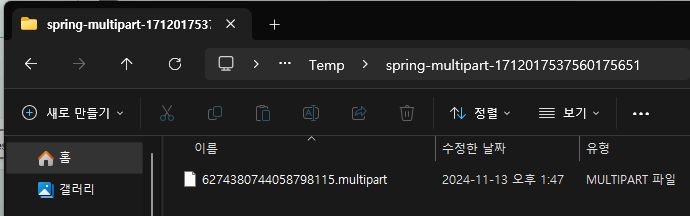
다음으로 확인할 부분은 @Service이다.
Service
    suspend fun uploadVideo(
        type: VideoType,
        id: String,
        token: String,
        video: FilePart,
    ) {
        val userId = jwtUtils.extractUid(token) ?: throw RuntimeException("Invalid token")
        val originalFileName = video.filename()
        val byteArray = fileToByteArray(video)

        val size = byteArray.size

				// 대충 ByteArray를 사용한 업로드 로직
    }

    suspend fun fileToByteArray(filePart: FilePart): ByteArray {
        // DataBuffer를 비동기적으로 가져오기
        val dataBuffer = DataBufferUtils.join(filePart.content()).awaitSingle()

        return try {
            // InputStream을 통해 ByteArray로 변환
            dataBuffer.asInputStream().use { inputStream ->
                inputStream.readAllBytes()
            }
        } finally {
            // DataBuffer 메모리 해제
            DataBufferUtils.release(dataBuffer)
        }
    }
여기의
val byteArray = fileToByteArray(video)에서 포인트를 찍어봤다. 그 순간 임시파일이 생성된 폴더를 확인해보니,
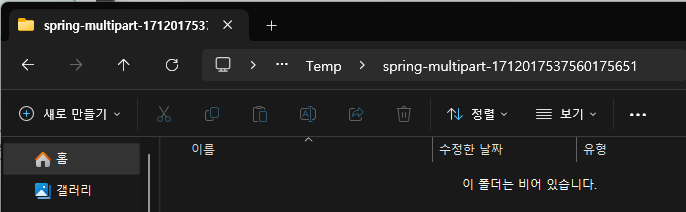
임시파일이 삭제가 되어버렸다. 또한 저 이후의 fileToByteArray()는 파일을 DataBuffer스트림으로 가져와, InputStream으로 변환한 후, 최종적으로 ByteArray 로 변환하여 값을 반환하는 메소드이다.
이렇게 파일을 읽어와 DataBuffer로 변환해야 되는데, 임시파일이 없어져버리니 문제가 발생한 것이었다.
1차 해결
그래서 첫 번째 방법으로 구상한 것은, Service단에 아예 ByteArray로 변환을 하고 보내주자.
    @ResponseStatus(HttpStatus.CREATED)
    @PostMapping("/upload/{type}", consumes = [MediaType.MULTIPART_FORM_DATA_VALUE])
    suspend fun upload(
        @RequestHeader("Authorization") token: String,
        @PathVariable("type") type: VideoType,
        @RequestPart("id") id: String,
        @RequestPart("file") video: FilePart,
    ): VideoResponse {
        val byteArray = fileToByteArray(video)

        // 비동기 작업 실행 (백그라운드)
        CoroutineScope(Dispatchers.IO).launch {
            videoService.uploadVideo(type, id, token.replace("Bearer ", ""), byteArray)
        }

        return VideoResponse(success = success)
    }

    suspend fun fileToByteArray(filePart: FilePart): ByteArray? {
        // DataBuffer를 비동기적으로 가져오기
        val dataBuffer = DataBufferUtils.join(filePart.content()).awaitSingle()

        return try {
            // InputStream을 통해 ByteArray로 변환
            dataBuffer.asInputStream().use { inputStream ->
                inputStream.readAllBytes()
            }
        } finally {
            // DataBuffer 메모리 해제
            DataBufferUtils.release(dataBuffer)
        }
    }
이렇게 변환을 하고 가져오니, 문제가 해결되었다. 하지만……
- 이 서버의 목적은 오래 걸리는 영상 업로드 작업을 위한 서버이다.
- 사용자가 점점 많아져 트래픽이 많아질 경우도 고려해야된다.
자체 테스트를 진행 중, 또 다른 문제점이 발견되었다.
2차 해결
분당 약 80~100번정도의 요청을 보내다 보니 문제가 발생했다. 바로, 임시파일 찌꺼기가 트래픽이 몰릴 경우 사라지지 않는 현상이 발생하는 것이다.
비상
그래서 떠올린 해결방법은 두가지이다.
- 임시파일을 매 요청마다 다른 디렉토리에 분리하여, 임시 디렉토리 내에서 충돌(?)을 방지해 정상적으로 파일이 로드되고, 삭제되도록 한다.
- 배치 스케줄러를 구현하여 일정 시간마다 남아있는 임시파일들을 전부 삭제해준다.
최종적으로 선택한 방법은 2번이다.
1번의 경우, java.io.tmpdir의 root(?) 디렉토리까지는 지정할 수 있다. 하지만 저 문제가 발생하는 원인인 java.nio.file의 임시 디렉토리를 설정하는 방법은 천지를 뒤져도 나오지 않았다.(아는분은 알려주세요)
그래서 2번 방식을 구현해보았다.
@Component
class TempFileScheduler {

    private val tempDirectoryPath = System.getProperty("java.io.tmpdir")
    private val folderCheckIntervalMillis = TimeUnit.MINUTES.toMillis(10)  // 최근 10분보다 이전에 수정된 폴더만 탐색

    @Scheduled(fixedRate = 1000 * 60 * 10)  // 10분마다 실행
    fun cleanUpMultipartFiles() {
        val baseDirectory = File(tempDirectoryPath)
        val now = Instant.now().toEpochMilli()

        if (baseDirectory.exists() && baseDirectory.isDirectory) {
            // 기본 경로의 하위 폴더 중 최근 10분보다 이전에 수정된 폴더만 필터링
            baseDirectory.listFiles { file ->
                file.isDirectory && (now - file.lastModified() > folderCheckIntervalMillis)
            }?.forEach { subDir ->
                subDir.listFiles { file ->
                    file.isFile && file.extension == "multipart"
                }?.forEach { file ->
                    try {
                        if (file.delete()) {
                            println("Deleted file: ${file.absolutePath}")
                        } else {
                            println("Failed to delete file: ${file.absolutePath}")
                        }
                    } catch (ex: Exception) {
                        println("Error deleting file: ${file.absolutePath}, ${ex.message}")
                    }
                }

                // 폴더가 비어 있으면 삭제
                if (subDir.listFiles().isNullOrEmpty() && subDir.name.startsWith("spring-multipart-")) {
                    try {
                        if (subDir.delete()) {
                            println("Deleted empty folder: ${subDir.absolutePath}")
                        } else {
                            println("Failed to delete empty folder: ${subDir.absolutePath}")
                        }
                    } catch (ex: Exception) {
                        println("Error deleting folder: ${subDir.absolutePath}, ${ex.message}")
                    }
                }
            }
        }
    }
}
예를 들어 지금이 14:00 라면, 13:50 이전에 수정된 모든 multipart임시파일과 임시 디렉토리는 삭제한다. 이렇게 설정한 이유는,
만약 타이밍이 맞지 않는다면, 파일을 읽던 도중 스케줄러가 동작해버리면, 사용자는 영문도 모른 채 업로드에 실패해버리는 상황이 발생하기 때문이다.
“이렇게 문제가 다 해결되었다.” 면 좋겠지만, 거지같은 문제가 하나 또 생겼다…ㅋㅋ
3차 해결
문제는 배포 환경에서 발생했다. 로컬 서버의 경우 기존에 발생했던 저 오류가 하나도 발생하지 않는다. (서버 부하테스트까지는 아니어도, 기존에 단위 테스트하던 만큼의 요청을 보내보았을 때)
하지만 문제는 배포 환경에서 벌어졌다. 트래픽이 너무 많아지자, 중간중간 FilePart 의 임시파일이 제대로 임시 디렉토리에 로드되지 않는 현상이 발생한 것이다.
나의 판단으로는 이것은 서버 성능상의 문제라고 판단하고, 이 오류가 발생했을 때, 사용자에게 dialog 메세지를 보여주기 위해 ByteArray변환에 실패했다고 전송하는 로직을 추가해준다.
눈썰미 좋은 사람은 알겠지만, 현재의 로직은 바로 success=true를 반환해버리고 백그라운드 작업을 한다. 이를 수정한 것이다.
    @ResponseStatus(HttpStatus.CREATED)
    @PostMapping("/upload/{type}", consumes = [MediaType.MULTIPART_FORM_DATA_VALUE])
    suspend fun upload(
        @RequestHeader("Authorization") token: String,
        @PathVariable("type") type: VideoType,
        @RequestPart("id") id: String,
        @RequestPart("file") video: FilePart,
    ): VideoResponse {
        val byteArray = fileToByteArray(video)

        val success = byteArray != null

        // 비동기 작업 실행 (백그라운드)
        if (success) {
            CoroutineScope(Dispatchers.IO).launch {
                videoService.uploadVideo(type, id, token.replace("Bearer ", ""), byteArray!!)
            }
        }

        return VideoResponse(success = success)
    }

    suspend fun fileToByteArray(filePart: FilePart): ByteArray? {
        // DataBuffer를 비동기적으로 가져오기
        val dataBuffer = runCatching {
            DataBufferUtils.join(filePart.content()).awaitSingle()
        }.getOrNull() ?: return null

        return try {
            // InputStream을 통해 ByteArray로 변환
            dataBuffer.asInputStream().use { inputStream ->
                inputStream.readAllBytes()
            }
        } finally {
            // DataBuffer 메모리 해제
            DataBufferUtils.release(dataBuffer)
        }
    }
이렇게 실패하여 null일 경우 success=false로 반환되게 해 놓아, 진짜로 문제를 해결했다.
이후 이런 문제가 지속될 경우, 메인 api server와 video server를 확실하게 분리부터 진행하고, 성능을 올리는 방향으로 유지보수를 해 나가면 될 것 같다.