1. 의문점
inner join과 where 중에 어떤 것이 먼저 적용되는가?
이 단순하지만 성능에 지대한 영향 미치는 적용 순서 하나에서 시작되었다.
해당 의문점이 발생한 계기는 아래와 같다.
1-1. 상황 설명

친구가 사무실(미팅룸이나 작업실 등)을 빌려주는 플랫폼 개발 프로젝트를 진행하던 중에
1. branch.branchName(지점 명), 현재 날짜 정보가 주어질 때
2. 해당 지점에서 (현재 날짜 - 1일 ~ 현재 날짜 + 1일)사이에 이미 잡혀있는 예약 목록을 모두 받아오는 Query
를 깔끔하게 작성하고 싶다며 조언을 구해왔다.
나는 바로 아래의 Query를 작성해서 친구에게 알려줬다.
SELECT r.*
FROM RESERVATION AS r
JOIN SPACE AS s ON s.ID = r.ID
JOIN BRANCH AS b ON b.ID = s.ID
WHERE b.BRANCH_NAME = ${branch.name}
    AND r.RESERVATION_START_DATE_TIME BETWEEN ${reservation_start_of} AND ${reservation_end_of};
하지만 여기서 "이러면 여기서 where보다 inner join이 먼저 적용되는거 아니야?"라는 의문에 빠져버렸다.
만약 여기서 resrvation, branch 테이블에 대해서 where절 보다 inner join이 먼저 적용된다면, where절이 먼저 적용되는 것보다 훨씬 많은 inner join 연산이 발생할 것이다.
또한, 이 연산량은 서비스를 지속하면 할 수록 resrvation, branch 데이터가 늘어나 감당할 수 없을 것이였다.
궁금증 해결을 위해 친구와 웹 서핑을 진행해봤지만, 결과로 돌아오는 것은 하나 같이 "(outer)join에서 on과 where의 적용 순서", "on과 where, inner join에서는 같은 성능!(이유 설명 X)"과 같은 궁금한 부분과 1도 관련 없는 내용들 뿐이었다. (on은 join할 때 공통된 column을 이용하니 특히 관련없었다.)
그럼 그렇지 하는 생각에 영문 검색도 해보았으나, 놀라울 정도로 같은 내용만 나왔다.
결국 직접 실험하는 수 밖에 없는 것이다.
2. 실험
실험을 위해 더미 데이터와 일반 Query, 강제적으로where절을 먼저 적용한 Query를 준비했다.
자세한 내용은 아래 실험 조건에서 설명하겠다.
2-1. 실험 조건
- 5만건의
reservation(예약)데이터- 이 중, 약 1.6만건의 데이터는 해당 Query를 통해 반환되도록 설정했다.
- 비교할 2개의 Query
SELECT r.*
FROM RESERVATION AS r
JOIN SPACE AS s ON s.ID = r.ID
JOIN BRANCH AS b ON b.ID = s.ID
WHERE b.BRANCH_NAME = ${branch.name}
    AND r.RESERVATION_START_DATE_TIME BETWEEN ${reservation_start_of} AND ${reservation_end_of};
// SubQuery를 이용해 join 이전에 where을 확실히 적용
SELECT r.*
FROM (
SELECT *
FROM RESERVATION r
WHERE r.RESERVATION_START_DATE_TIME BETWEEN ${reservation_start_of} AND ${reservation_end_of}
) AS r
JOIN SPACE s ON s.space_id = r.space_id
JOIN (
SELECT *
FROM BRANCH b
WHERE b.BRANCH_NAME = ${branch.name}
) AS b ON b.branch_id = s.branch_id;3. 실험 결과

(사진에서는 친구가 select부분만 살짝 수정했다)
초록색 상자는 SubQuery를 이용한 Query가 소모한 시간(ms),
파란색 상자는 SubQuery를 사용하지 않은 Query가 소모한 시간(ms)이다.
결과적으로, 아무 차이도 없었다.
혹시나 하는 마음에 Query 앞에 explain 키워드를 추가해 동작 순서를 비교해봤다.
(아래 등장하는 mr은 space를 상속한 테이블인데, 결과에 영향을 미치지 않으니 무시하면 된다)
// SubQuery를 이용하지 않은 경우
| {
  "query_block": {
    "select_id": 1,
    "nested_loop": [
      {
        "table": {
          "table_name": "mr1_0",
          "access_type": "ALL",
          "possible_keys": ["PRIMARY"],
          "rows": 138,
          "filtered": 100
        }
      },
      {
        "table": {
          "table_name": "s1_0",
          "access_type": "eq_ref",
          "possible_keys": ["PRIMARY", "FKt35ln2kfgj0mqlhtgvg07i4kt"],
          "key": "PRIMARY",
          "key_length": "8",
          "used_key_parts": ["space_id"],
          "ref": ["offispace.mr1_0.space_id"],
          "rows": 1,
          "filtered": 100,
          "attached_condition": "s1_0.branch_id is not null"
        }
      },
      {
        "table": {
          "table_name": "b1_0",
          "access_type": "eq_ref",
          "possible_keys": ["PRIMARY"],
          "key": "PRIMARY",
          "key_length": "8",
          "used_key_parts": ["branch_id"],
          "ref": ["offispace.s1_0.branch_id"],
          "rows": 1,
          "filtered": 100,
          "attached_condition": "b1_0.branch_name = '구로점'"
        }
      },
      {
        "table": {
          "table_name": "r1_0",
          "access_type": "ref",
          "possible_keys": ["FKdmhqfwmh1u14ulwqwj1c71kb7"],
          "key": "FKdmhqfwmh1u14ulwqwj1c71kb7",
          "key_length": "9",
          "used_key_parts": ["space_id"],
          "ref": ["offispace.mr1_0.space_id"],
          "rows": 3225,
          "filtered": 100,
          "attached_condition": "r1_0.reservation_start_date_time between <cache>('2024-05-22T00:00:00.000+0900') and <cache>('2024-05-24T00:00:00.000+0900')"
        }
      }
    ]
  }
} |
| {
"query_block": {
"select_id": 1,
"nested_loop": [
{
"table": {
"table_name": "mr",
"access_type": "ALL",
"possible_keys": ["PRIMARY"],
"rows": 138,
"filtered": 100
}
},
{
"table": {
"table_name": "s",
"access_type": "eq_ref",
"possible_keys": ["PRIMARY", "FKt35ln2kfgj0mqlhtgvg07i4kt"],
"key": "PRIMARY",
"key_length": "8",
"used_key_parts": ["space_id"],
"ref": ["offispace.mr.space_id"],
"rows": 1,
"filtered": 100,
"attached_condition": "s.branch_id is not null"
}
},
{
"table": {
"table_name": "branch",
"access_type": "eq_ref",
"possible_keys": ["PRIMARY"],
"key": "PRIMARY",
"key_length": "8",
"used_key_parts": ["branch_id"],
"ref": ["offispace.s.branch_id"],
"rows": 1,
"filtered": 100,
"attached_condition": "branch.branch_name = '구로점'"
}
},
{
"table": {
"table_name": "reservation",
"access_type": "ref",
"possible_keys": ["FKdmhqfwmh1u14ulwqwj1c71kb7"],
"key": "FKdmhqfwmh1u14ulwqwj1c71kb7",
"key_length": "9",
"used_key_parts": ["space_id"],
"ref": ["offispace.mr.space_id"],
"rows": 3225,
"filtered": 100,
"attached_condition": "reservation.reservation_start_date_time between <cache>('2024-05-22T00:00') and <cache>('2024-05-24T00:00')"
}
}
]
}
} |이렇게 2개의 Query 모두 동일한 순서로 동일한 동작을 하는 것을 눈으로 확인할 수 있었다.
4. DB Optimizer
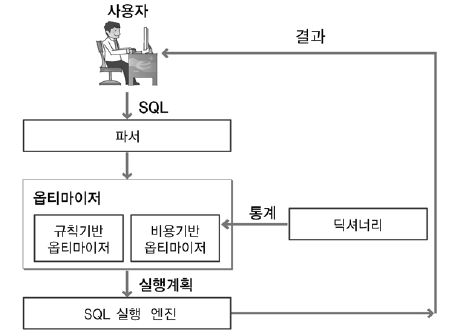
3번에서 서로 다른 2개의 Query가 같은 동작을 실행하는 이유, 그건 바로 DB 엔진에서 자체적으로 DB Optimizer를 통해 Query를 최적화해주기 때문이다.
즉, 우리가 SubQuery를 사용하든, 그렇지 않든 DB Optimizer는 join 이전에 where을 먼저 적용하는 것이 최적의 방법이라고 판단하고, 적용한다는 것이다.
물론 이런 DB Optimizer는 사용하는 DB에 따라, 또 작성한 SQL에 따라 결과가 다를 수 있다.
따라서, 성능을 생각한다면, 반드시 실험해볼 필요가 있고 생각한다.
PS. JPA를 이용할 때
위에서 작성한 2개의 Query를 기반으로 2개의 API를 작성하고, 프로젝트를 생성하여 걸리는 시간으 테스트해봤다.
"/third"로 시작하는 요청이 SubQuery를 사용하지 않은 요청,
"/fourth"로 시작하는 요청이 SubQuery를 사용한 요청이다.
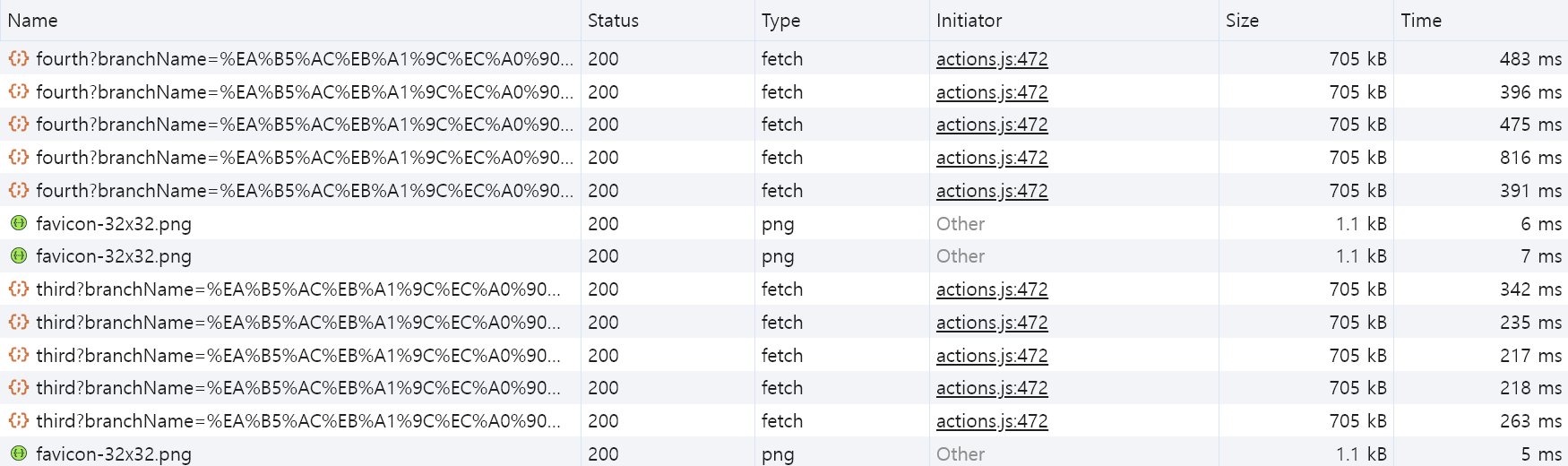
차이가 없었던 SQL과는 다르게 요청은 150ms의 의미 있는 속도 차이가 발생했다.
해당 차이는 아래 코드에서 발생한다.
import com.example.sabujak.reservation.dto.ReservationQueryDto;
import com.example.sabujak.reservation.entity.Reservation;
import com.querydsl.jpa.impl.JPAQueryFactory;
import lombok.RequiredArgsConstructor;
import org.springframework.jdbc.core.BeanPropertyRowMapper;
import org.springframework.jdbc.core.JdbcTemplate;

import java.time.LocalDateTime;
import java.util.List;

import static com.example.sabujak.branch.entity.QBranch.branch;
import static com.example.sabujak.reservation.entity.QReservation.reservation;
import static com.example.sabujak.space.entity.QSpace.space;

@RequiredArgsConstructor
public class ReservationRepositoryImpl implements ReservationRepositoryCustom {
    private final JPAQueryFactory queryFactory;
    private final JdbcTemplate jdbcTemplate;

    @Override
    public List<Reservation> findReservationListByDateAndBranchName(LocalDateTime startDatetime, LocalDateTime endDateTime, String branchName) {

        return queryFactory
                .select(reservation)
                .from(reservation)
                .join(reservation.space, space).fetchJoin()
                .join(space.branch, branch)
                .where(branch.branchName.eq(branchName),
                        reservation.reservationStartDateTime.between(startDatetime, endDateTime)
                )
                .fetch();
    }

    @Override
    public List<ReservationQueryDto> findReservationListByDateAndBranchNameWithSubQuery(LocalDateTime startDateTime, LocalDateTime endDateTime, String branchName) {
        String sql = "SELECT r.reservation_start_date_time AS reservationStartDateTime, " +
                "r.reservation_end_date_time AS reservationEndDateTime, " +
                "s.space_id AS spaceId, " +
                "s.space_floor AS spaceFloor, " +
                "s.space_name AS spaceName, " +
                "mr.meeting_room_capacity AS meetingRoomCapacity " +
                "FROM ( " +
                "    SELECT * " +
                "    FROM reservation " +
                "    WHERE reservation_start_date_time BETWEEN ? AND ? " +
                ") r " +
                "JOIN space s ON r.space_id = s.space_id " +
                "JOIN meeting_room mr ON s.space_id = mr.space_id " +
                "JOIN ( " +
                "    SELECT * " +
                "    FROM branch " +
                "    WHERE branch_name = ? " +
                ") b ON s.branch_id = b.branch_id";

        return jdbcTemplate.query(sql, new Object[]{startDateTime, endDateTime, branchName}, new BeanPropertyRowMapper<>(ReservationQueryDto.class));
    }
}
QueryDSL이 SubQuery를 지원해주지 않기 때문에 native query로 SubQuery를 작성하고, Projection까지 적용했다.
이외의 동작은 완벽하게 동일하지만, 해당 과정하나에서 150ms의 차이가 발생한 것이다.
결론
DB Optimizer는 생각보다 똑똑해서join이전에 테이블 크기를 줄일 수 있으면, 줄여준다.DB Optimizer의 훌륭한 성능에도 불구하고, 직접 Query를 작성해 실험해 보는 것은 필요하다.- 성능에 차이가 있다면, Query 뿐만이 아니라 작성한 JPA 성능 역시 고려해 볼 필요가 있다.