
1. Redux Overview and Concepts
1-1. What is Redux?
Redux는 'action'을 통해 state를 관리
-> 중앙화된 store
1-1-1. Why Should I Use Redux?
Redux는 global state를 관리를 도움
1-1-2. When Should I Use Redux?
Redux는 이 때 유용
다양한 위치에서 필요로 하는 많은 state를 가질 때
state가 빈번하게 업데이트될 때
state를 업데이트하는 logic이 복잡할 때
codebase가 길고 여러 명이 작업할 때
1-1-3. Redux Libraries and Tools
React-Redux
Redux Toolkit
Redux DevTools Extension
1-2. Redux Terms and Concepts
1-2-1. State Management
state? 앱을 구동시키는 source
view? 현재 state를 반영한 UI
actions? input에 따라 state를 update시키는 event
"one-way data flow"
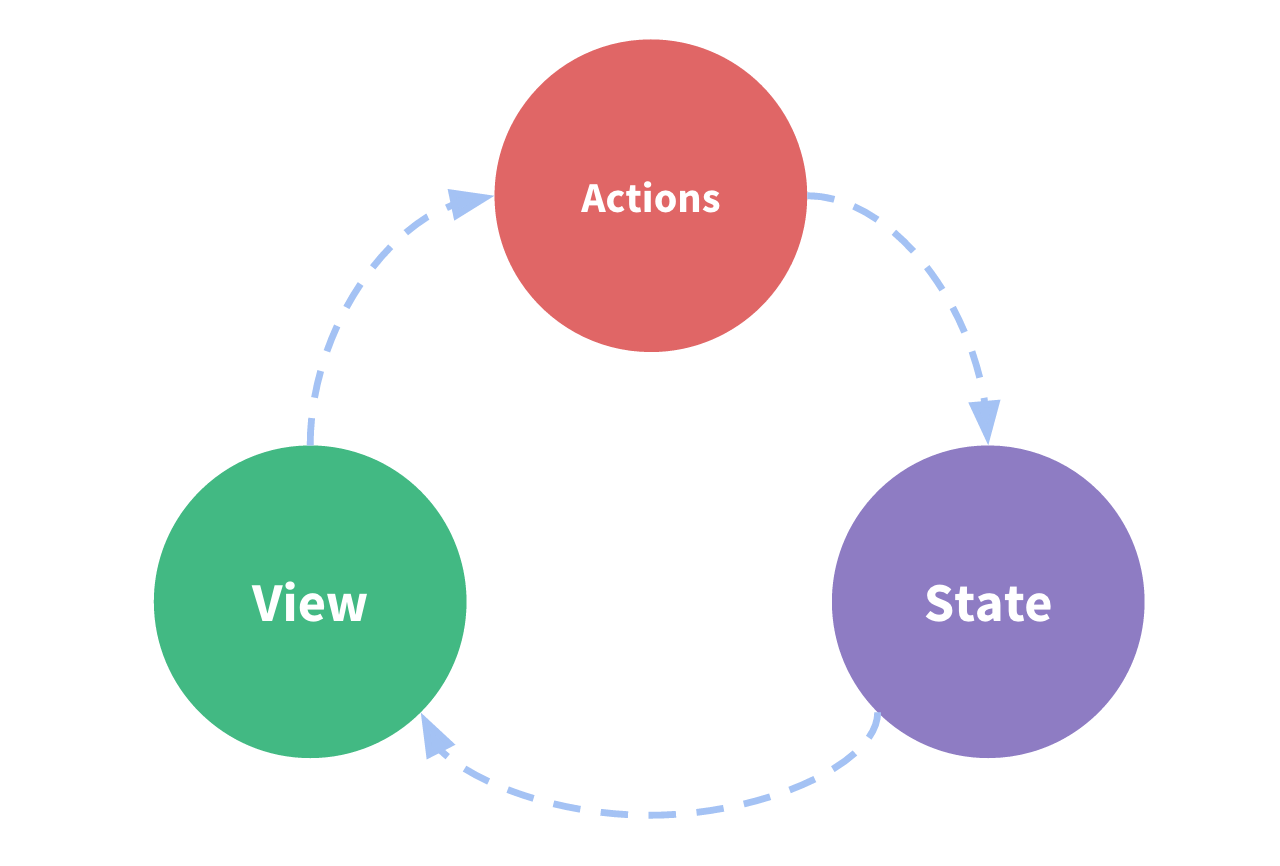
state = 특정 시점의 condition
UI = state에 따라 render
something happens -> something에 따라 state를 업데이트 -> 새로운 state에 따라 UI를 re-render
여러 component에서 같은 state를 공유?
기존: parent component로 "lifting state up"
Redux: component tree 밖의 centralized location에 공유 state를 위치
= component tree는 거대한 view가 어떤 component든 state 및 action에 접근
Redux?
global state를 포함하는 single centralized place + predictable하게 state를 업데이트하는 패턴
1-2-2. Immutability
Redux = state를 immutable하게 업데이트
"immutable" = never be changed
-> copies objects/arrays + modify copies
1-2-3. Terminology
Action?
const action = {
  type: '도메인/이벤트명',
  payload: 'text'
}
Action? type를 가지는 JavaScript object + 발생한 일을 묘사하는 event
type? action을 표현한 문자열
payload? 발생한 일에 대한 information
Action Creator?
const actionCreator = text => {
  return {
    type: '도메인/이벤트명',
    payload: text
  }
}
action object를 return하는 function
Reducer?
= 수신한 action(event) type에 따라 event를 처리하는 listener
current state와 action object를 argument로 받아서, state를 new state로 업데이트하여 return함
(state, action) => newState규칙?
existing state는 수정할 수 없음
-> immutable update (copy state + modify copy)
단계
reducer가 action에 관심?
-> o: copy state + modify copy
-> x: return unchanged state
const initialState = { value: 0 }
function counterReducer(state = initialState, action) {
  // Check to see if the reducer cares about this action
  if (action.type === '도메인/이벤트명') {
    // If so, make a copy of `state`
    return {
      ...state,
      // and update the copy with the new value
      value: new value
    }
  }
  // otherwise return the existing state unchanged
  return state
}
'Reducer'는 왜 Reducer인감?
Array.reduce() = "array -(reduce)-> value"
previousResult: 콜백의 마지막 반환값
currentItem: 현재 배열의 항목(처음 실행될 때는 initial value)
const array = [, , ]
const function = (previousResult, currentItem) => {
  return ~
}
const initialValue = value
const result = array.reduce(array, initialValue)
Redux reducer도 비슷
previous result -> state
currentItem -> action object
그러나 Redux reducer는 lifetime동안 reduce 진행
const actions = [
  { type: '도메인/이벤트명'},
  { type: '도메인/이벤트명'},
  { type: '도메인/이벤트명'}
]
const initialState = { value: 값 }
const result = actions.reduce(counterReducer, initialState)
Store?
store라는 객체에 Redux의 state가 존재
reducer에 넘겨지면서 생성 + getState()로 현재 state를 호출
import { configureStore } from '@reduxjs/toolkit'
const store = configureStore({ reducer: counterReducer })
const current_state = store.getState()
Dispatch
store.dispatch({action object}): state를 update하는 유일한 방법
reducer 실행 -> new state를 store에 저장
dispatching actions = "event trigger"
reducer = "event listener"
const function = () => {
  return {
    type: '도메인/이벤트명'
  }
}

store.dispatch(function())
Selectors
store의 state value에서 특정 value를 추출
const selectValue = state => state.value
const currentValue = selectValue(store.getState())
//
1-3. Redux Application Data Flow
"one-way data flow"
state = 특정 시점의 condition
UI = state에 따라 render
something happens -> something에 따라 state를 업데이트 -> 새로운 state에 따라 UI를 re-render
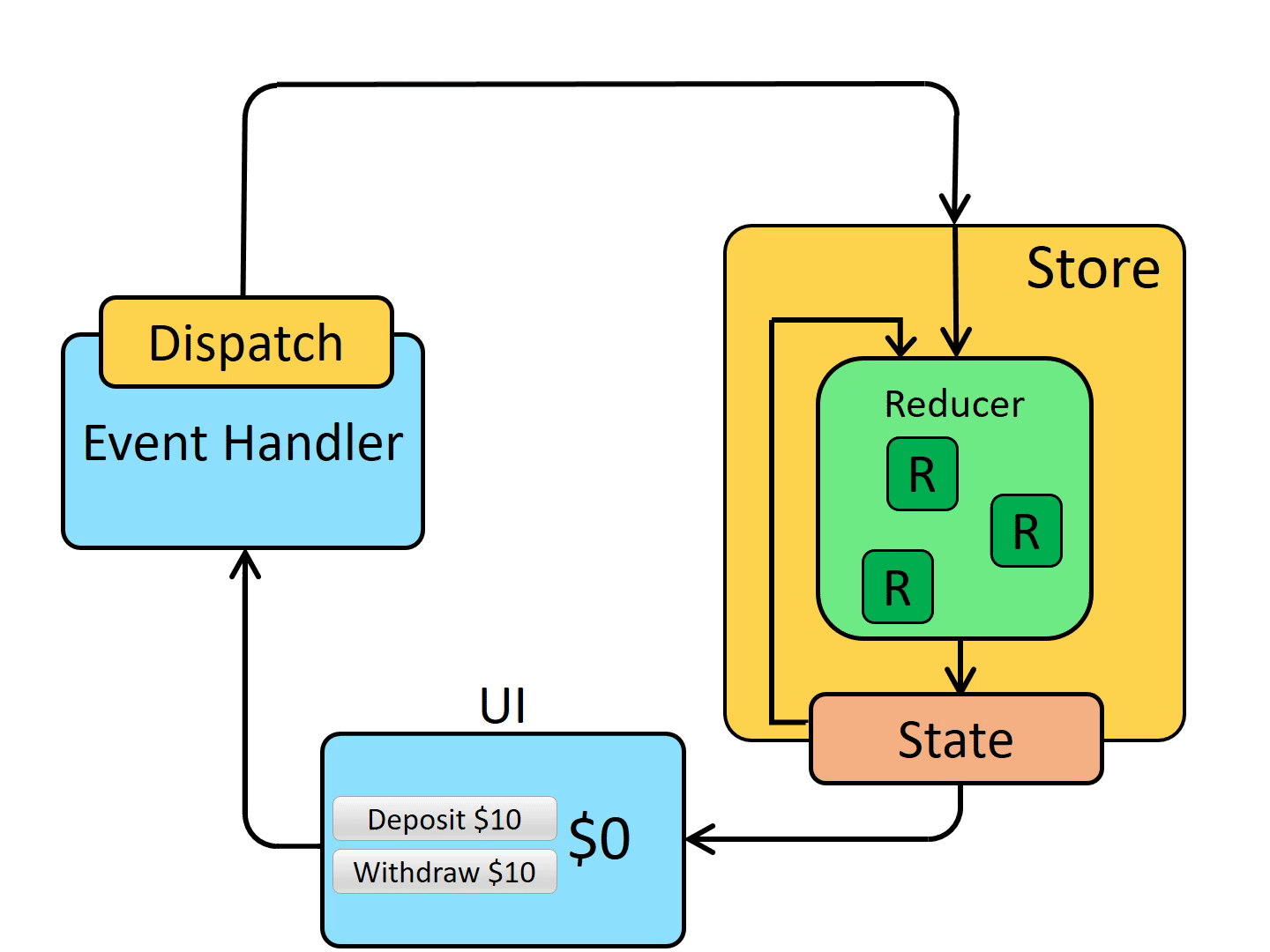
Initial setup
store는 root reducer로 생성 -> store는 root reducer를 호출하여 initial state를 return value로 저장 -> UI component는 store의 현재 state에 따라 render를 결정
store 업데이트를 subscribe하여 차후 state의 변화를 감지
Updates
Something happens -> store에 action을 dispatch
dispatch({type: '도메인/이벤트명'})-> store는 이전 state와 현재 action으로 reducer를 재실행하여 new state를 return value로 저장 -> store는 subscribe된 UI에 업데이트를 알림 -> UI component는 필요한 state의 변화를 체크 -> UI component는 변경된 state에 따라 화면을 re-render
1-4. What You've Learned
SUMMARY
Redux는 global application state를 관리하기 위한 library
보통 React-Redux library와 함께 사용
Redux Toolkitdms Redux logic을 작성하는데 권장
Redux는 "one-way data flow" 구조 사용
state = 특정 시점의 condition
UI = state에 따라 render
Something happens -> store에 action을 dispatch -> store는 이전 state와 현재 action으로 reducer를 재실행하여 new state를 return value로 저장 -> store는 subscribe된 UI에 업데이트를 알림 -> UI component는 필요한 state의 변화를 체크 -> UI component는 변경된 state에 따라 화면을 re-render
Redux는 여러 type의 코드를 사용
Action? type field가 있는 object + "what happend"를 설명
Reducer? previous state와 action를 argument로 new state value를 return
Store? action이 dispatch될 때마다 root reducer를 실행
1-5. What's Next?
2. Redux App Structure
2-1. Introduction
2-2. The Counter Example App
시작해부자
npx create-react-app redux-essentials-example --template redux2-2-1. Using the Counter App
"+" button을 click -> store에 "counter/increment" type의 action이 dispatch됨
dispatch에 따라 state.counter.value가 1로 변경
2-3. Application Contents
/src
	index.js: app의 시작
	App.js: 최상위 React component
	/app
		store.js: Redux store instance를 생성
	/features
		/counter
			Counter.js: 카운터 UI React component
            counterSlice.js: 카운터 기능 Redux logic
2-3-1. Creating the Redux Store
app/store.js

import { configureStore } from '@reduxjs/toolkit'
import counterReducer from '../features/counter/counterSlice'

export default configureStore({
  reducer: {
    counter: counterReducer
  }
})
configureStore? reducer를 argument로 store 생성
key name = 최종 state value의 key
features/counter/counterSlice.js는 counterReducer를 export -> counterReducer 함수를 import 및 store 생성 시 포함
{counter: counterReducer}?
state 객체에 state.counter section이 필요하고 action이 dispatch 될 때 counterReducer 함수가 state.counter 섹션의 업데이트 여부 및 방법을 결정하길 원함
Redux Slices
import { configureStore } from '@reduxjs/toolkit'
import usersReducer from '../features/users/usersSlice'
import postsReducer from '../features/posts/postsSlice'
import commentsReducer from '../features/comments/commentsSlice'

export default configureStore({
  reducer: {
    users: usersReducer,
    posts: postsReducer,
    comments: commentsReducer
  }
})
"slice"는 단일 feature에 대한 reducer logic과 action의 모음
-> root state 객체를 여러 개의 state "slices"로 분할
import { configureStore } from '@reduxjs/toolkit'
import usersReducer from '../features/users/usersSlice'
import postsReducer from '../features/posts/postsSlice'
import commentsReducer from '../features/comments/commentsSlice'

export default configureStore({
  reducer: {
    users: usersReducer,
    posts: postsReducer,
    comments: commentsReducer
  }
})
state "slice": state.users, state.posts, state.comments "slice reducer": Reducer는 state의 업데이트에 책임
Reducers와 State 구조
모든 slice reducer를 직접 호출
function rootReducer(state = {}, action) {
  return {
    users: usersReducer(state.users, action),
    posts: postsReducer(state.posts, action),
    comments: commentsReducer(state.comments, action)
  }
}
store가 생성될 때, single "root reducer" 전달 필요
slice reducer 함수가 많다면, 어떻게 single root reducer를 가질 수 있고, store state의 contents를 정의?
const rootReducer = combineReducers({
  users: usersReducer,
  posts: postsReducer,
  comments: commentsReducer
})

const store = configureStore({
  reducer: rootReducer
})
각 slice reducer를 따로 호출하고, state의 특정 slice를 전달하고 최종 new state object에 각 return value를 포함
combineReducers로 자동으로 수행
slice reducer로 가득 찬 객체를 인수로 받아들이고 action이 dispatch될 때마다 각 slice reducer를 호출하는 함수를 return
각 slice reducer의 결과는 모두 최종 결과로 단일 object로 결합됩니다
slice reducer object를 configureStore에 전달할 때, object?를 root reducer를 생성하기 위해 combineReducers로 전달
reducer 함수를 reducer argument로도 전달 가능
2-3-2. Creating Slice Reducers and Actions
import { createSlice } from '@reduxjs/toolkit'

export const counterSlice = createSlice({
  name: 'counter',
  initialState: {
    value: 0
  },
  reducers: {
    increment: state => {
      // Redux Toolkit allows us to write "mutating" logic in reducers. It
      // doesn't actually mutate the state because it uses the immer library,
      // which detects changes to a "draft state" and produces a brand new
      // immutable state based off those changes
      state.value += 1
    },
    decrement: state => {
      state.value -= 1
    },
    incrementByAmount: (state, action) => {
      state.value += action.payload
    }
  }
})

export const { increment, decrement, incrementByAmount } = counterSlice.actions

export default counterSlice.reducer
버튼 클릭 -> action type이 dispatch됨
{type: "counter/increment"}
{type: "counter/decrement"}
{type: "counter/incrementByAmount"}
action은 문자열인 type field가 있는 객체
action creator는 action 객체를 반환
createSlice 함수: action type string, action creator action object 생성 작업을 처리
slice 이름 정의 + reducer function을 가진 객체만 만들면 됨
-> {type: "slice의 name/reducers의 function"}로 생성됨
initialState 정의 -> 초기 state value
2-3-3. Rules of Reducers
argument(state & action)로 new state value를 산출
existing state를 수정불가 -> immutbale update (copying state & changing value)
"side effects" 불가
predictable -> 이해 및 테스트 용이
ex) state 업데이트 o -> UI 업데이트 x?
2-3-4. Reducers and Immutable Updates
"mutation": existing object/array value를 바꿈
"immutability": value는 바뀔 수 없음
reducer는 mutate the original / current state values를 mutate할 수 없음 -> Reducers make copies of the original values + mutate the copies
createSlice?
createSlice는 Immer inside 라이브러리 사용
Immer는 데이터를 wrap하는 Proxy 사용하고 wrapped 데이터를 mutate하는 코드 작성가능
Immer는 모든 변경사항을 추적한 다음, 변경사항리스트를 사용하여 immutably 업데이트 값을 return
function handwrittenReducer(state, action) {
  return {
    ...state,
    first: {
      ...state.first,
      second: {
        ...state.first.second,
        [action.someId]: {
          ...state.first.second[action.someId],
          fourth: action.someValue
        }
      }
    }
  }
}
->
function reducerWithImmer(state, action) {
  state.first.second[action.someId].fourth = action.someValue
}
export const counterSlice = createSlice({
name: 'counter',
initialState: {
value: 0
},
reducers: {
increment: state => {
// Redux Toolkit allows us to write "mutating" logic in reducers. It
// doesn't actually mutate the state because it uses the immer library,
// which detects changes to a "draft state" and produces a brand new
// immutable state based off those changes
state.value += 1
},
decrement: state => {
state.value -= 1
},
incrementByAmount: (state, action) => {
state.value += action.payload
}
}
})increment reducer는 state.value에 +1
de -1
-> action 객체를 볼 필요가 없음
incrementByAmount reducer는 state action 둘 다 arguments로 필요
In this case, we know that the amount we typed into the textbox is being put into the action.payload field, so we can add that to state.value.
2-3-5. Writing Async Logic with Thunks
So far, all the logic in our application has been synchronous. Actions are dispatched, the store runs the reducers and calculates the new state, and the dispatch function finishes. But, the JavaScript language has many ways to write code that is asynchronous, and our apps normally have async logic for things like fetching data from an API. We need a place to put that async logic in our Redux apps.
A thunk is a specific kind of Redux function that can contain asynchronous logic. Thunks are written using two functions:
An inside thunk function, which gets dispatch and getState as arguments
The outside creator function, which creates and returns the thunk function
The next function that's exported from counterSlice is an example of a thunk action creator:
We can use them the same way we use a typical Redux action creator:
However, using thunks requires that the redux-thunk middleware (a type of plugin for Redux) be added to the Redux store when it's created. Fortunately, Redux Toolkit's configureStore function already sets that up for us automatically, so we can go ahead and use thunks here.
When you need to make AJAX calls to fetch data from the server, you can put that call in a thunk. Here's an example that's written a bit longer, so you can see how it's defined:
What You've Learned
We can create a Redux store using the Redux Toolkit configureStore API
configureStore accepts a reducer function as a named argument
configureStore automatically sets up the store with good default settings
Redux logic is typically organized into files called "slices"
A "slice" contains the reducer logic and actions related to a specific feature / section of the Redux state
Redux Toolkit's createSlice API generates action creators and action types for each individual reducer function you provide
Redux reducers must follow specific rules
Should only calculate a new state value based on the state and action arguments
Must make immutable updates by copying the existing state
Cannot contain any asynchronous logic or other "side effects"
Redux Toolkit's createSlice API uses Immer to allow "mutating" immutable updates
Async logic is typically written in special functions called "thunks"
Thunks receive dispatch and getState as arguments
Redux Toolkit enables the redux-thunk middleware by default
React-Redux allows React components to interact with a Redux store
Wrapping the app with enables all components to use the store
Global state should go in the Redux store, local state should stay in React components