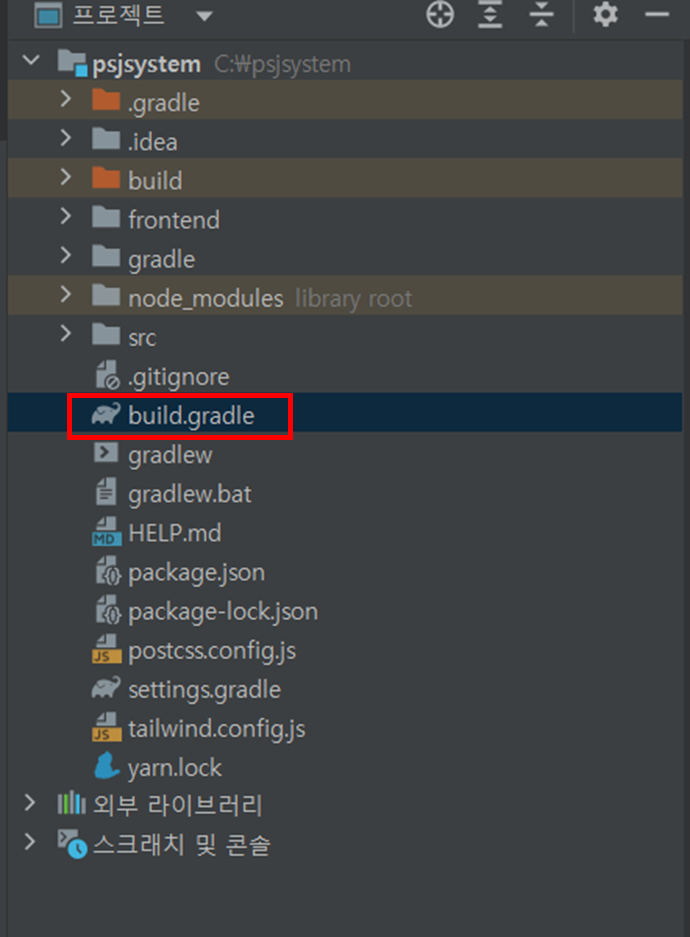
1. build.gradle 에 들어갑니다.
2. dependencies를 찾아서 추가합니다.
buildscript {
	// ext => build.gradle 내에서 쓸 전역변수를 선언하는 키워드.
	ext {
		queryDslVersion = "5.0.0"
	}
}

plugins {
	id 'org.springframework.boot' version '2.6.8' // springboot 버전
	id 'io.spring.dependency-management' version '1.0.14.RELEASE'
	id 'java' // jar파일로 패키징 해서 배포시킴
	// querydsl 플러그인 추가
	id "com.ewerk.gradle.plugins.querydsl" version "1.0.10"
}

group = 'mirae-info' // 그룹명
version = '0.0.1-SNAPSHOT'
sourceCompatibility = '17' // java version
apply plugin: 'war' // war파일로 패키징해서 배포, plugins 안에 추가해도 무관

bootWar {
	archiveFileName = 'ROOT.war' // war파일 배포시 출력되는 파일명
}

repositories {
	mavenCentral() //mavenCentral은 이전부터 많이 사용하는 저장소지만, 본인이 만든 라이브러리를 업로드하기 위해서는 많은 과정과 설치가 필요한 문제점이 있었다.
								//이를 보완하기 위한 라이브러리가 jcenter이다.
	maven {
		// maven 저장소에서 dependencies를 다운로드할 위치를 나타냄.
		url 'https://repo.clojars.org'
		// 저장소의 이름 지정
		name 'Clojars'
	}
}

ext {
	set('springCloudVersion', "2021.0.4")
}

dependencies {
	// jpa
	implementation 'org.springframework.boot:spring-boot-starter-data-jpa'
	// web
	implementation 'org.springframework.boot:spring-boot-starter-web'
	// 설정서버 : 외부에서 모든 환경에 대한 정보들을 관리해주는 중앙서버.
	implementation 'org.springframework.cloud:spring-cloud-config-server' // 설정서버
	// entity 트랜젝션
  implementation 'entity:entity-txn:0.1.4'
	// entity base
	implementation 'entity:entity-core:0.1.2'
	// entity to sql?
	implementation 'entity:entity-sql:0.1.2'
	// mysql connector
	implementation 'mysql:mysql-connector-java'
	providedRuntime 'org.springframework.boot:spring-boot-starter-tomcat'
	// runtimeOnly 'com.microsoft.sqlserver:mssql-jdbc'
	runtimeOnly 'com.microsoft.sqlserver:mssql-jdbc:6.1.0.jre8'
	testImplementation 'org.springframework.boot:spring-boot-starter-test'
//	implementation 'org.springframework.boot:spring-boot-starter-thymeleaf'
//	implementation('nz.net.ultraq.thymeleaf:thymeleaf-layout-dialect')
	compileOnly 'org.projectlombok:lombok'
	annotationProcessor 'org.projectlombok:lombok'
//	jwt 인증
	implementation 'javax.xml.bind:jaxb-api'
	implementation 'io.jsonwebtoken:jjwt-api:0.11.5'
	implementation 'io.jsonwebtoken:jjwt-impl:0.11.5'
	implementation 'io.jsonwebtoken:jjwt-jackson:0.11.5'
	// querydsl 디펜던시 추가
	implementation "com.querydsl:querydsl-jpa:${queryDslVersion}"
	implementation "com.querydsl:querydsl-apt:${queryDslVersion}"
	//json
	implementation group: 'org.json', name: 'json', version: '20090211'
}

dependencyManagement {
	imports {
	// BOM = Bill of Materials -> 재료들의 청구서? 필요한 재료들 리스트 정도랄까 ?
		mavenBom "org.springframework.cloud:spring-cloud-dependencies:${springCloudVersion}"
	}
}

tasks.named('test') {
	useJUnitPlatform()
}

// querydsl 사용할 경로 지정합니다. 현재 지정한 부분은 .gitignore에 포함되므로 git에 올라가지 않습니다.
def querydslDir = "$buildDir/generated/'querydsl'"

// JPA 사용여부 및 사용 경로 설정
querydsl {
	jpa = true
	querydslSourcesDir = querydslDir
}

// build시 사용할 sourceSet 추가 설정
sourceSets {
	main.java.srcDir querydslDir
}


// querydsl 컴파일 시 사용할 옵션 설정
compileQuerydsl {
	options.annotationProcessorPath = configurations.querydsl
}

// querydsl이 compileClassPath를 상속하도록 설정
configurations {
	compileOnly {
		extendsFrom annotationProcessor
	}
	querydsl.extendsFrom compileClasspath
}
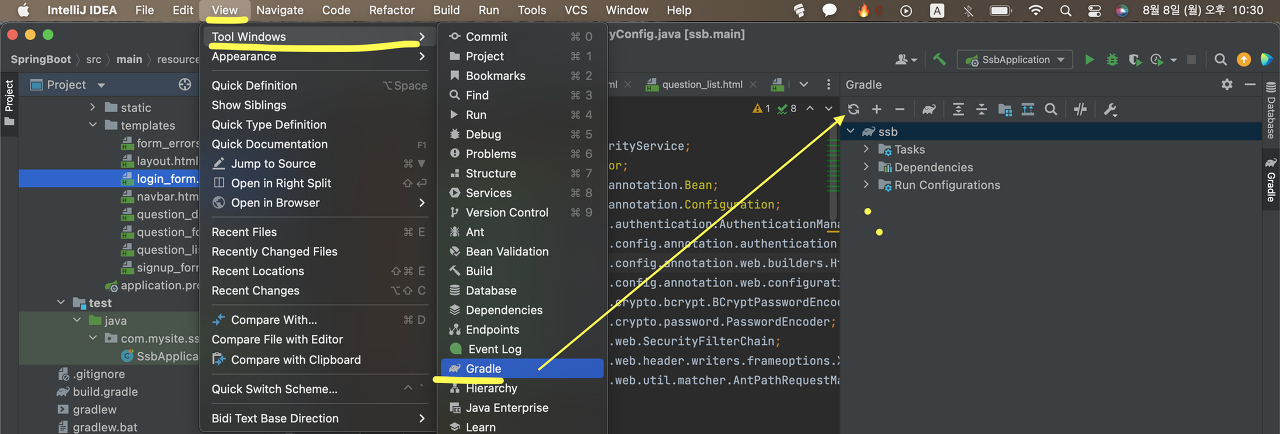
3. Gradle적용시키기
View -> Tool Windows -> Gradle