에러 로그
Cloudflare와 배포 삽질을 하다가 이런 에러를 만났다.
03:44:12.458	Detected the following tools from environment: yarn@3.6.3, nodejs@18.17.1
03:44:12.460	Installing project dependencies: yarn
03:44:13.365	➤ YN0070: Migrating from Yarn 1; automatically enabling the compatibility node-modules linker 👍
...
03:44:26.145	Error: Exit with error code: 1
03:44:26.145	    at ChildProcess.<anonymous> (/snapshot/dist/run-build.js)
03:44:26.146	    at Object.onceWrapper (node:events:652:26)
03:44:26.146	    at ChildProcess.emit (node:events:537:28)
03:44:26.146	    at ChildProcess._handle.onexit (node:internal/child_process:291:12)
03:44:26.153	Failed: build command exited with code: 1
03:44:27.044	Failed: error occurred while running build command
원인 분석
로그 맨 첫줄을 보면 나는 Yarn 버전을 1로 쓰고 있는데 Cloudflare에서는 3버전을 쓰고 있는 듯 하다.
해결
YARN_VERSION=1을 환경 변수에 지정해주면 해결된다.
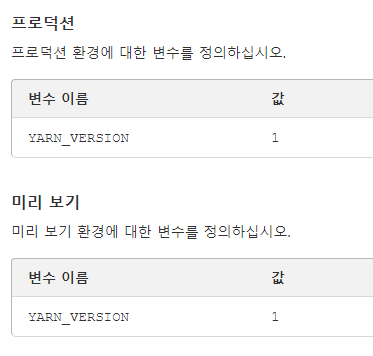
프로덕션에는 꼭 넣어주고 main 말고 다른 브랜치에서도 빌드를 한다면 미리 보기에도 넣어주자.
여담
Cloudflare는 별 말 없으면 Yarn3을 사용한다는 걸 알게 됐다
프로젝트를 세팅할 때 보통 버전 1을 사용하길래 나도 따라서 사용했는데 마이그레이션도 고려해볼만한 것 같다.

[Front-end Engineer] 안 되는 것 빼고 다 합니다