인프런 정수원 지식공유자님의 스프링 시큐리티 강의를 수강하고 공부한 내용을 정리한 글입니다.
주요 아키텍처
📌 위임 필터 및 필터 빈 초기화
DelegatingFilterProxy
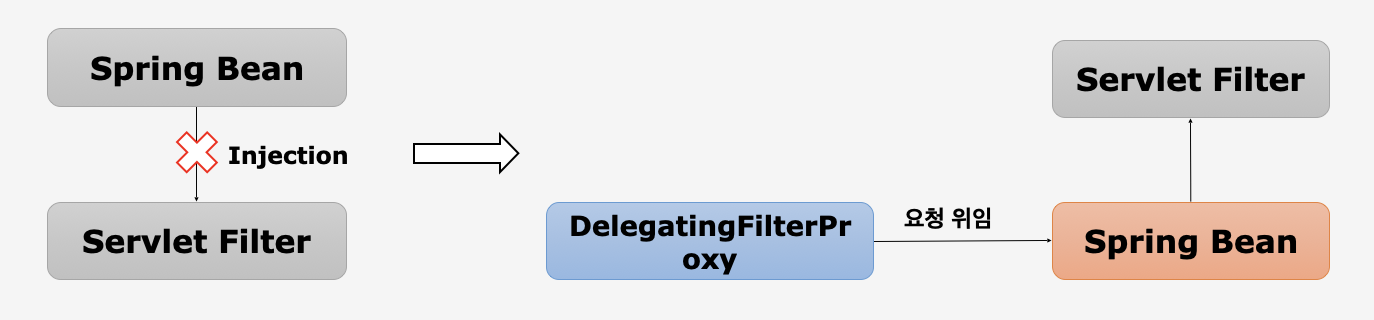
Servlet Filter는 스프링에서 정의된 Bean을 주입해서 사용할 수 없다.
SpringSecurityFilterChain 이름으로 생성된 Bean을 ApplicationContext에서 찾아 요청을 위임하고, 실제 보안 처리를 하지 않는다.
Servelt Filter
🫧 요청 처리 전후의 작업에 필터를 사용
🫧 Servlet Container에서 생성되고 실행
🫧 따라서 스프링에서 사용하는 기술을 사용할 수 없다 (= Spring Bean을 injection 할 수 없다)
🫧 그렇기 때문에 Spring Security는 Spring Bean을 만들고 Servlet Filter의 Filter를 구현한다 (bean으로 생성된 객체는 필터 타입)
DelegatingFilterProxy
🫧 DelegatingFilterProxy가 없을 때, 사용자가 요청하면 Servlet 기반으로 작동해 Filter가 먼저 받게 된다
🫧 사용자 요청을 Spring Bean이 처리할 수 있도록, Servlet Filter로서 가장 먼저 요청을 받아 Spring Bean에게 위임하는 역할
FilterChainProxy
{WegAsyncManagerIntegrationFilter@8791}
{SecurityContextPersistenceFilter@8795}
{HeaderWriterFilter@8800}
{CsrfFilter@8805}
{LogoutFilter@8808}
{UsernamePasswordAuthenticationFilter@8811}
{DefaultLoginPageGeneratingFilter@8837}
{DefaultLogoutPageGeneratingFilter@8840}
{ConcurrentSessionFilter@8843}
{RequestCacheAwareFilter@8846}
{SecurityContextHolderAwareRequestFilter@8849}
{AnonymousAuthenticationFilter@8854}
{SessionManagementFilter@8858}
{ExceptionTranslationFilter@8862}
{FilterSecurityInterceptor@8927}
🫧 SpringSecurityFilterChain의 이름으로 생성되는 필터 Bean (Spring Bean으로 생성)
🫧 DelegatingFilterProxy로부터 요청을 위임받고 실제 보안 처리
⠀⠀👉🏻 위의 필터를 관리, 제어, 호출하여 보안 처리
⠀⠀👉🏻 실제로 보안 처리를 하는 시작점
🫧 Spring Security 초기화 시 생성되는 필터 관리, 제어
⠀⠀👉🏻 스프링 시큐리티가 기본적으로 생성하는 필터
⠀⠀👉🏻 설정 클래스에서 API 추가 시 생성되는 필터
🫧 사용자의 요청을 필터 순서대로 호출하여 전달
🫧 사용자 정의 필터를 생성해서 기존의 필터 전/후로 추가 가능
⠀⠀👉🏻 필터의 순서를 잘 정의
🫧 마지막 필터까지 인증 및 인가 예외가 발생하지 않으면 보안 통과
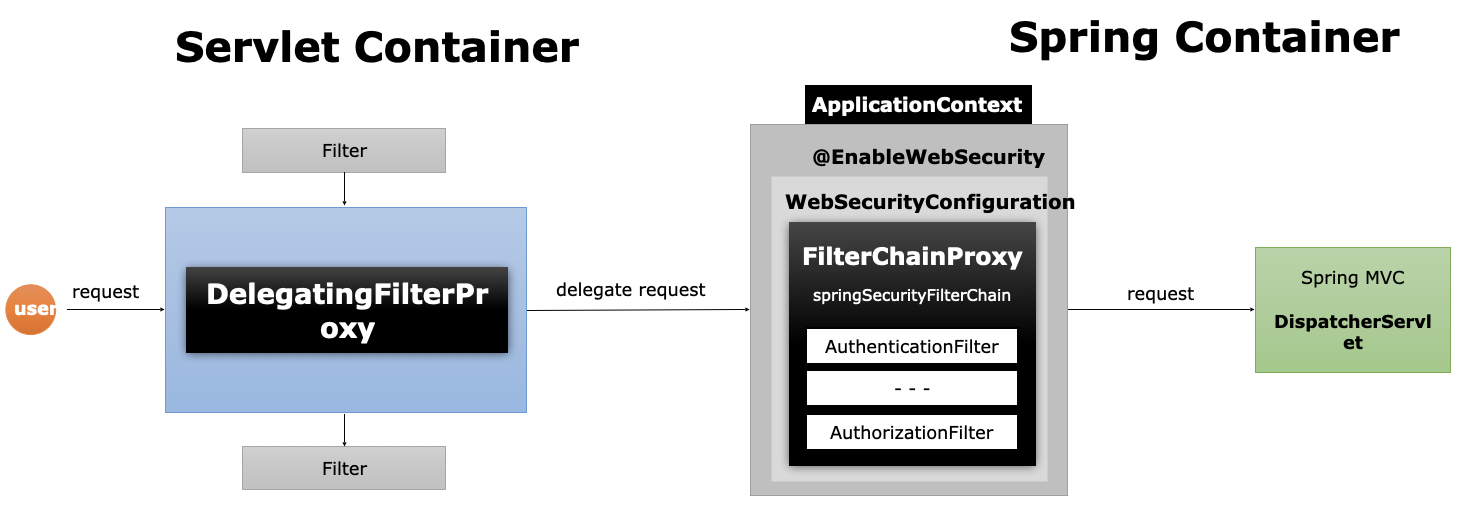
Servelt Container
👉🏻 가장 먼저 요청을 받는 영역
DelegatingFilterProxy
👉🏻 전달받은 요청 객체를 특정한 이름을 가진 Bean(=SpringSecurityFilterChain)을 찾아 Delegated request 요청을 위임
Spring Container
👉🏻 Spring Container에서 생성되는 bean을 관리하는 영역
FilterChainProxy
👉🏻 FilterChainProxy를 Bean으로 등록할 때 SpringSecurityFilterChain 이름으로 등록
👉🏻 요청에 대해 각 필터를 순차적으로 호출해 보안 처리
👉🏻 보안 처리가 끝나면 DispatcherServlet, Spring MVC로 요청을 전달하여 Servlet의 실제 요청에 대한 처리
📌 필터 초기화와 다중 보안 설정
필터 초기화와 다중 설정 클래스
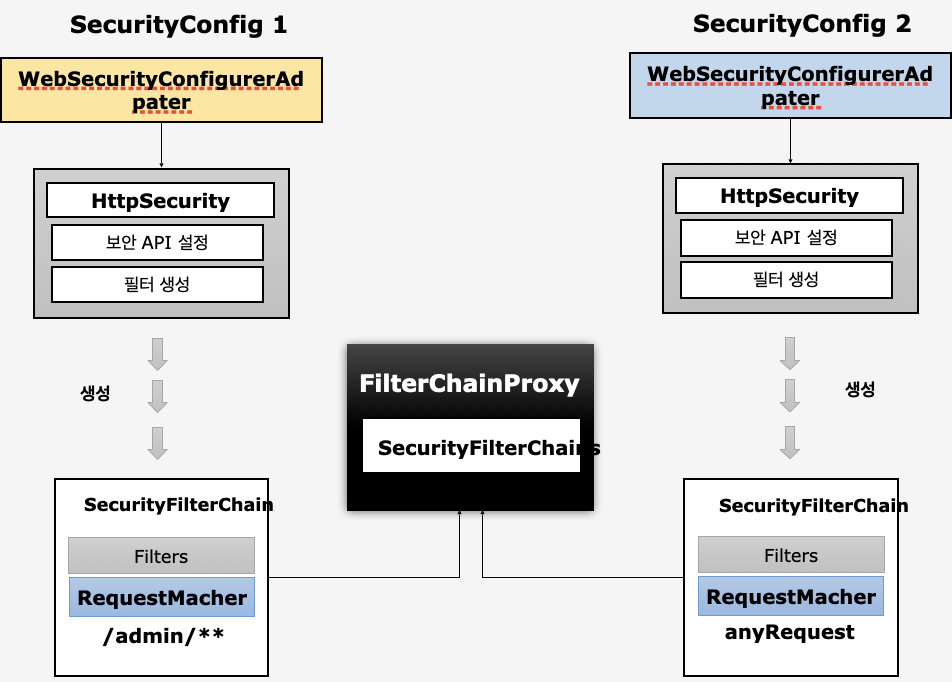
👉🏻 WebSecurityConfigureAdapter를 상속받아 HttpSecurity를 통해 각각의 인증이나 인가 관련 API 설정
👉🏻 SpringSecurity가 초기화되면서 API 관련 필터를 생성
👉🏻 사용자 요청을 받으면 보안 기능이 작동
🫧 보안 기능이 작동하는 설정 클래스가 2개 있다면 = 다중 설정 클래스
⠀⠀🦴 설정 클래스 별로 보안 기능이 각각 작동
⠀⠀🦴 설정 클래스 별로 RequestMatcher 설정
⠀⠀http.antMatcher("/admin.**")
⠀⠀👉🏻 admin이 아닌 다른 url로 접근하면 ⠀⠀SecurityConfig2가 작동
⠀⠀👉🏻 경로로 접근하는 보안 기능을 구분해서 설정 가능
⠀⠀🦴 설정 클래스 별로 필터가 생성
⠀⠀⠀⠀👉🏻 초기화 시 SecurityFilterChain의 Filter 객체 안에 변수로 담고
⠀⠀⠀⠀👉🏻 antMatcher로 설정한 url 정보가 RequestMatcher에 담음
⠀⠀🦴 FilterChainProxy가 각 필터들을 가지고 있다
⠀⠀⠀⠀👉🏻 SecurityFilterChains라는 List에 SecurityFilterChain을 저장
⠀⠀🦴 요청에 따라 RequestMatcher와 매칭되는 필터가 작동하도록 함
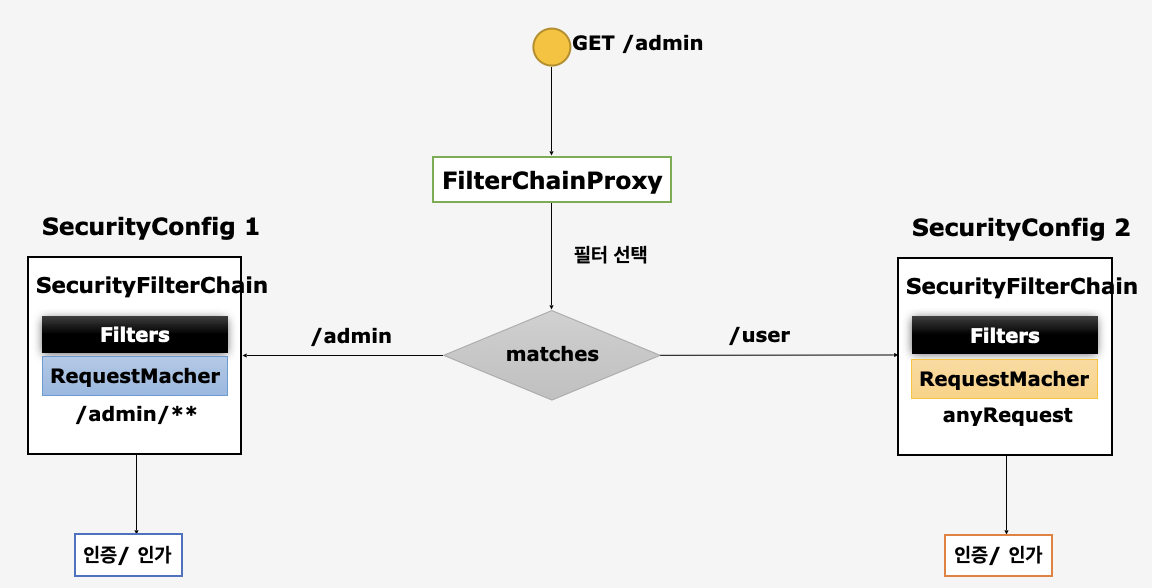
사용자가 GET 방식으로 admin URL을 요청
⠀⠀👉🏻 FilterChainProxy가 요청을 받아 처리할 Filter를 선택
⠀⠀⠀⠀👉🏻 url을 매칭하여 true인 Filter를 선택해 인가 처리
⠀⠀⠀⠀👉🏻 사용자가 설정 클래스를 여러 개 만들더라도 RequestMatcher만 다르게 구분하면 ok
다중 설정 클래스
// SecurityConfig.java

// 두 가지 설정 클래스 작성
@Configuration
@EnableWebSecurity // 웹 보안 활성화
public class SecurityConfig extends WebSecurityConfigurerAdapter {

	protected void configure(HttpSecurity http) throws Exception {
		http
			.antMatcher("/admin")
			.authorizeRequests()
			.anyRequest().authenticated() // 모든 사용자가 인증을 받아야 admin url에 접근 가능
		.and()
			.httpBasic();

	}
}

@Configuration
class SecurityConfig2 extends WebSecurityConfigurerAdapter {

	protected void configure(HttpSecurity http) throws Exception {
		http
			.authorizeRequests() // url 지정을 하지 않아 어떤 요청에도 보안 기능이 동작
			.anyRequest().permitAll()
			.and()
			.formLogin(); // formLogin 방식

	}
}

// 이대로 run하면 ERROR 발생!
// org.springframework.beans.factory.BeanCreationException
// : Error creating bean with name 'org.springframework.security.config.annotation.web.configuration.WebSecurityConfiguration'
// : Injection of autowired dependencies failed; nested exception is java.lang.IllegalStateException
// : @Order on WebSecurityConfigurers must be unique.
// Order of 100 was already used on io.security.basicsecurity.SecurityConfig$$EnhancerBySpringCGLIB$$e663abef@602c4656,
//  so it cannot be used on io.security.basicsecurity.SecurityConfig2$$EnhancerBySpringCGLIB$$30cefa91@5ffc5491 too.
// 즉, 두 개의 설정 클래스를 줬는데 Spring Security가 초기화 될 때 어떤 순서에 따라서 설정을 초기화하는데 같은 순서이기 때문에 순서를 달리 해야한다고 Warning
👉🏻 Order를 작성해주어야 한다
@Configuration
@EnableWebSecurity // 웹 보안 활성화
@Order(0)
public class SecurityConfig extends WebSecurityConfigurerAdapter {

	protected void configure(HttpSecurity http) throws Exception {
		http
			.antMatcher("/admin")
			.authorizeRequests()
			.anyRequest().authenticated() // 모든 사용자가 인증을 받아야 admin url에 접근 가능
		.and()
			.httpBasic();

	}
}

@Configuration
@Order(1)
class SecurityConfig2 extends WebSecurityConfigurerAdapter {

	protected void configure(HttpSecurity http) throws Exception {
		http
			.authorizeRequests() // url 지정을 하지 않아 어떤 요청에도 보안 기능이 동작
			.anyRequest().permitAll()
			.and()
			.formLogin(); // formLogin 방식

	}
}
👉🏻 Order 순서는 구체적인 것을 우선순위로 해야함
📌 인증 개념 이해 : Authentication
Authentication
👉🏻 누구인지 증명하는 것
👉🏻 사용자의 인증 정보를 저장하는 토큰 개념
👉🏻 인증 시 id와 password를 담고 인증 검증을 위해 전달
👉🏻 인증 후 최종 인증 결과(user 객체, 권한 정보)를 담고 SecurityContext에 저장
👉🏻 전역적으로 참조가 가능
Authentication authentication = SecurityContextHolder.getContext().getAuthentication();
👉🏻 구조
⠀⠀🧱 principal : 사용자 아이디 or User 객체 저장 (Object 타입)
⠀⠀🧱 credentials : 사용자 비밀번호
⠀⠀🧱 authorities : 인증된 사용자의 권한 목록
⠀⠀🧱 details : 인증 부가 정보
⠀⠀🧱 Authenticated : 인증 여부 (인증 o : true | 인증 x : false)
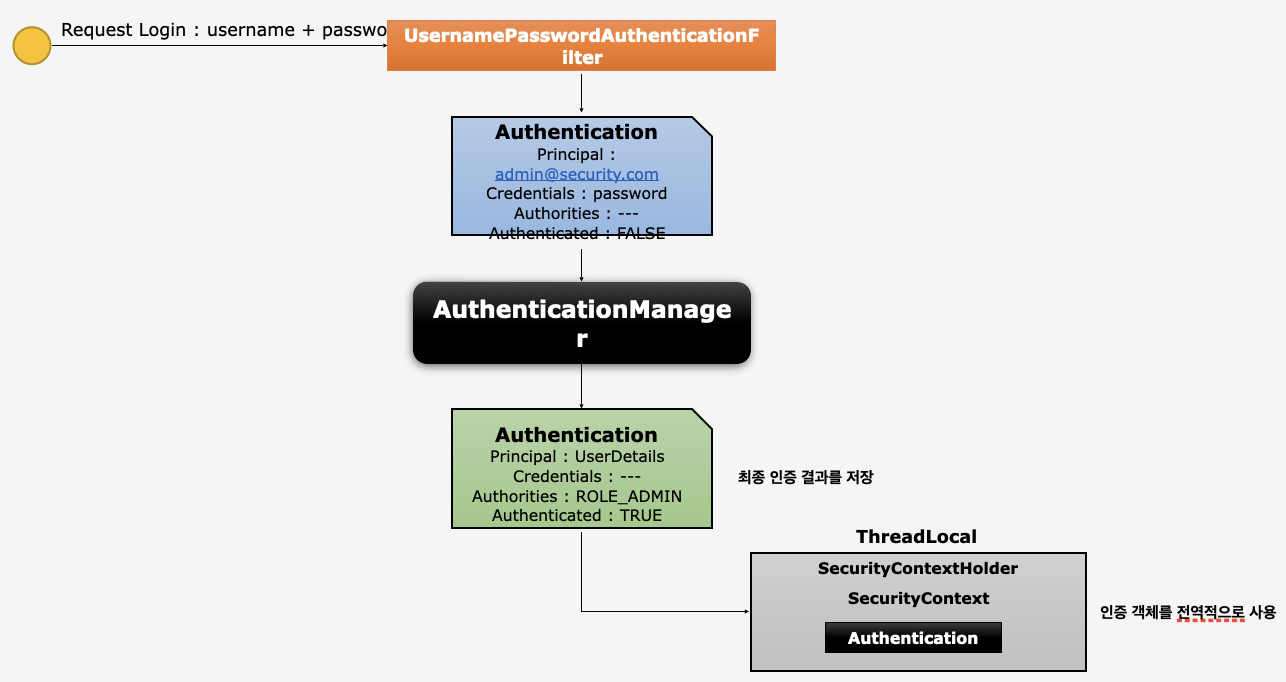
UsernamePasswordAuthenticationFilter
👉🏻 username, password 추출하여 Authentication 객체 생성
👉🏻 Authentication의 Principal 속성에 사용자 ID 제정, Credentials 속성에 password 저장 (인증 검증을 위한 처리에 사용)
AuthenticationManager
👉🏻 Authentication 객체로 인증 처리
👉🏻 인증 성공 후 Authentication 객체를 생성해 Principal에 인증에 성공한 user의 ID 저장, Credentials 속성에 password 저장 (보안 상 비워두기도), Authorities에는 권한 목록 저장
SecurityContext
👉🏻 최종적으로 성공한 인증 결과 Authentication 객체를 SecurityContext에 저장
👉🏻 인증 객체를 전역적으로 사용
📌 인증 저장소
SecurityContext
👉🏻 Authentication 객체가 저장되는 보관소, 필요 시 Authentication 객체를 꺼내어 쓸 수 있도록 제공되는 클래스 (SecurityContext > Authentication > User)
👉🏻 ThreadLocal에 저장되어 아무 곳에서나 참조가 가능하도록 설계 (ThreadLocal : Thread 마다 할당된 저장소, ThreadLocal은 Thread끼리 공유 x)
👉🏻 인증이 완료되면 HttpSession에 저장되어 어플리케이션 전반에 걸쳐 전역적인 참조가 가능
SecurityContextHolder
👉🏻 SecurityContext 객체 저장 방식 (3가지 방식으로 SecurityContext를 저장)
⠀⠀📦 MODE_THREADLOCAL : 스레드 당 SecurityContext객체를 할당(기본값)
⠀⠀📦 MODE_INHERITABLETHREADLOCAL : 메인 스레드와 자식 스레드에 관하여 동일한 SecurityContext를 유지
⠀⠀📦 MODE_GLOBAL : 응용 프로그램에서 단 하나의 SecurityContext 기존 정보 초기화
👉🏻 SecurityContextHolder.clearContext() : SecurityContext 기존 정보 초기화
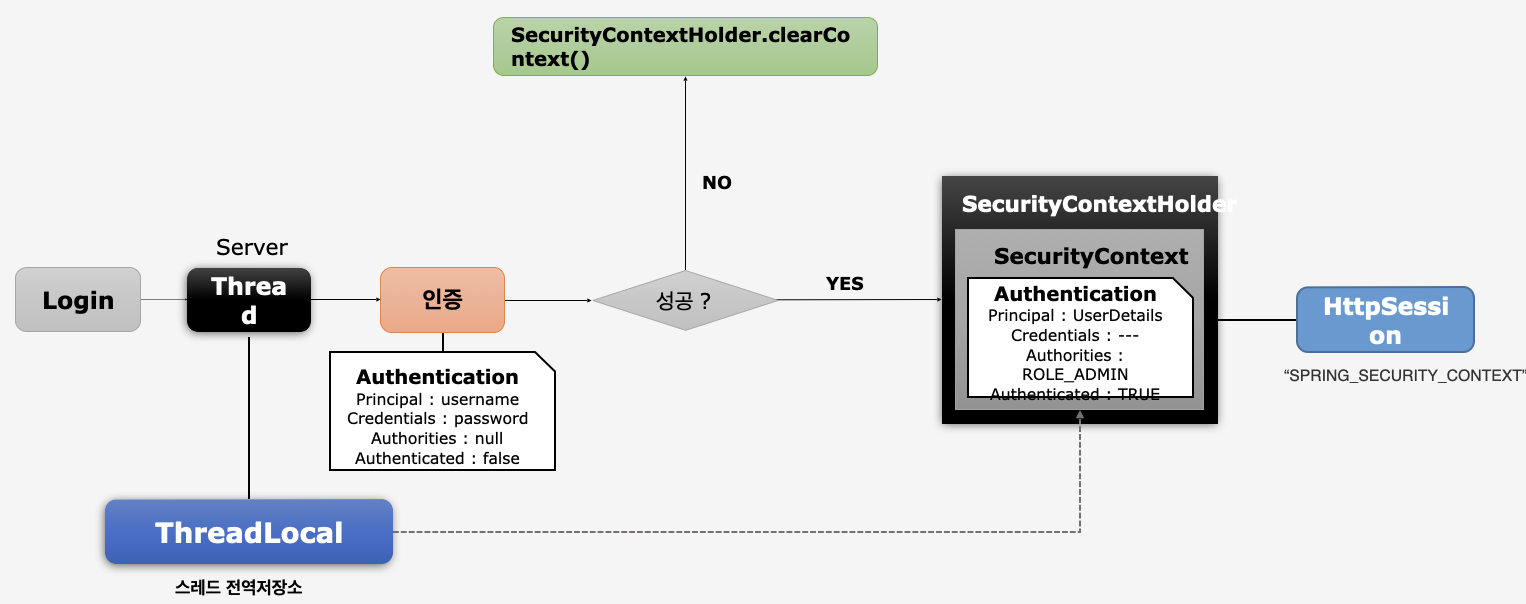
로그인 시도
👉🏻 서버가 요청을 받아 Thread 생성
👉🏻 Thread마다 ThreadLocal 할당
👉🏻 Thread가 인증 처리
👉🏻 인증 Filter가 인증 처리
👉🏻 Filter가 Authentication 객체 생성하여 user 정보 저장
⠀⠀😞 인증에 실패하면? SecurityContext 초기화 (= SecurityContextHolder.clearContext())
⠀⠀🙂 인증에 성공하면? SecurityContextHolder 안의 SecurityContext에 인증 객체(Authentication) 저장 👉🏻 HttpSession에 저장
SecurityContextHolder : ThreadLocal 객체를 가짐
ThreadLocal : SecurityContext를 담고 있음
// SecurityConfig.java
@Configuration
@EnableWebSecurity
public class SecurityConfig extends WebSecurityConfigurerAdapter {
protected void configure(HttpSecurity http) throws Exception {
http
.authorizeHttpRequests()
.anyRequest().authenticated();
http
.formLogin();
SecurityContextHolder.setStrategyName(SecurityContextHolder.MODE_INHERITABLETHREADLOCAL); // mode에 따라 thread 초기화 전략 바뀜
}
}
// SecurityController.java
@RestController
public class SecurityController {
@GetMapping("/") // root 경로로 접속 시
public String index(HttpSession session) {
Authentication authentication = SecurityContextHolder.getContext().getAuthentication();
SecurityContext context = (SecurityContext)session.getAttribute(HttpSessionSecurityContextRepository.SPRING_SECURITY_CONTEXT_KEY);
Authentication authentication1 = context.getAuthentication();
return "home"; // home 문자열 return
}
@GetMapping("/thread")
public String thread() {
new Thread(
new Runnable() {
@Override
public void run() {
Authentication authentication = SecurityContextHolder.getContext().getAuthentication();
}
}
).start();
return "thread";
}
}📌 인증 저장소 필터
SecurityContext 객체의 생성, 저장, 조회
🤫 익명 사용자
⠀⠀🫧 새로운 SecurityContext 객체를 생성하여 SecurityContextHolder에 저장
⠀⠀🫧 AnonymousAuthenticationFilter에서 AnonymousAuthenticationToken객체를 SecurityContext에 저장
🫡 인증 시
⠀⠀🫧 새로운 SecurityContext 객체를 생성하여 SecurityContextHolder에 저장
⠀⠀🫧 UsernamePasswordAuthenticationFilter에서 인증 성공 후 SecurityContext에 UsernamePasswordAuthentication 객체를 저장
🙂 인증 후
⠀⠀🫧 Session에서 SecurityContext 꺼내어 SecurityContextHolder에 저장
⠀⠀🫧 SecurityContext 안에 Authentication 객체가 존재하면 계속 인증을 유지
👉🏻 최종 응답 시 공통적으로
⠀⠀🫧 SecurityContextHolder.clearContext()
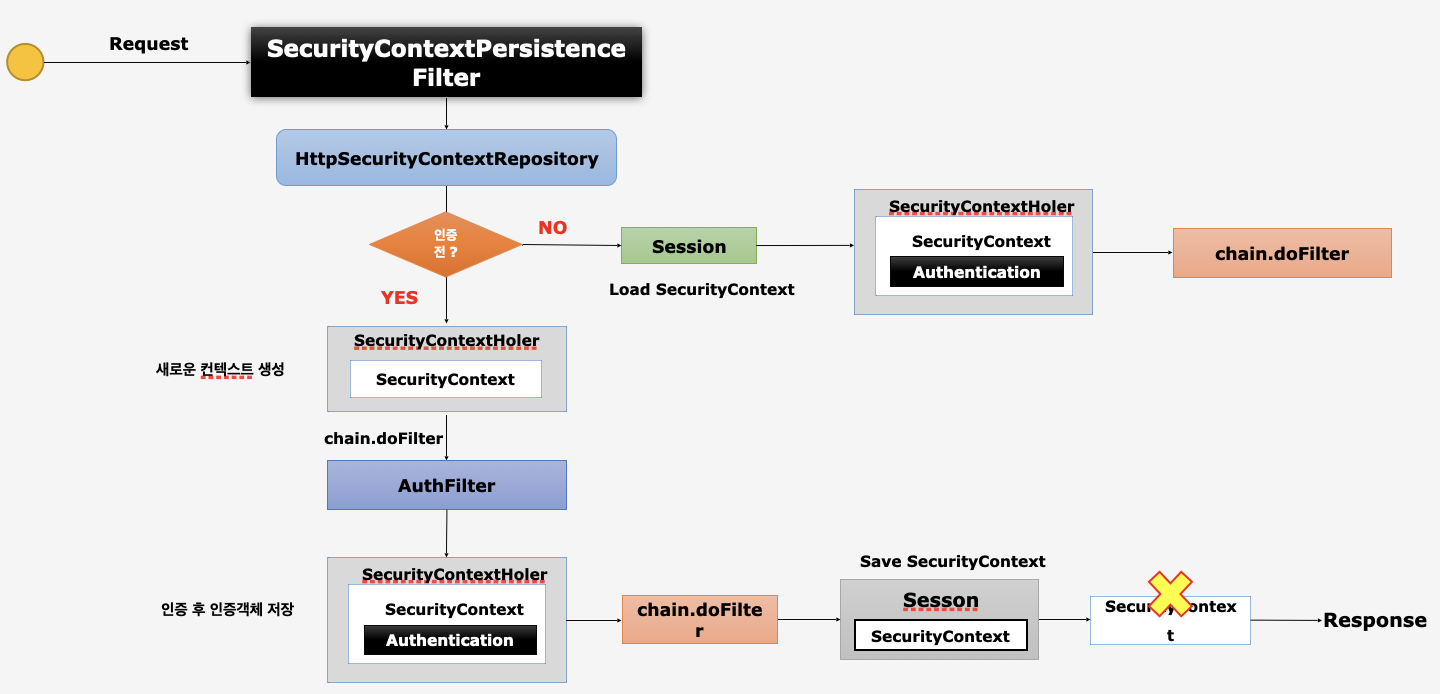
SecurityContextPersistenceFilter
🫧 요청을 처리
HttpSecurityContextRepository
🫧 SecurityContext 객체 생성, 조회
⠀⠀😞 인증 전?
⠀⠀⠀⠀👉🏻 새로운 SecurityContext 생성 (SecutiryContext == null)
⠀⠀⠀⠀👉🏻 AuthFilter(인증 필터)가 인증 처리
⠀⠀⠀⠀👉🏻 인증 후 인증객체 저장 (= SecurityContext 객체 안에 결과를 저장한 Authentication 저장)
⠀⠀⠀⠀👉🏻 다음 필터로 이동 (chain.doFilter)
⠀⠀⠀⠀👉🏻 클라이언트에게 응답하기 전에 session에 저장 (SecurityContextPersistenceFilter가 수행)
⠀⠀⠀⠀👉🏻 SecurityContextHolder에서 SecurityContext를 제거 후 클라이언트에게 응답
⠀⠀🙂 인증 후?
⠀⠀⠀⠀👉🏻 Session에서 SecurityContext 객체가 있는지 확인
⠀⠀⠀⠀👉🏻 Session에서 SecurityContext 객체를 꺼내 SecurityContextHolder에 저장
⠀⠀⠀⠀👉🏻 다음 필터로 이동 (chain.doFilter)
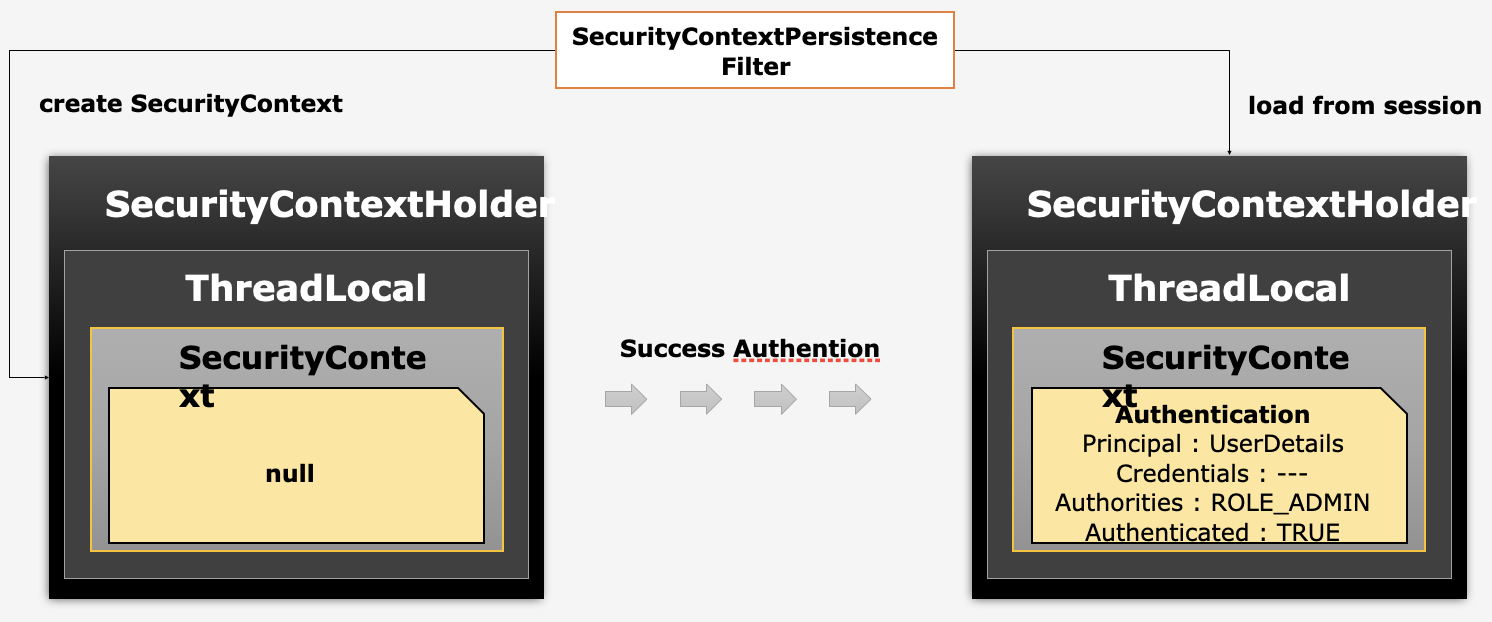
SecurityContextPersistenceFilter
😞 인증 전
⠀⠀새로운 SecurityContext 생성 (SecurityContextHolder > ThreadLocal > SecurityContext == null)
🙂 인증 후
⠀⠀Session에서 SecurityContext 객체를 꺼내 SecurityContextHolder 안에 저장
📌 인증 흐름 이해
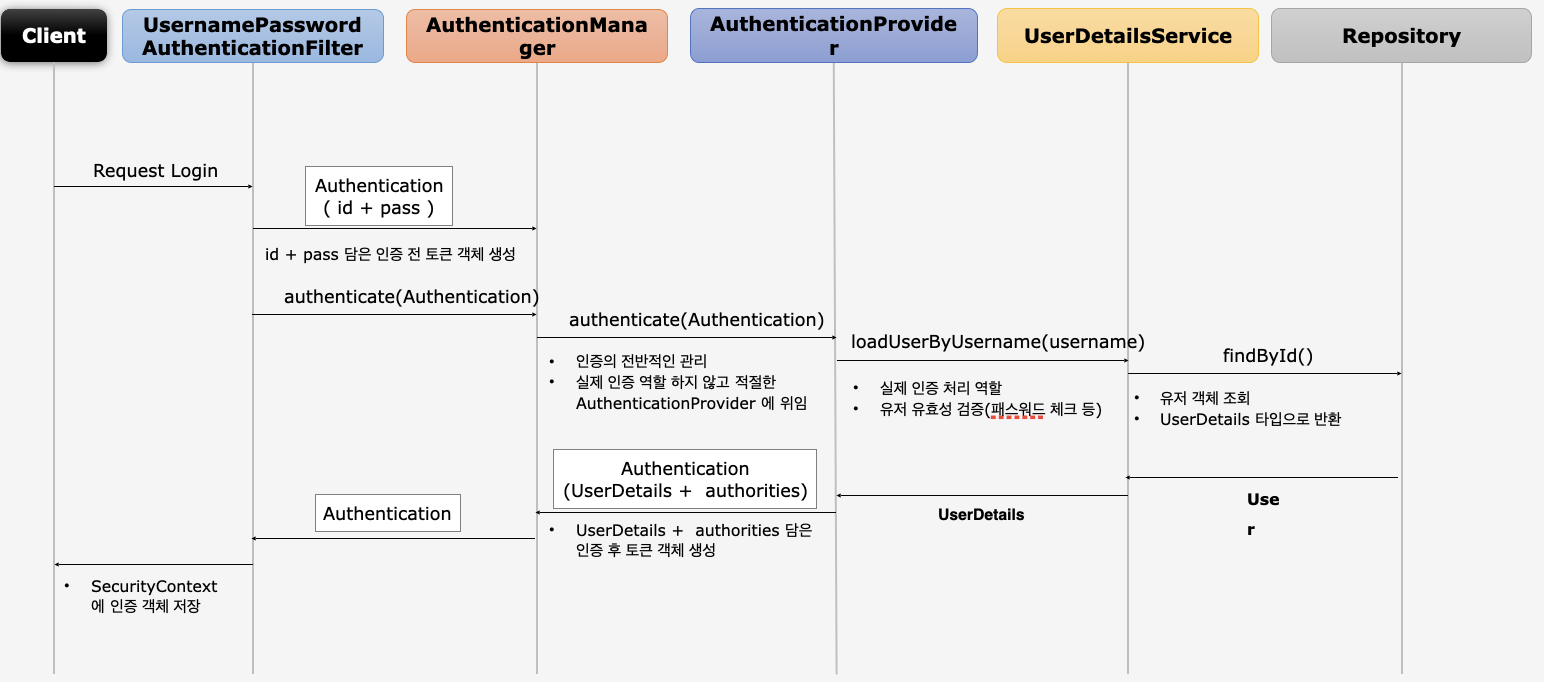
사용자가 로그인 요청 시
UsernamePasswordAuthentication
🫧 Authentication 객체 생성, 사용자가 입력한 id|password 정보를 담아 AuthenticationManager 클래스에게 전달하여 인증 처리 요청
⠀⠀👉🏻 SecurityContext에 인증 객체 저장
AuthenticationManager
🫧 인증의 전반적인 관리 (=인증 관리자), 실제 인증 x
🫧 AuthenticationProvider에게 인증 처리 위임
🫧 List 변수에 저장된 여러 개의 Provider 중에 현재 인증에 사용될 수 있는 Provider를 선택해 인증 처리 위임
⠀⠀👉🏻 반환받은 Authentication 객체를 UsernamePasswordAuthentication에게 전달
AuthenticationProvider
🫧 Manager로 부터 Authentication 인증 객체를 전달 받음
🫧 ID(=username) | password 검증
🦴 UserDetails를 반환 받았다면 username 인증을 완료했기 때문에 password 검증
🦴 인증 성공 후, 인증 결과를 담은 인증 객체 Authentication을 생성하여 AuthenticationManager에게 반환
UserDetailsService
🫧 username 검색
🫧 해당 계정이 DB에 존재하면 User 객체가 생성되어 UserDetails 타입으로 AuthenticationProvider에게 return
🫧 존재하지 않으면 예외 발생 (UsernamePasswordAuthentication이 예외를 받아서 후속 처리)
📌 인증 관리자 : AuthenticationManager
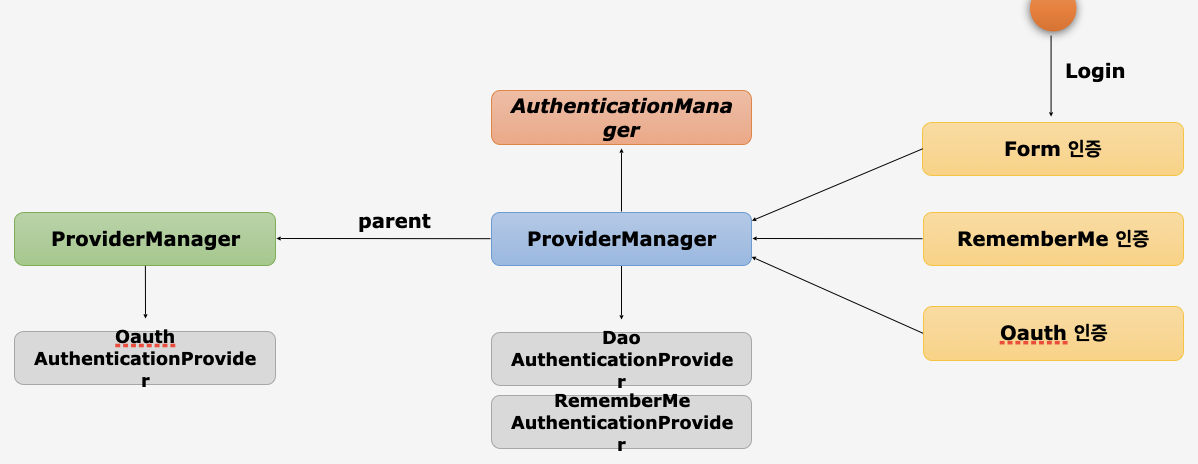
🦴 Filter로부터 인증 처리를 지시받은 첫 번째 클래스
🦴 인터페이스로 제공되고, 인터페이스의 구현체가 ProviderManager
🦴 실제 인증 처리를 하지 않고, AuthenticationProvider를 찾아 위임하는 역할
🫧 AuthenticationProvider 목록 중에서 인증 처리 요건에 맞는 AuthenticationProvider를 찾아 인증처리 위임 ❕찾는 조건이 있다❕
⠀⠀🦴 Form 인증 👉🏻 Dao AuthenticationProvider
⠀⠀🦴 RememberMe 인증 👉🏻 RememberMe AuthenticationProvider
🫧 부모(parent) ProviderManager를 설정하여 AuthenticationProvider를 계속 탐색할 수 있다
⠀⠀🦴 Oauth 인증
⠀⠀⠀⠀👉🏻 가진 Provider 중에 Oauth인증을 처리할 수 있는 Provider가 없다?
⠀⠀⠀⠀👉🏻 Oauth AuthenticationProvider를 가진 parent ProviderManager를 탐색 (= 부모 속성에 저장되어 있는 AuthenticationProvider를 찾기 위해 탐색 = 부모 속성의 ProviderManager에게 인증 처리 위임)
🫧 인증에 성공한 인증객체를 호출한 필터에게 전달하는 역할 수행
📌인증 처리자 : AuthenticationProvider
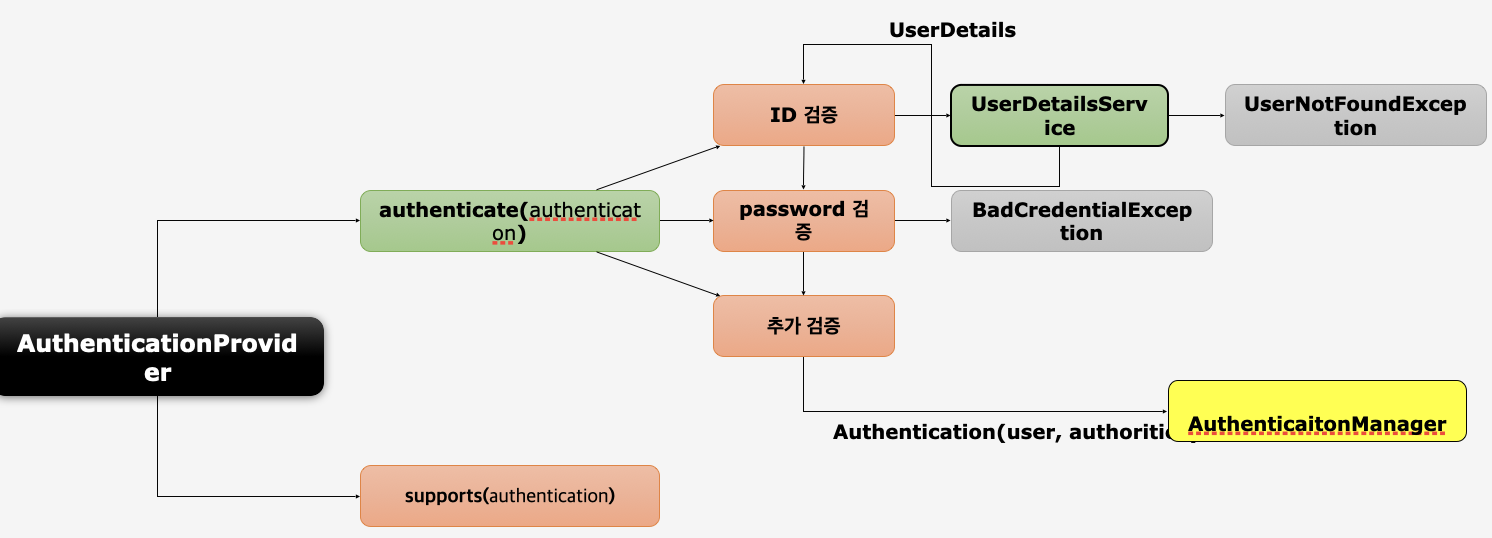
AuthenticationProvider
🦴 인증 처리에서 핵심적 역할
🦴 사용자가 입력한 정보(username, password)를 받아 실질적 검증
🦴 성공한 인증 객체를 생성해 ProviderManager에게 전달
🫧 인터페이스로 SpringSecurity가 제공하는 기본 구현체가 있지만, 보통은 개발자가 인터페이스를 직접 구현하여 인증 처리
🫧 두 개의 메소드 제공
⠀⠀1️⃣ authenticate
⠀⠀🍽 실제적인 인증 처리를 위한 검증
⠀⠀🍽 authentication : 사용자가 입력한 username과 password가 저장됨, 이 정보와 시스템에 저장된 user 정보와 일치하는지 검사
⠀⠀⠀⠀ID 검증
⠀⠀⠀⠀🥄 UserDetailsService에서 인증을 시도하는 사용자 계정이 있는지 확인
⠀⠀⠀⠀😞 없으면 UserNotFoundException 발생
⠀⠀⠀⠀🙂 있으면 User 객체 생성해서 UserDetails 타입으로 변환 후 AuthenticationProvider에게 전달
⠀⠀⠀⠀password 검증
⠀⠀⠀⠀🥄 반환받은 UserDetails 타입에는 시스템에 저장된 user의 password가 있다.
⠀⠀⠀⠀🥄 비교할 때는 password incoder를 통해 비교
⠀⠀⠀⠀😞 실패하면 BadCredentialException (예외는 인증을 요청한 Filter로 반환)
⠀⠀🍽 ID, password, 추가 검증까지 성공하면 Authentication(user, authorities) 인증 객체를 생성
⠀⠀🍽 인증 처리를 위임한 AuthenticationManger에게 인증 객체를 전달
⠀⠀2️⃣ supports
⠀⠀🍽 Form 인증 / RememberMe 인증에 기준이 되는지 검사
📌 인가 개념 및 필터 이해
⚙️ Authorization
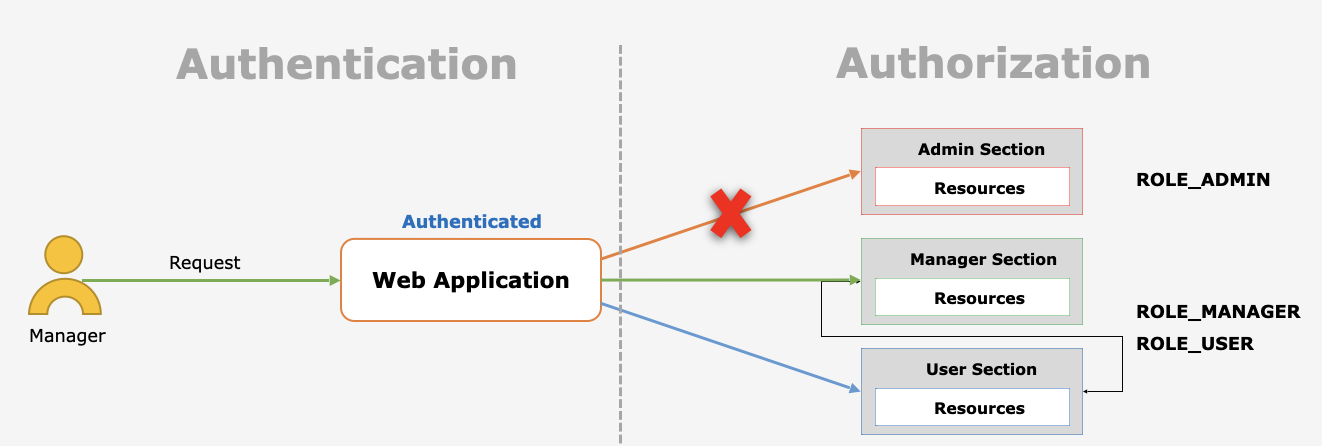
🫧 사용자에게 무엇이 허가되었는지 증명
⠀⠀🦴 인증을 받은 사용자가 어떤 자원에 접근하고자 할 때 그 사용자가 자원에 접근할 수 있는 자격이 되는지 판별
⠀⠀🦴 사용자가 자원에 접근하려고 하면 인증 여부를 확인 후에 자원에 설정된 자격을 갖췄는지 권한 심사
🫧 Spring Security가 지원하는 권한 계층
⠀⠀🌏 웹 계층
⠀⠀url 요청에 따른 메뉴 혹은 화면 단위의 레벨 보안 (url 자원에 설정된 권한과 자원을 요청한 사용자의 권한을 서로 심사해서 접근 가능성을 판단)
⠀⠀🌏 서비스 계층
⠀⠀화면 단위가 아닌 메소드 같은 기능 단위의 레벨 보안 (메소드 안에 진입하고자 할 때 메소드에 설정된 권한과 자원을 요청한 사용자의 권한이 일치하는지 판단)
⠀⠀🌏 도메인 계층 (Access Control List, 접근 제어 목록)
⠀⠀객체 단위의 레벨 보안 (파일, 폴더, DB을 사용하고자 할 때 도메인에 설정된 권한과 사용자의 권한을 비교)
FilterSecurityInterceptor
🫧 마지막에 위치한 필터로, 인증된 사용자에 대하여 특정 요청의 승인/거부 여부를 최종적으로 결정
🫧 인증 객체 없이 보호자원에 접근을 시도할 경우 AuthenticationException을 발생
🫧 권한 제어 방식 중 HTTP 자원의 보안을 처리하는 필터
🫧 권한 처리를 AccessDecisionManager에게 맡김
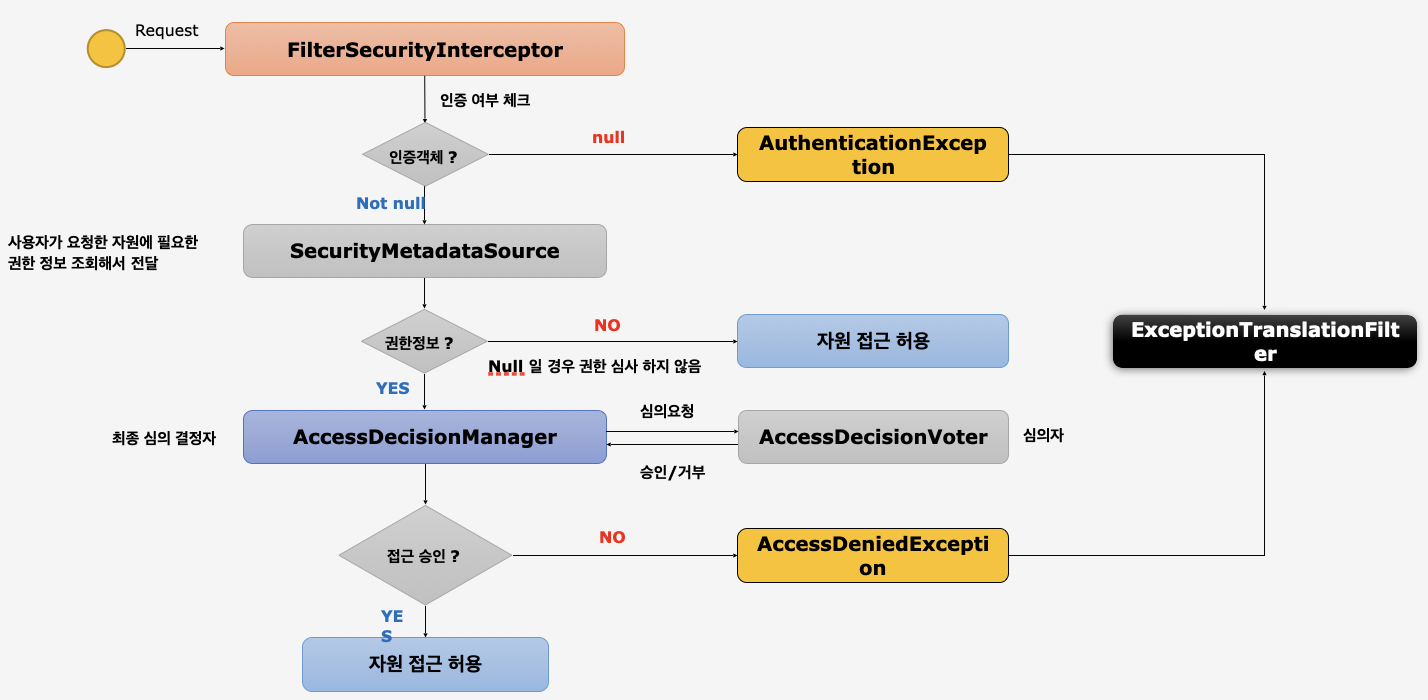
FilterSecurityInterceptor
🫧 사용자가 Request하면 요청을 받아서 인증 여부를 체크 (=사용자가 가진 인증 객체의 존재 여부 판단)
⠀⠀😞 없으면 인증 예외 발생 (ExceptionTranslationFilter가 처리)
⠀⠀🙂 인증 객체가 null이 아니면 SecurityMetadataSource로 이동
SecurityMetadataSource
🫧 사용자가 요청한 자원에 필요한 권한 정보 조회해서 전달 (= 자원의 권한 정보를 가져오는 역할)
🫧 저장된 권한 정보가 있다면 AccessDecisionManager에게 전달
AccessDecisionManager
🫧 권한정보를 통해서 권한심사 판단
👉🏻 내부적으로 AccessDecisionVoter를 통해 심의 요청하여 접근 자격을 판단하여 결과값을 받음
👉🏻 결과값을 통해 사용자가 자원에 접근이 가능한지 판단
👉🏻 접근이 불가능하면 예외 발생 (ExceptionTranslationFilter가 처리)
📌 인가 결정 심의자
AccessDecisionManager
🫧 인증 정보, 요청 정보, 권한 정보를 이용해서 사용자의 자원접근을 허용할 것인지 거부할 것인지를 최종 결정하는 주체
🫧 여러 개의 Voter들을 가질 수 있으며 Voter들로부터 접근 허용, 거부, 보류를 리턴받고 판단 및 결정
🫧 최종 접근 거부 시 예외 발생
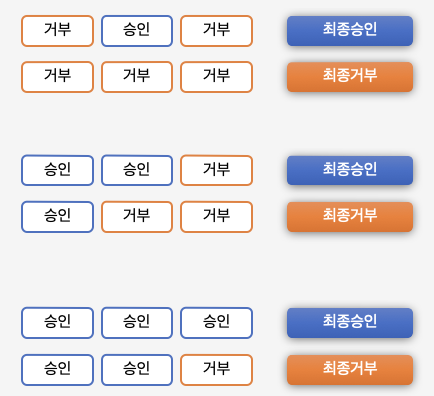
🫧 접근 결정의 세 가지 유형
⠀⠀🗣 AffirmativeBased
⠀⠀⠀⠀여러 개의 Voter클래스 중 하나라도 접근 허가로 결론을 내면 접근 허가로 판단
⠀⠀🗣 ConsensusBased
⠀⠀⠀⠀다수표에 의해 최종 결정을 판단
⠀⠀⠀⠀동수일 경우 기본은 접근 허가, allowEqualGrantedDeniedDecision을 false로 설정할 경우 접근 거부로 결정
⠀⠀🗣 UnanimousBased
⠀⠀⠀⠀모든 Voter가 만장일치로 접근을 승인해야 허가
AccessDecisionVoter
🫧 판단을 심사하는 것(위원)
🫧 Voter가 권한 부여 과정에서 판단하는 자료(전달 받는 자료)
⠀⠀🥥 Authentication - 인증 정보 (user)
⠀⠀🥥 FilterInvocation - 요청 정보 (antMatcher("/user"))
⠀⠀🥥 ConfigAttributes - 권한 정보 (hasRole("USER"))
🫧 결정 방식
⠀⠀🧑🏻⚖️ ACCESS_GRANTED : 접근허용 (1)
⠀⠀🧑🏻⚖️ ACCESS_DENIED : 접근거부 (0)
⠀⠀🧑🏻⚖️ ACCESS_ABSTAIN : 접근보류 (-1)
⠀⠀(결정 방식을 return해서 AccessDecisionManager가 접근 결정 방식의 값을 계산해서 최종 결정)
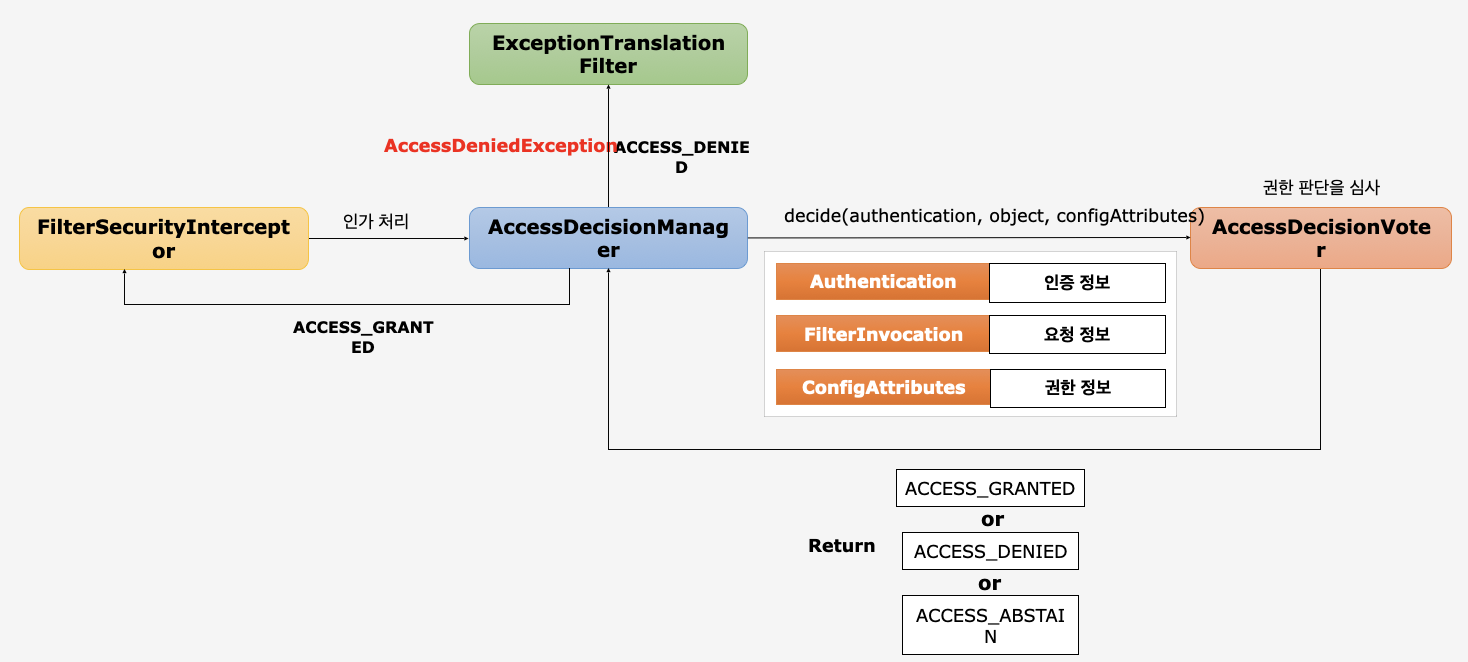
FilterSecurityInterceptor
👉🏻 AccessDecisionManager에게 인가처리 맡김
👉🏻 맡기면서 세 가지 정보(authentication, object, configAttribute) 전달
AccessDecisionManager
👉🏻 AccessDecisionVoter들에게 세 가지 정보 전달
👉🏻 권한 판단 심사 맡김
👉🏻 Voter로부터 받은 판단을 통해 예외를 발생하거나 인가 처리
AccessDecisionVoter
👉🏻 값들을 근거로 인가처리에 관련된 허용을 판단하여 반환