프로젝트 생성
스프링 부트 스타터 사이트로 이동해서 스프링 프로젝트 생성
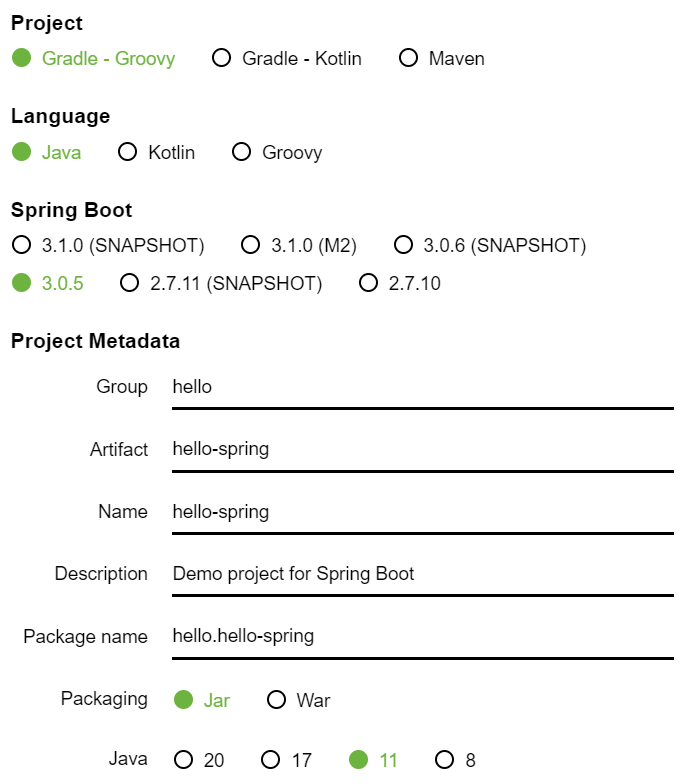
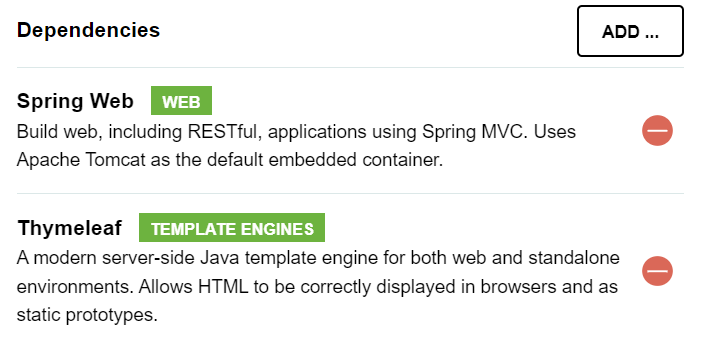
Gradle 전체 설정
// build.gradle
plugins {
  id 'org.springframework.boot' version '2.3.1.RELEASE'
  id 'io.spring.dependency-management' version '1.0.9.RELEASE'
  id 'java'
}

group = 'hello'
version = '0.0.1-SNAPSHOT'
sourceCompatibility = '11'

repositories {
  mavenCentral()
}
dependencies {
  implementation 'org.springframework.boot:spring-boot-starter-thymeleaf'
  implementation 'org.springframework.boot:spring-boot-starter-web'
  testImplementation('org.springframework.boot:spring-boot-starter-test') {
    exclude group: 'org.junit.vintage', module: 'junit-vintage-engine'
  }
}
test {
  useJUnitPlatform()
}
동작 확인
- 기본 메인 클래스 실행
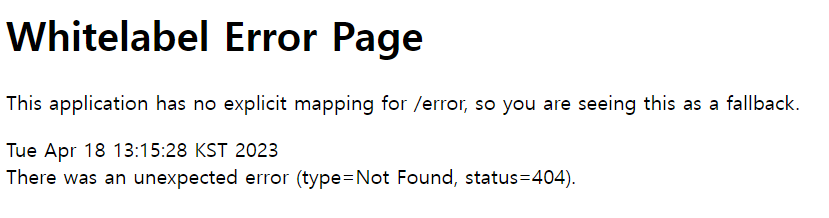
- 스프링 부트 메인 실행 후 에러페이지로 간단하게 동작 확인(
http://localhost:8888)
라이브러리 살펴보기
Gradle은 의존관계가 있는 라이브러리를 함께 다운로드 한다.
스프링 부트 라이브러리
- spring-boot-starter-web
- spring-boot-starter-tomcat: 톰캣 (웹서버)
- spring-webmvc: 스프링 웹 MVC
- spring-boot-starter-thymeleaf: 타임리프 템플릿 엔진(View)
- spring-boot-starter(공통): 스프링 부트 + 스프링 코어 + 로깅
- spring-boot
- spring-core - spring-boot-starter-logging
- logback, slf4j
- spring-boot
###테스트 라이브러리
- spring-boot-starter-test
- junit: 테스트 프레임워크
- mockito: 목 라이브러리
- assertj: 테스트 코드를 좀 더 편하게 작성하게 도와주는 라이브러리
- spring-test: 스프링 통합 테스트 지원
View 환경설정
Welcome Page 만들기
- 스프링 부트가 제공하는 Welcome Page 기능
- static/index.html 을 올려두면 Welcome page 기능을 제공한다.
- https://docs.spring.io/spring-boot/docs/2.3.1.RELEASE/reference/html/spring-boot-
features.html#boot-features-spring-mvc-welcome-page
// resources/static/index.html
<!DOCTYPE HTML>
<html>
<head>
   <title>Hello</title>
   <meta http-equiv="Content-Type" content="text/html; charset=UTF-8" />
</head>
<body>
Hello
<a href="/hello">hello</a>
</body>
</html>
thymeleaf 템플릿 엔진
- thymeleaf 공식 사이트: https://www.thymeleaf.org/
- 스프링 공식 튜토리얼: https://spring.io/guides/gs/serving-web-content/
- 스프링부트 메뉴얼: https://docs.spring.io/spring-boot/docs/2.3.1.RELEASE/reference/
html/spring-boot-features.html#boot-features-spring-mvc-template-engines
// src/main/java/hello/hellospring/controller/HelloController.java
@Controller
public class HelloController {
 @GetMapping("hello")
 public String hello(Model model) {
 model.addAttribute("data", "hello!!");
 return "hello";
 }
}
// resources/templates/hello.html
<!DOCTYPE HTML>
<html xmlns:th="http://www.thymeleaf.org">
<head>
<title>Hello</title>
<meta http-equiv="Content-Type" content="text/html; charset=UTF-8" />
</head>
<body>
<p th:text="'안녕하세요. ' + ${data}" >안녕하세요. 손님</p>
</body>
</html>thymeleaf 템플릿엔진 동작 확인
동작 환경 그림
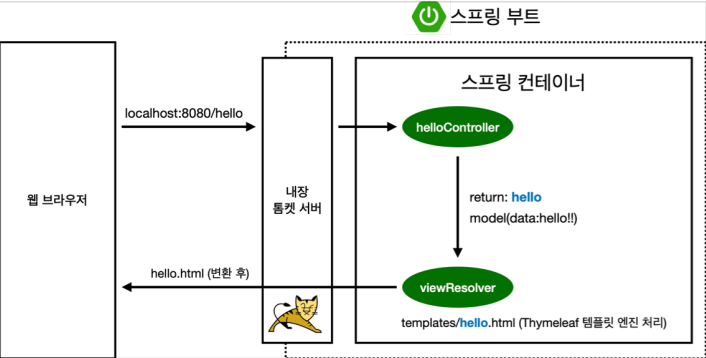
- 컨트롤러에서 리턴 값으로 문자를 반환하면 뷰 리졸버(
viewResolver)가 화면을 찾아서 처리한다.- 스프링 부트 템플릿엔진 기본 viewName 매핑
resources:templates/+{ViewName}+.html

안녕하세용