Java Web 개발자
윈도우 서비스 관리 : services.msc
톰켓 ON/OFF
톰켓 다이나믹 웹페이지 만들기
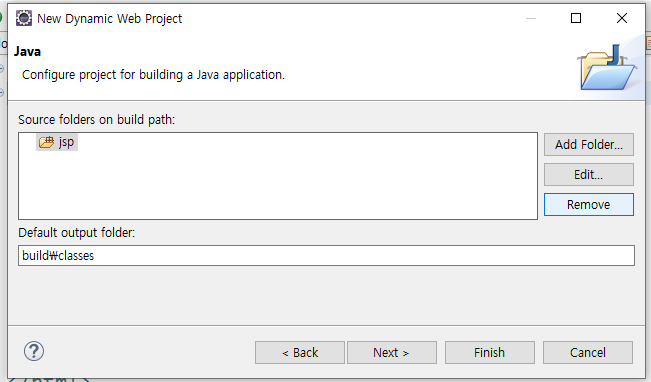
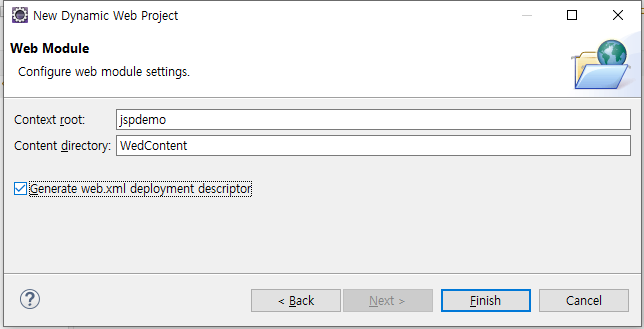
File - new -Dynamic Wed Project
이클립스 WebContent 없음 해결
<%! 자바 선언분 %>
<%= 자바 실행분 %>
Webcontent 브라우저에서 바로접근 할 수 있음
WEB폴더 (WEB CONTENT)
비즈니스 로직 없이도 가상의 결과물을 만들어
직접적으로 뷰를 살펴볼 수 있다.
jsp파일의 경과를 바로 볼 수 있는 대신 프로젝트를 서버에 올릴 경우 유저가 콘솔을 통해 jsp파일에 직접 접근할 수 있어 보안의 취약함이 발생할 수 있다.
web폴더(WebContetn폴더 앞으로 web 폴더라고 지칭함)에 파일이 있을 경우 비즈니스 로직없이도 가상의 결과물을 만들어 직접적으로 뷰를 살펴 볼 수 있다.
그렇기 때문에 우리가 localhost:8090/test.jsp로 접속시 해당 페이지를 볼 수 있었던 것이다.
WEB-INF 폴더
브라우저에서 직접적으로 접근이 불가한 경로이다.
css의 직접적인 참조라던가 localhost와 같이
브라우저의 직접적인 참조가 불가능하다.
때문에 보안성이 높다.
직접적으로 볼 수 없기 때문에 a태그로 이동이 불가능하며
Controller를 통해서만 이동을 해야한다.
WEB-INF는 Web Information
- 웹 애플리케이션 용으로 (servlet 규격으로) 따로 만들어진 디렉터리
- 웹을 중요한 파일들이 노출되지 않도록 만든 폴더
그렇다면 WEB-INF 폴더에 있는 test.jsp 파일은 왜 볼 수 없었던 것일까?
WEB-INF 폴더의 경우 브라우저에서 직접적으로 접근이 불가한 경로다.
우리가 앞서 살펴본 localhost:8090/test.jsp와 직접 같이 접근이 불가하다는 것을 의미한다
META-INF
- 자바 패키징 기술인 jar의 일부
- META-INF폴더는 자바에서 설정관련 파일을 저장하는 폴더
- jar 파일들을 풀어보면 META-INF 폴더 아래 MANIFEST.MF 라는 파일이 있고 사양서 내용이 있다.
jsp 기본 활용
<html>
<body>
	Converting a string to uppercase :
	<%=new String("hello World").toUpperCase()%>

	<br />
	<br /> 5 multiplied by 4 equals
	<%=5 * 4%>

	<br />
	<br /> Is 5 less than 3?
	<%=5 < 3%>
</body>
</html><html>
<body>
<h3>Hello World</h3>
The time on the server is
<%=new java.util.Date()%>
</body>
</html>jsp내에서 java 클래스 만들고 불러오기
<html>
<body>
	<%!String makeItLower(String data) {
		return data.toLowerCase();
	}%>

	Lower case "Hello World":
	<%=makeItLower("Hello World")%>
</body>
</html>
java파일 만들고 jsp에서 package 불러오기
package com.ExClass.jsp;

public class Exutil {

	public static String makeItLower(String data) {
		return data.toLowerCase();
	}
}
<%@ page import="com.ExClass.jsp.*"%>
<html>
<body>
Let's have some test :
</br>
<%=Exutil.makeItLower("HAPPY HAPPY HAPPY")%>
</br>
<%= com.ExClass.jsp.Exutil.makeItLower("HAPPY HAPPY HAPPY")%>
</body>
</html><% 여러줄 자바 코드 %>
<%! 선언부 %>
<%= 자바 expression %>
목록을 만드는 테크
<ul> umordered list 순서 없는 목록
<ol> ordered list 순서가 있는 목록
추가공부
Http 에러코드
세션 Session
 <html>
<head>
<title>Student Confirmation Title</title>
</head>
<body>

	The student is confirmed:
	<%= request.getParameter("firstName") %>
	<%= request.getParameter("lastName") %>
	<br />
	The student is confirmed:
	${param.firstName} ${param.lastName}
	<br />
	Favorite Programing Language:
	<%= request.getParameter("language") %>
	<br />

	Check Box:
	<ul>
	<%

	String[] langs = request.getParameterValues("Programinglanguage");
	if(langs != null){
		for(String t : langs){
			out.println("<li>" + t +"</li>" );
		}
		for(int i = 0; i <langs.length; i++){
			out.println("<li>" + langs[i] +"</li>" );
		}
	}else{
		out.println("NullpointerException");
	}

	%>
	</ul>

	<br />
	The student's country:
	<%= request.getParameter("country") %>
	${param.country}

	<br />
	<br />

</body>
</html><html>
<head><title>Student Registration Form</title></head>
<body>
<!-- form 어디로 보낼지, 어떤 방식으로 보낼지 지정함 -->
<form action="student-dropdown-response.jsp">
<fieldset style = "width:200">
First name : <input type = "text" name = "firstName"/>
<br/><br/>
Last name : <input type = "text" name = "lastName"/>
<br/><br/>
</fieldset>
<!-- 라디오버튼 -->
Favorite Programing Language "radio": </br>
<input type = "radio" name = "language" value = "Java"> Java
<input type = "radio" name = "language" value = "C#"> C#
<input type = "radio" name = "language" value = "PHP"> PHP
<input type = "radio" name = "language" value = "Ruby"> Ruby
<br/><br/>
<!-- 체크박스 -->
Favorite Programing Language "checkbox": </br>
<input type = "checkbox" name = "Programinglanguage" value = "Java"> Java
<input type = "checkbox" name = "Programinglanguage" value = "C#"> C#
<input type = "checkbox" name = "Programinglanguage" value = "PHP"> PHP
<input type = "checkbox" name = "Programinglanguage" value = "Ruby"> Ruby
<br/><br/>
<!-- 드랍다운 -->
<select name = "country">
<option>Brazil</option>
<option>France</option>
<option>Germany</option>
<option>United Kingdom</option>
<option>United States of America</option>
</select>
<input type = "submit" value = "Submit"/>
</form>
</body>
</html><%@ page import = "java.util.*" %>
<html>
<head>
<title>ToDo Demo</title>
</head>
<body>
<form action = "Todo-demo.jsp">
Add new item :
<input type = "text" name = "item"/>
<input type = "submit" value = "Submit"/>
</form>
<hr>
<h2>To List Items : </h2>
<b>To List Items : </b>
<%
List<String> todo= (List<String>) session.getAttribute("todo123456");
if(todo == null){
todo = new ArrayList<String>();
session.setAttribute("todo123456", todo);
}
String item = request.getParameter("item");
//!item.trim().equals("")
if((item != null) && (item.trim().length() > 0) && (!todo.contains(item))){
todo.add(item.trim());
}
%>
<ol><%
for(String s : todo){
out.println("<li>" + s + "</li>");
}
%></ol>
</body>
</html>