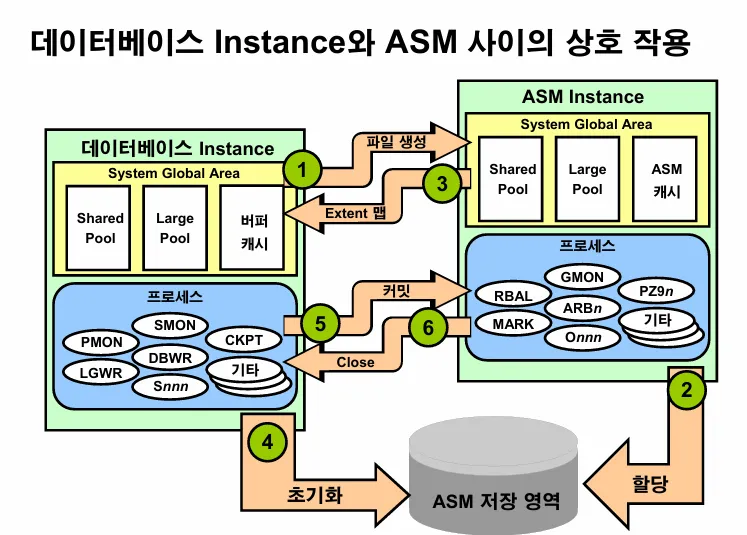
💡 ASM 인스턴스의 역할
- ASM 영역을 관리하기 위한 백그라운드 프로세서와 메모리가 있는 영역으로
이 인스턴스가 있어야raid 0 + 1의 효과도 누릴 수 있고 asm의 장점을 누릴 수 있음
[실습1] ASM 인스턴스가 떠 있는지 확인하시오
[+ASM:~]$ ps -ef |grep pmon
oracle    5369     1  0 11:14 ?        00:00:02 asm_pmon_+ASM
oracle    5562     1  0 11:14 ?        00:00:02 ora_pmon_orcl
oracle    6281  5761  0 14:45 pts/2    00:00:00 grep pmon
[+ASM:~]$
[실습2] ASM 인스턴스를 내렸다 올리시오
[+ASM:~]$ . oraenv
ORACLE_SID = [+ASM] ? orcl
The Oracle base for ORACLE_HOME=/u01/app/oracle/product/11.2.0/dbhome_1 is /u01/app/oracle
[orcl:~]$ sys

SQL*Plus: Release 11.2.0.1.0 Production on Wed Sep 17 14:46:01 2025

Copyright (c) 1982, 2009, Oracle.  All rights reserved.


Connected to:
Oracle Database 11g Enterprise Edition Release 11.2.0.1.0 - Production
With the Partitioning, Automatic Storage Management, OLAP, Data Mining
and Real Application Testing options

SQL> shutdown immediate
Database closed.
Database dismounted.
ORACLE instance shut down.
SQL> exit;

[orcl:~]$ ps -ef |grep pmon
oracle    5369     1  0 11:14 ?        00:00:02 asm_pmon_+ASM
oracle    6322  5761  0 14:46 pts/2    00:00:00 grep pmon
[orcl:~]$
[orcl:~]$
[orcl:~]$ . oraenv
ORACLE_SID = [orcl] ? +ASM
The Oracle base for ORACLE_HOME=/u01/app/oracle/product/11.2.0/grid is /u01/app/oracle
[+ASM:~]$ sqlplus / as sysasm

SQL*Plus: Release 11.2.0.1.0 Production on Wed Sep 17 14:47:03 2025

Copyright (c) 1982, 2009, Oracle.  All rights reserved.


Connected to:
Oracle Database 11g Enterprise Edition Release 11.2.0.1.0 - Production
With the Automatic Storage Management option

SQL> shutdown immediate
ASM diskgroups dismounted
ASM instance shutdown
SQL>
문제1. ASM 인스턴스가 내려가져 있는 상태에서 DB 인스턴스가 올라갈지 테스트하시오
--> 안 올라감. ASM 인스턴스 먼저 올려줘야 DB 인스턴스가 올라감
[+ASM:~]$ . oraenv
ORACLE_SID = [+ASM] ? orcl
The Oracle base for ORACLE_HOME=/u01/app/oracle/product/11.2.0/dbhome_1 is /u01/app/oracle
[orcl:~]$
[orcl:~]$ sys

SQL*Plus: Release 11.2.0.1.0 Production on Wed Sep 17 14:49:11 2025

Copyright (c) 1982, 2009, Oracle.  All rights reserved.

Connected to an idle instance.

SQL> startup
ORA-01078: failure in processing system parameters
ORA-01565: error in identifying file '+DATA/orcl/spfileorcl.ora'
ORA-17503: ksfdopn:2 Failed to open file +DATA/orcl/spfileorcl.ora
ORA-15077: could not locate ASM instance serving a required diskgroup
SQL>
문제2. ASM 인스턴스도 올리고 DB 인스턴스도 올리시오
[+ASM:~]$ sqlplus / as sysasm

SQL*Plus: Release 11.2.0.1.0 Production on Wed Sep 17 14:50:50 2025

Copyright (c) 1982, 2009, Oracle.  All rights reserved.

Connected to an idle instance.

SQL> startup
ASM instance started

Total System Global Area  284565504 bytes
Fixed Size                  1336036 bytes
Variable Size             258063644 bytes
ASM Cache                  25165824 bytes
ASM diskgroups mounted
SQL> exit;
Disconnected from Oracle Database 11g Enterprise Edition Release 11.2.0.1.0 - Production
With the Automatic Storage Management option


[+ASM:~]$ . oraenv
ORACLE_SID = [+ASM] ? orcl
The Oracle base for ORACLE_HOME=/u01/app/oracle/product/11.2.0/dbhome_1 is /u01/app/oracle

[orcl:~]$ sys
-bash: export: `=orcl': not a valid identifier

SQL*Plus: Release 11.2.0.1.0 Production on Wed Sep 17 14:51:32 2025

Copyright (c) 1982, 2009, Oracle.  All rights reserved.

Connected to an idle instance.

SQL> startup
ORACLE instance started.

Total System Global Area  481259520 bytes
Fixed Size                  1337352 bytes
Variable Size             306186232 bytes
Database Buffers          167772160 bytes
Redo Buffers                5963776 bytes
Database mounted.
Database opened.
SQL>
[실습3] ASM 인스턴스의 파라미터를 수정하시오.
디스크 추가할 때 rebalancing을 빨리 할 수 있도록 rbal의 프로세서의 갯수를 2배로 늘리시오
SQL> select instance_name
  2   from v$instance;

INSTANCE_NAME
----------------
+ASM

SQL> save i.sql
Created file i.sql
SQL>
SQL>
SQL> show parameter spfile

NAME                                 TYPE        VALUE
------------------------------------ ----------- ------------------------------
spfile                               string      +DATA/asm/asmparameterfile/reg
                                                 istry.253.796856615
SQL>
SQL>
SQL>
SQL>
SQL> show parameter asm_power_limit

NAME                                 TYPE        VALUE
------------------------------------ ----------- ------------------------------
asm_power_limit                      integer     1
SQL>
SQL>
SQL>
SQL> exit;
Disconnected from Oracle Database 11g Enterprise Edition Release 11.2.0.1.0 - Production
With the Automatic Storage Management option
[+ASM:~]$
[+ASM:~]$ ps -ef |grep rbal
oracle    6542     1  0 14:52 ?        00:00:00 asm_rbal_+ASM
oracle    6656     1  0 14:53 ?        00:00:00 ora_rbal_orcl
oracle    6813  5761  0 14:57 pts/2    00:00:00 grep rbal
[+ASM:~]$
[+ASM:~]$ sqlplus / as sysasm

SQL*Plus: Release 11.2.0.1.0 Production on Wed Sep 17 14:57:52 2025

Copyright (c) 1982, 2009, Oracle.  All rights reserved.


Connected to:
Oracle Database 11g Enterprise Edition Release 11.2.0.1.0 - Production
With the Automatic Storage Management option

SQL> alter system set asm_power_limit=2 scope=both;

System altered.

SQL> @i

INSTANCE_NAME
----------------
+ASM

[+ASM:~]$ . oraenv
ORACLE_SID = [+ASM] ? orcl
The Oracle base for ORACLE_HOME=/u01/app/oracle/product/11.2.0/dbhome_1 is /u01/app/oracle
[orcl:~]$ sys

SQL*Plus: Release 11.2.0.1.0 Production on Wed Sep 17 14:59:50 2025

Copyright (c) 1982, 2009, Oracle.  All rights reserved.


Connected to:
Oracle Database 11g Enterprise Edition Release 11.2.0.1.0 - Production
With the Partitioning, Automatic Storage Management, OLAP, Data Mining
and Real Application Testing options

SQL> shutdown immediate
Database closed.
Database dismounted.
ORACLE instance shut down.
SQL>
SQL> exit;
Disconnected from Oracle Database 11g Enterprise Edition Release 11.2.0.1.0 - Production
With the Partitioning, Automatic Storage Management, OLAP, Data Mining
and Real Application Testing options
[orcl:~]$
[orcl:~]$ . oraenv
ORACLE_SID = [orcl] ? +ASM
The Oracle base for ORACLE_HOME=/u01/app/oracle/product/11.2.0/grid is /u01/app/oracle
[+ASM:~]$ sqlplus / as sysasm

SQL*Plus: Release 11.2.0.1.0 Production on Wed Sep 17 15:00:15 2025

Copyright (c) 1982, 2009, Oracle.  All rights reserved.


Connected to:
Oracle Database 11g Enterprise Edition Release 11.2.0.1.0 - Production
With the Automatic Storage Management option

SQL> shutdown immediate
ASM diskgroups dismounted
ASM instance shutdown
SQL>
SQL> startup
ASM instance started

Total System Global Area  284565504 bytes
Fixed Size                  1336036 bytes
Variable Size             258063644 bytes
ASM Cache                  25165824 bytes
ASM diskgroups mounted
SQL>
SQL> show parameter asm

NAME                                 TYPE        VALUE
------------------------------------ ----------- ------------------------------
asm_diskgroups                       string      FRA
asm_diskstring                       string
asm_power_limit                      integer     2
asm_preferred_read_failure_groups    string
SQL>
SQL> exit;
Disconnected from Oracle Database 11g Enterprise Edition Release 11.2.0.1.0 - Production
With the Automatic Storage Management option
[+ASM:~]$
[+ASM:~]$ . oraenv
ORACLE_SID = [+ASM] ? orcl
The Oracle base for ORACLE_HOME=/u01/app/oracle/product/11.2.0/dbhome_1 is /u01/app/oracle
[orcl:~]$ sys

SQL*Plus: Release 11.2.0.1.0 Production on Wed Sep 17 15:01:41 2025

Copyright (c) 1982, 2009, Oracle.  All rights reserved.

Connected to an idle instance.

SQL> startup

[orcl:~]$ ps -ef |grep rbal
oracle    7015     1  0 15:01 ?        00:00:00 asm_rbal_+ASM
oracle    7139     1  0 15:03 ?        00:00:00 ora_rbal_orcl
oracle    7237  5761  0 15:03 pts/2    00:00:00 grep rbal
[orcl:~]$

기본은 1개인데 rebalancing이 실제로 실행되면 2개로 활성화 됩니다.
✔️ 순서
db 먼저 내리고(shutdown immediate)
asm 내리고(shutdown immediate)
asm 올리고(startup)
db 올리기(startup)
