💡 데이터를 이행하는 가장 빠른 방법
테이블스페이스 레벨 export / import
[실습] 테이블 스페이스 레벨 데이터 이행을 수행
-- 1. ora19 쪽에서 테이블 스페이스를 생성합니다.
create  tablespace ts700
datafile '/u01/app/oracle/oradata/ORA19/ts700.dbf' size 100m;

--2. scott 으로 접속해서 ts700 에 emp 테이블을 생성하시오
alter session set nls_Date_format='RR/MM/DD';
drop table emp;
drop table dept;


CREATE TABLE DEPT
       (DEPTNO number(10),
        DNAME VARCHAR2(14),
        LOC VARCHAR2(13) )
        tablespace ts700;


INSERT INTO DEPT VALUES (10, 'ACCOUNTING', 'NEW YORK');
INSERT INTO DEPT VALUES (20, 'RESEARCH',   'DALLAS');
INSERT INTO DEPT VALUES (30, 'SALES',      'CHICAGO');
INSERT INTO DEPT VALUES (40, 'OPERATIONS', 'BOSTON');

CREATE TABLE EMP (
 EMPNO               NUMBER(4) NOT NULL,
 ENAME               VARCHAR2(10),
 JOB                 VARCHAR2(9),
 MGR                 NUMBER(4) ,
 HIREDATE            DATE,
 SAL                 NUMBER(7,2),
 COMM                NUMBER(7,2),
 DEPTNO              NUMBER(2) )
   tablespace ts700;


INSERT INTO EMP VALUES (7839,'KING','PRESIDENT',NULL,'81-11-17',5000,NULL,10);
INSERT INTO EMP VALUES (7698,'BLAKE','MANAGER',7839,'81-05-01',2850,NULL,30);
INSERT INTO EMP VALUES (7782,'CLARK','MANAGER',7839,'81-05-09',2450,NULL,10);
INSERT INTO EMP VALUES (7566,'JONES','MANAGER',7839,'81-04-01',2975,NULL,20);
INSERT INTO EMP VALUES (7654,'MARTIN','SALESMAN',7698,'81-09-10',1250,1400,30);
INSERT INTO EMP VALUES (7499,'ALLEN','SALESMAN',7698,'81-02-11',1600,300,30);
INSERT INTO EMP VALUES (7844,'TURNER','SALESMAN',7698,'81-08-21',1500,0,30);
INSERT INTO EMP VALUES (7900,'JAMES','CLERK',7698,'81-12-11',950,NULL,30);
INSERT INTO EMP VALUES (7521,'WARD','SALESMAN',7698,'81-02-23',1250,500,30);
INSERT INTO EMP VALUES (7902,'FORD','ANALYST',7566,'81-12-11',3000,NULL,20);
INSERT INTO EMP VALUES (7369,'SMITH','CLERK',7902,'80-12-09',800,NULL,20);
INSERT INTO EMP VALUES (7788,'SCOTT','ANALYST',7566,'82-12-22',3000,NULL,20);
INSERT INTO EMP VALUES (7876,'ADAMS','CLERK',7788,'83-01-15',1100,NULL,20);
INSERT INTO EMP VALUES (7934,'MILLER','CLERK',7782,'82-01-11',1300,NULL,10);


commit;

-- 3. sys 로 접속해서 ts700 테이블 스페이스를 read only 로 변경합니다.
select  t.name, d.enabled
 from  v$tablespace   t, v$datafile   d
 where  t.ts# = d.ts#;

alter tablespace ts700 read only;

select  t.name, d.enabled
 from  v$tablespace   t, v$datafile   d
 where  t.ts# = d.ts#;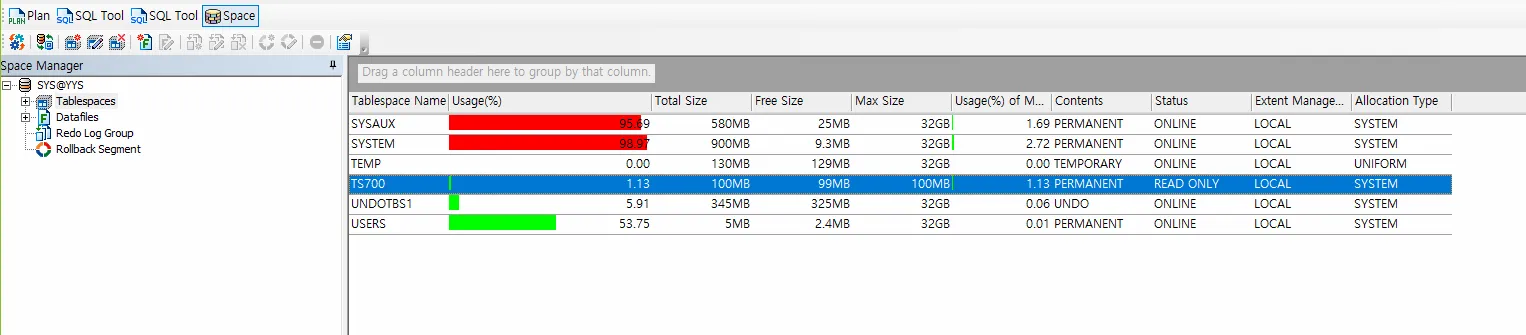
--4. ts700 테이블 스페이스를 tablespace 레벨로 export 합니다.

[oracle@ora19c ~]$ exp transport_tablespace=y tablespaces=ts700 file=ts700.dmp

Export: Release 19.0.0.0.0 - Production on 목 9월 11 15:17:04 2025
Version 19.3.0.0.0

Copyright (c) 1982, 2019, Oracle and/or its affiliates.  All rights reserved.


사용자명: sys as sysdba
비밀번호:

---5. ts700.dmp 덤프 파일과 ts700.dbf 파일 2개가 임폴트 할때 필요합니다.

[oracle@ora19c ~]$ cp /u01/app/oracle/oradata/ORA19/ts700.dbf /home/oracle/ts700.dbf [oracle@ora19c ~]$
[oracle@ora19c ~]$ ls -l ts700.dbf
-rw-r-----. 1 oracle oinstall 104865792  9월 11 15:19 ts700.dbf
[oracle@ora19c ~]$
[oracle@ora19c ~]$ ls -l ts700.dmp
-rw-r--r--. 1 oracle oinstall 16384  9월 11 15:17 ts700.dmp
[oracle@ora19c ~]$
[oracle@ora19c ~]$ sysdw

SQL*Plus: Release 19.0.0.0.0 - Production on 목 9월 11 15:21:40 2025
Version 19.3.0.0.0

Copyright (c) 1982, 2019, Oracle.  All rights reserved.


다음에 접속됨:
Oracle Database 19c Enterprise Edition Release 19.0.0.0.0 - Production
Version 19.3.0.0.0

SYS @ ora19dw > drop user scott cascade;

사용자가 삭제되었습니다.


--6. ora19dw 쪽에 import 를 수행합니다.

SYS @ ora19dw > create user scott identified by tiger;

사용자가 생성되었습니다.

SYS @ ora19dw > grant dba to scott;

권한이 부여되었습니다.

SYS @ ora19dw > exit;
Oracle Database 19c Enterprise Edition Release 19.0.0.0.0 - Production
Version 19.3.0.0.0에서 분리되었습니다.
[oracle@ora19c ~]$
[oracle@ora19c ~]$ imp transport_tablespace=y file=ts700.dmp datafiles='/home/oracle/ts700.dbf'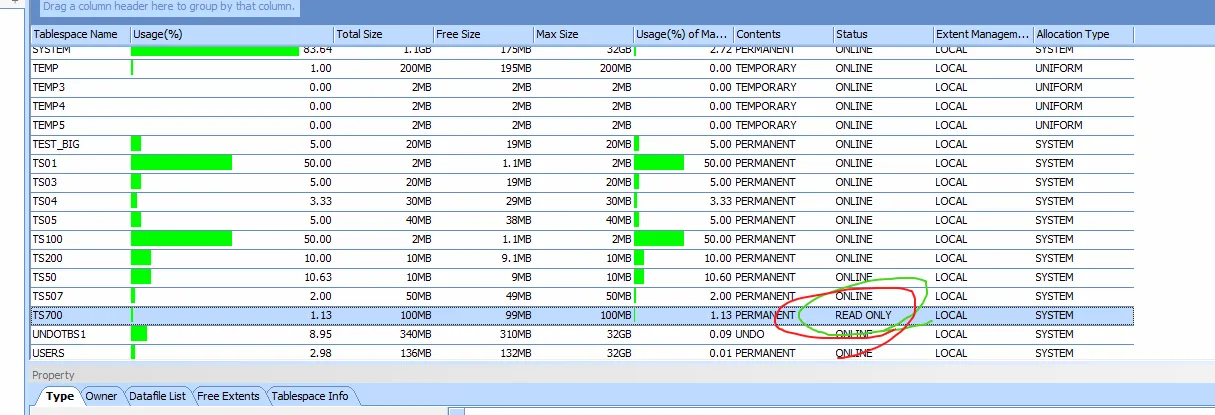
문제1. ora19 쪽에 hr 계정의 모든 테이블과 인덱스 등이 있는 테이블스페이스가 어딘지 확인합니다.
select table_name, tablespace_name
from dba_tables
where owner='HR';

select table_name, tablespace_name
from dba_indexes
where owner='HR';
💡 데이터 이행과 데이터 이관의 차이
데이터 이관
: 테이블스페이스 레벨로 데이터를 옮기는 형태
문제2. ORA19 쪽에 HR 계정의 테이블과 인덱스를 구성하기 위한 테이블 스페이스를 hrts 로 생성하시오. 500mb 사이즈로 생성하세요
create tablespace  hrts
 datafile '/u01/app/oracle/oradata/ORA19/hrts01.dbf' size 500m;
문제3. hr 계정의 테이블과 인덱스를 모두 hrts 로 옮기시오
select 'alter table ' || lower(table_name) || ' move tablespace hrts;'
 from  user_tables;

alter table regions move tablespace hrts;
alter table locations move tablespace hrts;
alter table departments move tablespace hrts;
alter table jobs move tablespace hrts;
alter table employees move tablespace hrts;
alter table job_history move tablespace hrts;
alter table countries move tablespace hrts;

select 'alter index ' || lower(index_name) || ' rebuild tablespace hrts online;'
 from user_indexes;

alter index reg_id_pk rebuild tablespace hrts online;
alter index country_c_id_pk rebuild tablespace hrts online;
alter index loc_id_pk rebuild tablespace hrts online;
alter index loc_city_ix rebuild tablespace hrts online;
alter index loc_state_province_ix rebuild tablespace hrts online;
alter index loc_country_ix rebuild tablespace hrts online;
alter index dept_id_pk rebuild tablespace hrts online;
alter index dept_location_ix rebuild tablespace hrts online;
alter index job_id_pk rebuild tablespace hrts online;
alter index emp_email_uk rebuild tablespace hrts online;
alter index emp_emp_id_pk rebuild tablespace hrts online;
alter index emp_department_ix rebuild tablespace hrts online;
alter index emp_job_ix rebuild tablespace hrts online;
alter index emp_manager_ix rebuild tablespace hrts online;
alter index emp_name_ix rebuild tablespace hrts online;
alter index jhist_emp_id_st_date_pk rebuild tablespace hrts online;
alter index jhist_job_ix rebuild tablespace hrts online;
alter index jhist_employee_ix rebuild tablespace hrts online;
alter index jhist_department_ix rebuild tablespace hrts online;
문제4. ora19dw 쪽에 hr 계정을 삭제하고 다시 생성하시오
[oracle@ora19c ~]$ sysdw

SYS @ ora19dw > drop user hr cascade;

사용자가 삭제되었습니다.

SYS @ ora19dw > create user hr identified by hr;

사용자가 생성되었습니다.

SYS @ ora19dw > grant dba to hr;

권한이 부여되었습니다.

SYS @ ora19dw >