LGWR: log writer
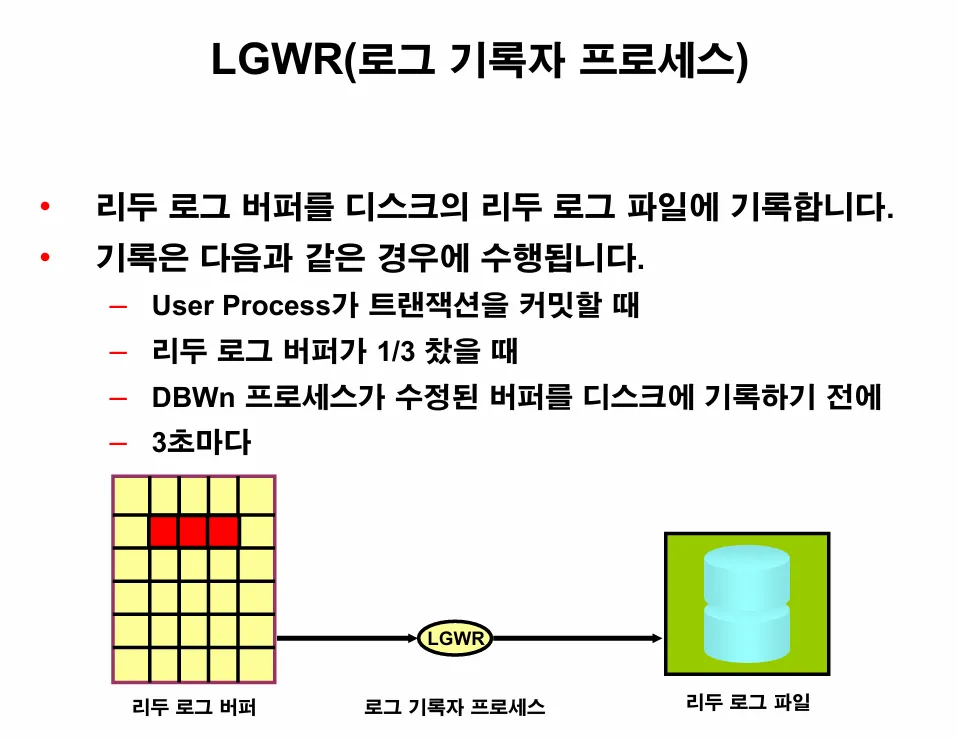
🔸 이론1. LGWR의 역할
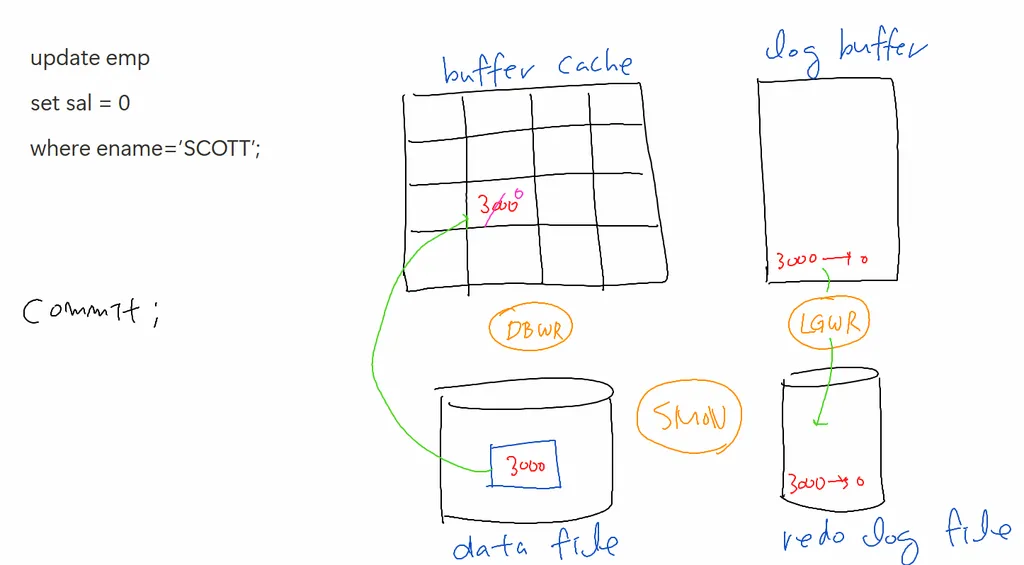
🔸 이론2. LGWR가 작동하는 시점 4가지
- COMMIT 할 때
- 리두로그 버퍼가 어느정도 찼을 때
- 3초마다
- checkpoint 이벤트 (메모리의 내용을 database에 일괄적용)
실습1. v$process 를 조회해서 LGWR 의 SPID 를 알아내시오
SQL> select pname, spid
  from v$process
  where pname  like  'LGW%';

PNAME SPID
----- ------------------------
LGWR  4878
실습2. 위의 spid 를 가지고 top 명령어를 쳐서 LGWR가 CPU 를 얼마나 쓰는지 확인하시오
[oracle@ora19c ~]$ top -p 4878

top - 12:00:15 up 58 min,  1 user,  load average: 0
Tasks:   1 total,   0 running,   1 sleeping,   0 st
%Cpu(s):  0.1 us,  0.1 sy,  0.0 ni, 99.3 id,  0.1 w
KiB Mem :  7856584 total,  3969032 free,   757396 u
KiB Swap:  5242876 total,  5242876 free,        0 u

  PID USER      PR  NI    VIRT    RES    SHR S
 4878 oracle    20   0 2394244  81124  77248 S
문제1. 서버를 리부트 하면 오라클과 리스너가 자동으로 올라오게 crontab에 등록하시오
[oracle@ora19c ~]$ vi start_listener.sh
[oracle@ora19c ~]$ cat start_listener.sh
#!/bin/bash

#환경변수 불러오기
source .bash_profile

# ORACLE Server 시작
/u01/app/oracle/product/19.3.0/dbhome_1/bin/sqlplus / as sysdba <<EOF
startup;
exit;
EOF

# 리스너 시작
/u01/app/oracle/product/19.3.0/dbhome_1/bin/lsnrctl start

[oracle@ora19c ~]$
[oracle@ora19c ~]$ chmod +x /home/oracle/start_listener.sh
[oracle@ora19c ~]$
[oracle@ora19c ~]$ crontab -e

@reboot /home/oracle/start_listener.sh >> /home/oracle/start_listener.log 2>&1

[oracle@ora19c ~]$ su -

[oracle@ora19c ~]# reboot [oracle@ora19c ~]$ sys
SQL*Plus: Release 19.0.0.0.0 - Production on 목 8월 21 13:48:22 2025
Version 19.3.0.0.0
Copyright (c) 1982, 2019, Oracle. All rights reserved.
다음에 접속됨:
Oracle Database 19c Enterprise Edition Release 19.0.0.0.0 - Production
Version 19.3.0.0.0
SQL> select status from v$instance;
STATUS
------------
OPEN