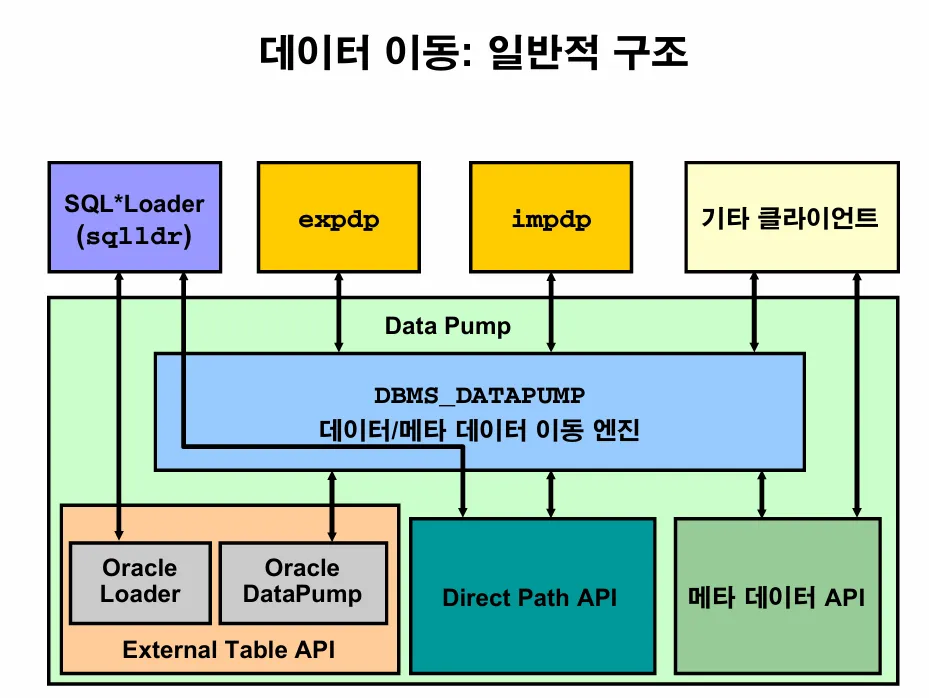
19C 교재
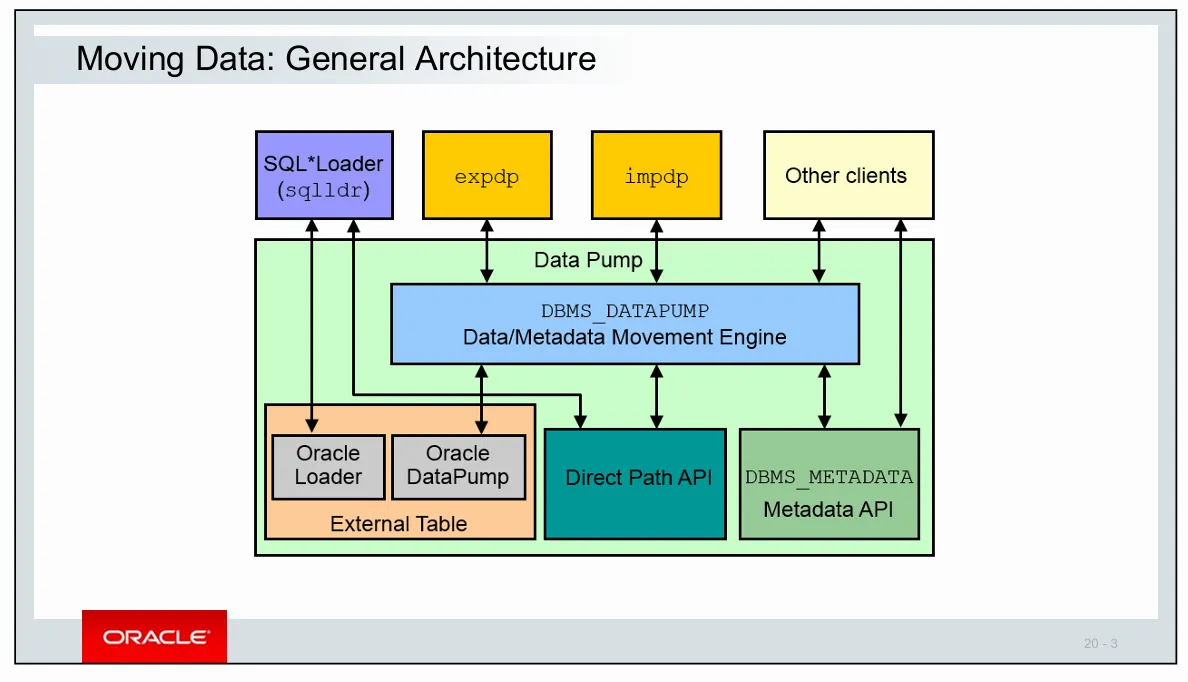
💡 데이터 이행의 3가지 방법
- export / import pump
- 서브쿼리를 사용한 insert : HWM 위로 병렬로 입력
- SQL* Loader 를 이용해서 엑셀 파일을 db의 테이블로 입력
💡 export / import 의 데이터 이행 2가지
- export / import dump
: 단순하고 빠르게 데이터를 이행할 때 사용- export / import pump
: 약간 복잡하지만 대용량 데이터를 빠르게 이행할 때 사용
💡 export / import 방법 4가지
- table level : 특정 테이블만 export / import 수행하기
- user level : scott과 같이 유져가 가지고 있는 모든 객체를 전부 export / import 수행하기
- tablespace level : 특정 테이블 스페이스를 통째로 export /import 하기
- database level : database를 통째로 export / import
[실습1] ora19 쪽에서 scott이 가지고 있는 emp 테이블을 export 하시오
exp 아이디/패스워드 tables=테이블명 file=테이블명.dmp
[oracle@ora19c ~]$ export ORACLE_SID=ORA19
[oracle@ora19c ~]$
[oracle@ora19c ~]$ . oraenv
ORACLE_SID = [ORA19] ? ORA19
The Oracle base remains unchanged with value /u01/app/oracle
[oracle@ora19c ~]$ echo $ORACLE_SID
ORA19

[oracle@ora19c ~]$ ps -ef | grep pmon
oracle    2109     1  0 09:19 ?        00:00:00 ora_pmon_ORA19
oracle    2877     1  0 09:21 ?        00:00:00 ora_pmon_ora19dw
oracle    5758  2805  0 10:03 pts/0    00:00:00 grep --color=auto pmon

[oracle@ora19c ~]$ exp scott/tiger tables=emp file=emp.dmp

[oracle@ora19c ~]$ ls -lh emp.dmp
-rw-r--r--. 1 oracle oinstall 16K  9월 11 10:05 emp.dmp

[oracle@ora19c ~]$ sysdw

SQL*Plus: Release 19.0.0.0.0 - Production on 목 9월 11 10:09:31 2025
Version 19.3.0.0.0

Copyright (c) 1982, 2019, Oracle.  All rights reserved.


다음에 접속됨:
Oracle Database 19c Enterprise Edition Release 19.0.0.0.0 - Production
Version 19.3.0.0.0

SYS @ ora19dw > drop user scott cascade;

사용자가 삭제되었습니다.

SYS @ ora19dw >
SYS @ ora19dw > create user scott  identified by tiger;

사용자가 생성되었습니다.

SYS @ ora19dw > grant dba to scott;

권한이 부여되었습니다.
[실습2] emp.dmp 를 dw 쪽에 import 하시오
[oracle@ora19c ~]$ imp scott/tiger tables=emp file=emp.dmp문제1. ORA19의 dept 테이블을 ora19dw 로 이행하시오
ORA19에서 export를 하고
ora19dw에서 import를 함
$ vi .bash_profile
alias ora19='export ORACLE_SID=ORA19; echo $ORACLE_SID'
alias ora19dw='export ORACLE_SID=ora19dw; echo $ORACLE_SID'

$source .bash_profile

[oracle@ora19c ~]$ ora19
ORA19

[oracle@ora19c ~]$ exp scott/tiger file=dept.dmp tables=dept

Export: Release 19.0.0.0.0 - Production on 목 9월 11 10:25:01 2025
Version 19.3.0.0.0

Copyright (c) 1982, 2019, Oracle and/or its affiliates.  All rights reserved.


다음에 접속됨: Oracle Database 19c Enterprise Edition Release 19.0.0.0.0 - Production
Version 19.3.0.0.0
AL32UTF8 문자 설정과 AL16UTF16 NCHAR 문자 설정에서 익스포트가 종료되었습니다

지정된 테이블을 익스포트하려고 합니다 via 규정 경로...
. .                            DEPT 테이블 익스포트 중          4 행이 엑스포트됨
익스포트가 경고 없이 정상적으로 종료되었습니다.


[oracle@ora19c ~]$ ora19dw
ora19dw
[oracle@ora19c ~]$
[oracle@ora19c ~]$ imp scott/tiger file=dept.dmp tables=dept

Import: Release 19.0.0.0.0 - Production on 목 9월 11 10:25:27 2025
Version 19.3.0.0.0

Copyright (c) 1982, 2019, Oracle and/or its affiliates.  All rights reserved.


다음에 접속됨: Oracle Database 19c Enterprise Edition Release 19.0.0.0.0 - Production
Version 19.3.0.0.0

익스포트 파일은 규정 경로를 거쳐 EXPORT:V19.00.00 에 의해 생성되었습니다
AL32UTF8 문자집합과 AL16UTF16 NCHAR 문자 집합에 임포트가 완성되었습니다
IMP-00403:

경고: 이 임포트는 권한 문제로 인해 실패한 DDL이 포함된 개별 SQL 파일 "import_sys"을(를) 생성했습니다.

. SCOTT 객체를 SCOTT(으)로 임포트하는 중입니다
. SCOTT 객체를 SCOTT(으)로 임포트하는 중입니다
. . 테이블                         "DEPT"(를)을 임포트 중          4 행이 임포트되었습니다
경고와 함께 임포트가 정상 종료되었습니다.


[oracle@ora19c ~]$ scottdw

SQL*Plus: Release 19.0.0.0.0 - Production on 목 9월 11 10:25:35 2025
Version 19.3.0.0.0

Copyright (c) 1982, 2019, Oracle.  All rights reserved.

마지막 성공한 로그인 시간: 목 9월  11 2025 10:25:27 +09:00

다음에 접속됨:
Oracle Database 19c Enterprise Edition Release 19.0.0.0.0 - Production
Version 19.3.0.0.0


-- dept 테이블이 잘 보이면 성공
SCOTT @ ora19dw > select * from dept;

    DEPTNO DNAME          LOC
---------- -------------- -------------
        10 ACCOUNTING     NEW YORK
        20 RESEARCH       DALLAS
        30 SALES          CHICAGO
        40 OPERATIONS     BOSTON


SCOTT @ ora19dw > drop table emp purge;
drop table emp purge
           *
1행에 오류:
ORA-00942: 테이블 또는 뷰가 존재하지 않습니다


SCOTT @ ora19dw > drop table dept purge;

테이블이 삭제되었습니다.
[실습3] 아래와 같이 ORA19쪽의 SCOTT 에서 인덱스를 생성하시오
SCOTT @ ORA19 > @demo

SCOTT @ ORA19 > create index emp_sal on emp(sal);

인덱스가 생성되었습니다.

SCOTT @ ORA19 > create index emp_job on emp(job);

인덱스가 생성되었습니다.

SCOTT @ ORA19 > create index dept_deptno on dept(deptno);

인덱스가 생성되었습니다.

SCOTT @ ORA19 > create index emp_empno on emp(empno);

인덱스가 생성되었습니다.
[실습4] scott의 emp 테이블을 export 시키시오
[oracle@ora19c ~]$ ora19
ora19

[oracle@ora19c ~]$ exp scott/tiger file=emp.dmp tables=emp

Export: Release 19.0.0.0.0 - Production on 목 9월 11 10:30:22 2025
Version 19.3.0.0.0

Copyright (c) 1982, 2019, Oracle and/or its affiliates.  All rights reserved.


다음에 접속됨: Oracle Database 19c Enterprise Edition Release 19.0.0.0.0 - Production
Version 19.3.0.0.0
AL32UTF8 문자 설정과 AL16UTF16 NCHAR 문자 설정에서 익스포트가 종료되었습니다

지정된 테이블을 익스포트하려고 합니다 via 규정 경로...
. .                             EMP 테이블 익스포트 중         14 행이 엑스포트됨
익스포트가 경고 없이 정상적으로 종료되었습니다.
[oracle@ora19c ~]$
[oracle@ora19c ~]$
[oracle@ora19c ~]$ ora19dw
ora19dw
[oracle@ora19c ~]$
[oracle@ora19c ~]$
[oracle@ora19c ~]$ imp scott/tiger file=emp.dmp tables=emp

Import: Release 19.0.0.0.0 - Production on 목 9월 11 10:31:52 2025
Version 19.3.0.0.0

Copyright (c) 1982, 2019, Oracle and/or its affiliates.  All rights reserved.


다음에 접속됨: Oracle Database 19c Enterprise Edition Release 19.0.0.0.0 - Production
Version 19.3.0.0.0

익스포트 파일은 규정 경로를 거쳐 EXPORT:V19.00.00 에 의해 생성되었습니다
AL32UTF8 문자집합과 AL16UTF16 NCHAR 문자 집합에 임포트가 완성되었습니다
IMP-00403:

경고: 이 임포트는 권한 문제로 인해 실패한 DDL이 포함된 개별 SQL 파일 "import_sys"을(를) 생성했습니다.

. SCOTT 객체를 SCOTT(으)로 임포트하는 중입니다
. SCOTT 객체를 SCOTT(으)로 임포트하는 중입니다
. . 테이블                          "EMP"(를)을 임포트 중         14 행이 임포트되었습니다
경고와 함께 임포트가 정상 종료되었습니다.
[oracle@ora19c ~]$ scottdw

SQL*Plus: Release 19.0.0.0.0 - Production on 목 9월 11 10:31:55 2025
Version 19.3.0.0.0

Copyright (c) 1982, 2019, Oracle.  All rights reserved.

마지막 성공한 로그인 시간: 목 9월  11 2025 10:31:52 +09:00

다음에 접속됨:
Oracle Database 19c Enterprise Edition Release 19.0.0.0.0 - Production
Version 19.3.0.0.0

SCOTT @ ora19dw > select index_name from user_indexes;

INDEX_NAME
--------------------------------------------------------------------------------
EMP_SAL
EMP_JOB
EMP_EMPNO

SCOTT @ ora19dw >
💡 import 시 주의사항
import할 때 테이블과 인덱스 생성스크립트를 미리 만들어놓고 거기에 데이터를 입력하는 순으로 import가 되기 때문에
데이터가 대용량이면 import 속도도 느려지고 temp tablespace가 full이 나는 현상이 발생함. temp tablespace가 full이 되면 import가 진행이 되지 않음
[실습5] 다시 emp.dmp와 dept.dmp를 지우고 ora19dw 쪽에 scott 유져의 emp와 dept를 drop 하시오
SCOTT @ ora19dw > drop table emp purge;

테이블이 삭제되었습니다.

SCOTT @ ora19dw > drop table dept purge;
drop table dept purge
           *
1행에 오류:
ORA-00942: 테이블 또는 뷰가 존재하지 않습니다


SCOTT @ ora19dw > exit;
Oracle Database 19c Enterprise Edition Release 19.0.0.0.0 - Production
Version 19.3.0.0.0에서 분리되었습니다.
[oracle@ora19c ~]$ rm emp.dmp dept.dmp
[oracle@ora19c ~]$
[실습6] ora19의 scott의 emp와 dept 테이블 인덱스 생성 스크립트를 추출하시오
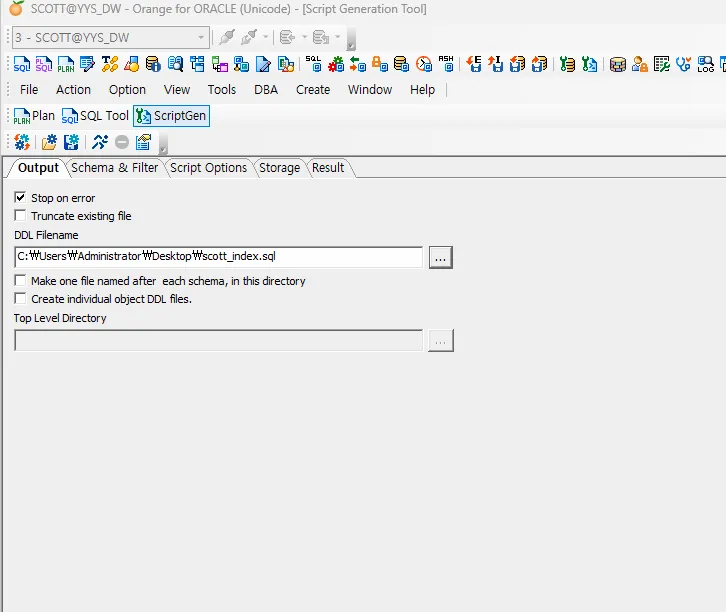
ㄴ dw 말고 다른쪽에서 하기
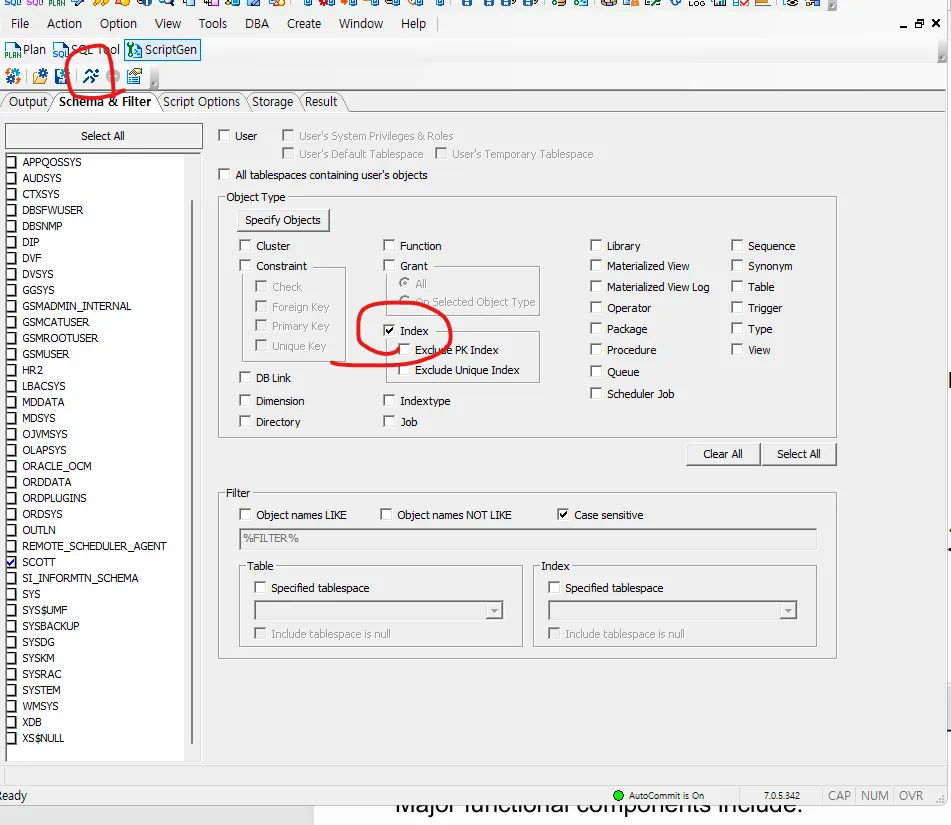
ㄴ SCOTT 체크, Index 체크하고 달리기 버튼(스크립트 생성) 클릭
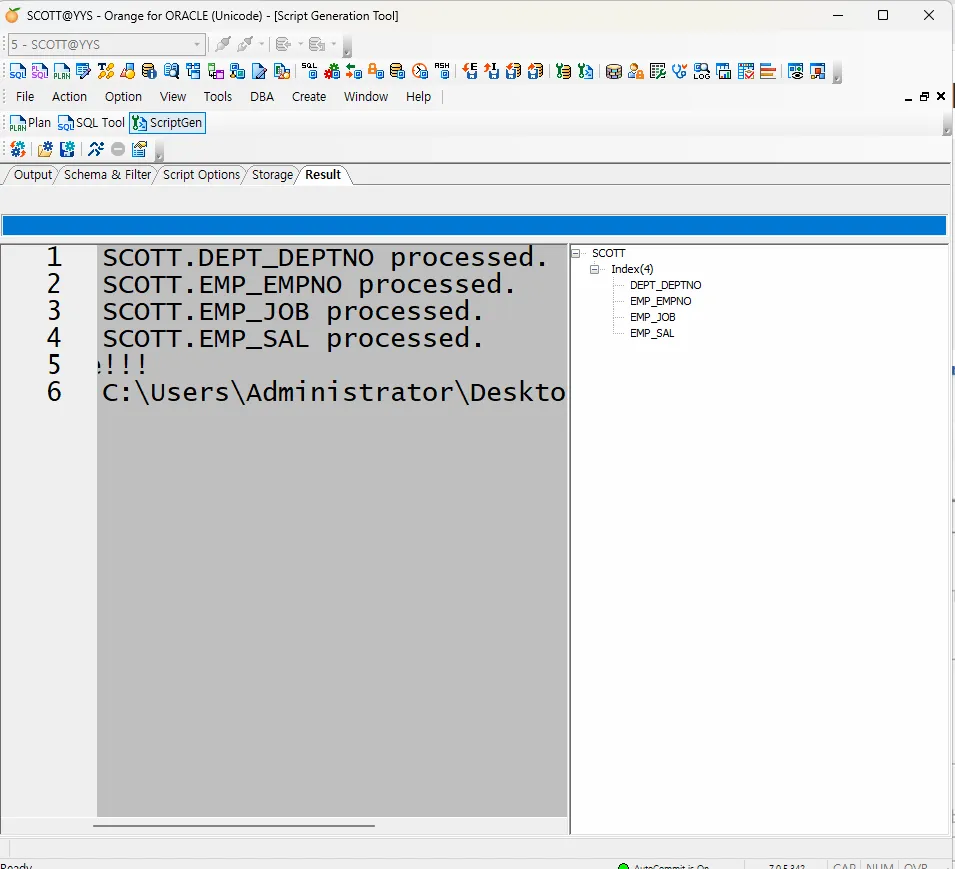
ㄴ 완료
CREATE INDEX SCOTT.DEPT_DEPTNO
ON SCOTT.DEPT (DEPTNO)
TABLESPACE USERS
STORAGE
(
    INITIAL 64K
    NEXT 1M
)  nologging parallel 4;

CREATE INDEX SCOTT.EMP_EMPNO
ON SCOTT.EMP (EMPNO)
TABLESPACE USERS
STORAGE
(
    INITIAL 64K
    NEXT 1M
)  nologging parallel 4;

CREATE INDEX SCOTT.EMP_JOB
ON SCOTT.EMP (JOB)
TABLESPACE USERS
STORAGE
(
    INITIAL 64K
    NEXT 1M
)  nologging parallel 4;

CREATE INDEX SCOTT.EMP_SAL
ON SCOTT.EMP (SAL)
TABLESPACE USERS
STORAGE
(
    INITIAL 64K
    NEXT 1M
)  nologging parallel 4;
ㄴ ;을 nologging parallel 4;로 변경하기
[실습7] ora19의 emp를 export 하는데 인덱스는 내보내지 마시오
indexes=n
[oracle@ora19c ~]$ exp scott/tiger tables=emp file=emp.dmp indexes=n[실습8] ora19dw 쪽에 emp를 임폴트 하는데 인덱스 없이 테이블만 임폴트 하시오
[oracle@ora19c ~]$ imp scott/tiger file=emp.dmp tables=emp indexes=n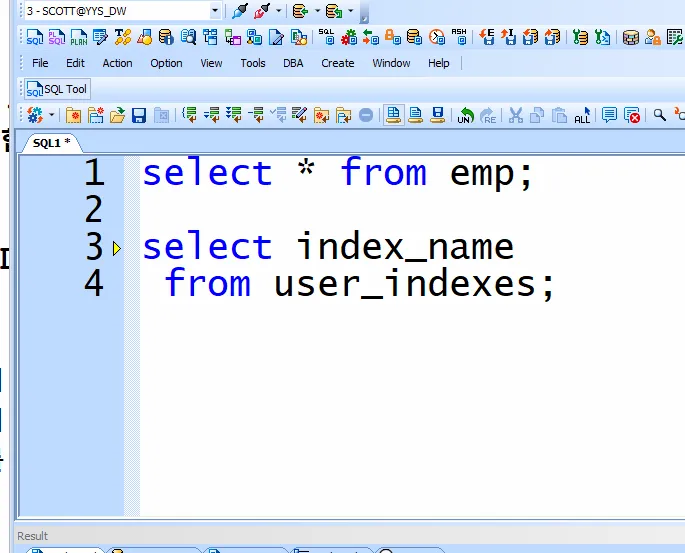
[실습9] 인덱스는 별도로 dw 쪽에서 스크립트로 생성하시오
CREATE INDEX SCOTT.EMP_EMPNO
ON SCOTT.EMP (EMPNO)
TABLESPACE USERS
STORAGE
(
    INITIAL 64K
    NEXT 1M
)  nologging parallel 4 ;

CREATE INDEX SCOTT.EMP_JOB
ON SCOTT.EMP (JOB)
TABLESPACE USERS
STORAGE
(
    INITIAL 64K
    NEXT 1M
)  nologging parallel 4 ;

CREATE INDEX SCOTT.EMP_SAL
ON SCOTT.EMP (SAL)
TABLESPACE USERS
STORAGE
(
    INITIAL 64K
    NEXT 1M
)  nologging parallel 4 ;


alter  index  emp_empno logging parallel 1 ;
alter  index  emp_job logging parallel 1 ;
alter  index  emp_sal logging parallel 1 ;


select index_name, degree, logging
 from user_indexes;
문제2. dept 테이블도 위와 같은 방법을 ora19에서 ora19dw 로 이행하시오
putty에서
[oracle@ora19c ~]$ ora19
ora19

[oracle@ora19c ~]$ exp scott/tiger file=dept.dmp tables=dept indexes=n


[oracle@ora19c ~]$ ora19dw
ora19dw

[oracle@ora19c ~]$ imp scott/tiger file=dept.dmp tables=dept indexes=n
orange에서
CREATE INDEX SCOTT.DEPT_DEPTNO
ON SCOTT.DEPT (DEPTNO)
TABLESPACE USERS
STORAGE
(
    INITIAL 64K
    NEXT 1M
) nologging parallel 4;


alter index DEPT_DEPTNO logging parallel 1;