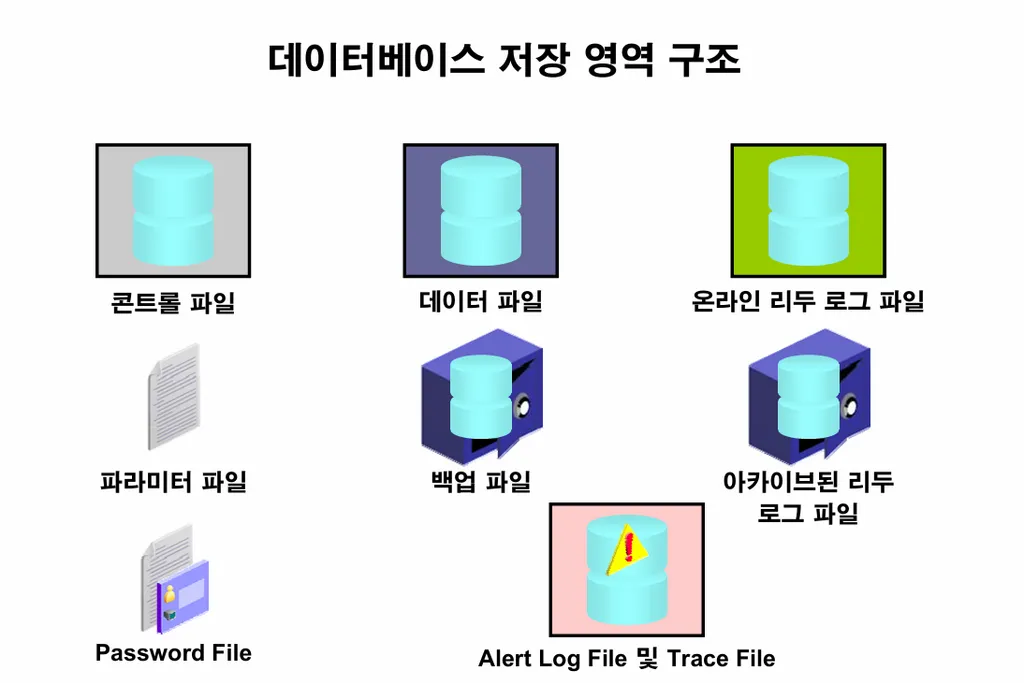
이론1. 데이터베이스를 구성하는 8가지 파일
1, 2, 3번 --> 필수
4, 5, 6, 7, 8 --> 선택
- data file : data 를 저장하는 파일
- redo log file : 변경사항을 기록하는 파일
- control file : db의 구조정보를 담고 있는 파일
- archive log file : 리두로그 파일의 백업본
- parameter file : 인스턴스의 구성 정보가 들어있는 파일
- password file : 특별한 권한을 가진 유져를 인증해주기 위한 파일
- alert log file 과 trace file : 오라클을 진단하기 위해서 필요한 파일
- 백업 파일 : 백업본
실습1. data file의 위치를 확인하시오
ed data.sql로 저장해둠
SQL> !cat data.sql
col file_name for a45

select file_id, file_name, status from dba_data_files;

SQL> @data

   FILE_ID FILE_NAME                                     STATUS
---------- --------------------------------------------- ---------
         1 /u01/app/oracle/oradata/ORA19/system01.dbf    AVAILABLE
         3 /u01/app/oracle/oradata/ORA19/sysaux01.dbf    AVAILABLE
         7 /u01/app/oracle/oradata/ORA19/users01.dbf     AVAILABLE
         4 /u01/app/oracle/oradata/ORA19/undotbs01.dbf   AVAILABLE
실습2. controlfile 의 위치를 확인하시오
💡 controlfile 내용: 데이터베이스의 구조와 상태정보
SQL> select name from v$controlfile;

NAME
--------------------------------------------------------------------------------
/u01/app/oracle/oradata/ORA19/control01.ctl
/u01/app/oracle/fast_recovery_area/ORA19/control02.ctl

SQL>
SQL> save control.sql
file control.sql(이)가 생성되었습니다
실습3. redo log file의 위치를 확인하시오
💡 redo log file: 데이터베이스에 변경한 이력정보가 들어있는 파일
SQL> select member from v$logfile;

MEMBER
--------------------------------------------------------------------------------
/u01/app/oracle/oradata/ORA19/redo03.log
/u01/app/oracle/oradata/ORA19/redo02.log
/u01/app/oracle/oradata/ORA19/redo01.log

SQL> save logfile.sql
file logfile.sql(이)가 생성되었습니다
SQL> @log

    GROUP# STATUS            SEQUENCE#
---------- ---------------- ----------
         1 INACTIVE                 34
         2 CURRENT                  35
         3 INACTIVE                 33

SQL> !cat logfile.sql
col member for a70
set lines 4000

select group#, member from v$logfile;


SQL> @logfile

    GROUP# MEMBER
---------- ----------------------------------------------------------------------
         3 /u01/app/oracle/oradata/ORA19/redo03.log
         2 /u01/app/oracle/oradata/ORA19/redo02.log
         1 /u01/app/oracle/oradata/ORA19/redo01.log
실습4. 아카이브 로그 파일의 위치를 확인하시오
💡 아카이브 로그 파일: 리두 로그 파일의 복사본
SQL> !cat arch.sql
select name from v$archived_log
/

SQL> @arch.sql
문제1. vlogfile을 조인해서 group번호, 로그파일위치, 로그 파일 상태를 다음과 같이 출력하시오

select l.group#, f.member, l.status
 from v$log l, v$logfile f
 where l.group# = f.group#;
실습5. 파라미터 파일의 위치를 확인하시오
💡 파라미터 파일
: 오라클 인스턴스의 구조정보가 들어있는 파일
SQL> show parameter spfile

NAME                                 TYPE        VALUE
------------------------------------ ----------- ------------------------------
spfile                               string      /u01/app/oracle/product/19.3.0
                                                 /dbhome_1/dbs/spfileORA19.ora
SQL> exit;
[oracle@ora19c ~]$ cd $ORACLE_HOME/dbs
[oracle@ora19c dbs]$ ls
hc_ORA19.dat  init.ora  lkORA19  orapwORA19  snapcf_ORA19.f  spfileORA19.ora
[oracle@ora19c dbs]$
[oracle@ora19c dbs]$ pwd
/u01/app/oracle/product/19.3.0/dbhome_1/dbs
[oracle@ora19c dbs]$
[oracle@ora19c dbs]$ cat spfileORA19.ora
C"mL▒▒eHCC"#ORA19.__data_transfer_cache_size=0
ORA19.__db_cache_size=1325400064
ORA19.__inmemory_ext_roarea=0
ORA19.__inmemory_ext_rwarea=0
ORA19.__java_pool_size=67108864
ORA19.__large_pool_size=16777216
ORA19.__oracle_base='/u01/app/oracle'#ORACLE_BASE set from environment
ORA19.__pga_aggregate_target=838860800
ORA19.__sga_target=1979711488
ORA19.__shared_io_pool_size=100663296
ORA19.__shared_pool_size=436207616
ORA19.__streams_pool_size=0
ORA19.__unified_pga_pool_size=0
*.audit_file_dest='/u0CC"_1/app/oracle/admin/ORA19/adump'
*.audit_trail='db'
*.compatible='19.0.0'
*.control_files='/u01/app/oracle/oradata/ORA19/control01.ctl','/u01/app/oracle/f          ast_recovery_area/ORA19/control02.ctl'
*.db_block_size=8192
*.db_name='ORA19'
*.db_recovery_file_dest='/u01/app/oracle/fast_recovery_area'
*.db_recovery_file_dest_size=8256m
*.dbwr_io_slaves=3
*.diagnostic_dest='/u01/app/oracle'
*.dispatchers='(PROTOCOL=TCP) (SERVICE=ORA19XDB)'
*.fast_start_mttr_target=600
*.large_pool_size=16777216
CC"2^*.local_listener='LISTENER_ORA19'
*.log_buffer=16777216
*.nls_language='KOREAN'
*.nls_territory='KOREA'
*.open_cursors=300
*.pga_aggregate_target=838860800
*.processes=320
*.remote_login_passwordfile='EXCLUSIVE'
*.sga_target=1874m
*.statistics_level='ALL'
*.undo_tablespace='UNDOTBS1'
[oracle@ora19c dbs]$
spfileORA19.ora 파일은 텍스트 파일 처럼 보이지만 텍스트 파일이 아니라 바이너리 파일입니다.
바이너리 파일은 vi 로 열어서 수정할 수 없습니다. 혹시라도 열고 수정하고 저장하면 손상됩니다.
이 파일은 database를 startup 할때 필요한 파일입니다. 이 파일이 없으면 인스턴스를 구성할 수 없습니다.
실습6. spfileORA19.ora 파라미터 파일을 백업하시오
[oracle@ora19c dbs]$ mkdir backup
[oracle@ora19c dbs]$
[oracle@ora19c dbs]$ cp spfileORA19.ora ./backup/
[oracle@ora19c dbs]$
[oracle@ora19c dbs]$ ls -l ./backup
합계 4
-rw-r-----. 1 oracle oinstall 3584  8월 22 13:49 spfileORA19.ora
[oracle@ora19c dbs]$
실습7. 파라미터 파일에 파라미터값중에 processes 파라미터를 320에서 600으로 변경하시오
SQL> show parameter processes

NAME                                 TYPE        VALUE
------------------------------------ ----------- ------------------------------
aq_tm_processes                      integer     1
db_writer_processes                  integer     1
gcs_server_processes                 integer     0
global_txn_processes                 integer     1
job_queue_processes                  integer     80
log_archive_max_processes            integer     4
processes                            integer     320
SQL>
SQL>
SQL> alter system set processes=600 scope=spfile;

시스템이 변경되었습니다.

SQL> show parameter processes

NAME                                 TYPE        VALUE
------------------------------------ ----------- ------------------------------
aq_tm_processes                      integer     1
db_writer_processes                  integer     1
gcs_server_processes                 integer     0
global_txn_processes                 integer     1
job_queue_processes                  integer     80
log_archive_max_processes            integer     4
processes                            integer     320
SQL> !cat $ORACLE_HOME/dbs/spfileORA19.ora
C"▒G▒AnHCC"#ORA19.__data_transfer_cache_size=0
ORA19.__db_cache_size=1325400064
ORA19.__inmemory_ext_roarea=0
ORA19.__inmemory_ext_rwarea=0
ORA19.__java_pool_size=67108864
ORA19.__large_pool_size=16777216
ORA19.__oracle_base='/u01/app/oracle'#ORACLE_BASE set from environment
ORA19.__pga_aggregate_target=838860800
ORA19.__sga_target=1979711488
ORA19.__shared_io_pool_size=100663296
ORA19.__shared_pool_size=436207616
ORA19.__streams_pool_size=0
ORA19.__unified_pga_pool_size=0
*.audit_file_dest='/u0CC"_1/app/oracle/admin/ORA19/adump'
*.audit_trail='db'
*.compatible='19.0.0'
*.control_files='/u01/app/oracle/oradata/ORA19/control01.ctl','/u01/app/oracle/fast_recovery_area/ORA19/control02.ctl'
*.db_block_size=8192
*.db_name='ORA19'
*.db_recovery_file_dest='/u01/app/oracle/fast_recovery_area'
*.db_recovery_file_dest_size=8256m
*.dbwr_io_slaves=3
*.diagnostic_dest='/u01/app/oracle'
*.dispatchers='(PROTOCOL=TCP) (SERVICE=ORA19XDB)'
*.fast_start_mttr_target=600
*.large_pool_size=16777216
CC"7\*.local_listener='LISTENER_ORA19'
*.log_buffer=16777216
*.nls_language='KOREAN'
*.nls_territory='KOREA'
*.open_cursors=300
*.pga_aggregate_target=838860800
*.processes=600
*.remote_login_passwordfile='EXCLUSIVE'
*.sga_target=1874m
*.statistics_level='ALL'
*.undo_tablespace='UNDOTBS1'
CC"FeCC"EeCC"DeC
SQL> PuTTY
💡 위의 작업은 파라미터 파일에만 반영했고 오라클 메모리에 반영하지 않았습니다. 반영하려면 인스턴스를 내렸다 올려야합니다.
실습8. 변경한 내용을 메모리에 반영하시오
SQL> shutdown immediate
데이터베이스가 닫혔습니다.
데이터베이스가 마운트 해제되었습니다.
ORACLE 인스턴스가 종료되었습니다.
SQL>
SQL>
SQL> startup
ORACLE 인스턴스가 시작되었습니다.

Total System Global Area 1979709008 bytes
Fixed Size                  8898128 bytes
Variable Size             520093696 bytes
Database Buffers         1426063360 bytes
Redo Buffers               24653824 bytes
데이터베이스가 마운트되었습니다.
데이터베이스가 열렸습니다.
SQL>
SQL>
SQL> show parameter processes

NAME                                 TYPE        VALUE
------------------------------------ ----------- ------------------------------
aq_tm_processes                      integer     1
db_writer_processes                  integer     1
gcs_server_processes                 integer     0
global_txn_processes                 integer     1
job_queue_processes                  integer     80
log_archive_max_processes            integer     4
processes                            integer     600
SQL>
💡 내렸다 올리면서 파라미터 파일의 내용을 보고 인스턴스를 구성하기 때문에 내렸다 올려야합니다.
문제2. 파라미터 중에 open_cursors 라는 파라미터는 300개에 600개로 변경하시오
SQL> show parameter open_cursors

NAME                                 TYPE        VALUE
------------------------------------ ----------- ------------------------------
open_cursors                         integer     300


SQL> alter system set open_cursors=600 scope=spfile;

시스템이 변경되었습니다.

SQL> shutdown immediate
데이터베이스가 닫혔습니다.
데이터베이스가 마운트 해제되었습니다.
ORACLE 인스턴스가 종료되었습니다.

SQL>
SQL> startup
ORACLE 인스턴스가 시작되었습니다.

Total System Global Area 1979709008 bytes
Fixed Size                  8898128 bytes
Variable Size             520093696 bytes
Database Buffers         1426063360 bytes
Redo Buffers               24653824 bytes
데이터베이스가 마운트되었습니다.
데이터베이스가 열렸습니다.
SQL>
SQL>
SQL> show parameter open_cursors

NAME                                 TYPE        VALUE
------------------------------------ ----------- ------------------------------
open_cursors                         integer     600
SQL>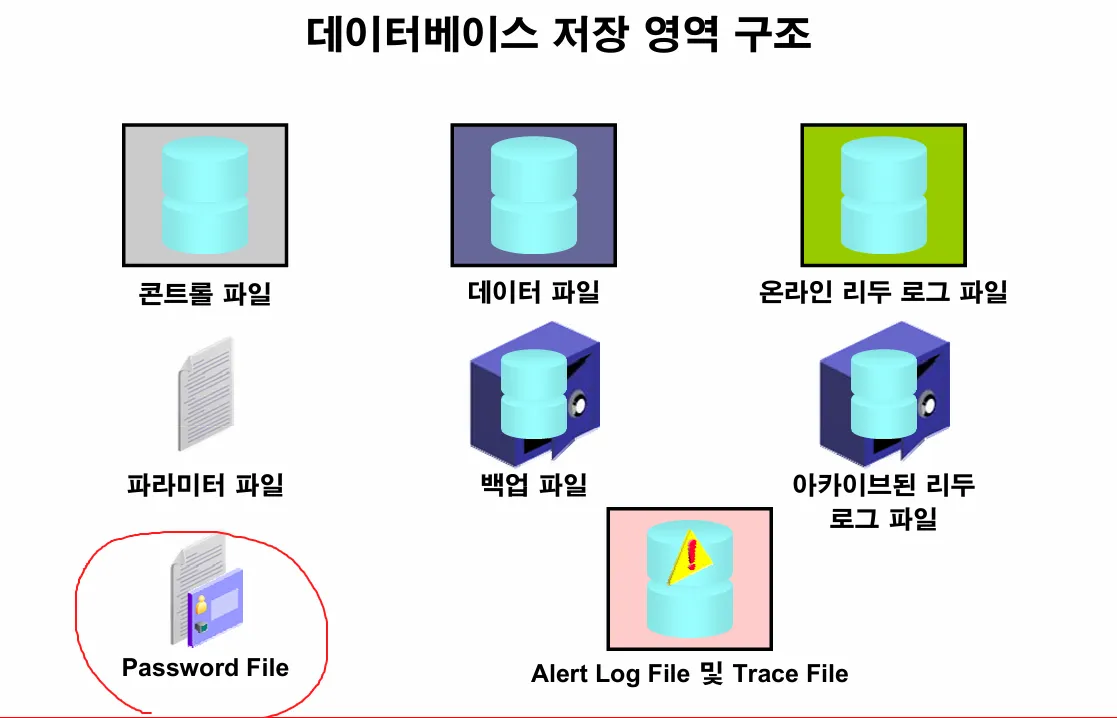
실습9. 패스워드 파일의 위치를 확인하시오
💡 패스워드 파일
: 특별한 권한을 가진 유저를 인증해주기 위한 인증정보가 들어있는 파일
특별한 권한이란
--> sysdba 권한을 말하는데 db를 올렸다 내렸다 할 수 있는 권한
이 파일안에 sys 유저의 패스워드가 들어있습니다. 그래서 혹시 오라클 설치할 때 sys 유저의 암호를 넣었는데 그 이후에 잊어버렸다면 패스워드 파일을 재생성하면 됩니다.
[oracle@ora19c dbs]$ cd $ORACLE_HOME/dbs
[oracle@ora19c dbs]$
[oracle@ora19c dbs]$ ls
backup        init.ora  orapwORA19      spfileORA19.ora
hc_ORA19.dat  lkORA19   snapcf_ORA19.f
[oracle@ora19c dbs]$
[oracle@ora19c dbs]$ ls -l orapw*
-rw-r-----. 1 oracle oinstall 2048  8월 18 18:48 orapwORA19
[oracle@ora19c dbs]$
실습10. 패스워드 파일에 등록된 유져들을 확인하시오
SQL> select username
  2   from v$pwfile_users;

USERNAME
--------------------------------------------------------------------------------
SYS
실습11. 패스워드 파일에 scott 을 등록시키시오
SQL> grant sysdba to scott;

권한이 부여되었습니다.

SQL> select username
  2   from v$pwfile_users;

USERNAME
--------------------------------------------------------------------------------
SYS
SCOTT
실습12. scott 으로 접속해서 db 를 내리시오
SQL> connect scott/tiger
연결되었습니다.
SQL>
SQL> show user
USER은 "SCOTT"입니다
SQL>
SQL> shutdown immediate
ORA-01031: 권한이 불충분합니다

SQL> connect scott/oracle_4U as sysdba
연결되었습니다.
SQL>
SQL>
SQL> shutdown immediate
데이터베이스가 닫혔습니다.
데이터베이스가 마운트 해제되었습니다.

SQL> show user
USER은 "SYS"입니다
SQL>
SQL> revoke sysdba from scott;

권한이 취소되었습니다.

SQL> select username
  2   from v$pwfile_users;

USERNAME
--------------------------------------------------------------------------------
SYS
실습13. sys 유저의 패스워드를 변경하시오.( 패스워드 파일을 재생성하면 됩니다.)
[oracle@ora19c dbs]$ cd $ORACLE_HOME/dbs
[oracle@ora19c dbs]$
[oracle@ora19c dbs]$ ls -l orapw*
-rw-r-----. 1 oracle oinstall 2560  8월 22 14:11 orapwORA19
[oracle@ora19c dbs]$
[oracle@ora19c dbs]$ cp orapwORA19 ./backup/
[oracle@ora19c dbs]$
[oracle@ora19c dbs]$ rm orapwORA19
[oracle@ora19c dbs]$

[oracle@ora19c dbs]$ orapwd password=kbmkbm_4U  entries=5 file=orapwORA19
[oracle@ora19c dbs]$
[oracle@ora19c dbs]$ ls -l orapw*
-rw-r-----. 1 oracle oinstall 6144  8월 22 14:18 orapwORA19

[oracle@ora19c dbs]$ sqlplus sys/oracle_4U@192.168.13.81:1521/ORA19 as sysdba

SQL*Plus: Release 19.0.0.0.0 - Production on 금 8월 22 14:20:22 2025
Version 19.3.0.0.0

Copyright (c) 1982, 2019, Oracle.  All rights reserved.

ERROR:
ORA-01017: 사용자명/비밀번호가 부적합, 로그온할 수 없습니다.


사용자명 입력:

[oracle@ora19c dbs]$ sqlplus sys/kbmkbm_4U@192.168.13.81:1521/ORA19 as sysdba

SQL*Plus: Release 19.0.0.0.0 - Production on 금 8월 22 14:21:57 2025
Version 19.3.0.0.0

Copyright (c) 1982, 2019, Oracle.  All rights reserved.


다음에 접속됨:
Oracle Database 19c Enterprise Edition Release 19.0.0.0.0 - Production
Version 19.3.0.0.0

SQL>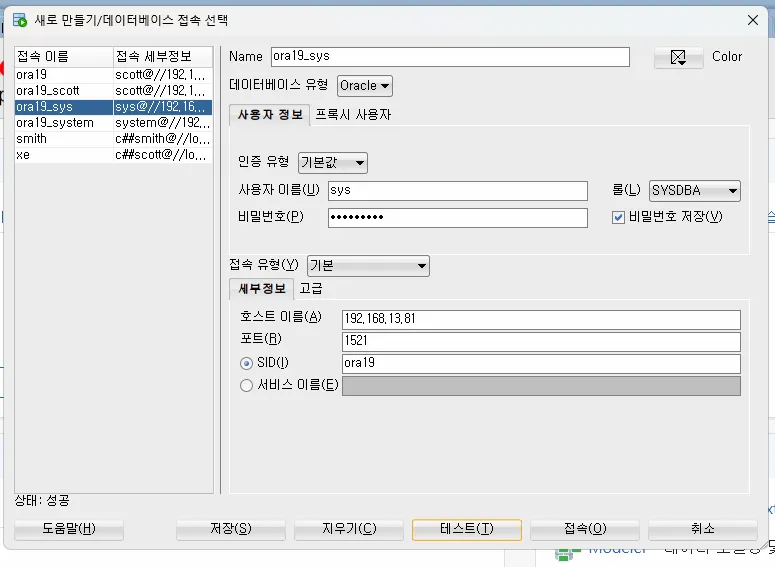
문제3. 다시 sys 유져의 패스워드를 oracle_4U 로 변경하시오
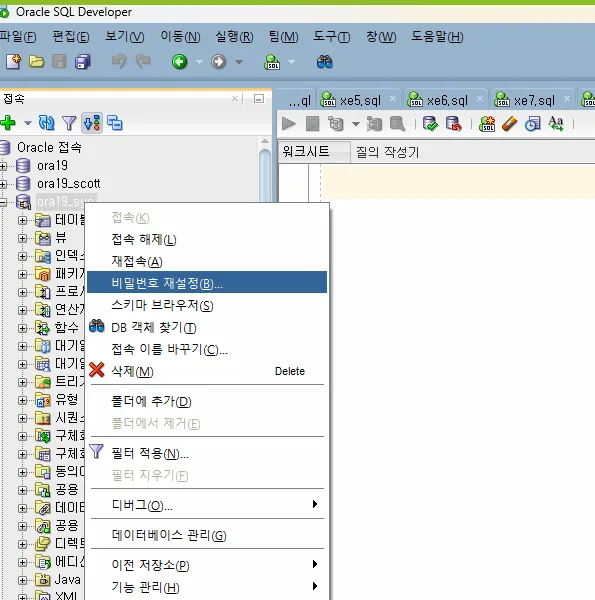
실습14. alert log file과 trace file의 위치를 확인하시오
💡 - alert log file
: 데이터베이스에서 발생한 여러 이슈들과 에러들, db구조변경 명령어들이 저장됨
- trace file
: 데이터베이스에서 발생한 특정 이슈의 상세한 정보가 저장됨
SELECT value FROM v$diag_info WHERE name = 'Diag Trace';

VALUE
--------------------------------------------------------------------------------
/u01/app/oracle/diag/rdbms/ora19/ORA19/trace
실습15. alert log file과 trace file 에 대표적으로 적히는 정보가 dead lock 인데 dead lock 을 일으켜 보시오
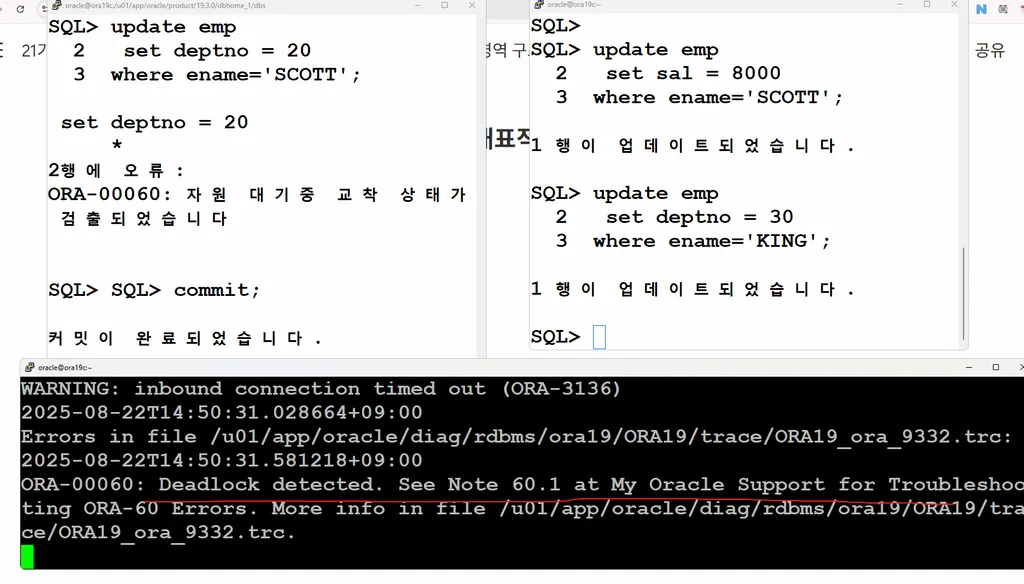
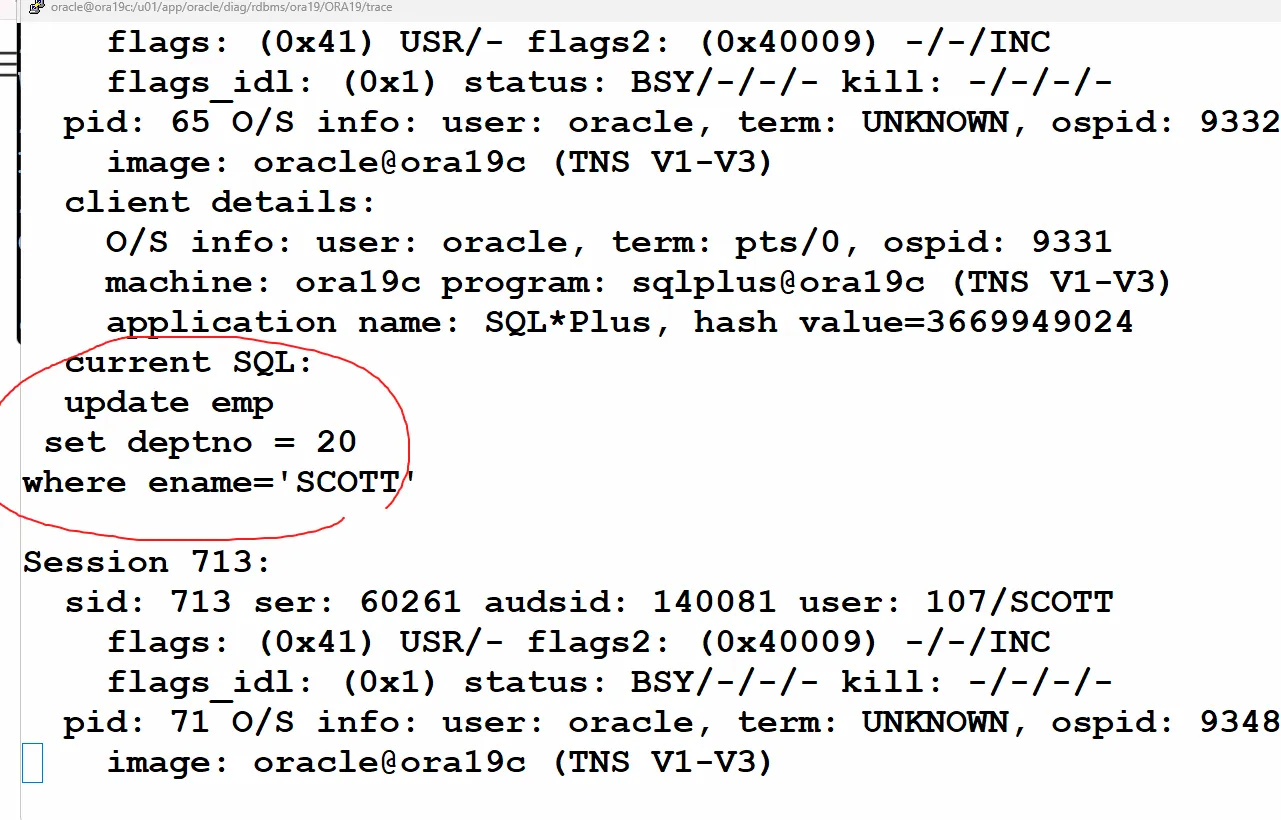
dba 는 alert log file에 나온 trace file 을 열어서 dead lock 관련 update 문을 확인할 수 있습니다.