💡
union과union all의 다른 점은 중복행을 제거한다는 것
union all은 그냥 위아래의 결과를 하나로 합치는 연산자이고
union은 합치고 나서 서로 중복된 행이 있으면 제거
문제1. 아래의 두개의 SQL을 실행해서 union all 과 union 의 차이점을 확인하시오
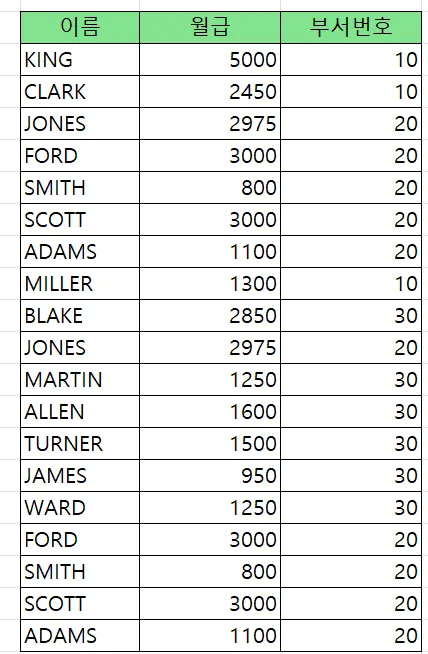
union all (중복)
select  ename, sal, deptno
 from emp
 where deptno in ( 10, 20 )
 union  all
select ename, sal, deptno
 from emp
 where deptno in ( 20, 30 );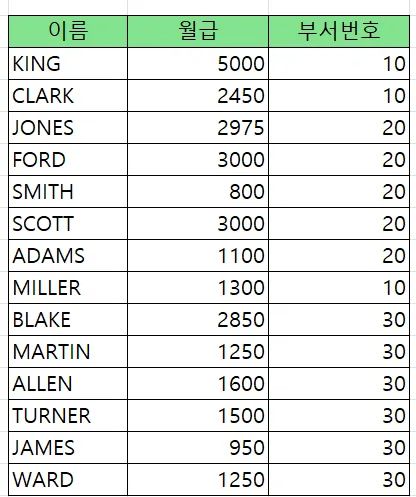
union (중복제거)
select  ename, sal, deptno
 from emp
 where deptno in ( 10, 20 )
 union
select ename, sal, deptno
 from emp
 where deptno in ( 20, 30 );
정렬 --> db 성능 안좋아짐
문제2. 아래의 SQL의 결과를 union 으로 수행하시오
select  deptno, sum(sal)
  from emp
  group  by rollup(deptno)
order by deptno asc; 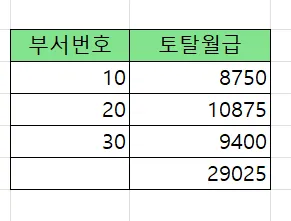
답
select deptno, sum(sal)
 from emp
 group by deptno
union
select  null, sum(sal)
 from emp
 order by deptno;


select * from table(dbms_xplan.display_cursor(null, null, 'ALLSTATS LAST'));


------------------------------------------------------------------------------------------------------------------
| Id  | Operation            | Name | Starts | E-Rows | A-Rows |   A-Time   | Buffers |  OMem |  1Mem | Used-Mem |
------------------------------------------------------------------------------------------------------------------
|   0 | SELECT STATEMENT     |      |      1 |        |      4 |00:00:00.01 |      14 |       |       |          |
|   1 |  SORT UNIQUE         |      |      1 |     15 |      4 |00:00:00.01 |      14 |  2048 |  2048 | 2048  (0)|
|   2 |   UNION-ALL          |      |      1 |        |      4 |00:00:00.01 |      14 |       |       |          |
|   3 |    HASH GROUP BY     |      |      1 |     14 |      3 |00:00:00.01 |       7 |  1116K|  1116K|          |
|   4 |     TABLE ACCESS FULL| EMP  |      1 |     14 |     14 |00:00:00.01 |       7 |       |       |          |
|   5 |    SORT AGGREGATE    |      |      1 |      1 |      1 |00:00:00.01 |       7 |       |       |          |
|   6 |     TABLE ACCESS FULL| EMP  |      1 |     14 |     14 |00:00:00.01 |       7 |       |       |          |
------------------------------------------------------------------------------------------------------------------
문제3. 아래의 SQL을 이번에는 union 으로 수행하시오
select  deptno, job, sum(sal)
  from emp
  group by  grouping sets( deptno, job, () );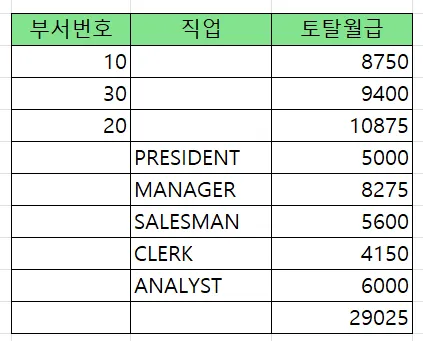
답
select deptno 부서번호, to_char(null) 직업, sum(sal) 토탈월급
 from emp
 group by deptno
union
select to_number(null), job, sum(sal)
 from emp
 group by job
union
select to_number(null), to_char(null), sum(sal)
 from emp;
💡 집합 연산자 사용시 주의 사항
- 집합 연산자 위쪽 쿼리와 아래쪽 쿼리의 컬럼 갯수가 동일해야 합니다.
- 집합 연산자 위쪽 쿼리와 아래쪽 쿼리의 컬럼의 데이터 유형이 동일해야합니다.
- 컬럼명은 맨위의 쿼리문의 컬럼명으로 정해집니다.
- order by 절은 맨 아래의 쿼리문에만 작성할 수 있습니다.
📌 order by절에 컬럼별칭을 주려면
아래처럼 모든 해당 컬럼명에 별칭을 다 써줘야됨
select deptno 부서번호, to_char(null) 직업, sum(sal) 토탈월급
 from emp
 group by deptno
union
select to_number(null) 부서번호, job, sum(sal)
 from emp
 group by job
union
select to_number(null) 부서번호, to_char(null), sum(sal)
 from emp
 order by 부서번호;
OCP 문제. UNION ALL 과 UNION 에 관련한 OCP 문제
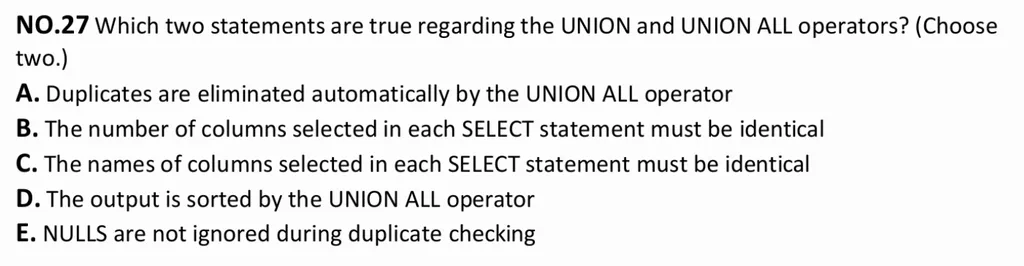
정답 2개: B, E
풀이
A. union에 대한 설명
C. 컬럼이름 반드시 동일할 필요 x
D. union all로 정렬 안됨
보기 분석:
A. Duplicates are eliminated automatically by the UNION ALL operator
❌ 틀림. UNION은 중복 제거, UNION ALL은 중복을 제거하지 않고 모두 출력합니다.
B. The number of columns selected in each SELECT statement must be identical
✅ 맞음. UNION과 UNION ALL 모두 SELECT 절의 컬럼 수가 같아야 합니다.
C. The names of columns selected in each SELECT statement must be identical
❌ 틀림. 컬럼 이름이 아니라 컬럼 개수와 데이터 타입의 호환성이 중요합니다. 이름은 달라도 됩니다.
D. The output is sorted by the UNION ALL operator
❌ 틀림. UNION은 중복 제거를 위해 내부적으로 정렬을 수행할 수 있지만, UNION ALL은 정렬하지 않습니다. 정렬을 하려면 ORDER BY를 따로 사용해야 합니다.
E. NULLs are not ignored during duplicate checking
✅ 맞음. UNION에서 중복을 제거할 때 NULL도 값 비교에 포함되어 동일한 NULL 값은 중복으로 간주됩니다.
✅ 정답:
B and E
문제4. 아래의 SQL의 결과를 union 으로 구현하시오
select deptno, sum(sal)
  from emp
  group by cube(deptno);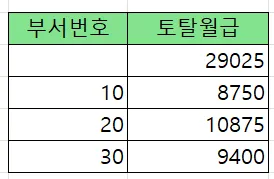
답
select to_number(null) as deptno, sum(sal)
 from emp
union
select deptno, sum(sal)
 from emp
 group by deptno
 order by deptno nulls first;
문제5. 아래의 SQL을 union 으로 구현하시오
select  deptno, job, sum(sal)
  from emp
  group  by  rollup(deptno, job)
order by deptno,job; 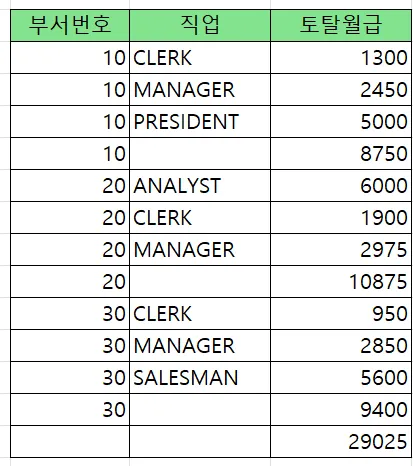
답
select deptno, job, sum(sal)
 from emp
 group by deptno, job
union
select deptno, null as job, sum(sal)
 from emp
 group by deptno
 union
 select null as deptno, null as job, sum(sal)
 from emp
 order by deptno, job;
문제. 아래의 SQL의 결과를 union 으로 구현하시오
select  deptno, job, sum(sal)
 from emp
 group  by grouping sets( (deptno,job), () )
 order by deptno asc, job asc;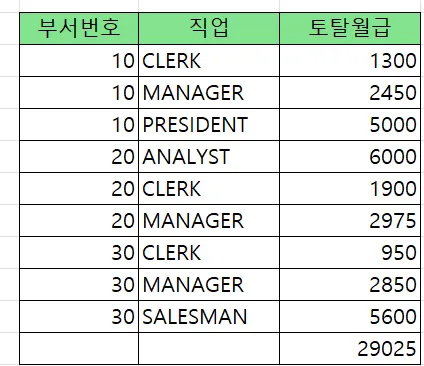
답
select  deptno, job, sum(sal)
 from emp
 group by deptno, job
union
select null as deptno, null as job, sum(sal)
 from emp
 order by deptno, job;