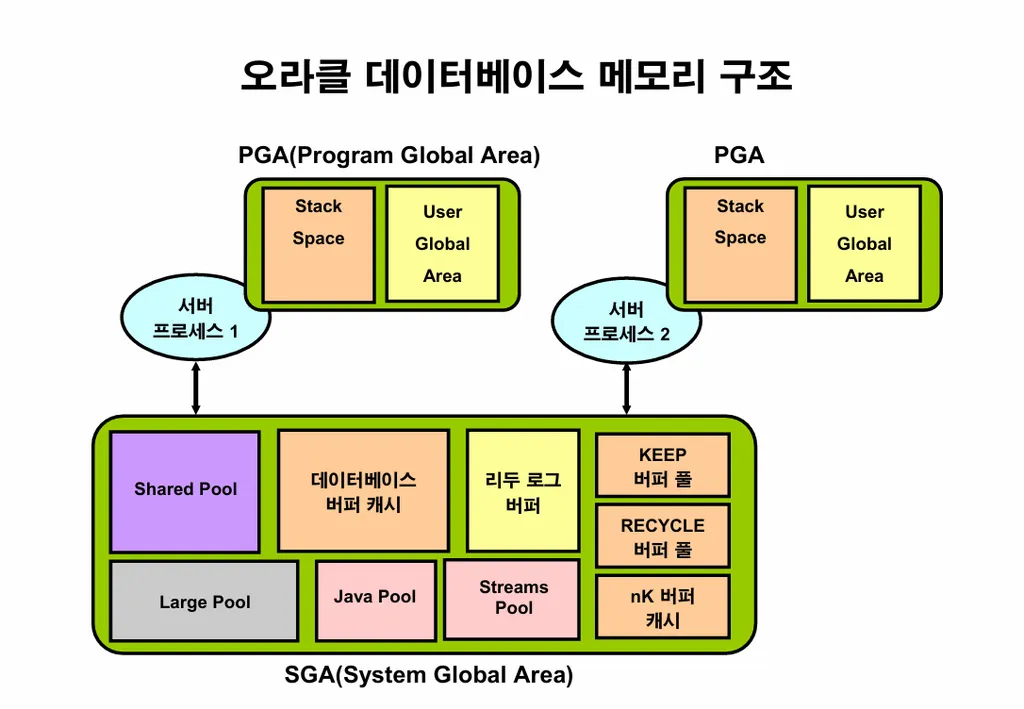
-
SGA ( System Global Area ) : 오라클 프로세서들이 공유해서 사용하는 공유 메모리 영역입니다.
-
PGA ( Program Global Area ) : 서버 프로세서가 개별적으로 사용하는 메모리 영역입니다. 이 영역에서 정렬 작업과 해쉬조인이 일어납니다.
이 메모리 영역을 DBA가 알아야하는 이유
: 악성 SQL이 수행되면 위의 메모리 영역을 혼자 다 차지하고 사용
--> 전체적으로 성능이 느려짐
실습1. sys 유져로 편하게 접속할 수 있는 alias 를 생성하시오
[oracle@ora19c ~]$ alias sys='sqlplus / as sysdba'
[oracle@ora19c ~]$
[oracle@ora19c ~]$ sys

SQL*Plus: Release 19.0.0.0.0 - Production on 화 8월 19 00:1                               9:36 2025
Version 19.3.0.0.0

Copyright (c) 1982, 2019, Oracle.  All rights reserved.


다음에 접속됨:
Oracle Database 19c Enterprise Edition Release 19.0.0.0.0 -                                Production
Version 19.3.0.0.0

SQL>
실습2. scott 만 쳐도 scott으로 접속되게 alias 를 만드시오
[oracle@ora19c ~]$ alias scott='sqlplus scott/tiger'
[oracle@ora19c ~]$
[oracle@ora19c ~]$ scott

SQL*Plus: Release 19.0.0.0.0 - Production on 화 8월 19 00:21:31 2025
Version 19.3.0.0.0

Copyright (c) 1982, 2019, Oracle.  All rights reserved.

마지막 성공한 로그인 시간: 월 8월  18 2025 23:49:30 +09:00

다음에 접속됨:
Oracle Database 19c Enterprise Edition Release 19.0.0.0.0 - Production
Version 19.3.0.0.0

SQL> show user
USER은 "SCOTT"입니다
SQL>
SQL>
실습3. oracle 유져로 접속할때마다 자동으로 실행되는 .bash_profile에 위의 alias 를 넣고 저장하시오
[oracle@ora19c ~]$ pwd
/home/oracle
[oracle@ora19c ~]$ ls -al .bash_profile
-rw-r--r--. 1 oracle oinstall 639  8월 18 20:18 .bash_profile
[oracle@ora19c ~]$
[oracle@ora19c ~]$ vi .bash_profile
[oracle@ora19c ~]$ cat .bash_profile
# .bash_profile

# Get the aliases and functions
if [ -f ~/.bashrc ]; then
        . ~/.bashrc
fi

# User specific environment and startup programs

PATH=$PATH:$HOME/.local/bin:$HOME/bin
export ORACLE_BASE=/u01/app/oracle
export ORACLE_HOME=/u01/app/oracle/product/19.3.0/dbhome_1
export ORA_INVENTORY=/u01/app/oraInventory
export ORACLE_SID=ORA19
#export TNS_ADMIN=/u01/app/oracle/product/19.3.0/dbhome_1/network/admin
export PATH=$PATH:$HOME/bin:$ORACLE_HOME/bin
export LD_LIBRARY_PATH=$ORACLE_HOME/lib:/lib:/usr/lib
export CLASSPATH=$ORACLE_HOME/JRE:$ORACLE_HOME/jlib:$ORACLE_HOME/rdbms/jlib
export NLS_LANG=KOREAN_KOREA.AL32UTF8
export PATH

alias sys='sqlplus / as sysdba'
alias scott='sqlplus scott/tiger'

[oracle@ora19c ~]$ source .bash_profile
[oracle@ora19c ~]$ scott
실습4. PGA 영역의 사용량을 확인하는 스크립트를 저장하시오
-- PGA 전체 통계
SELECT name, value/1024/1024 AS "Size(MB)"
FROM v$pgastat
WHERE name IN ('total PGA allocated',
               'total PGA inuse',
               'total PGA used for auto workareas',
               'total PGA used for manual workareas');
-- PGA 사용률 (할당량 대비 사용량)
set lines 500
set pages 400
SELECT
ROUND(pga_used.value/1024/1024, 2) AS "PGA_Used(MB)",
ROUND(pga_alloc.value/1024/1024, 2) AS "PGA_Allocated(MB)",
ROUND(pga_target.value/1024/1024, 2) AS "PGA_Target(MB)",
ROUND((pga_used.value / pga_alloc.value) * 100, 2) AS "Used_vs_Allocated(%)",
ROUND((pga_alloc.value / pga_target.value) * 100, 2) AS "Allocated_vs_Target(%)"
FROM
(SELECT value FROM v$pgastat WHERE name = 'total PGA inuse') pga_used,
(SELECT value FROM v$pgastat WHERE name = 'total PGA allocated') pga_alloc,
(SELECT value FROM v$parameter WHERE name = 'pga_aggregate_target') pga_target;실습5. 아래의 SGA 영역의 크기 확인하는 스크립트를 각각 저장하시오
-- SGA 풀별 사용량
SELECT pool,
       SUM(bytes)/1024/1024 AS "Used(MB)",
       SUM(bytes)/1024/1024/1024 AS "Used(GB)"
 FROM v$sgastat
 WHERE pool IS NOT NULL
 GROUP BY pool
 ORDER BY SUM(bytes) DESC;

-- SGA 전체 크기 확인
select * from v$sga; SQL> ed pga1.sql
SQL> ed pga2.sql
SQL> ed sga1.sql
SQL> ed sga2.sql
SQL> @pga1
SQL> @pga2
SQL> @sga1
SQL> @sga2[oracle@ora19c ~]$ ls -l *.sql
-rw-r--r--. 1 oracle oinstall 259 8월 19 15:51 pga1.sql
-rw-r--r--. 1 oracle oinstall 679 8월 19 15:55 pga2.sql
-rw-r--r--. 1 oracle oinstall 49 8월 19 16:00 sga1.sql
-rw-r--r--. 1 oracle oinstall 207 8월 19 16:00 sga2.sql