
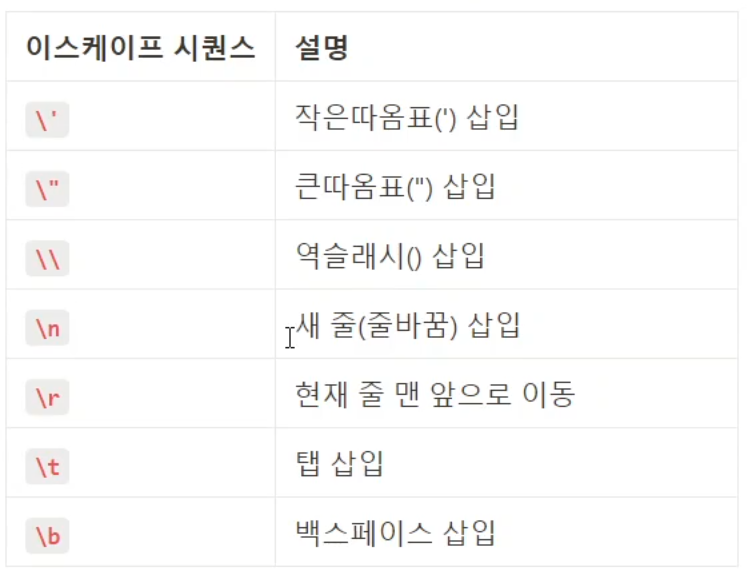
""안에 사용하는 문법들
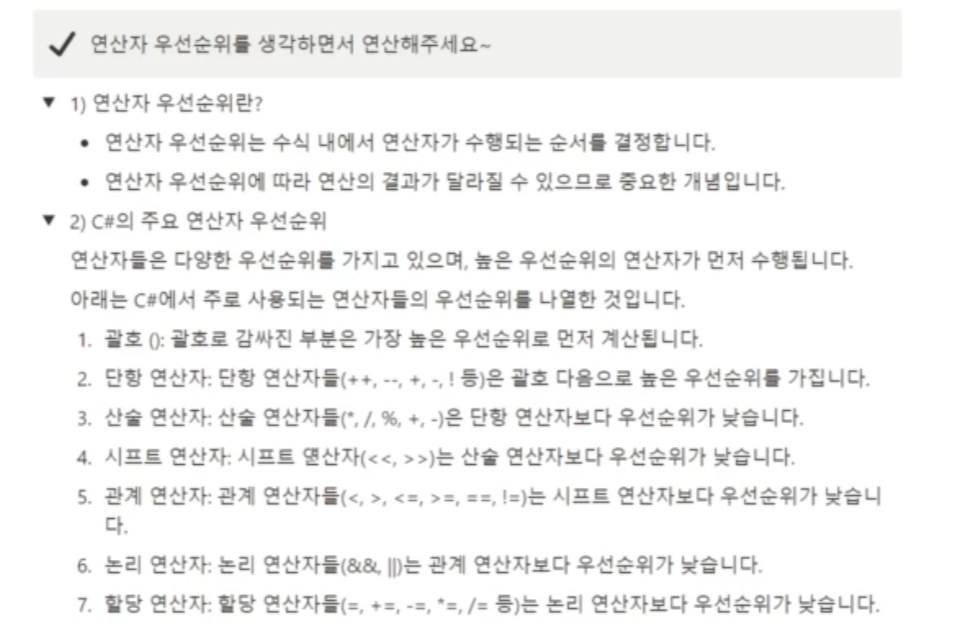
연산자의 우선순위
- 검색
string str = "Hello, World!";
int index = str.IndexOf("World");
이 코드는 str 문자열에서 "World" 문자열의 첫 번째 인덱스를 찾아 index 변수에 저장합니다.
- 대체
string str = "Hello, World!";
string newStr = str.Replace("World", "Universe");
이 코드는 str 문자열에서 "World" 문자열을 "Universe" 문자열로 대체한 새로운 문자열 newStr을 생성합니다.
string input = Console.ReadLine();
string[] numbers = input.Split(' ');
이러면 input이 10, 20 이면 10, 20이 따로 numbers에 담기게된다
int currentExp = 1200;
int requiredExp = 2000;
string result = (currentExp >= requiredExp) ? "레벨업 가능" : "레벨업 불가능";
    Console.WriteLine(result);
    //결과 레벨업 불가능
↑삼항 연산자
 int PlayerScore = 100;
 string PlayerRank = string.Empty;

 // 인트 나누기 인트는 나머지값을 없앰.
 // EX) 95/ 10 = 9 (나머지값을 없애므로)
 switch (PlayerScore / 10)
 {
     case 10:
     case 9:
         PlayerRank = "Diamond";
         break;
     case 8:
         PlayerRank = "Platinum";
         break;
     default:
         PlayerRank = "Iron";
         break;
 }
 Console.WriteLine(PlayerRank);
 //결과 Diamond
위 코드를 보면 playerscore / 10을 해서 값이 10이 되었는데,
그러면 case10에 해당되게 되고, break가 걸리지 않는이상 아래로 주욱 내려가다가
case9에 해당하는 diamond를 받는다.
char input = Console.ReadLine()[0];
if (input >= 'a' && input <= 'z' || input >= 'A' && input <= 'Z')
{
    Console.WriteLine("알파벳입니다.");
}
else
{
    Console.WriteLine("알파벳이 아닙니다.");
}
조건문에 문자를 넣는것도 가능했다.
int i;
for (i = 0; i < 10; i += 2)
{

}
for문 안에서 사용된 i는 for문이 끝나면 끝인데
for밖에서 한번 선언해주면 i가 저장된다
for도 while처럼무한루프가 가능하다
for(;;)float의 값은 엄청 작은 수라서 Unity버전과 상황에 따라 값이 변할수 있어서 조심해야 한다고 한다.

상등비교를 주의해야하고 오류가 발생할수있다.
문자 등을 특정한 데이터 형태로 변경하는 것을 인코딩이라고 하며, 대표적으로 ASCII가 있다.
컬렉션
배열과는 다르게 크기가 가변적이다
배열과 비슷한 자료 구조를 가지고있다
-
List
-
list는 가변적인 크기를 갖는 배열
-
list를 생성할 때는 list에 담을 자료형을 지정
List<int> numbers = new List<int>(); // 빈 리스트 생성
numbers.Add(1); // 리스트에 데이터 추가
numbers.Add(2);
numbers.Add(3);
numbers.Remove(2); // 리스트에서 데이터 삭제

foreach(int number in numbers) // 리스트 데이터  출력
{
  Console.WriteLine(number);
}
-
-
Dictionary
- 딕셔너리는 키와 값으로 구성된 데이터를 저장
- 중복된 키를 가질 수 없으며, 키와 값이 쌍을 이루어 데이터를 저장
Dictionary<string, int> scores = new Dictionary<string, int>(); // 빈 딕셔너리 생성
scores.Add("Alice", 100); // 딕셔너리에 데이터 추가
scores.Add("Bob", 80);
scores.Add("Charlie", 90);
scores.Remove("Bob"); // 딕셔너리에서 데이터 삭제

foreach(KeyValuePair<string, int> pair in scores) // 딕셔너리 데이터 출력
{
   Console.WriteLine(pair.Key + ": " + pair.Value);
}- Stack
- 후입선출(LIFO) 구조를 가진 자료 구조
  Stack<int> stack1 = new Stack<int>();  // int형 Stack 선언

// Stack에 요소 추가
stack1.Push(1);
stack1.Push(2);
stack1.Push(3);

// Stack에서 요소 가져오기
int value = stack1.Pop(); // value = 3 (마지막에 추가된 요소)- Queue
- 선입선출(FIFO) 구조를 가진 자료 구조
  Queue<int> queue1 = new Queue<int>(); // int형 Queue 선언

// Queue에 요소 추가
queue1.Enqueue(1);
queue1.Enqueue(2);
queue1.Enqueue(3);

// Queue에서 요소 가져오기
int value = queue1.Dequeue(); // value = 1 (가장 먼저 추가된 요소)- HashSet
- 중복되지 않은 요소들로 이루어진 집합
  HashSet<int> set1 = new HashSet<int>();  // int형 HashSet 선언

// HashSet에 요소 추가
set1.Add(1);
set1.Add(2);
set1.Add(3);

// HashSet에서 요소 가져오기
foreach (int element in set1)
{
    Console.WriteLine(element);
}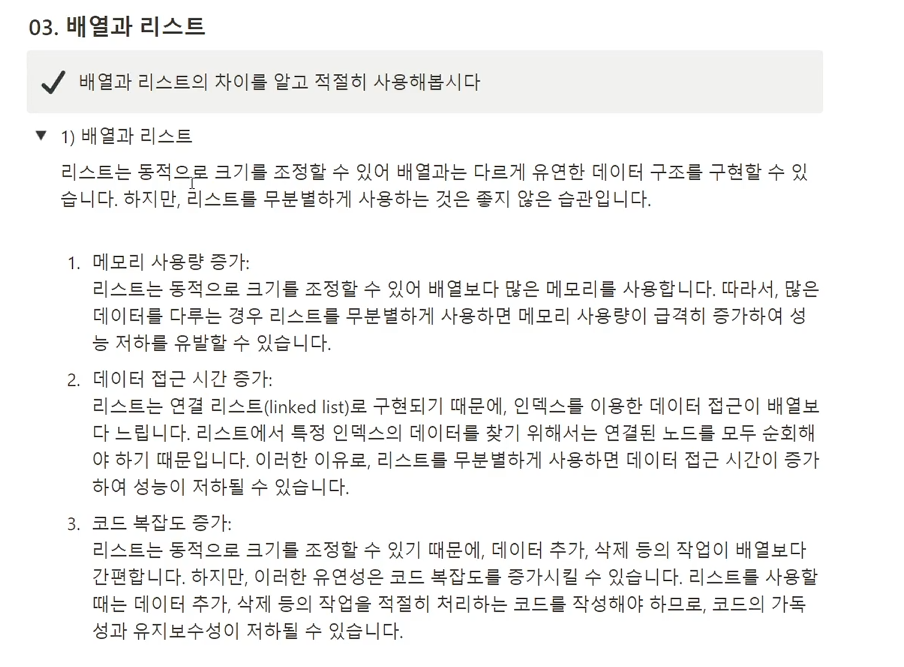
배열과 리스트의 차이점
1줄요약 : 리스트를 무분별하게 사용하지 말라
오버로딩 개념과 활용
- 메서드 오버로딩은 동일한 이름의 메서드를 다양한 배개변수 목록으로 다중 정의하는 개념입니다.
- 매개변수의 개수, 타입, 순서가 다른 여러 메서드를 동일한 이름으로 정의하여 메서드 호출시 매개변수의 형태에 따라 적절한 메서드가 선택되도록 할 수 있습니다.
- 오버로딩은 메서드의 기능이나 작업은 동일하지만 입력값에 따라 다르게 동작해야 할 때 사용됩니다.
void PrintMessage(string message)
{
    Console.WriteLine("Message: " + message);
}

void PrintMessage(int number)
{
    Console.WriteLine("Number: " + number);
}


// 메서드 호출
PrintMessage("Hello, World!");  // 문자열 매개변수를 가진 메서드 호출
PrintMessage(10); // 정수 매개변수를 가진 메서드 호출-
재귀 호출 개념과 동작 원리
-
재귀 호출은 메서드가 자기 자신을 호출하는 것을 의미합니다.
-
재귀 호출은 호출 스택에 호출된 메서드의 정보를 순차적으로 쌓고, 메서드가 반환되면서 스택에서 순차적으로 제거되는 방식으로 동작합니다.
void CountDown(int n)
{
    if (n <= 0)
    {
        Console.WriteLine("Done");
    }
    else
    {
        Console.WriteLine(n);
        CountDown(n - 1);  // 자기 자신을 호출
    }
}

// 메서드 호출
CountDown(5);
-
-
재귀 호출의 활용과 주의점
- 재귀 호출을 사용할 때 주의해야 할 점은 종료 조건을 명확히 정의해야 하며, 종료 조건을 만족하지 못하면 무한히 재귀 호출이 반복되어 스택 오버플로우 등의 오류가 발생할 수 있습니다.
- 재귀 호출은 메모리 사용량이 더 크고 실행 속도가 느릴 수 있으므로, 필요한 경우에만 적절히 사용하는 것이 좋습니다.
숫자 맞추기 게임 만들기
 Console.WriteLine("숫자 맞추기 게임을 시작합니다. 1에서 100까지의 숫자 중 하나를 맞춰보세요");
 Random random = new Random();
 int guess = 0;
 int number = random.Next(1,101);
 int attempts = 0;
 while (number != guess)
 {
     Console.Write("숫자를 입력하세요: ");
     guess = int.Parse(Console.ReadLine());
     if (guess < number)
     {
         Console.WriteLine("너무 작습니다");
         attempts++;
     }
     if (guess > number)
     {
         Console.WriteLine("너무 큽니다!");
         attempts++;
     }
 }
 Console.WriteLine($"축하합니다! {attempts}번만에 숫자를 맞추었습니다.");