
인덱스란?
- 인덱스는 도큐먼트를 저장하는 논리적 단위로, 관계형 데이터베이스의 테이블과 유사한 개념이다.
- 하나의 인 덱스에 다수의 도큐먼트가 포함되는 구조인데, 동일한 인덱스에 있는 도큐먼트는 동일한 스키마를 갖는다.
- 또 한 모든 도큐먼트는 반드시 하나의 인덱스에 포함되어야 한다.
- 인덱스 이름에는 영어 소문자를 비롯하여 \, /, *, ?, “, <, >, |, # , 공백, 쉼표 등을 제외한 특수문자를 사용할 수 있으며 255바이트를 넘을 수 없다.
- elasticsearch 에서는 검색기능을 제공하며 DSL 방식의 검색을 지원한다. 모든 검색 형태는 json 형태로 입력되어야 한다.
- javascript 로 부터 파생된 데이터 표기, 출력 형태이며 현재는 자바스크립트에만 의존적이지 않고 대부분의 언어에서 데이터를 입력 및 출력시 활용할 수 있다
- 최근에는 MSA 방법에 의해 특정 애플리케이션이나 웹사이트를 제작할 경우 기능별로 구분하여 프로그래밍(개발)이 진행된다.
- 인덱스는 도큐먼트를 저장하는 논리적 단위이다.
스키마에 따른 그룹핑
- 일반적으로 스키마에 따라 인덱스를 구분한다.
- 회원정보 도큐먼트와 장바구니 도큐먼트는 성격이 다 르므로 데이터 스키마도 다르다.
- 이렇게 서로다른 스키마를 가진 도큐먼트를 하나의 인덱스에 저장하는 방법 은 바람직하지 않다.
- 스키마에 따라 인덱스를 구분하는 것은 기본며 필수적인 사항은 아니다.
- 인덱스 스키마 는 매핑을 통해 정의한다.
결론을 말하자면 그룹핑을 하는 이유는 데이터를 효율적으로 처리하기 위함이다.
어떻게 효율적으로 처리하냐 ? → 데이터가 커질수록 데이터 정제작업이 많은데 그룹핑을하면 데이터를 효율적으로 관리할 수 있다.
- Document
CREATE TABLE member (
uid int not null AUTO_INCREMENT PRIMARY KEY, name varchar(50) not null,
age int not null,
gender varchar(6) not null
);
INSERT INTO member (name, age, gender) values ("mike", 25, "male");

{
"name": "mike",
"age": 25,
"gender": "male"
}
name” , “age”, “gender” 를 필드라고 하며, “mike”, 25, “male” 를 값이라고 한다.
엘라스틱서치 매핑으로 필드들의 데이터 타입을 지정할 수 있는데, name, gender 필드는 텍스트 타입, age 필드는 정수 타입으로 매핑이 되어있다.
도큐먼스 CRUD
- Document : 하나의 Json 오브젝트로 Elasticsearch 시스템에서 데이터를 구성하는 최소단위이다.
- 일반적인 Row형 데이터베이스에서 하나의 row에 대응하는 개념으로 이해한다.
- Document를 Elastichserach 인덱스에 Create, Read, Update, Delete 한다.
- 도큐먼트는 인덱스 내에 포함되야 한다.
name” , “age”, “gender” 를 필드라고 하며, “mike”, 25, “male” 를 값이라고 한다.
엘라스틱서치 매핑으로 필드들의 데이터 타입을 지정할 수 있는데, name, gender 필드는 텍스트 타입, age 필드는 정수 타입으로 매핑이 되어있다.
데이터(인덱스) 생성
PUT index0/_doc/1
{
  "name": "gildong",
  "age": 22,
  "address": "seoul"
}

#! Elasticsearch built-in security features are not enabled. Without authentication, your cluster could be accessible to anyone. See https://www.elastic.co/guide/en/elasticsearch/reference/7.17/security-minimal-setup.html to enable security.
{
  "_index" : "index0",
  "_type" : "_doc",
  "_id" : "1",
  "_version" : 1,
  "result" : "created",
  "_shards" : {
    "total" : 2,
    "successful" : 1,
    "failed" : 0
  },
  "_seq_no" : 0,
  "_primary_term" : 1
}- age는 long타입, name은 text와 같이 타입을 미리 지정하지 않아도 엘라스틱 서치는 도큐먼트의 필드와 값을 보고 자동으로 이를 지정해주는데 이 기능을 ‘dynamic mapping’ 이라고 한다.
데이터(인덱스) 조회
- 인덱스의 정보를 확인한다.
GET kibana_sample_data_ecommerce/_search
{
  "size": 0,
  "aggs": {
    "range_aggs": {
      "range" : {
        "field": "products.base_price",
        "ranges": [
          { "from": 0, "to": 30 },
          { "from": 30, "to": 50 },
          { "from": 50, "to": 100 },
          { "from": 100, "to": 200 },
          { "from": 200, "to": 1000 }
          ]
        }
      }
    }
  }
{
"took" : 2,
"timed_out" : false,
"_shards" : {
"total" : 1,
"successful" : 1,
"skipped" : 0,
"failed" : 0
},
"hits" : {
"total" : {
"value" : 4675,
"relation" : "eq"
},
"max_score" : null,
"hits" : [ ]
},
"aggregations" : {
"range_aggs" : {
"buckets" : [
{
"key" : "0.0-30.0",
"from" : 0.0,
"to" : 30.0,
"doc_count" : 3882
},
{
"key" : "30.0-50.0",
"from" : 30.0,
"to" : 50.0,
"doc_count" : 1468
},
{
"key" : "50.0-100.0",
"from" : 50.0,
"to" : 100.0,
"doc_count" : 1902
},
{
"key" : "100.0-200.0",
"from" : 100.0,
"to" : 200.0,
"doc_count" : 263
},
{
"key" : "200.0-1000.0",
"from" : 200.0,
"to" : 1000.0,
"doc_count" : 13
}
]
}
}
}데이터(인덱스) 수정
- POST 이용하여 엎어쓰기
- 기존 내용중 변경을 원하는 데이터가 수정되지만 입력되지 않은 데이터는 없어진다. 순수하게 업데이트라고 할 수는 없다.
- update API 를 이용하여 특정 도큐먼트의 값을 업데이트 할 때 POST 메서드를 사용한다.
POST index0/_update/1
{
  "doc": {
    "name": "minsoo"
  }
}- update api 이용하기
{
  "_index" : "index0",
  "_type" : "_doc",
  "_id" : "1",
  "_version" : 2,
  "_seq_no" : 5,
  "_primary_term" : 1,
  "found" : true,
  "_source" : {
    "name" : "minsoo",
    "age" : 22,
    "address" : "seoul"
  }
}
데이터(인덱스) 삭제
- index0 인덱스에서 도큐먼트를 삭제하고 _search를 통해 전체 도큐먼트를 확인한다
DELETE index0/_doc/3"max_score" : 1.0,
"hits" : [
{
"_index" : "index0",
"_type" : "_doc",
"_id" : "2",
"_score" : 1.0,
"_source" : {
"name" : "chulsoo",
"age" : 23,
"address" : "busan"
}
},
{
"_index" : "index0",
"_type" : "_doc",
"_id" : "1",
"_score" : 1.0,
"_source" : {
"name" : "minsoo",
"age" : 22,
"address" : "seoul"
}
}
]
}
}벌크 데이터
- 데이터 CRUD를 할 때는 REST API 를 호출해 하나하나 도큐먼트를 요청하는 것보다 벌크로 한번에 요청하는 것이 효율적이다.
- API를 20번 호출해 20개의 도큐먼트를 인덱싱한다면? 20번의 HTTP 통신이 발생하는데, API를 한번에 호출한다면 2훨씬 빠르고 경제적일 것이다.
- 읽기는 지원하지 않고 생성, 수정, 삭제만 지원한다.
PUT index1

POST _bulk
{"index": {"_index": "index1", "_id": "1"}}
{"name": "gil dong hong", "age": 30, "gender": "male"}
{"index": {"_index": "index1", "_id": "2"}}
{"name": "young hee park", "age": 25, "gender": "female"}

GET index1/_search
{
"took" : 2,
"timed_out" : false,
"_shards" : {
"total" : 1,
"successful" : 1,
"skipped" : 0,
"failed" : 0
},
"hits" : {
"total" : {
"value" : 2,
"relation" : "eq"
},
"max_score" : 1.0,
"hits" : [
{
"_index" : "index1",
"_type" : "_doc",
"_id" : "1",
"_score" : 1.0,
"_source" : {
"name" : "gil dong hong",
"age" : 30,
"gender" : "male"
}
},
{
"_index" : "index1",
"_type" : "_doc",
"_id" : "2",
"_score" : 1.0,
"_source" : {
"name" : "young hee park",
"age" : 25,
"gender" : "female"
}
}
]
}
}Mapping
- 엘라스틱서치에서 관계형 DB의 스키마와 비슷한 역할을 하는 것이 있는데 바로 매핑이다.
- JSON 형태의 데이터를 루씬이 이해할 수 있도록 바꿔주는 작업이다.
- 매핑을 엘라스틱서치가 자동으로 하면 다이내믹매핑, 사용자가 직접 설정하면 명시적 매핑이다.
예를 들어 JSON 도큐먼트에 “age” 20 이라는 필드와 값이 있따면 엘라스틱 서치는 20을 숫자로 인식한다.
원본 소스가 integer 이므로 인덱스 생성시 age 필드를 long 타입의 필드로 매핑한다.
명시적 매핑
- 인덱스 매핑을 직접 정의한다.
- 인덱스를 생성할 때 mapping을 설정하거나 mapping API 를 이용하여 매핑을 지정한다.
- 매핑이 정해지면 새로운 필드를 추가할 수는 있지만, 이미 정의된 필드를 수정하거나 삭제는 불가능하다.
- 필드 이름을 변경하거나 데이터 타입을 변경하기 위해서는 새로운 인덱스를 만들거나 reindex API 를 이용해야 하므로 매핑 작업은 신중해야 한다.
# index1 삭제하기
DELETE index1

# index1 생성 (매핑 수동으로 지정)
PUT index1
{
  "mappings": {
    "properties": {
      "name": {"type": "text"},
      "age": {"type": "short"},
      "gender": {"type": "keyword"}
    }
  }
}

# bulk 데이터 전송
POST _bulk
{"index": {"_index": "index1", "_id": "1"}}
{"name": "gil dong hong", "age": 30, "gender": "male"}
{"index": {"_index": "index1", "_id": "2"}}
{"name": "young hee park", "age": 25, "gender": "female"}

# index1에 포함된 도큐먼트 확인
GET index1/_search

# index1에 포함된 필드들의 데이터 타입 확인
GET index1/_mapping
분석기
- 엘라스틱서치는 전문 검색을 지원하기 위해 역인덱싱 기술을 사용한다.
- 전문 검색은 장문의 문자열에서 부분 검색을 수행하는 것이며, 역인덱싱은 장문의 문자열을 분석해 작은 단위로 쪼개어 인덱싱하는 기술이다.
- 역인덱싱에서 양질의 결과를 얻기 위해서는 문자열을 나누는 기준이 중요하다.
- 엘라스틱 서치는 다음과 같이 캐릭터 필터, 토크나이저, 토큰 필터로 구성되어 있는 분석기 모듈을 갖고 있다.
분석기 구성
- Standard : 특별한 설정이 없으면 기본으로 사용하는 분석기이다.
- simple : 문자만 토큰화, 공백, 숫자, 하이픈이나 작은 따옴표 같은 문자는 토큰화 하지 않는다.
- whitespace : 공백을 기준으로 구분하여 토큰화한다.
- stop : simple 과 비슷하다. 스톱필터가 포함되어 있다.
토크나이저
분석기는 반드시 하나의 토크나이저를 포함해야 한다. 토크나이저는 문자열을 분리해 토큰화해준다.분석기에는 반드시 포함해야 하므로 형태에 맞게끔 설정해야 한다.
-
standard : 스탠다드 분석기가 사용하는 토크나이저, 기본값, 쉼표나 마침표 같은 기호를 제거한다.
-
lowercase : 텍스트 기반으로 토큰화하며 모든 문자를 소문자로 변경하여 토큰화 해준다.
-
ngram : N 개의 연속된 글자단위를 모두 토큰화한다.
- 예를 들어 “엘라스틱서치” 라고 한다면 ( 엘라, 라스, 스틱, 틱서, 서치 ) 와 같이 연속된 두 글자를 모두 추출해준다.
-
캐릭터 필터의 예) html 코드의 내용을 불러왔다고 가정해 보자. html 에서 사용하는 태그는 이를 나누고 인덱싱할 필요가 없는 데이터이다. 이러한 쓸모없는 데이터는 캐릭터 필터에서 사전에 삭제해준다.
-
토크나이저 : 분석기는 반드시 하나의 토크나이저를 포함한다
-
토큰 필터 : 대문자 -> 소문자, loving/loved/love/loves => love
- 이제 토큰(나눈단위)이 용어(나눈후 변경)가 되었고이를 인덱싱한다 => 역인덱싱
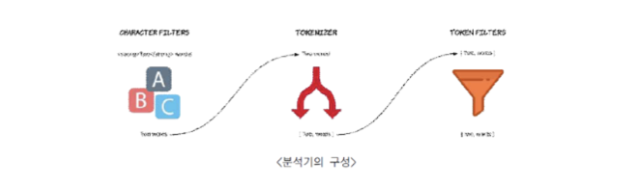
- 이제 토큰(나눈단위)이 용어(나눈후 변경)가 되었고이를 인덱싱한다 => 역인덱싱
토크나이저 테스트
POST _analyze
{
  "analyzer": "standard",
  "text": "Hello, my name is gildong hong. She loves him. I am 22 years old"
}
{
"tokens" : [
{
"token" : "hello",
"start_offset" : 0,
"end_offset" : 5,
"type" : "<ALPHANUM>",
"position" : 0
},
{
"token" : "my",
"start_offset" : 7,
"end_offset" : 9,
"type" : "<ALPHANUM>",
"position" : 1
},
{
"token" : "name",
"start_offset" : 10,
"end_offset" : 14,
"type" : "<ALPHANUM>",
"position" : 2
},
{
"token" : "is",
"start_offset" : 15,
"end_offset" : 17,
"type" : "<ALPHANUM>",
"position" : 3
},
{
"token" : "gildong",
"start_offset" : 18,
"end_offset" : 25,
"type" : "<ALPHANUM>",
"position" : 4
},
{
"token" : "hong",
"start_offset" : 26,
"end_offset" : 30,
"type" : "<ALPHANUM>",
"position" : 5
},
{
"token" : "she",
"start_offset" : 32,
"end_offset" : 35,
"type" : "<ALPHANUM>",
"position" : 6
},
{
"token" : "loves",
"start_offset" : 36,
"end_offset" : 41,
"type" : "<ALPHANUM>",
"position" : 7
},
{
"token" : "him",
"start_offset" : 42,
"end_offset" : 45,
"type" : "<ALPHANUM>",
"position" : 8
},
{
"token" : "i",
"start_offset" : 47,
"end_offset" : 48,
"type" : "<ALPHANUM>",
"position" : 9
},
{
"token" : "am",
"start_offset" : 49,
"end_offset" : 51,
"type" : "<ALPHANUM>",
"position" : 10
},
{
"token" : "22",
"start_offset" : 52,
"end_offset" : 54,
"type" : "<NUM>",
"position" : 11
},
{
"token" : "years",
"start_offset" : 55,
"end_offset" : 60,
"type" : "<ALPHANUM>",
"position" : 12
},
{
"token" : "old",
"start_offset" : 61,
"end_offset" : 64,
"type" : "<ALPHANUM>",
"position" : 13
}
]
}쿼리 실습
# 전문 쿼리 실습
PUT text_index
{
  "mappings": {
    "properties": {
      "writer": {"type" : "keyword"},
      "title": {"type": "text"}
    }
  }
}

PUT text_index/_doc/1
{
  "wirter": "gildong",
  "title": "The Cloud Computing Rules"
}

PUT text_index/_doc/2
{
  "writer": "chulsoo",
  "title": "My Cloud Bread"
}

# 전체 검색

GET text_index/_search
{
  "query": {
    "match": {
      "title": "Cloud Computing"
    }
  }
}

# 작가 검색

GET text_index/_search
{
  "query": {
    "match": {
      "writer": "gildong"
    }
  }
}

# 제목 검색

GET text_index/_search
{
  "query": {
    "match": {
      "title": "Cloud"
    }
  }
}
{
"took" : 1,
"timed_out" : false,
"_shards" : {
"total" : 1,
"successful" : 1,
"skipped" : 0,
"failed" : 0
},
"hits" : {
"total" : {
"value" : 2,
"relation" : "eq"
},
"max_score" : 0.82713,
"hits" : [
{
"_index" : "text_index",
"_type" : "_doc",
"_id" : "1",
"_score" : 0.82713,
"_source" : {
"wirter" : "gildong",
"title" : "The Cloud Computing Rules"
}
},
{
"_index" : "text_index",
"_type" : "_doc",
"_id" : "2",
"_score" : 0.19363807,
"_source" : {
"writer" : "chulsoo",
"title" : "My Cloud Bread"
}
}
]
}
}
인덱스 템플릿
# 인덱스 템플릿 만들기
PUT _index_template/mysql_2024_template
{
  "index_patterns": ["mysql_2024_*"],
  "priority": 1,
  "template": {
    "settings": {
      "number_of_shards": 3,
      "number_of_replicas": 1
    },
    "mappings": {
      "properties": {
        "name": {"type": "keyword"},
        "time" : {"type": "date"},
        "message": {"type": "text"}
      }
    }
  }
}
GET mysql_2024_02/_mapping
[결과]
{
"mysql_2024_02" : {
"mappings" : {
"properties" : {
"message" : {
"type" : "text"
},
"name" : {
"type" : "keyword"
},
"time" : {
"type" : "date"
}
}
}
}
}
인덱스이름이 패턴 mysql_2024_* 에 매치하여 자동으로 타입이 결정된다.POST _analyze
{
"tokenizer": "standard",
"text": "email: test@test.com"
}
POST _analyze
{
"tokenizer": "lowercase",
"text": "email: test@test.com"
}
POST _analyze
{
"tokenizer": "uax_url_email",
"text": "email: test@test.com"
}{
"tokens" : [
{
"token" : "email",
"start_offset" : 0,
"end_offset" : 5,
"type" : "<ALPHANUM>",
"position" : 0
},
{
"token" : "test",
"start_offset" : 7,
"end_offset" : 11,
"type" : "<ALPHANUM>",
"position" : 1
},
{
"token" : "test.com",
"start_offset" : 12,
"end_offset" : 20,
"type" : "<ALPHANUM>",
"position" : 2
}
]
}{
"tokens" : [
{
"token" : "email",
"start_offset" : 0,
"end_offset" : 5,
"type" : "<ALPHANUM>",
"position" : 0
},
{
"token" : "test@test.com",
"start_offset" : 7,
"end_offset" : 20,
"type" : "<EMAIL>",
"position" : 1
}
]
}